Compare commits
110 Commits
v0.1.0-bet
...
v1.0.8
| Author | SHA1 | Date | |
|---|---|---|---|
| 436296652b | |||
| c265777313 | |||
| e80a2b6683 | |||
| a6586b7304 | |||

|
59bf9bff2d | ||
|
|
d4bc355d94 | ||
| 4e9dc1ce67 | |||
| dc7d9382d6 | |||
|
|
66aafb41bd | ||
| 2c844c01ec | |||
| e5be3ad5db | |||
|
|
29b302531b | ||
| 3ca7c2ac5a | |||
|
|
32138c1da6 | ||
| 86fc18ab69 | |||
|
|
928b15c722 | ||
| 487cea4662 | |||
|
|
92f85ff1f3 | ||
| 63c593f09a | |||
|
|
3c5ff64afd | ||
| 0ebc6dafbd | |||
| c22ab2c85b | |||
| 133702619e | |||
|
|
e384798184 | ||
| 80da400891 | |||
|
|
48700b3001 | ||
| b865d9d78d | |||
| 20c6393344 | |||
|
|
7c71417e5d | ||
| 655b19bc7c | |||
| 051df670a5 | |||
| 9e885865f7 | |||
|
|
21e0b85662 | ||
| 38fb888f00 | |||
|
|
2429eef5e0 | ||
| 2563f398da | |||
| 0cad35e2da | |||
| 65edf40164 | |||
| c3f88b7846 | |||
|
|
088d9c1edb | ||
| a6ec769a9b | |||
|
|
7430fbf3ef | ||
| ce397b35aa | |||
|
|
caf184c327 | ||
| 488b05f062 | |||
|
|
2447a47269 | ||
| 9380342b4f | |||
|
|
9b36e9d911 | ||
| c9a961d5e8 | |||
| 77878888ca | |||
|
|
50e8564027 | ||
| f07ac1c70c | |||
|
|
b6e7ae0c8b | ||
| 854af4c3bc | |||
|
|
0eaba42f27 | ||
| b2791e3aae | |||
|
|
2eb2358589 | ||
| 8b862b3fe0 | |||
|
|
5922269f7e | ||
| 99ce5c28d0 | |||
|
|
637fc758a7 | ||
| f90bf5c532 | |||
|
|
f2d1d02c48 | ||
| d04f100dfd | |||
|
|
734c4d1cd9 | ||
| 78aba5394f | |||
|
|
4fc89beaa0 | ||
| fb2a3c9c23 | |||
|
|
bc6f88996c | ||
| 1db63dd3db | |||
|
|
467d368a76 | ||
| 134d8e382b | |||
|
|
fefc9285e1 | ||
| 322b84cc70 | |||
| f3be5d8660 | |||
| 470cdab4f6 | |||
|
|
b35c816c25 | ||
| 0e2d6fe1a2 | |||
|
|
e0c46e95f8 | ||
| 2528d984ad | |||
|
|
56606fd721 | ||
| f21f7d6357 | |||
| fa031e63f8 | |||
|
|
e929013183 | ||
| d380cf7036 | |||
| 05a61527e7 | |||
|
|
2c80c9ed81 | ||
|
|
8e8b176e11 | ||
| c1886f95f8 | |||
| 5e8d12c564 | |||
| 1990a16972 | |||
| eeca79e681 | |||
|
|
8b45de4a4d | ||
| 2c3d9e5791 | |||
|
|
32b69575b1 | ||
| d663bfd290 | |||
|
|
a1aa776725 | ||
| 6b18b4e9fa | |||
| a579b24f9a | |||
|
|
8b3ab61467 | ||
|
|
084031c496 | ||
| 15b24b61b5 | |||
|
|
81dae0631a | ||
|
|
38d2e52c93 | ||
| cf6ccb1743 | |||
| f889b61494 | |||
|
|
436288df7c | ||
|
|
7967f144f1 | ||
|
|
ba4c6c1dee | ||
| ca9df9065e |

@@ -1,31 +1,11 @@
|
||||
name: Upload Assets to Release
|
||||
name: Release Version
|
||||
|
||||
on:
|
||||
push:
|
||||
branches:
|
||||
- "release/*"
|
||||
tags:
|
||||
- 'v*'
|
||||
|
||||
jobs:
|
||||
# draft_release:
|
||||
# name: Draft Release
|
||||
# runs-on: ubuntu-latest
|
||||
# outputs:
|
||||
# upload_url: ${{ steps.draft_release.outputs.upload_url }}
|
||||
# version: ${{ steps.set_env.outputs.version }}
|
||||
# steps:
|
||||
# - name: Set Version Env
|
||||
# id: set_env
|
||||
# run: |
|
||||
# ref_name=${{ github.ref_name }}
|
||||
# echo "version=${ref_name#release/}" >> "$GITHUB_OUTPUT"
|
||||
# - name: Get release
|
||||
# id: draft_release
|
||||
# uses: cardinalby/git-get-release-action@1.2.4
|
||||
# with:
|
||||
# releaseName: Draft
|
||||
# env:
|
||||
# GITHUB_TOKEN: ${{ github.token }}
|
||||
|
||||
draft_release:
|
||||
name: Draft Release
|
||||
permissions:
|
||||
@@ -50,19 +30,29 @@ jobs:
|
||||
env:
|
||||
GITHUB_TOKEN: ${{ secrets.GITHUB_TOKEN }}
|
||||
|
||||
upload_blender_addon:
|
||||
name: Upload Blender Add-on
|
||||
build_extension:
|
||||
name: Build Blender Extension
|
||||
needs: draft_release
|
||||
runs-on: ubuntu-latest
|
||||
strategy:
|
||||
matrix:
|
||||
platform: ["windows-x64", "linux-x64", "macos-arm64", "macos-x64"]
|
||||
steps:
|
||||
- name: Checkout Code
|
||||
uses: actions/checkout@v4
|
||||
with:
|
||||
lfs: 'true'
|
||||
- name: Zip Add-on
|
||||
run: |
|
||||
zip -r package.zip bioxelnodes
|
||||
- name: Upload Release Asset
|
||||
lfs: "true"
|
||||
- name: Set up Python
|
||||
uses: actions/setup-python@v4
|
||||
with:
|
||||
python-version: 3.11
|
||||
- name: Build Extension
|
||||
run: | # build.py need tomlkit to edit blender_manifest.toml
|
||||
pip install tomlkit
|
||||
python build.py ${{ matrix.platform }}
|
||||
cd src/bioxelnodes
|
||||
zip -r ../../package.zip .
|
||||
- name: Upload Extension
|
||||
id: upload-release-asset
|
||||
uses: actions/upload-release-asset@v1
|
||||
env:
|
||||
@@ -70,5 +60,5 @@ jobs:
|
||||
with:
|
||||
upload_url: ${{ needs.draft_release.outputs.upload_url }} # This pulls from the CREATE RELEASE step above, referencing it's ID to get its outputs object, which include a `upload_url`. See this blog post for more info: https://jasonet.co/posts/new-features-of-github-actions/#passing-data-to-future-steps
|
||||
asset_path: ./package.zip
|
||||
asset_name: BioxelNodes_${{ needs.draft_release.outputs.version }}.zip
|
||||
asset_name: BioxelNodes_${{ needs.draft_release.outputs.version }}_${{ matrix.platform }}.zip
|
||||
asset_content_type: application/zip
|
||||
6
.gitignore
vendored
@@ -131,4 +131,8 @@ blendcache_*
|
||||
|
||||
*.ipynb
|
||||
|
||||
.secrets
|
||||
.secrets
|
||||
|
||||
.vdb
|
||||
|
||||
!scipy_ndimage/*/**
|
||||
11
.prettierrc
Normal file
@@ -0,0 +1,11 @@
|
||||
{
|
||||
"tabWidth": 2,
|
||||
"overrides": [
|
||||
{
|
||||
"files": "*.md",
|
||||
"options": {
|
||||
"tabWidth": 4
|
||||
}
|
||||
}
|
||||
]
|
||||
}
|
||||
11
.vscode/BioxelNodes.code-workspace
vendored
Normal file
@@ -0,0 +1,11 @@
|
||||
{
|
||||
"folders": [
|
||||
{
|
||||
"path": ".."
|
||||
},
|
||||
{
|
||||
"path": "../src/bioxelnodes"
|
||||
}
|
||||
],
|
||||
"settings": {}
|
||||
}
|
||||
21
LICENSE
Normal file
@@ -0,0 +1,21 @@
|
||||
MIT License
|
||||
|
||||
Copyright (c) 2024 OmooLab
|
||||
|
||||
Permission is hereby granted, free of charge, to any person obtaining a copy
|
||||
of this software and associated documentation files (the "Software"), to deal
|
||||
in the Software without restriction, including without limitation the rights
|
||||
to use, copy, modify, merge, publish, distribute, sublicense, and/or sell
|
||||
copies of the Software, and to permit persons to whom the Software is
|
||||
furnished to do so, subject to the following conditions:
|
||||
|
||||
The above copyright notice and this permission notice shall be included in all
|
||||
copies or substantial portions of the Software.
|
||||
|
||||
THE SOFTWARE IS PROVIDED "AS IS", WITHOUT WARRANTY OF ANY KIND, EXPRESS OR
|
||||
IMPLIED, INCLUDING BUT NOT LIMITED TO THE WARRANTIES OF MERCHANTABILITY,
|
||||
FITNESS FOR A PARTICULAR PURPOSE AND NONINFRINGEMENT. IN NO EVENT SHALL THE
|
||||
AUTHORS OR COPYRIGHT HOLDERS BE LIABLE FOR ANY CLAIM, DAMAGES OR OTHER
|
||||
LIABILITY, WHETHER IN AN ACTION OF CONTRACT, TORT OR OTHERWISE, ARISING FROM,
|
||||
OUT OF OR IN CONNECTION WITH THE SOFTWARE OR THE USE OR OTHER DEALINGS IN THE
|
||||
SOFTWARE.
|
||||
67
README.md
@@ -1,3 +1,66 @@
|
||||
# BioxelNodes
|
||||
BioxelNodes is a blender add-on for better volume data visualization with cycles.
|
||||
[中文文档](https://uj6xfhbzp0.feishu.cn/wiki/LPKEwjooSivxjskWHlCcQznjnNf?from=from_copylink)
|
||||
|
||||
# Bioxel Nodes
|
||||
|
||||
[](https://blender.org/)
|
||||

|
||||

|
||||

|
||||
|
||||
[](https://discord.gg/pYkNyq2TjE)
|
||||
|
||||
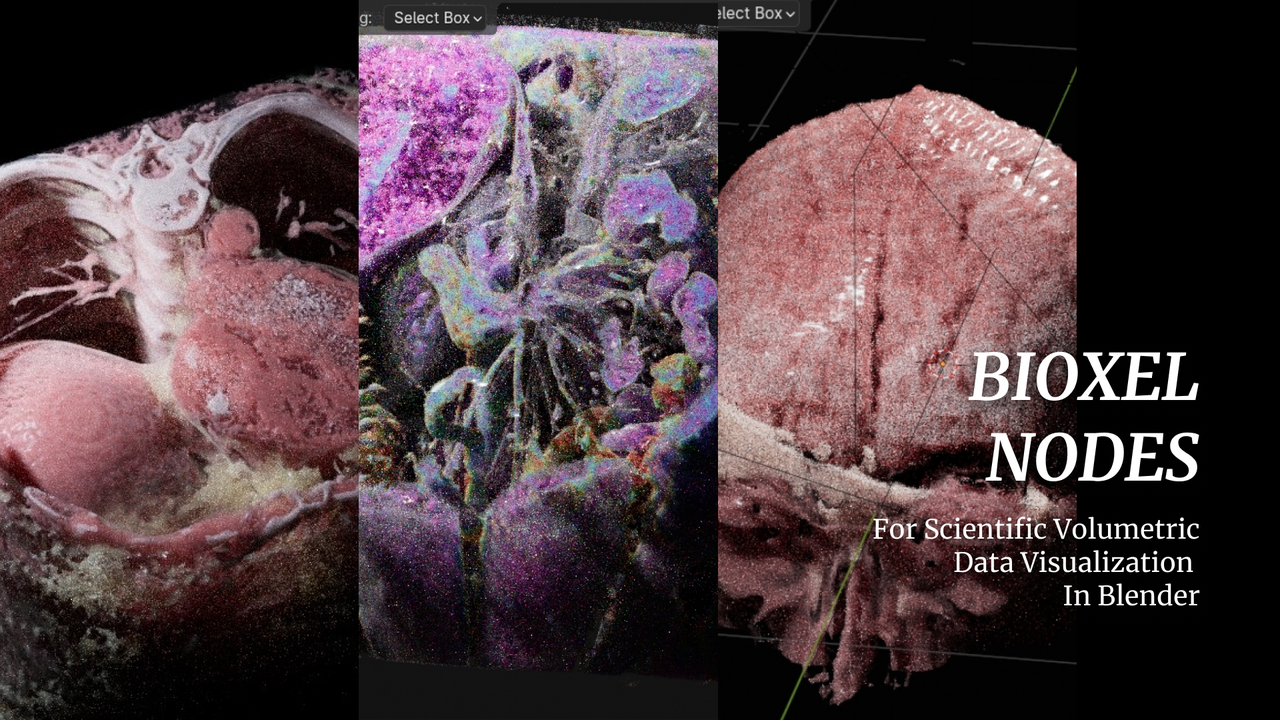
Bioxel Nodes is a Blender addon for scientific volumetric data visualization. It using Blender's powerful **Geometry Nodes** and **Cycles** to process and render volumetric data.
|
||||
|
||||
|
||||
|
||||
- Realistic rendering result, also support EEVEE NEXT.
|
||||
- Support multiple formats.
|
||||
- Support 4D volumetric data.
|
||||
- All kinds of cutters.
|
||||
- Simple and powerful nodes.
|
||||
- Based on blender natively, can work without addon.
|
||||
|
||||
**Read the [getting started](https://omoolab.github.io/BioxelNodes/latest/installation) to begin your journey into visualizing volumetric data!**
|
||||
|
||||
Welcome to our [discord server](https://discord.gg/pYkNyq2TjE), if you have any problems with this add-on.
|
||||
|
||||
## Support Multiple Formats
|
||||
|
||||
| Format | EXT |
|
||||
| ------ | ---------------------------------------- |
|
||||
| DICOM | .dcm, .DCM, .DICOM, .ima, .IMA |
|
||||
| BMP | .bmp, .BMP |
|
||||
| JPEG | .jpg, .JPG, .jpeg, .JPEG |
|
||||
| PNG | .png, .PNG |
|
||||
| TIFF | .tif, .TIF, .tiff, .TIFF |
|
||||
| Nifti | .nia, .nii, .nii.gz, .hdr, .img, .img.gz |
|
||||
| Nrrd | .nrrd, .nhdr |
|
||||
| HDF5 | .hdf, .h4, .hdf4, .he2, .h5, .hdf5, .he5 |
|
||||
| OME | .ome.tiff, .ome.tif |
|
||||
| MRC | .mrc, .mrc.gz, .map, .map.gz |
|
||||
|
||||
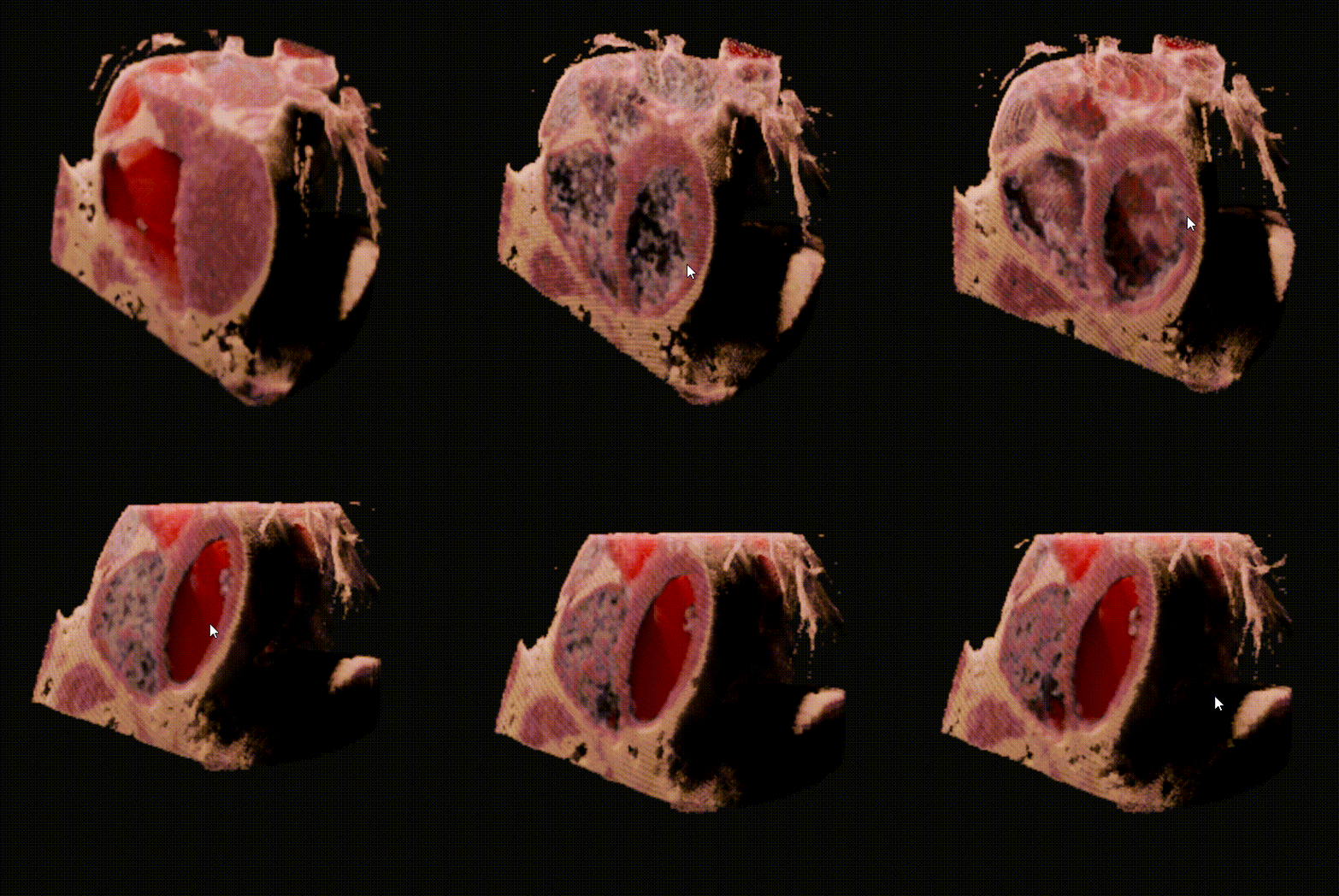
## Support 4D volumetric data
|
||||
|
||||
|
||||
|
||||
🥰 4D volumetric data can also be imported into Blender.
|
||||
|
||||
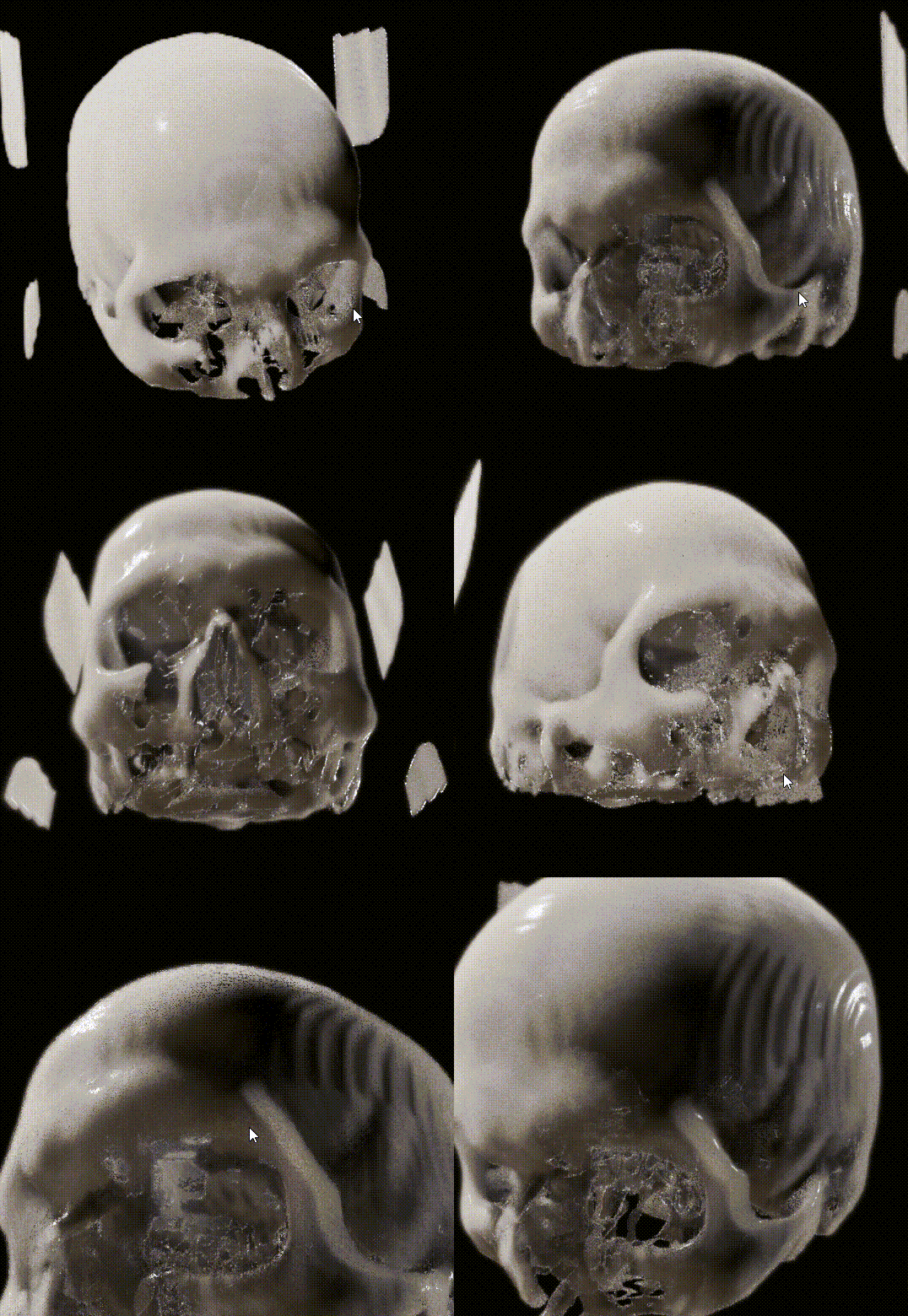
## Support EEVEE NEXT
|
||||
|
||||
|
||||
|
||||
👍 EEVEE NEXT is absolutely AWESOME! Bioxel Nodes is fully support EEVEE NEXT now! However, there are some limitations:
|
||||
|
||||
1. Only one cutter supported.
|
||||
2. EEVEE result is not that great as Cycles does.
|
||||
|
||||
## Known Limitations
|
||||
|
||||
- Only works with Cycles CPU , Cycles GPU (OptiX), EEVEE
|
||||
- Section surface cannot be generated when convert to mesh (will be supported soon)
|
||||
|
||||
## Roadmap
|
||||
|
||||
- Better multi-format import experience
|
||||
- One-click bake model with texture
|
||||
- AI Segmentation to Generate Labels
|
||||
|
||||
@@ -1,34 +0,0 @@
|
||||
from .nodes import custom_nodes
|
||||
from . import auto_load
|
||||
from . import menu
|
||||
|
||||
import bpy
|
||||
|
||||
|
||||
bl_info = {
|
||||
"name": "BiovelNodes",
|
||||
"author": "Ma Nan",
|
||||
"description": "",
|
||||
"blender": (4, 0, 0),
|
||||
"version": (0, 1, 0),
|
||||
"location": "File -> Import",
|
||||
"warning": "",
|
||||
"category": "Import-Export"
|
||||
}
|
||||
|
||||
auto_load.init()
|
||||
|
||||
|
||||
def register():
|
||||
auto_load.register()
|
||||
custom_nodes.register()
|
||||
menu.create_menu()
|
||||
|
||||
|
||||
def unregister():
|
||||
try:
|
||||
menu.remove_menu()
|
||||
custom_nodes.unregister()
|
||||
auto_load.unregister()
|
||||
except RuntimeError:
|
||||
pass
|
||||
BIN
bioxelnodes/assets/Nodes.blend
LFS
@@ -1,46 +0,0 @@
|
||||
import bpy
|
||||
from .utils import get_bioxels_obj
|
||||
|
||||
|
||||
class ConvertToMesh(bpy.types.Operator):
|
||||
bl_idname = "bioxelnodes.convert_to_mesh"
|
||||
bl_label = "Bioxels To Mesh"
|
||||
bl_description = "Convert Bioxels To Mesh."
|
||||
bl_options = {'UNDO'}
|
||||
|
||||
def execute(self, context):
|
||||
bioxels_objs = []
|
||||
|
||||
for obj in bpy.context.selected_objects:
|
||||
bioxels_obj = get_bioxels_obj(obj)
|
||||
if bioxels_obj:
|
||||
bioxels_objs.append(bioxels_obj)
|
||||
|
||||
if len(bioxels_objs)==0:
|
||||
self.report({"WARNING"}, "Cannot find any bioxels.")
|
||||
return {'FINISHED'}
|
||||
|
||||
for bioxels_obj in bioxels_objs:
|
||||
bpy.ops.mesh.primitive_cube_add(
|
||||
size=2, enter_editmode=False, align='WORLD', location=(0, 0, 0), scale=(1, 1, 1))
|
||||
mesh_obj = bpy.context.active_object
|
||||
|
||||
mesh_obj.name = f"{bioxels_obj.parent.name}_Mesh"
|
||||
bpy.ops.node.new_geometry_nodes_modifier()
|
||||
modifier = mesh_obj.modifiers[0]
|
||||
nodes = modifier.node_group.nodes
|
||||
links = modifier.node_group.links
|
||||
|
||||
output_node = nodes.get("Group Output")
|
||||
object_node = nodes.new("GeometryNodeObjectInfo")
|
||||
realize_nodes = nodes.new("GeometryNodeRealizeInstances")
|
||||
object_node.inputs[0].default_value = bioxels_obj
|
||||
object_node.transform_space = 'RELATIVE'
|
||||
|
||||
links.new(object_node.outputs['Geometry'], realize_nodes.inputs[0])
|
||||
links.new(realize_nodes.outputs[0], output_node.inputs[0])
|
||||
bpy.ops.object.convert(target='MESH')
|
||||
bpy.context.object.active_material_index = 1
|
||||
bpy.ops.object.material_slot_remove()
|
||||
|
||||
return {'FINISHED'}
|
||||
@@ -1 +0,0 @@
|
||||
from .node_menu import CustomNodes
|
||||
@@ -1,134 +0,0 @@
|
||||
import bpy
|
||||
from pathlib import Path
|
||||
from .nodes import AddCustomNode
|
||||
|
||||
|
||||
class CustomNodes():
|
||||
def __init__(
|
||||
self,
|
||||
menu_items,
|
||||
nodes_file,
|
||||
root_label='CustomNodes',
|
||||
root_icon='NONE'
|
||||
) -> None:
|
||||
if not Path(nodes_file).is_file():
|
||||
raise FileNotFoundError(Path(nodes_file).resolve().as_posix())
|
||||
|
||||
self.menu_items = menu_items
|
||||
self.nodes_file = Path(nodes_file).resolve().as_posix()
|
||||
|
||||
self.root_label = root_label
|
||||
self.root_icon = root_icon
|
||||
|
||||
menu_classes = []
|
||||
self._create_menu_class(
|
||||
items=menu_items,
|
||||
label=root_label,
|
||||
menu_classes=menu_classes
|
||||
)
|
||||
self.menu_classes = menu_classes
|
||||
|
||||
idname = f"CUSTOMNODES_MT_NODES__{root_label.replace(' ', '').upper()}"
|
||||
|
||||
def add_node_menu(self, context):
|
||||
if ('GeometryNodeTree' == bpy.context.area.spaces[0].tree_type):
|
||||
layout = self.layout
|
||||
layout.separator()
|
||||
layout.menu(idname, icon=root_icon)
|
||||
|
||||
self.add_node_menu = add_node_menu
|
||||
|
||||
def _create_menu_class(self, menu_classes, items, label='CustomNodes', icon=0, idname_namespace=None):
|
||||
nodes_file = self.nodes_file
|
||||
idname_namespace = idname_namespace or "CUSTOMNODES_MT_NODES_"
|
||||
idname = f"{idname_namespace}_{label.replace(' ', '').upper()}"
|
||||
|
||||
# create submenu class if item is menu.
|
||||
for item in items:
|
||||
item_items = item.get('items') if item != 'separator' else None
|
||||
if item_items:
|
||||
menu_class = self._create_menu_class(
|
||||
menu_classes=menu_classes,
|
||||
items=item_items,
|
||||
label=item.get('label') or 'CustomNodes',
|
||||
icon=item.get('icon') or 0,
|
||||
idname_namespace=idname
|
||||
)
|
||||
item['menu_class'] = menu_class
|
||||
|
||||
# create menu class
|
||||
class Menu(bpy.types.Menu):
|
||||
bl_idname = idname
|
||||
bl_label = label
|
||||
|
||||
def draw(self, context):
|
||||
layout = self.layout
|
||||
|
||||
for item in items:
|
||||
# print(item)
|
||||
if item == "separator":
|
||||
layout.separator()
|
||||
elif item.get('menu_class'):
|
||||
layout.menu(
|
||||
item.get('menu_class').bl_idname,
|
||||
icon=item.get('icon') or 'NONE'
|
||||
)
|
||||
else:
|
||||
op = layout.operator(
|
||||
'customnodes.add_custom_node',
|
||||
text=item.get('label'),
|
||||
icon=item.get('icon') or 'NONE'
|
||||
)
|
||||
op.nodes_file = nodes_file
|
||||
op.node_type = item['node_type']
|
||||
op.node_label = item.get('label') or ""
|
||||
op.node_description = item.get(
|
||||
'node_description') or "Add Custom Node."
|
||||
op.node_link = item.get('link') or True
|
||||
op.node_callback = item.get('node_callback') or ""
|
||||
|
||||
menu_classes.append(Menu)
|
||||
return Menu
|
||||
|
||||
def _find_item(self, found_items, menu_items, node_type: str):
|
||||
|
||||
for item in menu_items:
|
||||
if item.get("node_type") == node_type:
|
||||
found_items.append(item)
|
||||
|
||||
item_items = item.get('items') if item != 'separator' else None
|
||||
if item_items:
|
||||
self._find_item(found_items, item_items, node_type)
|
||||
|
||||
def find_item(self, node_type: str):
|
||||
found_items = []
|
||||
self._find_item(found_items, self.menu_items, node_type)
|
||||
return found_items[0] if len(found_items) > 0 else None
|
||||
|
||||
def add_node(self, node_tree, node_type: str):
|
||||
item = self.find_item(node_type)
|
||||
if item:
|
||||
op = AddCustomNode()
|
||||
op.nodes_file = self.nodes_file
|
||||
op.node_type = item['node_type']
|
||||
op.node_label = item.get('label') or ""
|
||||
op.node_link = item.get('link') or True
|
||||
op.node_callback = item.get('node_callback') or ""
|
||||
return op.add_node(node_tree)
|
||||
else:
|
||||
raise RuntimeError("No custom node type found.")
|
||||
|
||||
def register(self):
|
||||
for cls in self.menu_classes:
|
||||
bpy.utils.register_class(cls)
|
||||
|
||||
bpy.types.NODE_MT_add.append(self.add_node_menu)
|
||||
|
||||
def unregister(self):
|
||||
try:
|
||||
for cls in reversed(self.menu_classes):
|
||||
bpy.utils.unregister_class(cls)
|
||||
|
||||
bpy.types.NODE_MT_add.remove(self.add_node_menu)
|
||||
except RuntimeError:
|
||||
pass
|
||||
@@ -1,120 +0,0 @@
|
||||
import bpy
|
||||
|
||||
|
||||
class AddCustomNode():
|
||||
|
||||
nodes_file: bpy.props.StringProperty(
|
||||
name="nodes_file",
|
||||
subtype='FILE_PATH',
|
||||
default=""
|
||||
) # type: ignore
|
||||
|
||||
node_type: bpy.props.StringProperty(
|
||||
name='node_type',
|
||||
description='',
|
||||
default='',
|
||||
subtype='NONE',
|
||||
maxlen=0
|
||||
) # type: ignore
|
||||
|
||||
node_label: bpy.props.StringProperty(
|
||||
name='node_label',
|
||||
default=''
|
||||
) # type: ignore
|
||||
|
||||
node_description: bpy.props.StringProperty(
|
||||
name="node_description",
|
||||
description="",
|
||||
default="Add custom node group.",
|
||||
subtype="NONE"
|
||||
) # type: ignore
|
||||
|
||||
node_link: bpy.props.BoolProperty(
|
||||
name='node_link',
|
||||
default=True
|
||||
) # type: ignore
|
||||
|
||||
node_callback: bpy.props.StringProperty(
|
||||
name='node_callback',
|
||||
default=''
|
||||
) # type: ignore
|
||||
|
||||
@classmethod
|
||||
def description(cls, context, properties):
|
||||
return properties.node_description
|
||||
|
||||
def assign_node_tree(self, node):
|
||||
node.node_tree = bpy.data.node_groups[self.node_type]
|
||||
|
||||
node.width = 200.0
|
||||
node.label = self.node_label or self.node_type
|
||||
node.name = self.node_type
|
||||
|
||||
if self.node_callback:
|
||||
exec(self.node_callback)
|
||||
|
||||
return node
|
||||
|
||||
def get_node_tree(self, node_type, node_link):
|
||||
# try to get node from current file if exists
|
||||
node_tree = bpy.data.node_groups.get(node_type)
|
||||
# if not exists, get it from asset file.
|
||||
if not node_tree:
|
||||
bpy.ops.wm.append(
|
||||
'EXEC_DEFAULT',
|
||||
directory=f"{self.nodes_file}/NodeTree",
|
||||
filename=node_type,
|
||||
link=node_link,
|
||||
use_recursive=True
|
||||
)
|
||||
|
||||
node_tree = bpy.data.node_groups.get(node_type)
|
||||
if node_tree:
|
||||
# self.recursive_append_material(node_tree)
|
||||
return node_tree
|
||||
else:
|
||||
raise RuntimeError('No custom node found')
|
||||
|
||||
def recursive_append_material(self, node_tree):
|
||||
for child in node_tree.nodes:
|
||||
material_socket = child.inputs.get('Material')
|
||||
if material_socket:
|
||||
print(material_socket.default_value)
|
||||
try:
|
||||
self.recursive_append_material(child.node_tree)
|
||||
except:
|
||||
...
|
||||
|
||||
def add_node(self, node_tree):
|
||||
self.get_node_tree(self.node_type, self.node_link)
|
||||
node = node_tree.new("GeometryNodeGroup")
|
||||
self.assign_node_tree(node)
|
||||
|
||||
return node
|
||||
|
||||
|
||||
class CUSTOMNODES_OT_Add_Custom_Node(bpy.types.Operator, AddCustomNode):
|
||||
bl_idname = "customnodes.add_custom_node"
|
||||
bl_label = "Add Custom Node"
|
||||
bl_options = {"REGISTER", "UNDO"}
|
||||
|
||||
def execute(self, context):
|
||||
self.get_node_tree(self.node_type, self.node_link)
|
||||
|
||||
# intended to be called upon button press in the node tree
|
||||
prev_context = bpy.context.area.type
|
||||
bpy.context.area.type = 'NODE_EDITOR'
|
||||
# actually invoke the operator to add a node to the current node tree
|
||||
# use_transform=True ensures it appears where the user's mouse is and is currently
|
||||
# being moved so the user can place it where they wish
|
||||
bpy.ops.node.add_node(
|
||||
'INVOKE_DEFAULT',
|
||||
type='GeometryNodeGroup',
|
||||
use_transform=True
|
||||
)
|
||||
bpy.context.area.type = prev_context
|
||||
node = bpy.context.active_node
|
||||
|
||||
self.assign_node_tree(node)
|
||||
|
||||
return {"FINISHED"}
|
||||
@@ -1 +0,0 @@
|
||||
from .preferences import ExternalPackagePreferences
|
||||
@@ -1,389 +0,0 @@
|
||||
"""
|
||||
Handling installation of external python packages inside of Blender's bundled python.
|
||||
"""
|
||||
import subprocess
|
||||
import sys
|
||||
import logging
|
||||
from importlib.metadata import version as get_version, PackageNotFoundError
|
||||
import bpy
|
||||
from pathlib import Path
|
||||
|
||||
ADDON_NAME = __package__.split(".")[0]
|
||||
|
||||
PYPI_MIRROR = {
|
||||
# the original.
|
||||
'Default': '',
|
||||
# two mirrors in China Mainland to help those poor victims under GFW.
|
||||
'BFSU (Beijing)': 'https://mirrors.bfsu.edu.cn/pypi/web/simple',
|
||||
'TUNA (Beijing)': 'https://pypi.tuna.tsinghua.edu.cn/simple',
|
||||
# append more if necessary.
|
||||
}
|
||||
|
||||
|
||||
class InstallationError(Exception):
|
||||
"""
|
||||
Exception raised when there is an error installing a package.
|
||||
|
||||
Attributes
|
||||
----------
|
||||
package_name : str
|
||||
The name of the package that failed to install.
|
||||
error_message : str
|
||||
The error message returned by pip.
|
||||
|
||||
"""
|
||||
|
||||
def __init__(self, package_name, error_message):
|
||||
self.package_name = package_name
|
||||
self.error_message = error_message
|
||||
super().__init__(f"Failed to install {package_name}: {error_message}")
|
||||
|
||||
|
||||
class PackageInstaller():
|
||||
def __init__(
|
||||
self,
|
||||
log_dir: str,
|
||||
requirements_dir: str,
|
||||
pypi_mirror_provider='Default',
|
||||
) -> None:
|
||||
self.pypi_mirror_provider = pypi_mirror_provider
|
||||
self.log_path: Path = Path(log_dir)
|
||||
self.requirements_path: Path = Path(requirements_dir)
|
||||
|
||||
def start_logging(self, logfile_name: str = 'side-packages-install') -> logging.Logger:
|
||||
"""
|
||||
Configure and start logging to a file.
|
||||
|
||||
Parameters
|
||||
----------
|
||||
logfile_name : str, optional
|
||||
The name of the log file. Defaults to 'side-packages-install'.
|
||||
|
||||
Returns
|
||||
-------
|
||||
logging.Logger
|
||||
A Logger object that can be used to write log messages.
|
||||
|
||||
This function sets up a logging configuration with a specified log file name and logging level.
|
||||
The log file will be created in the `ADDON_DIR/logs` directory. If the directory
|
||||
does not exist, it will be created. The function returns a Logger object that can be used to
|
||||
write log messages.
|
||||
|
||||
"""
|
||||
# Create the logs directory if it doesn't exist
|
||||
self.log_path.mkdir(parents=True, exist_ok=True)
|
||||
|
||||
# Set up logging configuration
|
||||
logfile_path = Path(self.log_path, f"{logfile_name}.log")
|
||||
logging.basicConfig(filename=logfile_path, level=logging.INFO)
|
||||
|
||||
# Return logger object
|
||||
return logging.getLogger()
|
||||
|
||||
@property
|
||||
def pypi_mirror_url(self) -> str:
|
||||
"""
|
||||
Process a PyPI mirror provider and return the corresponding URL.
|
||||
|
||||
Parameters
|
||||
----------
|
||||
pypi_mirror_provider : str
|
||||
The PyPI mirror provider to process.
|
||||
|
||||
Returns
|
||||
-------
|
||||
str
|
||||
The URL of the PyPI mirror.
|
||||
|
||||
Raises
|
||||
------
|
||||
ValueError
|
||||
If the provided PyPI mirror provider is invalid.
|
||||
|
||||
"""
|
||||
if self.pypi_mirror_provider.startswith('https:'):
|
||||
return self.pypi_mirror_provider
|
||||
elif self.pypi_mirror_provider in PYPI_MIRROR.keys():
|
||||
return PYPI_MIRROR[self.pypi_mirror_provider]
|
||||
else:
|
||||
raise ValueError(
|
||||
f"Invalid PyPI mirror provider: {self.pypi_mirror_provider}")
|
||||
|
||||
@property
|
||||
def packages(self) -> dict:
|
||||
"""
|
||||
Read a requirements file and extract package information into a dictionary.
|
||||
|
||||
Parameters
|
||||
----------
|
||||
requirements : str, optional
|
||||
The path to the requirements file. If not provided, the function looks for a `requirements.txt`
|
||||
file in the same directory as the script.
|
||||
|
||||
Returns
|
||||
-------
|
||||
dict
|
||||
A dictionary containing package information. Each element of the dictionary is a dictionary containing the package name, version, and description.
|
||||
|
||||
Example
|
||||
-------
|
||||
Given the following requirements file:
|
||||
```python
|
||||
Flask==1.1.2 # A micro web framework for Python
|
||||
pandas==1.2.3 # A fast, powerful, flexible, and easy-to-use data analysis and manipulation tool
|
||||
numpy==1.20.1 # Fundamental package for scientific computing
|
||||
```
|
||||
The function would return the following dictionary:
|
||||
```python
|
||||
[
|
||||
{
|
||||
"package": "Flask",
|
||||
"version": "1.1.2",
|
||||
"description": "A micro web framework for Python"
|
||||
},
|
||||
{
|
||||
"package": "pandas",
|
||||
"version": "1.2.3",
|
||||
"description": "A fast, powerful, flexible, and easy-to-use data analysis and manipulation tool"
|
||||
},
|
||||
{
|
||||
"package": "numpy",
|
||||
"version": "1.20.1",
|
||||
"description": "Fundamental package for scientific computing"
|
||||
}
|
||||
]
|
||||
```
|
||||
"""
|
||||
requirements_filepath = self.requirements_path / "requirements.txt"
|
||||
if requirements_filepath.is_file():
|
||||
with requirements_filepath.open('r') as f:
|
||||
lines = f.read().splitlines()
|
||||
packages = {}
|
||||
for line in lines:
|
||||
try:
|
||||
package, description = line.split('#')
|
||||
package_meta = package.split('==')
|
||||
name = package_meta[0].strip()
|
||||
packages[name] = {
|
||||
"name": name,
|
||||
"version": package_meta[1].strip(),
|
||||
"description": description.strip()
|
||||
}
|
||||
except ValueError:
|
||||
# Skip line if it doesn't have the expected format
|
||||
pass
|
||||
return packages
|
||||
else:
|
||||
raise FileNotFoundError(requirements_filepath)
|
||||
|
||||
def is_installed(self, package_name: str) -> bool:
|
||||
"""
|
||||
Check if the specified package is installed and the version matches that specified
|
||||
in the `requirements.txt` file.
|
||||
|
||||
Parameters
|
||||
----------
|
||||
package : str
|
||||
The name of the package to check.
|
||||
|
||||
Returns
|
||||
-------
|
||||
bool
|
||||
True if the package is the current version, False otherwise.
|
||||
|
||||
"""
|
||||
package = self.packages.get(package_name)
|
||||
try:
|
||||
available_version = get_version(package['name'])
|
||||
return available_version == package['version']
|
||||
except PackageNotFoundError:
|
||||
return False
|
||||
|
||||
def run_python(self, cmd_list: list = None, timeout: int = 600):
|
||||
"""
|
||||
Runs pip command using the specified command list and returns the command output.
|
||||
|
||||
Parameters
|
||||
----------
|
||||
cmd_list : list, optional
|
||||
List of pip commands to be executed. Defaults to None.
|
||||
mirror_url : str, optional
|
||||
URL of a package repository mirror to be used for the command. Defaults to ''.
|
||||
timeout : int, optional
|
||||
Time in seconds to wait for the command to complete. Defaults to 600.
|
||||
|
||||
Returns
|
||||
-------
|
||||
tuple
|
||||
A tuple containing the command list, command return code, command standard output,
|
||||
and command standard error.
|
||||
|
||||
Example
|
||||
-------
|
||||
Install numpy using pip and print the command output
|
||||
```python
|
||||
cmd_list = ["-m", "pip", "install", "numpy"]
|
||||
mirror_url = 'https://pypi.org/simple/'
|
||||
cmd_output = run_python(cmd_list, timeout=300)
|
||||
print(cmd_output)
|
||||
```
|
||||
|
||||
"""
|
||||
|
||||
# path to python.exe
|
||||
python_exe = Path(sys.executable).resolve().as_posix()
|
||||
|
||||
# build the command list
|
||||
cmd_list = [python_exe] + cmd_list
|
||||
|
||||
# add mirror to the command list if it's valid
|
||||
if self.pypi_mirror_url and self.pypi_mirror_url.startswith('https'):
|
||||
cmd_list += ['-i', self.pypi_mirror_url]
|
||||
|
||||
log = self.start_logging()
|
||||
log.info(f"Running Pip: '{cmd_list}'")
|
||||
|
||||
# run the command and capture the output
|
||||
result = subprocess.run(cmd_list, timeout=timeout,
|
||||
stdout=subprocess.PIPE, stderr=subprocess.PIPE)
|
||||
|
||||
if result.returncode != 0:
|
||||
log.error('Command failed: %s', cmd_list)
|
||||
log.error('stdout: %s', result.stdout.decode())
|
||||
log.error('stderr: %s', result.stderr.decode())
|
||||
else:
|
||||
log.info('Command succeeded: %s', cmd_list)
|
||||
log.info('stdout: %s', result.stdout.decode())
|
||||
# return the command list, return code, stdout, and stderr as a tuple
|
||||
return result
|
||||
|
||||
def install_package(self, package: str) -> list:
|
||||
"""
|
||||
Install a Python package and its dependencies using pip.
|
||||
|
||||
Parameters
|
||||
----------
|
||||
package : str
|
||||
The name of the package to install.
|
||||
pypi_mirror_provider : str, optional
|
||||
The name/url of the PyPI mirror provider to use. Default is 'Default'.
|
||||
|
||||
Returns
|
||||
-------
|
||||
list
|
||||
A list of tuples containing the command list, return code, stdout, and stderr
|
||||
for each pip command run.
|
||||
|
||||
Raises
|
||||
------
|
||||
ValueError
|
||||
If the package name is not provided.
|
||||
|
||||
Example
|
||||
-------
|
||||
To install the package 'requests' from the PyPI mirror 'MyMirror', use:
|
||||
```
|
||||
install_package('requests', 'MyMirror')
|
||||
```
|
||||
|
||||
"""
|
||||
if not package:
|
||||
raise ValueError("Package name must be provided.")
|
||||
|
||||
print(f"Installing {package}...")
|
||||
print(f"Using PyPI mirror: {self.pypi_mirror_provider}")
|
||||
|
||||
self.run_python(["-m", "ensurepip"]),
|
||||
self.run_python(["-m", "pip", "install", "--upgrade", "pip"])
|
||||
result = self.run_python(["-m", "pip", "install", package, "--user"])
|
||||
|
||||
return result
|
||||
|
||||
def install_all_packages(self, pypi_mirror_provider: str = 'Default') -> list:
|
||||
"""
|
||||
Install all packages listed in the 'requirements.txt' file.
|
||||
|
||||
Parameters
|
||||
----------
|
||||
pypi_mirror_provider : str, optional
|
||||
The PyPI mirror to use for package installation. Defaults to 'Default',
|
||||
which uses the official PyPI repository.
|
||||
|
||||
Returns
|
||||
-------
|
||||
list
|
||||
A list of tuples containing the installation results for each package.
|
||||
|
||||
Raises
|
||||
------
|
||||
InstallationError
|
||||
If there is an error during package installation.
|
||||
|
||||
Example
|
||||
-------
|
||||
To install all packages listed in the 'requirements.txt' file, run the following command:
|
||||
```
|
||||
install_all_packages(pypi_mirror_provider='https://pypi.org/simple/')
|
||||
```
|
||||
|
||||
"""
|
||||
results = []
|
||||
for package in self.packages.items():
|
||||
|
||||
try:
|
||||
result = self.install_package(
|
||||
package=f"{package.get('name')}=={package.get('version')}"
|
||||
)
|
||||
results.append(result)
|
||||
except InstallationError as e:
|
||||
raise InstallationError(
|
||||
f"Error installing package {package.get('name')}: {str(e)}")
|
||||
return results
|
||||
|
||||
|
||||
class EXTERNALPACKAGE_OT_Install_Package(bpy.types.Operator):
|
||||
bl_idname = 'externalpackage.install_package'
|
||||
bl_label = 'Install Given Python Package'
|
||||
bl_options = {'REGISTER', 'INTERNAL'}
|
||||
|
||||
package: bpy.props.StringProperty(
|
||||
name='Python Package',
|
||||
description='Python Package to Install'
|
||||
) # type: ignore
|
||||
version: bpy.props.StringProperty(
|
||||
name='Python Package',
|
||||
description='Python Package to Install'
|
||||
) # type: ignore
|
||||
|
||||
description: bpy.props.StringProperty(
|
||||
name='Operator description',
|
||||
default='Install specified python package.'
|
||||
) # type: ignore
|
||||
|
||||
@classmethod
|
||||
def description(cls, context, properties):
|
||||
return properties.description
|
||||
|
||||
def execute(self, context):
|
||||
preferences = context.preferences.addons[ADDON_NAME].preferences
|
||||
installer = PackageInstaller(
|
||||
pypi_mirror_provider=preferences.pypi_mirror_provider,
|
||||
log_dir=preferences.log_dir,
|
||||
requirements_dir=preferences.requirements_dir
|
||||
)
|
||||
|
||||
result = installer.install_package(f"{self.package}=={self.version}")
|
||||
if result.returncode == 0 and installer.is_installed(self.package):
|
||||
self.report(
|
||||
{'INFO'},
|
||||
f"Successfully installed {self.package} v{self.version}"
|
||||
)
|
||||
else:
|
||||
self.report(
|
||||
{'ERROR'},
|
||||
f"""
|
||||
Error installing package. Please check the log files
|
||||
in {preferences.log_dir}.
|
||||
"""
|
||||
)
|
||||
return {'FINISHED'}
|
||||
@@ -1,73 +0,0 @@
|
||||
import bpy
|
||||
from pathlib import Path
|
||||
from .package import PackageInstaller, PYPI_MIRROR
|
||||
|
||||
# Defines the preferences panel for the addon, which shows the buttons for
|
||||
# installing and reinstalling the required python packages defined in 'requirements.txt'
|
||||
|
||||
|
||||
def get_pypi_mirrors(self, context, edit_text):
|
||||
return PYPI_MIRROR.keys()
|
||||
|
||||
|
||||
class ExternalPackagePreferences():
|
||||
requirements_dir: bpy.props.StringProperty(
|
||||
name="requirements.txt Directory",
|
||||
subtype='DIR_PATH',
|
||||
default=Path(__file__).parent.as_posix()
|
||||
) # type: ignore
|
||||
|
||||
log_dir: bpy.props.StringProperty(
|
||||
name="Python Log Directory",
|
||||
subtype='DIR_PATH',
|
||||
default=Path(Path.home(), '.externalpackage', 'logs').as_posix()
|
||||
) # type: ignore
|
||||
|
||||
pypi_mirror_provider: bpy.props.StringProperty(
|
||||
name='pypi_mirror_provider',
|
||||
description='PyPI Mirror Provider',
|
||||
options={'TEXTEDIT_UPDATE', 'LIBRARY_EDITABLE'},
|
||||
default='Default',
|
||||
subtype='NONE',
|
||||
search=get_pypi_mirrors,
|
||||
) # type: ignore
|
||||
|
||||
def draw(self, context):
|
||||
layout = self.layout
|
||||
layout.label(text="Install the required packages.")
|
||||
|
||||
col_main = layout.column(heading='', align=False)
|
||||
row_import = col_main.row()
|
||||
row_import.prop(self, 'pypi_mirror_provider', text='Set PyPI Mirror')
|
||||
|
||||
|
||||
installer = PackageInstaller(
|
||||
pypi_mirror_provider=self.pypi_mirror_provider,
|
||||
log_dir=self.log_dir,
|
||||
requirements_dir=self.requirements_dir
|
||||
)
|
||||
|
||||
for package in installer.packages.values():
|
||||
|
||||
name = package.get('name')
|
||||
version = package.get('version')
|
||||
description = package.get('description')
|
||||
|
||||
if installer.is_installed(name):
|
||||
row = layout.row()
|
||||
row.label(text=f"{name} version {version} is installed.")
|
||||
op = row.operator('externalpackage.install_package',
|
||||
text=f'Reinstall {name}')
|
||||
op.package = name
|
||||
op.version = version
|
||||
op.description = f'Reinstall {name}'
|
||||
else:
|
||||
row = layout.row(heading=f"Package: {name}")
|
||||
col = row.column()
|
||||
col.label(text=str(description))
|
||||
col = row.column()
|
||||
op = col.operator('externalpackage.install_package',
|
||||
text=f'Install {name}')
|
||||
op.package = name
|
||||
op.version = version
|
||||
op.description = f'Install required python package: {name}'
|
||||
@@ -1,486 +0,0 @@
|
||||
import bpy
|
||||
import shutil
|
||||
from bpy_extras.io_utils import axis_conversion
|
||||
import pyopenvdb as vdb
|
||||
import numpy as np
|
||||
from pathlib import Path
|
||||
from uuid import uuid4
|
||||
import mathutils
|
||||
from .utils import calc_bbox_verts, extract_last_number, get_bioxels_obj, show_message
|
||||
from .nodes import custom_nodes
|
||||
|
||||
SUPPORT_EXTS = ['.dcm', '.tif', '.tiff', '.png', '.bmp', '', '.jpg']
|
||||
|
||||
|
||||
def get_data_files(filepath: str):
|
||||
file_path = Path(filepath).resolve()
|
||||
suffix = file_path.suffix
|
||||
|
||||
files = list(file_path.parent.iterdir())
|
||||
files = [f for f in files if f.is_file() and f.suffix == suffix]
|
||||
|
||||
def last_number(file: Path):
|
||||
return extract_last_number(file.stem)
|
||||
|
||||
files.sort(key=last_number)
|
||||
files = [f.as_posix() for f in files]
|
||||
return files
|
||||
|
||||
|
||||
def on_orig_spacing_changed(self, context):
|
||||
if self.auto:
|
||||
self.auto = False
|
||||
new_orig_spacing = tuple(self.orig_spacing)
|
||||
|
||||
orig_shape = tuple(self.orig_shape)
|
||||
bioxel_size = float(self.bioxel_size)
|
||||
|
||||
self.bioxels_shape = (
|
||||
int(orig_shape[0] / bioxel_size * new_orig_spacing[0]),
|
||||
int(orig_shape[1] / bioxel_size * new_orig_spacing[1]),
|
||||
int(orig_shape[2] / bioxel_size * new_orig_spacing[2]),
|
||||
)
|
||||
else:
|
||||
self.auto = True
|
||||
|
||||
|
||||
def on_bioxel_size_changed(self, context):
|
||||
if self.auto:
|
||||
self.auto = False
|
||||
new_bioxel_size = float(self.bioxel_size)
|
||||
|
||||
orig_shape = tuple(self.orig_shape)
|
||||
orig_spacing = tuple(self.orig_spacing)
|
||||
|
||||
self.bioxels_shape = (
|
||||
int(orig_shape[0] / new_bioxel_size * orig_spacing[0]),
|
||||
int(orig_shape[1] / new_bioxel_size * orig_spacing[1]),
|
||||
int(orig_shape[2] / new_bioxel_size * orig_spacing[2]),
|
||||
)
|
||||
else:
|
||||
self.auto = True
|
||||
|
||||
|
||||
def on_info_changed(self, context):
|
||||
for region in context.area.regions:
|
||||
if region.type == "UI":
|
||||
region.tag_redraw()
|
||||
|
||||
|
||||
class ImportDICOMDialog(bpy.types.Operator):
|
||||
bl_idname = "bioxelnodes.import_dicom_dialog"
|
||||
bl_label = "Volume Data as Biovels"
|
||||
bl_description = "Import Volume Data as Biovels (VDB)."
|
||||
bl_options = {'UNDO'}
|
||||
|
||||
filepath: bpy.props.StringProperty(
|
||||
subtype="FILE_PATH",
|
||||
options={'HIDDEN'}
|
||||
) # type: ignore
|
||||
|
||||
bioxels_shape: bpy.props.IntVectorProperty(
|
||||
name="Bioxels Shape",
|
||||
min=0,
|
||||
default=(100, 100, 100)
|
||||
) # type: ignore
|
||||
|
||||
bioxel_size: bpy.props.FloatProperty(
|
||||
name="Bioxel Size",
|
||||
soft_min=0.1, soft_max=10.0,
|
||||
min=1e-2, max=1e2,
|
||||
default=1,
|
||||
update=on_bioxel_size_changed
|
||||
) # type: ignore
|
||||
|
||||
orig_spacing: bpy.props.FloatVectorProperty(
|
||||
name="Original Spacing",
|
||||
default=(1, 1, 1),
|
||||
update=on_orig_spacing_changed
|
||||
) # type: ignore
|
||||
|
||||
orig_shape: bpy.props.IntVectorProperty(
|
||||
name="Original Shape",
|
||||
default=(100, 100, 100),
|
||||
options={'HIDDEN'}
|
||||
) # type: ignore
|
||||
|
||||
auto: bpy.props.BoolProperty(
|
||||
name="Auto Setting",
|
||||
default=False,
|
||||
options={'HIDDEN'}
|
||||
) # type: ignore
|
||||
|
||||
scene_scale: bpy.props.FloatProperty(
|
||||
name="Scene Scale",
|
||||
soft_min=0.001, soft_max=100.0,
|
||||
min=1e-6, max=1e6,
|
||||
default=0.01,
|
||||
) # type: ignore
|
||||
|
||||
do_add_segmentnode: bpy.props.BoolProperty(
|
||||
name="Add Segment Node",
|
||||
default=True,
|
||||
) # type: ignore
|
||||
|
||||
do_change_render_setting: bpy.props.BoolProperty(
|
||||
name="Change Render Setting",
|
||||
default=True,
|
||||
) # type: ignore
|
||||
|
||||
def execute(self, context):
|
||||
if not self.filepath:
|
||||
self.report({"WARNING"}, "Get no file path.")
|
||||
return {'CANCELLED'}
|
||||
|
||||
if Path(self.filepath).suffix not in SUPPORT_EXTS:
|
||||
self.report({"WARNING"}, "Not Supported extension.")
|
||||
return {'CANCELLED'}
|
||||
|
||||
file_path = Path(self.filepath).resolve()
|
||||
name = file_path.parent.name
|
||||
files = get_data_files(self.filepath)
|
||||
|
||||
import SimpleITK as sitk
|
||||
image = sitk.ReadImage(files)
|
||||
|
||||
bioxel_size = float(self.bioxel_size)
|
||||
|
||||
orig_spacing = tuple(self.orig_spacing)
|
||||
image_spacing = image.GetSpacing()
|
||||
image_shape = image.GetSize()
|
||||
|
||||
bioxels_spacing = (
|
||||
image_spacing[0] / orig_spacing[0] * bioxel_size,
|
||||
image_spacing[1] / orig_spacing[1] * bioxel_size,
|
||||
image_spacing[2] / orig_spacing[2] * bioxel_size
|
||||
)
|
||||
|
||||
bioxels_shape = (
|
||||
int(image_shape[0] / bioxel_size * orig_spacing[0]),
|
||||
int(image_shape[1] / bioxel_size * orig_spacing[1]),
|
||||
int(image_shape[2] / bioxel_size * orig_spacing[2]),
|
||||
)
|
||||
|
||||
print("Bioxel Size:", bioxel_size)
|
||||
print("Bioxels Shape:", bioxels_shape)
|
||||
|
||||
print("Resampling...")
|
||||
image = sitk.Resample(
|
||||
image1=image,
|
||||
size=bioxels_shape,
|
||||
transform=sitk.Transform(),
|
||||
interpolator=sitk.sitkLinear,
|
||||
outputOrigin=image.GetOrigin(),
|
||||
outputSpacing=bioxels_spacing,
|
||||
outputDirection=image.GetDirection(),
|
||||
defaultPixelValue=0,
|
||||
outputPixelType=image.GetPixelID(),
|
||||
)
|
||||
|
||||
try:
|
||||
image = sitk.DICOMOrient(image, 'RAS')
|
||||
except:
|
||||
...
|
||||
|
||||
array = sitk.GetArrayFromImage(image)
|
||||
orig_dtype = str(array.dtype)
|
||||
print(f"Coverting Dtype {orig_dtype} -> float")
|
||||
array = array.astype(float)
|
||||
|
||||
# ITK indices, by convention, are [i,j,k] while NumPy indices are [k,j,i]
|
||||
# https://www.slicer.org/wiki/Coordinate_systems
|
||||
|
||||
# ITK Numpy 3D
|
||||
# R (ight) i -> k -> x
|
||||
# A (nterior) j -> j -> y
|
||||
# S (uperior) k -> i -> z
|
||||
|
||||
array = np.transpose(array)
|
||||
bioxels_max = float(np.max(array))
|
||||
bioxels_min = float(np.min(array))
|
||||
|
||||
bioxels_offset = 0.0
|
||||
if bioxels_min < 0 and orig_dtype[0] != "u":
|
||||
bioxels_offset = -bioxels_min
|
||||
array = array + np.full_like(array, bioxels_offset)
|
||||
bioxels_max = float(np.max(array))
|
||||
bioxels_min = float(np.min(array))
|
||||
print("Offseted Max:", bioxels_max)
|
||||
print("Offseted Min:", bioxels_min)
|
||||
|
||||
# Build VDB
|
||||
grid = vdb.FloatGrid()
|
||||
grid.copyFromArray(array.copy())
|
||||
|
||||
# After sitk.DICOMOrient(), origin and direction will also orient base on LPS
|
||||
# so we need to convert them into RAS
|
||||
mat_lps2ras = axis_conversion(
|
||||
from_forward='-Z',
|
||||
from_up='-Y',
|
||||
to_forward='-Z',
|
||||
to_up='Y'
|
||||
).to_4x4()
|
||||
|
||||
mat_location = mathutils.Matrix.Translation(
|
||||
mathutils.Vector(image.GetOrigin())
|
||||
)
|
||||
|
||||
mat_rotation = mathutils.Matrix(
|
||||
np.array(image.GetDirection()).reshape((3, 3))
|
||||
).to_4x4()
|
||||
|
||||
mat_scale = mathutils.Matrix.Scale(
|
||||
bioxel_size, 4
|
||||
)
|
||||
|
||||
transfrom = mat_lps2ras @ mat_location @ mat_rotation @ mat_scale
|
||||
|
||||
grid.transform = vdb.createLinearTransform(transfrom.transposed())
|
||||
grid.name = "value"
|
||||
|
||||
preferences = context.preferences.addons[__package__].preferences
|
||||
vdb_dirpath = Path(preferences.cache_dir, 'VDBs')
|
||||
vdb_dirpath.mkdir(parents=True, exist_ok=True)
|
||||
vdb_path = Path(vdb_dirpath, f"{uuid4()}.vdb")
|
||||
|
||||
print(f"Storing the VDB file ({vdb_path.as_posix()})...")
|
||||
vdb.write(vdb_path.as_posix(), grids=[grid])
|
||||
|
||||
# Read VDB
|
||||
print(f"Importing the VDB file to Blender scene...")
|
||||
bpy.ops.object.volume_import(
|
||||
filepath=vdb_path.as_posix(), align='WORLD', location=(0, 0, 0), scale=(1, 1, 1))
|
||||
|
||||
bioxels_obj = bpy.context.active_object
|
||||
|
||||
# Set props to VDB object
|
||||
bioxels_obj.name = f"{name}_Bioxels"
|
||||
bioxels_obj.data.name = f"{name}_Bioxels"
|
||||
|
||||
# Make transformation
|
||||
scene_scale = float(self.scene_scale)
|
||||
|
||||
# (S)uperior -Z -> Y
|
||||
# (A)osterior Y -> Z
|
||||
mat_ras2blender = axis_conversion(
|
||||
from_forward='-Z',
|
||||
from_up='Y',
|
||||
to_forward='Y',
|
||||
to_up='Z'
|
||||
).to_4x4()
|
||||
|
||||
mat_scene_scale = mathutils.Matrix.Scale(
|
||||
scene_scale, 4
|
||||
)
|
||||
|
||||
bioxels_obj.matrix_world = mat_ras2blender @ mat_scene_scale
|
||||
|
||||
bioxels_obj.lock_location[0] = True
|
||||
bioxels_obj.lock_location[1] = True
|
||||
bioxels_obj.lock_location[2] = True
|
||||
bioxels_obj.lock_rotation[0] = True
|
||||
bioxels_obj.lock_rotation[1] = True
|
||||
bioxels_obj.lock_rotation[2] = True
|
||||
bioxels_obj.lock_scale[0] = True
|
||||
bioxels_obj.lock_scale[1] = True
|
||||
bioxels_obj.lock_scale[2] = True
|
||||
bioxels_obj.hide_select = True
|
||||
bioxels_obj['bioxels'] = True
|
||||
|
||||
bpy.ops.node.new_geometry_nodes_modifier()
|
||||
node_tree = bioxels_obj.modifiers[0].node_group
|
||||
|
||||
# Wrapper a Container
|
||||
bpy.ops.mesh.primitive_cube_add(
|
||||
enter_editmode=False, align='WORLD', location=(0, 0, 0), scale=(1, 1, 1)
|
||||
)
|
||||
container_obj = bpy.context.active_object
|
||||
bbox_verts = calc_bbox_verts((0, 0, 0), bioxels_shape)
|
||||
for index, vert in enumerate(container_obj.data.vertices):
|
||||
co = transfrom @ mathutils.Vector(bbox_verts[index])
|
||||
co = mat_ras2blender @ co
|
||||
co = mat_scene_scale @ co
|
||||
vert.co = co
|
||||
|
||||
bioxels_obj.parent = container_obj
|
||||
container_obj.name = name
|
||||
container_obj.data.name = name
|
||||
container_obj.visible_camera = False
|
||||
container_obj.visible_diffuse = False
|
||||
container_obj.visible_glossy = False
|
||||
container_obj.visible_transmission = False
|
||||
container_obj.visible_volume_scatter = False
|
||||
container_obj.visible_shadow = False
|
||||
container_obj.display_type = 'WIRE'
|
||||
container_obj['bioxels_container'] = True
|
||||
container_obj['scene_scale'] = scene_scale
|
||||
container_obj['bioxel_size'] = bioxel_size
|
||||
container_obj['bioxels_max'] = bioxels_max
|
||||
container_obj['bioxels_min'] = bioxels_min
|
||||
container_obj['bioxels_offset'] = bioxels_offset
|
||||
container_obj['bioxels_shape'] = bioxels_shape
|
||||
|
||||
bpy.ops.object.modifier_add(type='NODES')
|
||||
container_obj.modifiers[0].node_group = node_tree
|
||||
container_obj.modifiers[0].show_in_editmode = False
|
||||
container_obj.modifiers[0].show_viewport = False
|
||||
container_obj.modifiers[0].show_render = False
|
||||
|
||||
# Create BioxelNodes to VDB object
|
||||
print(f"Creating BioxelNodes to the VDB...")
|
||||
|
||||
if self.do_add_segmentnode:
|
||||
nodes = node_tree.nodes
|
||||
links = node_tree.links
|
||||
|
||||
input_node = nodes.get("Group Input")
|
||||
output_node = nodes.get("Group Output")
|
||||
segment_node = custom_nodes.add_node(nodes, 'BioxelNodes_Segment')
|
||||
|
||||
links.new(input_node.outputs[0], segment_node.inputs[0])
|
||||
links.new(segment_node.outputs[0], output_node.inputs[0])
|
||||
|
||||
# Change render setting for better result
|
||||
if self.do_change_render_setting:
|
||||
bpy.context.scene.render.engine = 'CYCLES'
|
||||
bpy.context.scene.cycles.volume_bounces = 12
|
||||
bpy.context.scene.cycles.transparent_max_bounces = 64
|
||||
|
||||
self.report({"INFO"}, "Successfully Imported")
|
||||
|
||||
return {'FINISHED'}
|
||||
|
||||
def invoke(self, context, event):
|
||||
# print(tuple(self.orig_shape))
|
||||
self.auto = True
|
||||
self.bioxel_size = 1
|
||||
context.window_manager.invoke_props_dialog(self)
|
||||
return {'RUNNING_MODAL'}
|
||||
|
||||
|
||||
class ReadDICOM(bpy.types.Operator):
|
||||
bl_idname = "bioxelnodes.read_dicom"
|
||||
bl_label = "Volume Data as Biovels"
|
||||
bl_description = "Import Volume Data as Biovels (VDB)."
|
||||
bl_options = {'UNDO'}
|
||||
|
||||
filepath: bpy.props.StringProperty(
|
||||
subtype="FILE_PATH"
|
||||
) # type: ignore
|
||||
|
||||
ok: bpy.props.BoolProperty(
|
||||
default=True
|
||||
) # type: ignore
|
||||
|
||||
def execute(self, context):
|
||||
files = get_data_files(self.filepath)
|
||||
|
||||
import SimpleITK as sitk
|
||||
image = sitk.ReadImage(files)
|
||||
|
||||
print("Collecting Meta Data...")
|
||||
print("Original Shape:", image.GetSize())
|
||||
print("Original Spacing:", image.GetSpacing())
|
||||
print("Original Origin:", image.GetOrigin())
|
||||
print("Original Direction:", image.GetDirection())
|
||||
|
||||
bpy.ops.bioxelnodes.import_dicom_dialog(
|
||||
'INVOKE_DEFAULT',
|
||||
filepath=self.filepath,
|
||||
orig_shape=image.GetSize(),
|
||||
orig_spacing=image.GetSpacing()
|
||||
)
|
||||
|
||||
self.report({"INFO"}, "Successfully Readed.")
|
||||
|
||||
return {'FINISHED'}
|
||||
|
||||
def modal(self, context, event):
|
||||
self.execute(context)
|
||||
return {'FINISHED'}
|
||||
|
||||
def invoke(self, context, event):
|
||||
if not self.filepath:
|
||||
return {'CANCELLED'}
|
||||
|
||||
if Path(self.filepath).suffix not in SUPPORT_EXTS:
|
||||
return {'CANCELLED'}
|
||||
|
||||
show_message('Reading image data, it may take a while',
|
||||
'Please be patient...')
|
||||
context.window_manager.modal_handler_add(self)
|
||||
return {'RUNNING_MODAL'}
|
||||
|
||||
|
||||
class ImportDICOM(bpy.types.Operator):
|
||||
bl_idname = "bioxelnodes.import_dicom"
|
||||
bl_label = "Volume Data as Biovels"
|
||||
bl_description = "Import Volume Data as Biovels (VDB)."
|
||||
bl_options = {'UNDO'}
|
||||
|
||||
filepath: bpy.props.StringProperty(
|
||||
subtype="FILE_PATH"
|
||||
) # type: ignore
|
||||
|
||||
def execute(self, context):
|
||||
bpy.ops.bioxelnodes.read_dicom(
|
||||
'INVOKE_DEFAULT',
|
||||
filepath=self.filepath
|
||||
)
|
||||
return {'FINISHED'}
|
||||
|
||||
def invoke(self, context, event):
|
||||
context.window_manager.fileselect_add(self)
|
||||
return {'RUNNING_MODAL'}
|
||||
|
||||
|
||||
class BIOXELNODES_FH_ImportDicom(bpy.types.FileHandler):
|
||||
bl_idname = "BIOXELNODES_FH_ImportDicom"
|
||||
bl_label = "File handler for dicom import"
|
||||
bl_import_operator = "bioxelnodes.read_dicom"
|
||||
bl_file_extensions = ".dcm"
|
||||
|
||||
@classmethod
|
||||
def poll_drop(cls, context):
|
||||
return (context.area and context.area.type == 'VIEW_3D')
|
||||
|
||||
|
||||
class ExportVDB(bpy.types.Operator):
|
||||
bl_idname = "bioxelnodes.export_vdb"
|
||||
bl_label = "Bioxels as VDB"
|
||||
bl_description = "Export Bioxels original VDB data."
|
||||
bl_options = {'UNDO'}
|
||||
|
||||
filepath: bpy.props.StringProperty(
|
||||
subtype="FILE_PATH"
|
||||
) # type: ignore
|
||||
|
||||
filename_ext = ".vdb"
|
||||
|
||||
def invoke(self, context, event):
|
||||
bioxels_obj = None
|
||||
for obj in bpy.context.selected_objects:
|
||||
bioxels_obj = get_bioxels_obj(obj)
|
||||
break
|
||||
|
||||
if bioxels_obj:
|
||||
context.window_manager.fileselect_add(self)
|
||||
return {'RUNNING_MODAL'}
|
||||
else:
|
||||
self.report({"WARNING"}, "Cannot find any bioxels.")
|
||||
return {'CANCELLED'}
|
||||
|
||||
def execute(self, context):
|
||||
bioxels_obj = None
|
||||
for obj in bpy.context.selected_objects:
|
||||
bioxels_obj = get_bioxels_obj(obj)
|
||||
break
|
||||
|
||||
filepath = f"{self.filepath.split('.')[0]}.vdb"
|
||||
output_path: Path = Path(filepath).resolve()
|
||||
source_path: Path = Path(bioxels_obj.data.filepath).resolve()
|
||||
# print('output_path', output_path)
|
||||
# print('source_path', source_path)
|
||||
shutil.copy(source_path, output_path)
|
||||
|
||||
return {'FINISHED'}
|
||||
@@ -1,33 +0,0 @@
|
||||
import bpy
|
||||
from .convert import ConvertToMesh
|
||||
from .io import ExportVDB, ImportDICOM
|
||||
|
||||
|
||||
def TOPBAR_FILE_IMPORT(self, context):
|
||||
layout = self.layout
|
||||
layout.separator()
|
||||
layout.operator(ImportDICOM.bl_idname)
|
||||
|
||||
|
||||
def TOPBAR_FILE_EXPORT(self, context):
|
||||
layout = self.layout
|
||||
layout.separator()
|
||||
layout.operator(ExportVDB.bl_idname)
|
||||
|
||||
|
||||
def VIEW3D_OBJECT(self, context):
|
||||
layout = self.layout
|
||||
layout.operator(ConvertToMesh.bl_idname)
|
||||
layout.separator()
|
||||
|
||||
|
||||
def create_menu():
|
||||
bpy.types.TOPBAR_MT_file_import.append(TOPBAR_FILE_IMPORT)
|
||||
bpy.types.TOPBAR_MT_file_export.append(TOPBAR_FILE_EXPORT)
|
||||
bpy.types.VIEW3D_MT_object_context_menu.prepend(VIEW3D_OBJECT)
|
||||
|
||||
|
||||
def remove_menu():
|
||||
bpy.types.TOPBAR_MT_file_import.remove(TOPBAR_FILE_IMPORT)
|
||||
bpy.types.TOPBAR_MT_file_export.remove(TOPBAR_FILE_EXPORT)
|
||||
bpy.types.VIEW3D_MT_object_context_menu.remove(VIEW3D_OBJECT)
|
||||
@@ -1,146 +0,0 @@
|
||||
|
||||
from pathlib import Path
|
||||
from .custom_nodes import CustomNodes
|
||||
import bpy
|
||||
|
||||
|
||||
def add_driver_to_node_factory(source_prop, target_prop):
|
||||
callback_str = f"""
|
||||
import bpy
|
||||
from bioxelnodes.utils import add_direct_driver, get_bioxels_obj
|
||||
bioxels_obj = get_bioxels_obj(bpy.context.active_object)
|
||||
container_obj = bioxels_obj.parent
|
||||
if bioxels_obj:
|
||||
add_direct_driver(
|
||||
target=node,
|
||||
target_prop='{target_prop}',
|
||||
source=container_obj,
|
||||
source_prop='{source_prop}'
|
||||
)
|
||||
else:
|
||||
print('Cannot find any bioxels.')
|
||||
"""
|
||||
return callback_str
|
||||
|
||||
|
||||
def set_prop_to_node_factory(source_prop, target_prop):
|
||||
callback_str = f"""
|
||||
import bpy
|
||||
from bioxelnodes.utils import get_bioxels_obj
|
||||
bioxels_obj = get_bioxels_obj(bpy.context.active_object)
|
||||
container_obj = bioxels_obj.parent
|
||||
if bioxels_obj:
|
||||
node.inputs.get('{target_prop}').default_value = container_obj.get('{source_prop}')
|
||||
else:
|
||||
print('Cannot find any bioxels.')
|
||||
"""
|
||||
return callback_str
|
||||
|
||||
|
||||
MENU_ITEMS = [
|
||||
{
|
||||
'label': 'Present',
|
||||
'icon': 'MESH_MONKEY',
|
||||
'items': [
|
||||
{
|
||||
'label': 'Segment',
|
||||
'icon': 'OUTLINER_OB_META',
|
||||
'node_type': 'BioxelNodes_Segment',
|
||||
'node_description': '',
|
||||
'node_callback': "\n".join([
|
||||
set_prop_to_node_factory("bioxel_size", "Detail Size"),
|
||||
set_prop_to_node_factory("bioxels_offset", "Offset"),
|
||||
])
|
||||
},
|
||||
{
|
||||
'label': 'Anatomy',
|
||||
'icon': 'OUTLINER_OB_META',
|
||||
'node_type': 'BioxelNodes_Anatomy',
|
||||
'node_description': '',
|
||||
'node_callback': "\n".join([
|
||||
set_prop_to_node_factory("bioxel_size", "Detail Size"),
|
||||
set_prop_to_node_factory("bioxels_offset", "Offset"),
|
||||
])
|
||||
}
|
||||
]
|
||||
},
|
||||
{
|
||||
'label': 'Segment',
|
||||
'icon': 'OUTLINER_DATA_VOLUME',
|
||||
'items': [
|
||||
{
|
||||
'label': 'Segment by Level',
|
||||
'icon': 'AREA_JOIN',
|
||||
'node_type': 'BioxelNodes_SegmentByLevel',
|
||||
'node_description': '',
|
||||
'node_callback': "\n".join([
|
||||
set_prop_to_node_factory("bioxel_size", "Detail Size"),
|
||||
set_prop_to_node_factory("bioxels_offset", "Offset"),
|
||||
])
|
||||
},
|
||||
{
|
||||
'label': 'Segment by Range',
|
||||
'icon': 'AREA_SWAP',
|
||||
'node_type': 'BioxelNodes_SegmentByRange',
|
||||
'node_description': '',
|
||||
'node_callback': "\n".join([
|
||||
set_prop_to_node_factory("bioxel_size", "Detail Size"),
|
||||
set_prop_to_node_factory("bioxels_offset", "Offset"),
|
||||
])
|
||||
},
|
||||
{
|
||||
'label': 'Segment by Layers',
|
||||
'icon': 'OUTLINER_OB_FORCE_FIELD',
|
||||
'node_type': 'BioxelNodes_SegmentsByLayers',
|
||||
'node_description': '',
|
||||
'node_callback': "\n".join([
|
||||
set_prop_to_node_factory("bioxel_size", "Detail Size"),
|
||||
set_prop_to_node_factory("bioxels_offset", "Offset"),
|
||||
])
|
||||
}
|
||||
]
|
||||
},
|
||||
{
|
||||
'label': 'Shader',
|
||||
'icon': 'SHADING_RENDERED',
|
||||
'items': [
|
||||
{
|
||||
'label': 'Segment Shader',
|
||||
'icon': 'OUTLINER_OB_VOLUME',
|
||||
'node_type': 'BioxelNodes_SegmentShader',
|
||||
'node_description': ''
|
||||
}
|
||||
]
|
||||
},
|
||||
{
|
||||
'label': 'Slicer',
|
||||
'icon': 'CLIPUV_DEHLT',
|
||||
'items': [
|
||||
{
|
||||
'label': 'RAS Slicer',
|
||||
'icon': 'EMPTY_DATA',
|
||||
'node_type': 'BioxelNodes_RAS-Slicer',
|
||||
'node_description': ''
|
||||
},
|
||||
{
|
||||
'label': 'Axis Slicer',
|
||||
'icon': 'OUTLINER_OB_EMPTY',
|
||||
'node_type': 'BioxelNodes_AxisSlicer',
|
||||
'node_description': '',
|
||||
},
|
||||
{
|
||||
'label': 'Box Slicer',
|
||||
'icon': 'MOD_WIREFRAME',
|
||||
'node_type': 'BioxelNodes_BoxSlicer',
|
||||
'node_description': '',
|
||||
}
|
||||
]
|
||||
},
|
||||
]
|
||||
|
||||
custom_nodes = CustomNodes(
|
||||
menu_items=MENU_ITEMS,
|
||||
nodes_file=Path(__file__).parent/"assets/Nodes.blend",
|
||||
root_label='BioxelNodes',
|
||||
root_icon="FILE_VOLUME",
|
||||
)
|
||||
@@ -1,23 +0,0 @@
|
||||
import bpy
|
||||
from pathlib import Path
|
||||
from .external_package import ExternalPackagePreferences
|
||||
|
||||
|
||||
class BioxelNodesPreferences(bpy.types.AddonPreferences, ExternalPackagePreferences):
|
||||
bl_idname = __package__
|
||||
|
||||
cache_dir: bpy.props.StringProperty(
|
||||
name="Python Log Directory",
|
||||
subtype='DIR_PATH',
|
||||
default=Path(Path.home(), '.bioxelnodes').as_posix()
|
||||
) # type: ignore
|
||||
|
||||
|
||||
def draw(self, context):
|
||||
layout = self.layout
|
||||
layout.label(text="Configuration")
|
||||
layout.prop(self, 'cache_dir', text='Set Cache Directory')
|
||||
|
||||
# ExternalPackagePreferences Config
|
||||
self.requirements_dir = Path(__file__).parent.as_posix()
|
||||
super().draw(context)
|
||||
@@ -1 +0,0 @@
|
||||
SimpleITK==2.3.1 # Insight Segmentation and Registration Toolkit.
|
||||
@@ -1,135 +0,0 @@
|
||||
import bpy
|
||||
import mathutils
|
||||
|
||||
|
||||
def show_message(message="", title="Message Box", icon='INFO'):
|
||||
|
||||
def draw(self, context):
|
||||
self.layout.label(text=message)
|
||||
|
||||
bpy.context.window_manager.popup_menu(draw, title=title, icon=icon)
|
||||
|
||||
|
||||
def calc_bbox_verts(origin, size):
|
||||
bbox_origin = mathutils.Vector(
|
||||
(origin[0], origin[1], origin[2]))
|
||||
bbox_size = mathutils.Vector(
|
||||
(size[0], size[1], size[2]))
|
||||
bbox_verts = [
|
||||
(
|
||||
bbox_origin[0] + 0,
|
||||
bbox_origin[1] + 0,
|
||||
bbox_origin[2] + 0
|
||||
),
|
||||
(
|
||||
bbox_origin[0] + 0,
|
||||
bbox_origin[1] + 0,
|
||||
bbox_origin[2] + bbox_size[2]
|
||||
),
|
||||
(
|
||||
bbox_origin[0] + 0,
|
||||
bbox_origin[1] + bbox_size[1],
|
||||
bbox_origin[2] + 0
|
||||
),
|
||||
(
|
||||
bbox_origin[0] + 0,
|
||||
bbox_origin[1] + bbox_size[1],
|
||||
bbox_origin[2] + bbox_size[2]
|
||||
),
|
||||
(
|
||||
bbox_origin[0] + bbox_size[0],
|
||||
bbox_origin[1] + 0,
|
||||
bbox_origin[2] + 0
|
||||
),
|
||||
(
|
||||
bbox_origin[0] + bbox_size[0],
|
||||
bbox_origin[1] + 0,
|
||||
bbox_origin[2] + bbox_size[2],
|
||||
),
|
||||
(
|
||||
bbox_origin[0] + bbox_size[0],
|
||||
bbox_origin[1] + bbox_size[1],
|
||||
bbox_origin[2] + 0,
|
||||
),
|
||||
(
|
||||
bbox_origin[0] + bbox_size[0],
|
||||
bbox_origin[1] + bbox_size[1],
|
||||
bbox_origin[2] + bbox_size[2],
|
||||
),
|
||||
]
|
||||
return bbox_verts
|
||||
|
||||
|
||||
def get_bioxels_obj(current_obj):
|
||||
bioxels_obj = None
|
||||
if current_obj.get('bioxels_container'):
|
||||
bioxels_values = []
|
||||
for obj in bpy.data.objects:
|
||||
if obj.parent == current_obj and obj.get('bioxels'):
|
||||
bioxels_values.append(obj)
|
||||
|
||||
if len(bioxels_values) > 0:
|
||||
bioxels_obj = bioxels_values[0]
|
||||
|
||||
elif current_obj.get('bioxels') and current_obj.parent:
|
||||
if current_obj.parent.get('bioxels_container'):
|
||||
bioxels_obj = current_obj
|
||||
|
||||
return bioxels_obj
|
||||
|
||||
|
||||
def extract_last_number(text):
|
||||
# Initialize an empty string to store the digits
|
||||
digits = ""
|
||||
|
||||
# Iterate through the characters in reverse order
|
||||
started = False
|
||||
for char in text[::-1]:
|
||||
if char.isdigit():
|
||||
started = True
|
||||
# If the character is a digit, add it to the digits string
|
||||
digits += char
|
||||
else:
|
||||
if started:
|
||||
# If a non-digit character is encountered, stop the loop
|
||||
break
|
||||
|
||||
# Reverse the digits string to get the correct order
|
||||
last_number = digits[::-1]
|
||||
|
||||
return int(last_number)
|
||||
|
||||
|
||||
def add_driver(target_prop, var_sources, expression):
|
||||
|
||||
driver = target_prop.driver_add("default_value")
|
||||
is_vector = isinstance(driver, list)
|
||||
drivers = driver if is_vector else [driver]
|
||||
|
||||
for i, driver in enumerate(drivers):
|
||||
for j, var_source in enumerate(var_sources):
|
||||
|
||||
source = var_source['source']
|
||||
prop = var_source['prop']
|
||||
|
||||
var = driver.driver.variables.new()
|
||||
var.name = f"var{j}"
|
||||
|
||||
var.targets[0].id_type = source.id_type
|
||||
var.targets[0].id = source
|
||||
var.targets[0].data_path = f'["{prop}"][{i}]'\
|
||||
if is_vector else f'["{prop}"]'
|
||||
|
||||
driver.driver.expression = expression
|
||||
|
||||
|
||||
def add_direct_driver(target, target_prop, source, source_prop):
|
||||
target_prop = target.inputs.get(target_prop)
|
||||
drivers = [
|
||||
{
|
||||
"source": source,
|
||||
"prop": source_prop
|
||||
}
|
||||
]
|
||||
expression = "var0"
|
||||
add_driver(target_prop, drivers, expression)
|
||||
90
build.py
Normal file
@@ -0,0 +1,90 @@
|
||||
from pathlib import Path
|
||||
import shutil
|
||||
import subprocess
|
||||
import sys
|
||||
from dataclasses import dataclass
|
||||
import tomlkit
|
||||
|
||||
|
||||
@dataclass
|
||||
class Platform:
|
||||
pypi_suffix: str
|
||||
blender_tag: str
|
||||
|
||||
|
||||
required_packages = ["SimpleITK==2.3.1",
|
||||
"pyometiff==1.0.0",
|
||||
"mrcfile==1.5.1",
|
||||
"h5py==3.11.0",
|
||||
"transforms3d==0.4.2",
|
||||
"tifffile==2024.7.24"]
|
||||
|
||||
|
||||
platforms = {"windows-x64": Platform(pypi_suffix="win_amd64",
|
||||
blender_tag="windows-x64"),
|
||||
"linux-x64": Platform(pypi_suffix="manylinux2014_x86_64",
|
||||
blender_tag="linux-x64"),
|
||||
"macos-arm64": Platform(pypi_suffix="macosx_12_0_arm64",
|
||||
blender_tag="macos-arm64"),
|
||||
"macos-x64": Platform(pypi_suffix="macosx_10_16_x86_64",
|
||||
blender_tag="macos-x64")}
|
||||
|
||||
packages_to_remove = {
|
||||
"imagecodecs",
|
||||
"numpy"
|
||||
}
|
||||
|
||||
|
||||
def run_python(args: str):
|
||||
python = Path(sys.executable).resolve()
|
||||
subprocess.run([python] + args.split(" "))
|
||||
|
||||
|
||||
def build_extension(platform: Platform, python_version="3.11") -> None:
|
||||
wheel_dirpath = Path("./src/bioxelnodes/wheels")
|
||||
toml_filepath = Path("./src/bioxelnodes/blender_manifest.toml")
|
||||
scipy_ndimage_dirpath = Path("./scipy_ndimage", platform.blender_tag)
|
||||
|
||||
# download required_packages
|
||||
run_python(
|
||||
f"-m pip download {' '.join(required_packages)} --dest {wheel_dirpath.as_posix()} --only-binary=:all: --python-version={python_version} --platform={platform.pypi_suffix}"
|
||||
)
|
||||
|
||||
for f in wheel_dirpath.glob('*.whl'):
|
||||
if any([package in f.name for package in packages_to_remove]):
|
||||
f.unlink(missing_ok=True)
|
||||
|
||||
elif platform.blender_tag == "macos-arm64" and \
|
||||
"lxml" in f.name and "universal2" in f.name:
|
||||
f.rename(Path(f.parent,
|
||||
f.name.replace("universal2", "arm64")))
|
||||
|
||||
for ndimage_filepath in scipy_ndimage_dirpath.iterdir():
|
||||
to_filepath = Path("./src/bioxelnodes/bioxel/scipy", ndimage_filepath.name)
|
||||
shutil.copy(ndimage_filepath, to_filepath)
|
||||
|
||||
# Load the TOML file
|
||||
with toml_filepath.open("r") as file:
|
||||
manifest = tomlkit.parse(file.read())
|
||||
|
||||
manifest["platforms"] = [platform.blender_tag]
|
||||
manifest["wheels"] = [f"./wheels/{f.name}"
|
||||
for f in wheel_dirpath.glob('*.whl')]
|
||||
|
||||
# build.append('generated', generated)
|
||||
# manifest.append('build', build)
|
||||
|
||||
# Write the updated TOML file
|
||||
with toml_filepath.open("w") as file:
|
||||
text = tomlkit.dumps(manifest)
|
||||
file.write(text)
|
||||
|
||||
|
||||
def main():
|
||||
platform_name = sys.argv[1]
|
||||
platform = platforms[platform_name]
|
||||
build_extension(platform)
|
||||
|
||||
|
||||
if __name__ == "__main__":
|
||||
main()
|
||||
99
docs/SARS-Cov-2.md
Normal file
@@ -0,0 +1,99 @@
|
||||
# SARS-Cov-2
|
||||
|
||||

|
||||
|
||||

|
||||
|
||||
In this tutorial, we'll make a structural visualzation of the SARS-Cov-2 Virus. Please see [step by step](step_by_step.md) to make sure you have a basic understanding of how to use the addon, and make sure the addon version is v1.0.2 or higher!
|
||||
|
||||
Research data is from paper published in September 2020 in Cell Press ([https://www.cell.com/cell/fulltext/S0092-8674(20)31159-4](<https://www.cell.com/cell/fulltext/S0092-8674(20)31159-4>)) by Li Sai team at Tsinghua University. This research revealed the molecular assembly of the authentic SARS-CoV-2 virus using cryoelectron tomography (cryo-ET) and subtomogram averaging (STA). Here is an official video of this study
|
||||
|
||||
<iframe width="560" height="315" src="https://www.youtube.com/embed/JSKl5VY4k5w?si=t4LhrCRebxrX_Saf&controls=0" title="YouTube video player" frameborder="0" allow="accelerometer; autoplay; clipboard-write; encrypted-media; gyroscope; picture-in-picture; web-share" referrerpolicy="strict-origin-when-cross-origin" allowfullscreen></iframe>
|
||||
|
||||
"It remains enigmatic how coronaviruses pack the ∼30-kb RNA into the ∼80-nm-diameter viral lumen. Are the RNPs ordered relative to each other to avoid RNA entangling, knotting, or even damage or are they involved in virus assembly?" Three assembly classes were proposed in the paper, we will make a visualzation of the "eggs-in-a-nest"-shaped RNPs assembly, based on real cryo-ET data.
|
||||
|
||||
## Download and import data
|
||||
|
||||
The data of this research is hosted on EMDB ([https://www.ebi.ac.uk/emdb](https://www.ebi.ac.uk/emdb)), and the website of SARS-Cov-2 virus is [here](https://www.ebi.ac.uk/emdb/EMD-30430). Open the page, find "Download" button and select the first selection "3D Volume (.map.gz)".
|
||||
|
||||
In case you can't download data, you can download here.
|
||||
|
||||
[SARS-Cov-2.map](https://drive.google.com/file/d/1LMybsmTVbwQ38_eqAx6hbZTc5p2fdcjK/view?usp=sharing)
|
||||
|
||||
After downloading, put it into any directory and import the data. In the import options, it is recommended to adjust the Bioxel Size to 5, in order to reduce the shape of the data to increase the speed of calculation and rendering. If you are confident in the performance of your hardware, you can leave the original 2.72 unchanged. After adjusting the Bioxel Size, the shape of the converted data will be calculated below based on the current bioxel size. The amount of data will increase exponentially with larger shape, and may result in OOM (out of memory).
|
||||
|
||||
## Cutout the Virus
|
||||
|
||||
After importing, you can get the virus by creating and connecting nodes and setting parameters as shown below
|
||||
|
||||

|
||||
|
||||
Place the light and the camera in the way as below. The backlight is a area light, color white, intensity 500W, spread 90°, and inside the virus, place a point light, color `FFD08D`, intensity 5W. Camera focal length is 200 mm. the background color is pure black. The Look of the color management is High Contrast.
|
||||
|
||||

|
||||
|
||||
Continue editing the node, followed by "Set Properies" and "Set Color by Ramp 4" node, the parameters of these two nodes are set as shown in the figure, where the color part, from top to bottom, is set to `E1D0FC` (1.0), `FFE42D` (0.5), `3793FF` (0.5), `FFFF8EC` (0.1) (alpha value in parentheses). Color alpha also affects density.
|
||||
|
||||

|
||||
|
||||
If you feel that rendering is too slow, see [here](improve_performance.md) for suggestions
|
||||
|
||||
## Color the RNPs alone
|
||||
|
||||
The current rendering is pretty good, but considering that my goal is to make it clear how the RNPs are arranged within the virus, the RNPs should be colored differently than the others. So how to color the RNPs alone?
|
||||
|
||||
First of all, we have to separate the RNPs. The value of RNPs is between the membrane and S protein, so it is very difficult to separate. The good thing is that the virus is spherical, we can separate the RNPs part of the virus from the rest by using a sphere cutter. To do so, in the Geometry Nodes panel menu of the container, click **Bioxel Nodes > Add a Cutter > Sphere Cutter**, and adjust the scale and position of the newly created sphere object named "Sphere_Cutter" appropriately, so that it can just separate the internal RNPs and membrane of the virus.
|
||||
|
||||

|
||||
|
||||
The process of changing the position of the "Sphere_Cutter" object can be very laggy, then you can turn off "With Surface" and do it in Slice Viewer mode. Once you are happy with it, you can restore the settings.
|
||||
|
||||
Then we turn on Invert in the "Sphere Cutter" node and you can see the opposite result. This way we've managed to separate the two, next let's color them separately and finally merge them with Join Component. Create and join the nodes as shown below, where the second Cutter node is copied and the color value in Set Color is `FFDDFE` (0.5). If all is well, the rendering should look like below.
|
||||
|
||||

|
||||
|
||||
At this point, the rendering of a SARS-Cov-2 virus is complete!
|
||||
|
||||
## Render RNPs and Membranes
|
||||
|
||||
Realistic rendering is great, but Non-photorealistic rendering (NPR) is better for presenting structural information. So I will render ultrastructure of the RNPs assembly with toon shader.
|
||||
|
||||

|
||||
|
||||
The silhouettes of RNPs uses Blender's Line Art feature, but Line Art must be based on a mesh. Select the nodes that are extruding the RNPs (i.e., the "Cut" nodes that are in charge of cutting out the RNPs), and right-click, click **Bioxel Nodes > Extract Mesh**. This gives you a new mesh object of the RNPs.
|
||||
|
||||
Extract the membrane mesh in the same way.
|
||||
|
||||
The membrane has a much higher value than the rest of the virus, so let's create a new "Cutout" node, also after the ReCenter, but with the threshold adjusted to 0.13. After the Cutout, connect to the "To Surface" node and parameterize it as shown in the figure, noting that the Remove Island Threshold is set to 1000 so that any fragments smaller than 1000 pts be eliminated. Then select the "To Surface" node, and perform the operation of extracting the mesh.
|
||||
|
||||

|
||||
|
||||
The mesh of the membrane needs to be cut in half, this can be done with the Box Trim brush in sculpt mode or with the Boolean modifier. the mesh of the RNPs may also need some repair work, I cleaned up some of the broken surfaces of the RNPs. all the meshes are now ready to be used.
|
||||
|
||||

|
||||
|
||||
For Line Art, please see the video tutorial from Blender Secrets.
|
||||
|
||||
<iframe width="560" height="315" src="https://www.youtube.com/embed/aIWdBq7-ias?si=CrcStx5VVJBwDpzu&controls=0" title="YouTube video player" frameborder="0" allow="accelerometer; autoplay; clipboard-write; encrypted-media; gyroscope; picture-in-picture; web-share" referrerpolicy="strict-origin-when-cross-origin" allowfullscreen></iframe>
|
||||
|
||||
Finally, an infographic on the ultrastructure of RNPs is done!
|
||||
|
||||

|
||||
|
||||
If you have trouble following the docs, you can download the project files.
|
||||
|
||||
[SARS-Cov-2.zip](https://drive.google.com/file/d/15GpIoIjVAE-Jr98zWo7oupuk1KfRVPmk/view?usp=sharing)
|
||||
|
||||
## Homework
|
||||
|
||||
Other data relevant to the study are provided in the paper, you could try visualizing them.
|
||||
|
||||

|
||||
|
||||
Go to the official EMDB website https://www.ebi.ac.uk/emdb/ and enter the EMD number in the search box to get them.
|
||||
|
||||
The Electron Microscopy Data Bank (EMDB) is a public repository for cryogenic-sample Electron Microscopy (cryoEM) volumes and representative tomograms of macromolecular complexes and subcellular structures. If you want to get data on other virus, just enter their name in the search box. For example, hepatitis B virus, enter it into the search box, then select Virus in the Sample Type on the left side, and download the data you need (it is better to find the corresponding paper to clarify the data information).
|
||||
|
||||
**Try to visualize hepatitis B virus.**
|
||||
|
||||

|
||||
118
docs/advanced_usage.md
Normal file
@@ -0,0 +1,118 @@
|
||||
# Advanced Usage
|
||||
|
||||
## Concepts
|
||||
|
||||
In the previous section, I mentioned some key concepts, I'll describe them in detail so that you can better understand the following operations.
|
||||
|
||||
### Container
|
||||
|
||||
First is the **Container**, it is the easiest to describe, you can think of it as a scene, or a solver container. it is the stage that carries all stuffs.
|
||||
|
||||
### Layer
|
||||
|
||||
Second is the **Layer**, which represents different fields of data under the same location in container of the same subject. Just as view layers in any map app, one as roads, one as satellite view, while in Bioxel, one as MRI, one as CT, one as electrical signals, etc. Some layers are for material, such as color, density, etc., we call them **Material Layer**. One container contains different layers of one subject each. Any external data imported into the container is converted into the layer.
|
||||
|
||||
### Component
|
||||
|
||||
Finally, the **Component**, which is a fragment of **Material Layer**. Multiple materials (Matters) may exist within the same area with different meanings of presentation, like objects in blender, each representing a part of the scene. Bioxel Nodes provides a series of nodes and tools that allow the user to create material layers (Components) based on the other layers (serve as source data), In the previous section, we used the CT data (layer) to make the material (matter) of skull, this process known as materialization.
|
||||
|
||||
## Attache the Muscles to the Skull
|
||||
|
||||
Multiple components can exist in one container, just as multiple objects can exist in one scene. They can be controlled individually or combined with each other to build complex scenes. Next, let's try cutouting muscle from the VHP anatomical images and attaching the muscles to the skull that created in the previous section. The anatomical images are very large, so I've cropped and scaled them down to 1/4 of their original size for ease of use. Download the file and unzip it into a new directory.
|
||||
|
||||
[VHP_M_AnatomicalImages_Head.zip](https://drive.google.com/file/d/164AjQX0tmgUpWZlleJ5i1IKHco4ytDu2/view?usp=drive_link)
|
||||
|
||||
You can also download the data directly from the official website, [https://data.lhncbc.nlm.nih.gov/public/Visible-Human/Male-Images/PNG_format/head/index.html](https://data.lhncbc.nlm.nih.gov/public/Visible-Human/Male-Images/PNG_format/head/index.html)
|
||||
|
||||
First import the CT data as described in [step by step](step_by_step.md). Then import the anatomical images, but unlike before, this time from the Geometry Nodes menu of the existing container (not the top menu), click **Bioxel Nodes > Import Volumetric Data (Init) > as Color**, locate to the unzipped folder, and select any .png file (do not multi-select, and do not select the folder). This way the imported layer will be in the same container as the previous CT data. You can also import by dragging it into the container geometry node interface instead of the 3D Viewport interface. Also note that **as Color** (not as Scalar) is clicked because the anatomical images are RGB data.
|
||||
|
||||

|
||||
|
||||
Let's take more time in the import options this time 🫡, first let's talk about what the **Original Spacing** is in the options, you can simply think of it as the original "pixel size" of a image, since the volume is 3D, its pixels (i.e., voxels) are cuboids with a length, width, and height rather than 2D rectangles. And their length, width, and height size is the **Spacing**.
|
||||
|
||||
Normally, Bioxel Nodes can read the spacing from the data header, and you don't need to fill in the value, but there is no record of that in any PNG image, so you need to input it manually. in the official description of the VHP, it is mentioned that each pixel of the anatomical images corresponds to the size of .33mm, and the thickness of each slice is 1mm, so the Original Spacing of the anatomical images should be set to `(0.33, 0.33, 1)`.
|
||||
|
||||
However, the file I provided is scaled by 1/4 for each image, so the X and Y axes need to be multiplied by 4. So the final Original Spacing should be set to `(1.33, 1.33, 1)`, which should be understandable, right? (If you are importing an official file, then it should still be set to `(0.33, 0.33, 1)`)
|
||||
Layer Name should be set to "Anatomical Images", other options remain default, click Ok.
|
||||
|
||||

|
||||
|
||||
After importing, connect the "Cutout by Hue" node (Add > Bioxel Nodes > Component > Cutout by Hue) after the newly created "Fetch Layer" node, and turn on the Slice Viewer mode preview, as shown below.
|
||||
|
||||

|
||||
|
||||
In addition to spacing, the Dicom file also records the subject's position and orientation, but those information is apparently not recorded in PNG format. This results in a mismatch between the CT data and the anatomical images in position. We need to manually align this two layers: First, set the threshold of the "Cutout by Threshold" node to 0.2 so that the full head can be cutouted and displayed. Then add "ReCenter" node before "Cutout by Hue" node and "Cutout by Threshold" node each, then add Locater to the "anatomical images" workflow (see [step by step](step_by_step.md) for details), and finally add "Join Component" node (Add > Bioxel Nodes > Component > Join Component), and connect them as shown below, with the parameters set as shown.
|
||||
|
||||

|
||||
|
||||
The "Join Component" node allows you to merge two components together. Move and rotate the Locater object so that the two components are exactly the same in position. If you're having trouble matching them up, here's the exact transform values to fill in the Locater object properties.
|
||||
|
||||

|
||||
|
||||
Next let's cutout the muscles individually.
|
||||
|
||||
First let's talk about the "Cutout by Hue" node. Literally, it cutout regions by hue of color. If you select this node and press "M" key to temporarily mute it, you'll see that the data becomes a cube with blue parts in Slice Viewer mode. the default value of Hue in the "Cutout by Hue" node is red, meaning that the node retains areas of the body that are close to red, and strip out the blue, which is on the opposite side of the red in the hue ring, leaving the human body parts.
|
||||
|
||||
If you turn down the value of Sensitivity, you'll see that the visabile part is decreasing, leaving only the part more closer to red, and the muscle happens to be red, so we can easily cutout the muscle. The color of the specimen tissue is not as vibrant as it is in the live state, and we can fine-tune the color to restore the vibrancy by using the "Set Color by Color" node (Add > Bioxel Nodes > Property > Set Color by Color).
|
||||
|
||||
To finally put it all together, connect and set the nodes as shown below, where the two colors in "Set Color by Ramp 2" node are `E7D2C5` and `FFEDEC`. If everything is working correctly, you'll get the rendering below.
|
||||
|
||||

|
||||
|
||||
You can also add "Transfrom" and "Cutter" nodes at the end and all components.
|
||||
|
||||

|
||||
|
||||
The multimodal data of VHP do not have any deformation or scaling differences, but only positional differences, so all data can be aligned easily. However, in most cases, the differences of different modalities are so great that they need to be registered first, which is not possible with Bioxel Nodes at the moment (but it is in plan). Nevertheless, you can build different components based on the same layer and combine them together. For example, based on the CT data, with the "Cutout by Range" node, you can eliminate the low value regions (fat), eliminate the high value regions (bone), and you can still get the muscle. And then attach it to the skull.
|
||||
|
||||

|
||||
|
||||
However, the CT values of brain and muscle are very close to each other, so it is extremely difficult to separate the brain from the muscle by threshold. So how should cutout the brain?
|
||||
|
||||
## Cutout the Brain
|
||||
|
||||
We can use AI technology to realize the division of brain regions, this process is called Segmentation, and the brain regions are as label. There are many models and methods for medical image segmentation, here we recommend [Total Segmentator](https://github.com/wasserth/TotalSegmentator).
|
||||
|
||||
It is an out-of-the-box CT/MRI medical image segmentation Python library. You can deploy Total Segmentator locally or process your data through the official online site [https://totalsegmentator.com](https://totalsegmentator.com).
|
||||
|
||||
Let me demonstrate the operation, we are still using the CT data from VHP. Click on "Drop DICOM.zip or ..." and select the VHP_M_CT_Head.zip file. Enter "brain" below "Selected task", press Enter to confirm. Finally click "Process data" button.
|
||||
|
||||

|
||||
|
||||
Wait for the uploading and processing, after all, you will be redirected to the following page, click "Download results" button, download and unzip segmentations.zip to any folder directory.
|
||||
|
||||

|
||||
|
||||
In case you can't get the brain segment (label), you can download it directly (without unzipping it).
|
||||
|
||||
[VHP_M_CT_Head_Brain.nii.gz](https://drive.google.com/file/d/1KGiZ3G11YLXkGszSrvWQ9kTF4TMpxUPd/view?usp=drive_link)
|
||||
|
||||
Next we import the brain segment (label) into the container in the same way as we imported the anatomical imagess(under the same container), but this time selecting **as Label**, with the Layer Name set to "Brain", and leaving the other options as default. Once the import is complete, a new "Fetch Layer" node will be added. Create and set the node as shown below, and you should be able to see the surface of brain.
|
||||
|
||||

|
||||
|
||||
Do you see the "step" like shape on surface? this is due to the low precision of the AI segmentation results. So How to addressing the issue? Select the Fetch Layer node of the brain label, right-click to pop up menu, click **Bioxel Nodes > Resample Value**, in the dialog box, change the "Smooth Size" to 3 or higher (the higher it is, the slower the calculation will be), click OK and wait for the calculation to finish. When it is done, a new layer will be added, replace the original one, is it smoother? The following figure lists different levels of smoothing.
|
||||
|
||||

|
||||
|
||||
The smoother it is, the more comfortable it looks, but it also means that more details are lost and the calculation is slower.
|
||||
|
||||
But if you cut the brain, you will find that the cross-section is homogeneous, this is because the label type layer is does not contain any modality data itself. Bioxel Nodes provides a function to fill in any layer values by label, if you set the value below brain tissue in the non-brain region of CT data, then any "Cutout" node will only keep the brain region.
|
||||
|
||||
The operation is like this, select the "Fetch Layer" node of the CT data, right-click to pop up the menu, click **Bioxel Nodes > Fill Value by Label**, in the dialog box, Label is set to the newly imported brain label layer, Fill Value is set to -100 (as long as it is less than the Hu value of the brain tissue), click OK. wait for the data processing, a new data layer will be added to the container when it is finished.
|
||||
|
||||
As shown in the following figure, connect the nodes and set the node parameters, in which the two colors of "Set Color by Ramp 2" node are `B26267` and `EBC5B7`, and the "Cutout by Range" and "Set Color by Ramp 2" node are changed to "Value" mode (the default is "Factor" mode), because the maximum and minimum values of the brain are too close to each other and difficult to adjust in "Factor" mode. To make the brain tissue look more transparent, I add the "Set Properties" (Add > Bioxel Nodes > Property > Set Properties) node at the end and changed the "Density" to 0.5.
|
||||
|
||||

|
||||
|
||||
(Still feel not smooth enough? It's really hard to get rid of "step" surface completely at the moment)
|
||||
|
||||
Now the brain is done. Finally we combine all together and you get something like the following.
|
||||
|
||||

|
||||
|
||||
🤗 If you've followed the docs up to this point, give yourself a round of applause, you've mastered this addon! If you have trouble following the docs instruction, you can download the project files to understand how the nodes work.
|
||||
|
||||
[VHP.zip](https://drive.google.com/file/d/1EHB7sxNSvJNwmoTfFnpyOSsm2M_2Y0hO/view?usp=sharing)
|
||||
|
||||
AI segmentation is an essential part of volumetric data visualization. Therefore, the future Bioxel Nodes will integrate some commonly used AI segmentation models, so that users can complete the volumetric data visualization in place!
|
||||
BIN
docs/assets/4d-time.gif
Normal file

|
After Width: | Height: | Size: 2.5 MiB |
BIN
docs/assets/SARS-Cov-2/image-1.png
Normal file

|
After Width: | Height: | Size: 1.0 MiB |
BIN
docs/assets/SARS-Cov-2/image-10.png
Normal file

|
After Width: | Height: | Size: 29 KiB |
BIN
docs/assets/SARS-Cov-2/image-11.png
Normal file

|
After Width: | Height: | Size: 1.8 MiB |
BIN
docs/assets/SARS-Cov-2/image-2.png
Normal file

|
After Width: | Height: | Size: 246 KiB |
BIN
docs/assets/SARS-Cov-2/image-3.png
Normal file

|
After Width: | Height: | Size: 963 KiB |
BIN
docs/assets/SARS-Cov-2/image-4.png
Normal file

|
After Width: | Height: | Size: 354 KiB |
BIN
docs/assets/SARS-Cov-2/image-5.png
Normal file

|
After Width: | Height: | Size: 278 KiB |
BIN
docs/assets/SARS-Cov-2/image-6.png
Normal file

|
After Width: | Height: | Size: 366 KiB |
BIN
docs/assets/SARS-Cov-2/image-7.png
Normal file

|
After Width: | Height: | Size: 591 KiB |
BIN
docs/assets/SARS-Cov-2/image-8.png
Normal file

|
After Width: | Height: | Size: 184 KiB |
BIN
docs/assets/SARS-Cov-2/image-9.png
Normal file

|
After Width: | Height: | Size: 413 KiB |
BIN
docs/assets/SARS-Cov-2/image.png
Normal file

|
After Width: | Height: | Size: 1.8 MiB |
BIN
docs/assets/advanced_usage/image-1.png
Normal file

|
After Width: | Height: | Size: 41 KiB |
BIN
docs/assets/advanced_usage/image-10.png
Normal file

|
After Width: | Height: | Size: 185 KiB |
BIN
docs/assets/advanced_usage/image-11.png
Normal file

|
After Width: | Height: | Size: 326 KiB |
BIN
docs/assets/advanced_usage/image-12.png
Normal file

|
After Width: | Height: | Size: 288 KiB |
BIN
docs/assets/advanced_usage/image-13.png
Normal file

|
After Width: | Height: | Size: 412 KiB |
BIN
docs/assets/advanced_usage/image-2.png
Normal file

|
After Width: | Height: | Size: 337 KiB |
BIN
docs/assets/advanced_usage/image-3.png
Normal file

|
After Width: | Height: | Size: 328 KiB |
BIN
docs/assets/advanced_usage/image-4.png
Normal file

|
After Width: | Height: | Size: 505 KiB |
BIN
docs/assets/advanced_usage/image-5.png
Normal file

|
After Width: | Height: | Size: 340 KiB |
BIN
docs/assets/advanced_usage/image-6.png
Normal file

|
After Width: | Height: | Size: 369 KiB |
BIN
docs/assets/advanced_usage/image-7.png
Normal file

|
After Width: | Height: | Size: 343 KiB |
BIN
docs/assets/advanced_usage/image-8.png
Normal file

|
After Width: | Height: | Size: 338 KiB |
BIN
docs/assets/advanced_usage/image-9.png
Normal file

|
After Width: | Height: | Size: 351 KiB |
BIN
docs/assets/advanced_usage/image.png
Normal file

|
After Width: | Height: | Size: 76 KiB |
BIN
docs/assets/cover.png
Normal file

|
After Width: | Height: | Size: 3.5 MiB |
BIN
docs/assets/eevee.gif
Normal file

|
After Width: | Height: | Size: 3.5 MiB |
BIN
docs/assets/improve_performance/image-1.png
Normal file

|
After Width: | Height: | Size: 1.3 MiB |
BIN
docs/assets/improve_performance/image-2.png
Normal file

|
After Width: | Height: | Size: 903 KiB |
BIN
docs/assets/improve_performance/image.png
Normal file

|
After Width: | Height: | Size: 126 KiB |
BIN
docs/assets/installation/image.png
Normal file

|
After Width: | Height: | Size: 40 KiB |
BIN
docs/assets/logo.png
Normal file

|
After Width: | Height: | Size: 18 KiB |
BIN
docs/assets/step_by_step/image-1.png
Normal file

|
After Width: | Height: | Size: 177 KiB |
BIN
docs/assets/step_by_step/image-2.png
Normal file

|
After Width: | Height: | Size: 278 KiB |
BIN
docs/assets/step_by_step/image-3.png
Normal file

|
After Width: | Height: | Size: 284 KiB |
BIN
docs/assets/step_by_step/image-4.png
Normal file

|
After Width: | Height: | Size: 311 KiB |
BIN
docs/assets/step_by_step/image-5.png
Normal file

|
After Width: | Height: | Size: 369 KiB |
BIN
docs/assets/step_by_step/image-6.png
Normal file

|
After Width: | Height: | Size: 350 KiB |
BIN
docs/assets/step_by_step/image-7.png
Normal file

|
After Width: | Height: | Size: 320 KiB |
BIN
docs/assets/step_by_step/image-8.png
Normal file

|
After Width: | Height: | Size: 314 KiB |
BIN
docs/assets/step_by_step/image-9.png
Normal file

|
After Width: | Height: | Size: 83 KiB |
BIN
docs/assets/step_by_step/image.png
Normal file

|
After Width: | Height: | Size: 86 KiB |
15
docs/faq.md
Normal file
@@ -0,0 +1,15 @@
|
||||
# FAQ
|
||||
|
||||
## Nothing in the scene when rendering?
|
||||
|
||||
If you're using the Cycles renderer with GPU, make sure your GPU supports "Optix", as Bioxel Nodes relies on OSL (Open shader language) for volumetric rendering, otherwise you'll have to use the CPU for rendering.
|
||||
|
||||
If you're using the EEVEE renderer, this issue is due to EEVEE not loading shaders for some unknown reason, save the file and restart Blender to fix it.
|
||||
|
||||
## After updating the addon, the nodes in the file have turned red?
|
||||
|
||||
This is because the version of the nodes in the file does not match the current version of the addon after updating.
|
||||
|
||||
If you still want to edit the file with Bioxel Nodes, you can only roll back the addon version to the version that corresponds to the nodes.
|
||||
|
||||
If you just want the file to work and you won't rely on Bioxel Nodes any more, then you can just click **Bioxel Nodes > Relink Node Library >** in the top menu and select the corresponding version. Check to see if the nodes are working and rendering properly, and when everything is OK, click **Bioxel Nodes > Save Node Library** and select the save location in the dialog box.
|
||||
39
docs/improve_performance.md
Normal file
@@ -0,0 +1,39 @@
|
||||
# Improve Performance
|
||||
|
||||
Volume reconstruction and volume rendering are very consuming computation, I believe that this add-on's experience is terrible on poorly hardware. here are tips to improve the add-on performance.
|
||||
|
||||
## Use Low-Res Data as Preview
|
||||
|
||||
The addon provides data resample function, the operation is as follows. First, in the container's geometry node, select the layer you need to resample, right-click **Bioxel Nodes > Resample Value**, in the dialog box, change the "Bioxel Size" value to twice or more than the current value, click OK. the addon will create a low-res version of the layer and load it into the container's geometry node.
|
||||
|
||||

|
||||
|
||||
You can see that the speed of the reconstruction has been reduced from 240 ms to 37 ms, making it possible to compute in almost real-time, and improving the speed of the feedback of the changing the parameters. Once you are satisfied with the adjustment, you can then connect the original layer to the nodes. This tip can greatly improve the operation experience of the node.
|
||||
|
||||
## Raise the Step Rate of a Container
|
||||
|
||||
Step rate is a key setting in volume rendering. The higher the step rate, the faster the rendering will be, but at the same time, the thinner the volume will look. If you want to have a very thin effect, or if you don't need to cut through component, you can always set the step rate high, you can adjust step rate in the render settings globaly. However, I recommend you to adjust the step rate of the container separately, so that it doesn't affect the rendering of the other volume in the Blender file, do as follows.
|
||||
|
||||
In the container's geometry nodes panel menu, click **Bioxel Nodes > Change Container Properties**, in the dialog box, raise the "Step Rate" value (up to 100) and click OK.
|
||||
|
||||

|
||||
|
||||
You can see that the rendering speed is much higher, but at the same time the cuts look blurry and transparent.
|
||||
|
||||
## Balance rendering settings
|
||||
|
||||
I list some of the settings that affect the volume rendering most, so you can find the most balanced settings for your needs.
|
||||
|
||||
- **Light Paths > Max Bounces > Volume** affects the number of bounces a volume has, the higher the value, the more transparent it will look.
|
||||
|
||||
- **Light Paths > Max Bounces > Transparent** affects the number of times transparent surfaces are transmitted, the higher the value, the more transparent it will look.
|
||||
|
||||
- **Volumes > Step Rate Render | Viewport** affects the volume rendering step, the smaller the value, the more detailed the volume will look
|
||||
|
||||
Bioxel Nodes provides some render setting presets for quick setup. In the top menu, click **Bioxel Nodes > Render Setting Presets**, including Performance (left), Balance (center), and Quality (right). Here is a comparison of them.
|
||||
|
||||

|
||||
|
||||
## Rendering with EEVEE
|
||||
|
||||
EEVEE doesn't render volume as well as Cycles, but it does have the advantage of rendering the volumetric data, and is even a better choice if you want to get a clear view of slice. And EEVEE's real-time rendering make it possible to create interactive stuff in Blender.
|
||||
66
docs/index.md
Normal file
@@ -0,0 +1,66 @@
|
||||
[中文文档](https://uj6xfhbzp0.feishu.cn/wiki/LPKEwjooSivxjskWHlCcQznjnNf?from=from_copylink)
|
||||
|
||||
# Bioxel Nodes
|
||||
|
||||
[](https://blender.org/)
|
||||

|
||||

|
||||

|
||||
|
||||
[](https://discord.gg/pYkNyq2TjE)
|
||||
|
||||
Bioxel Nodes is a Blender addon for scientific volumetric data visualization. It using Blender's powerful **Geometry Nodes** and **Cycles** to process and render volumetric data.
|
||||
|
||||

|
||||
|
||||
- Realistic rendering result, also support EEVEE NEXT.
|
||||
- Support multiple formats.
|
||||
- Support 4D volumetric data.
|
||||
- All kinds of cutters.
|
||||
- Simple and powerful nodes.
|
||||
- Based on blender natively, can work without addon.
|
||||
|
||||
**Read the [getting started](https://omoolab.github.io/BioxelNodes/latest/installation) to begin your journey into visualizing volumetric data!**
|
||||
|
||||
Welcome to our [discord server](https://discord.gg/pYkNyq2TjE), if you have any problems with this add-on.
|
||||
|
||||
## Support Multiple Formats
|
||||
|
||||
| Format | EXT |
|
||||
| ------ | ---------------------------------------- |
|
||||
| DICOM | .dcm, .DCM, .DICOM, .ima, .IMA |
|
||||
| BMP | .bmp, .BMP |
|
||||
| JPEG | .jpg, .JPG, .jpeg, .JPEG |
|
||||
| PNG | .png, .PNG |
|
||||
| TIFF | .tif, .TIF, .tiff, .TIFF |
|
||||
| Nifti | .nia, .nii, .nii.gz, .hdr, .img, .img.gz |
|
||||
| Nrrd | .nrrd, .nhdr |
|
||||
| HDF5 | .hdf, .h4, .hdf4, .he2, .h5, .hdf5, .he5 |
|
||||
| OME | .ome.tiff, .ome.tif |
|
||||
| MRC | .mrc, .mrc.gz, .map, .map.gz |
|
||||
|
||||
## Support 4D volumetric data
|
||||
|
||||

|
||||
|
||||
🥰 4D volumetric data can also be imported into Blender.
|
||||
|
||||
## Support EEVEE NEXT
|
||||
|
||||

|
||||
|
||||
👍 EEVEE NEXT is absolutely AWESOME! Bioxel Nodes is fully support EEVEE NEXT now! However, there are some limitations:
|
||||
|
||||
1. Only one cutter supported.
|
||||
2. EEVEE result is not that great as Cycles does.
|
||||
|
||||
## Known Limitations
|
||||
|
||||
- Only works with Cycles CPU , Cycles GPU (OptiX), EEVEE
|
||||
- Section surface cannot be generated when convert to mesh (will be supported soon)
|
||||
|
||||
## Roadmap
|
||||
|
||||
- Better multi-format import experience
|
||||
- One-click bake model with texture
|
||||
- AI Segmentation to Generate Labels
|
||||
19
docs/installation.md
Normal file
@@ -0,0 +1,19 @@
|
||||
# Installation
|
||||
|
||||
**Currently only support Blender 4.2 or above, make sure you have the correct version of Blender.**
|
||||
|
||||
## Install in Blender (recommended)
|
||||
|
||||
This is the most recommended way, in the top menu, click **Edit > Preferences**, in "Get Extensions" Section, enter "bio" in the search box, then click Install. due to the add-on size (25MB~50MB) you may need to wait a while.
|
||||
|
||||

|
||||
|
||||
## Blender Official Extensions Website
|
||||
|
||||
Or you can visit the Blender official extensions website at [https://extensions.blender.org/add-ons/bioxelnodes/](https://extensions.blender.org/add-ons/bioxelnodes/)
|
||||
Click Get Add-on, open Blender, drag in Blender and follow the instructions to install.
|
||||
|
||||
## Manual Install
|
||||
|
||||
You can also install _BioxelNodes\_{version}.zip_ manually by downloading from [bere](https://github.com/OmooLab/BioxelNodes/releases/latest).
|
||||
In the top menu, click **Edit > Preferences**, **Add-ons > Install from Disk** and select the Zip file you just downloaded.
|
||||
97
docs/step_by_step.md
Normal file
@@ -0,0 +1,97 @@
|
||||
# Step by Step
|
||||
|
||||
## Download Data
|
||||
|
||||
Here is the open data from [Visible Human Project (VHP)](https://www.nlm.nih.gov/research/visible/visible_human.html) for you to learn how to use this addon. It is a CT scan image of a male head, download and unzip it to a new directry for later usage.
|
||||
|
||||
[VHP_M_CT_Head.zip](https://drive.google.com/file/d/1bBGpt5pQ0evr-0-f4KDNRnKPoUYj2bJ-/view?usp=drive_link)
|
||||
|
||||
VHP original radiology data was shared in the proprietary format that predated DICOM, complicating its use. Now all data has been harmonized to standard DICOM and released in [NCI Imaging Data Commons (IDC)](https://portal.imaging.datacommons.cancer.gov/), you also can download data from IDC by yourself.
|
||||
|
||||
## Import Data
|
||||
|
||||
In the top menu, click **Bioxel Nodes > Import Volumetric Data (Init) > as Scalar**, locate to the unzipped folder, select any DICOM file (don't select more than one, and don't select the folder either), and click **Import as Scalar**.
|
||||
|
||||

|
||||
|
||||
You can also choose to import data by dragging one DICOM file into the 3D viewport (some DICOM files don't have extension suffix and can't be dragged in).
|
||||
|
||||
The process of reading the data may take a while, the bottom right corner of the Blender interface will show you the progress of the reading, and a dialog box will pop up when the reading is successful. Ignore all the options for now and just click OK, I will explain the purpose of these options later.
|
||||
|
||||
The import process involves data conversion, so there is more waiting time, and the progress of the import is displayed in the lower right corner of the interface. After importing, the addon will create a new object, with a new geometry nodes that will serve as a "workbench" for manipulating the data, the new object is called the **Container**. The newly imported data is stored in the Container as a **Layer**, which is loaded into the Container's Geometry node via the "Fetch Layer" node (the red one), and be converted into a **Component** that can be rendered.
|
||||
|
||||

|
||||
|
||||
Next, let's preview the data in Blender.
|
||||
|
||||
In the container's geometry nodes panel menu, click **Bioxel Nodes > Add a Slicer**. The addon will insert a node named "Slice" between the "Fetch Layer" and the "Output" and create a new plane object named "Slicer". Click the "Slice Viewer" button in the upper right corner of the 3D viewport to enter the preview mode, then move and rotate the "Slicer" object. You will see a slice image of the data, which should be familiar to anyone who has used any DICOM viewing software.
|
||||
|
||||

|
||||
|
||||
(If the volume disappears when you click the "Slice Viewer" button, save the file and restart Blender, it should be fixed, or you can turn on the Cycles rendering to see the slicer plane as well. The issue is caused by EEVEE's failure of reloading the shaders.)
|
||||
|
||||
The "Slicer" node is used to display the slices of the data, with an external object as the location of the slice plane. This step is not necessary for visualization, but it provides a quick way to preview the data in Blender for user perception. Next, let's turn the volumetric data into a renderable object.
|
||||
|
||||
## Cutout the Skull
|
||||
|
||||
Bone tends to have much higher CT values than soft tissue, so you can split bone and soft tissue by setting a threshold. In the Geometry Nodes panel menu of the container, click **Add > Bioxel Nodes > Component > Cutout by Threshold** to add a "Cutout" node and connect it between the "Fetch Layer" node and the "Output", and then set the "Threshold" parameter of the "Cutout by Threshold" node to 0.3 and turn on the "With Surface" option. Switch to viewport shading to "Render Preview". The node graph and the render result are shown below.
|
||||
|
||||

|
||||
|
||||
If you want the render result to be consistent with the above image, you also need to change the default light object type from "Point" to "Area" to increase the brightness, and change the Look in Color Management to "High Contrast".
|
||||
|
||||
You can understand the role of the "Threshold" parameter in shaping the output by changing it. If you feel very laggy while draging the parameter, you can temporarily turn off the "With Surface" option in the "Cutout" node. When you are satisfied, turn it on again. In addition, the volume rendering is very computationally intensive, which is also a major cause of the lag, so you can adjust the parameters in "Slice Viewer" mode first, and then do the Cycles rendering when you are satisfied.
|
||||
|
||||
You may consider using GPU for faster rendering, but please note that Bioxel Nodes only supports Optix GPUs due to its dependency on OSL (Open shader language), and the first time you turn on GPU rendering, you may need to wait for Blender to load the appropriate dependencies (the screen will get stuck), so please be patient.
|
||||
|
||||
Although the output component looks like a mesh object, it retains its internal information through its volume, so when you cut through the component, you should see an inhomogeneous cross-section made up of volume, rather than just an empty shell like any mesh object. Let's cut the skull to see its complex internal structure.
|
||||
|
||||
## Cut and Color
|
||||
|
||||
In the container's geometry nodes panel menu, click **Bioxel Nodes > Add a Cutter > Plane Cutter**, the addon will insert a "Cut" node and a "Object Cutter" node. Also, it will create a new plane object named "Plane Cutter" to the scene, at this point you should be able to see that the skull has been cut through as expected.
|
||||
|
||||
Just like the "Slicer" object, move and rotate the "Plane Cutter" and the position and direction of the cut will change accordingly. Please adjust the Cutter object to a vertical orientation so that it cuts the skull vertically, as shown below.
|
||||
|
||||

|
||||
|
||||
The CT value of the skull is inhomogeneous, which reflects the difference in substance density of the bone. We can enhance the display of this difference by coloring. In the Geometry Nodes panel menu of the container, click **Add > Bioxel Nodes > Propetry > Set Color by Ramp 5** to add the "Set Color" node and connect it after any node. Set the node's parameters "From Min" to 0.3 and "From Max" to 0.5, as shown below.
|
||||
|
||||

|
||||
|
||||
When rendering is turned on, you can clearly see that the calvaria and teeth are colored red, meaning that the bone in these areas is denser. You can try to adjust the parameters of the "Set Color" node to recognize their roles. If you feel laggy when draging the parameters, you can temporarily turn off "With Surface" and switch to "Slice Viewer" mode.
|
||||
|
||||
## Transformation
|
||||
|
||||
You may find that the position of the skull is a bit off the origin, this is due to the fact that the addon keeps the position information from the original data record during the import process. If you need to change the position, do not move the container (object) directly as you would in 3D viewport; the addon provides dedicated "Transform" node to handle transformations.
|
||||
|
||||
In the Geometry Nodes panel menu of the container, click **Bioxel Nodes > Add a Locator**, the addon will insert the "Transform Parent" node and create a new empty object named "Locator". If you move, rotate, or scale the "Locator", the skull will Transform as well. If you also want the origin of the rotational transformation to be set at the geometric center of the skull, just add a "ReCenter" node (Add > Bioxel Nodes > Transform > ReCenter) in front of the "Transform Parent" node, as shown below.
|
||||
|
||||

|
||||
|
||||
Being used to moving objects directly in the 3D viewport, you may find it strange to have an extra step to transform component like this. This is in consideration of the fact that there may be multiple components involved in one container with different transform needs, as well as future development plans for resampling mechanism, which I'll explain in more detail later.
|
||||
|
||||
## Surface Mesh
|
||||
|
||||
A mesh, made up of vertexs and faces, is the "greatest common" in the 3D world. Therefore, in order to be compatible with other 3D workflow, the addon provides the "To Surface" node (Add > Bioxel Nodes > Component > ToSurface), which converts the component into a mesh. Note that the surface mesh is not editable in the container's geometry node, and can only be connected to "Transform" and "Shader" nodes.
|
||||
|
||||
As shown below, you can connect "Slime Shader" node (Add > Bioxel Nodes > Surface > Slime Shader) after the "To Surface" node to give the surface a shader, or connect "Transform" nodes.
|
||||
|
||||

|
||||
|
||||
If you want to edit the mesh, in the Geometry Nodes panel menu of the container, click **Bioxel Nodes > Extract from Container > Extract Mesh**, the addon will create a new mesh model object prefixed with the container name, and then you can perform the usual 3D operations, such as digitally sculpting, animating, exporting to 3D print format stl, etc.
|
||||
|
||||
## Deliver Blender File
|
||||
|
||||
The layers cache is stored in a temporary folder, while the addon's custom nodes are linked to the node library file in addon directory. Both of them are exist locally by default, and if you only deliver the Blender file to other devices, the file will not work properly because the resources are missing.
|
||||
|
||||
Therefore, you need to save all temporary files before you deliver the Blender file. The procedure is simple:
|
||||
|
||||
1. Save the Blender file.
|
||||
2. in the top menu, click **Bioxel Nodes > Save Node Library**, and set the relative path.
|
||||
3. in the top menu, click **Bioxel Nodes > Save All Layers Cache** and set the relative path.
|
||||
|
||||
Zip the Blender file together with the local node library file and the layer cache files (there may be more than one).
|
||||
|
||||

|
||||
|
||||
🤗 If you can follow the documentation up to this point, you're already started!
|
||||
20
docs/stylesheets/extra.css
Normal file
@@ -0,0 +1,20 @@
|
||||
[data-md-color-scheme="slate"] {
|
||||
--md-code-hl-string-color: #8b8b8b;
|
||||
--md-code-hl-keyword-color: white;
|
||||
--md-code-hl-number-color: white;
|
||||
--md-typeset-a-color: white;
|
||||
}
|
||||
|
||||
[data-md-color-scheme="default"] {
|
||||
--md-code-hl-string-color: #444444;
|
||||
--md-code-hl-keyword-color: black;
|
||||
--md-code-hl-number-color: black;
|
||||
}
|
||||
|
||||
[data-md-color-scheme=slate][data-md-color-primary=black] {
|
||||
--md-typeset-a-color: white;
|
||||
}
|
||||
|
||||
[data-md-color-scheme=default][data-md-color-primary=black] {
|
||||
--md-typeset-a-color: black;
|
||||
}
|
||||
39
docs/support_format.md
Normal file
@@ -0,0 +1,39 @@
|
||||
# Support Format
|
||||
|
||||
Can't wait to play with the addon using your own data? Here's a list of the formats currently supported.
|
||||
|
||||
| Format | EXT |
|
||||
| ------ | ---------------------------------------- |
|
||||
| DICOM | .dcm, .DCM, .DICOM, .ima, .IMA |
|
||||
| BMP | .bmp, .BMP |
|
||||
| JPEG | .jpg, .JPG, .jpeg, .JPEG |
|
||||
| PNG | .png, .PNG |
|
||||
| TIFF | .tif, .TIF, .tiff, .TIFF |
|
||||
| Nifti | .nia, .nii, .nii.gz, .hdr, .img, .img.gz |
|
||||
| Nrrd | .nrrd, .nhdr |
|
||||
| HDF5 | .hdf, .h4, .hdf4, .he2, .h5, .hdf5, .he5 |
|
||||
| OME | .ome.tiff, .ome.tif |
|
||||
| MRC | .mrc, .mrc.gz, .map, .map.gz |
|
||||
|
||||
Despite my best efforts, I still can't achieve perfect support for all volumetric data formats, and I will continue to work on this.
|
||||
|
||||
## Open Databases
|
||||
|
||||
If you don't have volumetric data, then you can download from some open databases.
|
||||
|
||||
**Note that just because they are open and available for download does not mean you can use them for anything! Be sure to look at the description of the available scopes from website.**
|
||||
|
||||
| Source | Object |
|
||||
| ------------------------------------------------------------------------------------ | ------------------ |
|
||||
| [MorphoSource](https://www.morphosource.org/) | Open Research Data |
|
||||
| [Dryad](https://datadryad.org) | Open Research Data |
|
||||
| [Cell Image Library](http://cellimagelibrary.org/home) | Cells |
|
||||
| [OpenOrganelle](https://openorganelle.janelia.org/datasets) | Cells |
|
||||
| [Allen Cell Explorer](https://www.allencell.org/3d-cell-viewer.html) | Cells |
|
||||
| [EMDB](https://www.ebi.ac.uk/emdb/) | Protein, Viruses |
|
||||
| [IDC](https://portal.imaging.datacommons.cancer.gov/explore/) | Medical Images |
|
||||
| [Embodi3D](https://www.embodi3d.com/files/category/37-medical-scans/) | Medical Images |
|
||||
| [Github](https://github.com/sfikas/medical-imaging-datasets) | Medical Images |
|
||||
| [NIHR](https://nhsx.github.io/open-source-imaging-data-sets/) | Medical Images |
|
||||
| [Medical Segmentation Decathlon](http://medicaldecathlon.com/) | Medical Images |
|
||||
| [Visible Human Project](https://www.nlm.nih.gov/research/visible/visible_human.html) | Medical Images |
|
||||
90
mkdocs.yml
Normal file
@@ -0,0 +1,90 @@
|
||||
site_name: Bioxel Nodes Handbook
|
||||
site_url: https://omoolab.github.io/BioxelNodes/
|
||||
site_author: OmooLab
|
||||
site_description: Bioxel Nodes is a Blender add-on for scientific volumetric data visualization.
|
||||
|
||||
repo_name: OmooLab/BioxelNodes
|
||||
repo_url: https://github.com/OmooLab/BioxelNodes
|
||||
|
||||
nav:
|
||||
- index.md
|
||||
- Getting Started:
|
||||
- Installation: installation.md
|
||||
- Step by Step: step_by_step.md
|
||||
- Advanced Usage: advanced_usage.md
|
||||
- Support Format: support_format.md
|
||||
- Improve Performance: improve_performance.md
|
||||
- FAQ: faq.md
|
||||
- Tutorials:
|
||||
- SARS-Cov-2: SARS-Cov-2.md
|
||||
|
||||
theme:
|
||||
name: material
|
||||
favicon: assets/logo.png
|
||||
logo: assets/logo.png
|
||||
language: en
|
||||
font:
|
||||
text: Open Sans
|
||||
code: Cascadia Code
|
||||
palette:
|
||||
# Palette toggle for automatic mode
|
||||
- media: "(prefers-color-scheme)"
|
||||
primary: black
|
||||
toggle:
|
||||
icon: fontawesome/solid/circle-half-stroke
|
||||
name: Switch to light mode
|
||||
|
||||
# Palette toggle for light mode
|
||||
- media: "(prefers-color-scheme: light)"
|
||||
scheme: default
|
||||
primary: black
|
||||
toggle:
|
||||
icon: fontawesome/regular/moon
|
||||
name: Switch to dark mode
|
||||
|
||||
# Palette toggle for dark mode
|
||||
- media: "(prefers-color-scheme: dark)"
|
||||
scheme: slate
|
||||
primary: black
|
||||
toggle:
|
||||
icon: fontawesome/solid/moon
|
||||
name: Switch to system preference
|
||||
features:
|
||||
- header.autohide
|
||||
- navigation.footer
|
||||
- navigation.indexes
|
||||
- navigation.sections
|
||||
- navigation.tabs
|
||||
- navigation.tabs.sticky
|
||||
- content.code.copy
|
||||
- content.code.select
|
||||
|
||||
extra:
|
||||
version:
|
||||
provider: mike
|
||||
default: latest
|
||||
|
||||
extra_css:
|
||||
- stylesheets/extra.css
|
||||
|
||||
copyright: Copyright © 2020 - 2024 Omoolab
|
||||
|
||||
plugins:
|
||||
- search
|
||||
- mkdocstrings
|
||||
|
||||
markdown_extensions:
|
||||
- attr_list
|
||||
- md_in_html
|
||||
- mkdocs-click
|
||||
- admonition
|
||||
- pymdownx.highlight:
|
||||
anchor_linenums: true
|
||||
line_spans: __span
|
||||
pygments_lang_class: true
|
||||
- pymdownx.inlinehilite
|
||||
- pymdownx.snippets
|
||||
- pymdownx.details
|
||||
- pymdownx.superfences
|
||||
- pymdownx.tabbed:
|
||||
alternate_style: true
|
||||
32
pyproject.toml
Normal file
@@ -0,0 +1,32 @@
|
||||
[project]
|
||||
name = "bioxelnodes"
|
||||
version = "1.0.8"
|
||||
description = ""
|
||||
authors = [{ name = "Ma Nan", email = "icrdr2010@outlook.com" }]
|
||||
requires-python = ">=3.11.0,<3.12.dev0"
|
||||
readme = "README.md"
|
||||
license = "MIT"
|
||||
dependencies = [
|
||||
"simpleitk==2.3.1",
|
||||
"pyometiff==1.0.0",
|
||||
"mrcfile==1.5.1",
|
||||
"h5py==3.11.0",
|
||||
"transforms3d==0.4.2",
|
||||
]
|
||||
|
||||
[dependency-groups]
|
||||
dev = [
|
||||
"bpy>=4.2.0,<5",
|
||||
"pytest>=8.3.2,<9",
|
||||
"pytest-dependency>=0.6.0,<0.7",
|
||||
"pytest-cov>=5.0.0,<6",
|
||||
"mkdocs>=1.6.0,<2",
|
||||
"mkdocs-material>=9.5.30,<10",
|
||||
"autopep8>=2.3.1,<3",
|
||||
"mike>=2.1.2,<3",
|
||||
"tomlkit>=0.13.0,<0.14",
|
||||
]
|
||||
|
||||
[build-system]
|
||||
requires = ["hatchling"]
|
||||
build-backend = "hatchling.build"
|
||||
BIN
scipy_ndimage/macos-arm64/_nd_image.cpython-311-darwin.so
Normal file
BIN
scipy_ndimage/macos-x64/_nd_image.cpython-311-darwin.so
Normal file
BIN
scipy_ndimage/windows-x64/_nd_image.cp311-win_amd64.pyd
Normal file
26
src/bioxelnodes/__init__.py
Normal file
@@ -0,0 +1,26 @@
|
||||
import bpy
|
||||
|
||||
from .props import BIOXELNODES_LayerListUL
|
||||
from . import auto_load
|
||||
from . import menus
|
||||
|
||||
|
||||
auto_load.init()
|
||||
|
||||
|
||||
def register():
|
||||
auto_load.register()
|
||||
bpy.types.WindowManager.bioxelnodes_progress_factor = bpy.props.FloatProperty(
|
||||
default=1.0)
|
||||
bpy.types.WindowManager.bioxelnodes_progress_text = bpy.props.StringProperty()
|
||||
bpy.types.WindowManager.bioxelnodes_layer_list_UL = bpy.props.PointerProperty(
|
||||
type=BIOXELNODES_LayerListUL)
|
||||
menus.add()
|
||||
|
||||
|
||||
def unregister():
|
||||
menus.remove()
|
||||
del bpy.types.WindowManager.bioxelnodes_progress_factor
|
||||
del bpy.types.WindowManager.bioxelnodes_progress_text
|
||||
del bpy.types.WindowManager.bioxelnodes_layer_list_UL
|
||||
auto_load.unregister()
|
||||
BIN
src/bioxelnodes/assets/Nodes/BioxelNodes_latest.blend
LFS
Normal file
BIN
src/bioxelnodes/assets/Nodes/BioxelNodes_v0.2.9.blend
LFS
Normal file
BIN
src/bioxelnodes/assets/Nodes/BioxelNodes_v0.3.3.blend
LFS
Normal file
@@ -16,6 +16,7 @@ blender_version = bpy.app.version
|
||||
modules = None
|
||||
ordered_classes = None
|
||||
|
||||
|
||||
def init():
|
||||
global modules
|
||||
global ordered_classes
|
||||
@@ -23,6 +24,7 @@ def init():
|
||||
modules = get_all_submodules(Path(__file__).parent)
|
||||
ordered_classes = get_ordered_classes_to_register(modules)
|
||||
|
||||
|
||||
def register():
|
||||
for cls in ordered_classes:
|
||||
bpy.utils.register_class(cls)
|
||||
@@ -33,6 +35,7 @@ def register():
|
||||
if hasattr(module, "register"):
|
||||
module.register()
|
||||
|
||||
|
||||
def unregister():
|
||||
for cls in reversed(ordered_classes):
|
||||
bpy.utils.unregister_class(cls)
|
||||
@@ -47,13 +50,16 @@ def unregister():
|
||||
# Import modules
|
||||
#################################################
|
||||
|
||||
|
||||
def get_all_submodules(directory):
|
||||
return list(iter_submodules(directory, directory.name))
|
||||
return list(iter_submodules(directory, __package__))
|
||||
|
||||
|
||||
def iter_submodules(path, package_name):
|
||||
for name in sorted(iter_submodule_names(path)):
|
||||
yield importlib.import_module("." + name, package_name)
|
||||
|
||||
|
||||
def iter_submodule_names(path, root=""):
|
||||
for _, module_name, is_package in pkgutil.iter_modules([str(path)]):
|
||||
if is_package:
|
||||
@@ -67,22 +73,26 @@ def iter_submodule_names(path, root=""):
|
||||
# Find classes to register
|
||||
#################################################
|
||||
|
||||
|
||||
def get_ordered_classes_to_register(modules):
|
||||
return toposort(get_register_deps_dict(modules))
|
||||
|
||||
|
||||
def get_register_deps_dict(modules):
|
||||
my_classes = set(iter_my_classes(modules))
|
||||
my_classes_by_idname = {cls.bl_idname : cls for cls in my_classes if hasattr(cls, "bl_idname")}
|
||||
my_classes_by_idname = {cls.bl_idname: cls for cls in my_classes if hasattr(cls, "bl_idname")}
|
||||
|
||||
deps_dict = {}
|
||||
for cls in my_classes:
|
||||
deps_dict[cls] = set(iter_my_register_deps(cls, my_classes, my_classes_by_idname))
|
||||
return deps_dict
|
||||
|
||||
|
||||
def iter_my_register_deps(cls, my_classes, my_classes_by_idname):
|
||||
yield from iter_my_deps_from_annotations(cls, my_classes)
|
||||
yield from iter_my_deps_from_parent_id(cls, my_classes_by_idname)
|
||||
|
||||
|
||||
def iter_my_deps_from_annotations(cls, my_classes):
|
||||
for value in typing.get_type_hints(cls, {}, {}).values():
|
||||
dependency = get_dependency_from_annotation(value)
|
||||
@@ -90,6 +100,7 @@ def iter_my_deps_from_annotations(cls, my_classes):
|
||||
if dependency in my_classes:
|
||||
yield dependency
|
||||
|
||||
|
||||
def get_dependency_from_annotation(value):
|
||||
if blender_version >= (2, 93):
|
||||
if isinstance(value, bpy.props._PropertyDeferred):
|
||||
@@ -100,21 +111,24 @@ def get_dependency_from_annotation(value):
|
||||
return value[1]["type"]
|
||||
return None
|
||||
|
||||
|
||||
def iter_my_deps_from_parent_id(cls, my_classes_by_idname):
|
||||
if bpy.types.Panel in cls.__bases__:
|
||||
if issubclass(cls, bpy.types.Panel):
|
||||
parent_idname = getattr(cls, "bl_parent_id", None)
|
||||
if parent_idname is not None:
|
||||
parent_cls = my_classes_by_idname.get(parent_idname)
|
||||
if parent_cls is not None:
|
||||
yield parent_cls
|
||||
|
||||
|
||||
def iter_my_classes(modules):
|
||||
base_types = get_register_base_types()
|
||||
for cls in get_classes_in_modules(modules):
|
||||
if any(base in base_types for base in cls.__bases__):
|
||||
if any(issubclass(cls, base) for base in base_types):
|
||||
if not getattr(cls, "is_registered", False):
|
||||
yield cls
|
||||
|
||||
|
||||
def get_classes_in_modules(modules):
|
||||
classes = set()
|
||||
for module in modules:
|
||||
@@ -122,34 +136,52 @@ def get_classes_in_modules(modules):
|
||||
classes.add(cls)
|
||||
return classes
|
||||
|
||||
|
||||
def iter_classes_in_module(module):
|
||||
for value in module.__dict__.values():
|
||||
if inspect.isclass(value):
|
||||
yield value
|
||||
|
||||
|
||||
def get_register_base_types():
|
||||
return set(getattr(bpy.types, name) for name in [
|
||||
"Panel", "Operator", "PropertyGroup", "FileHandler",
|
||||
"AddonPreferences", "Header", "Menu",
|
||||
"Node", "NodeSocket", "NodeTree",
|
||||
"UIList", "RenderEngine",
|
||||
"Gizmo", "GizmoGroup",
|
||||
])
|
||||
return set(
|
||||
getattr(bpy.types, name)
|
||||
for name in [
|
||||
"Panel",
|
||||
"Operator",
|
||||
"PropertyGroup",
|
||||
"AddonPreferences",
|
||||
"Header",
|
||||
"Menu",
|
||||
"Node",
|
||||
"NodeSocket",
|
||||
"NodeTree",
|
||||
"UIList",
|
||||
"RenderEngine",
|
||||
"Gizmo",
|
||||
"GizmoGroup",
|
||||
"FileHandler"
|
||||
]
|
||||
)
|
||||
|
||||
|
||||
# Find order to register to solve dependencies
|
||||
#################################################
|
||||
|
||||
|
||||
def toposort(deps_dict):
|
||||
sorted_list = []
|
||||
sorted_values = set()
|
||||
while len(deps_dict) > 0:
|
||||
unsorted = []
|
||||
sorted_list_sub = [] # helper for additional sorting by bl_order - in panels
|
||||
for value, deps in deps_dict.items():
|
||||
if len(deps) == 0:
|
||||
sorted_list.append(value)
|
||||
sorted_list_sub.append(value)
|
||||
sorted_values.add(value)
|
||||
else:
|
||||
unsorted.append(value)
|
||||
deps_dict = {value : deps_dict[value] - sorted_values for value in unsorted}
|
||||
deps_dict = {value: deps_dict[value] - sorted_values for value in unsorted}
|
||||
sorted_list_sub.sort(key=lambda cls: getattr(cls, "bl_order", 0))
|
||||
sorted_list.extend(sorted_list_sub)
|
||||
return sorted_list
|
||||
0
src/bioxelnodes/bioxel/__init__.py
Normal file
9
src/bioxelnodes/bioxel/container.py
Normal file
@@ -0,0 +1,9 @@
|
||||
from .layer import Layer
|
||||
|
||||
|
||||
class Container():
|
||||
def __init__(self,
|
||||
name,
|
||||
layers: list[Layer] = []) -> None:
|
||||
self.name = name
|
||||
self.layers = layers
|
||||
43
src/bioxelnodes/bioxel/io.py
Normal file
@@ -0,0 +1,43 @@
|
||||
from pathlib import Path
|
||||
import uuid
|
||||
|
||||
|
||||
# 3rd-party
|
||||
import h5py
|
||||
|
||||
from .container import Container
|
||||
from .layer import Layer
|
||||
|
||||
|
||||
def load_container(load_file: str):
|
||||
load_path = Path(load_file).resolve()
|
||||
with h5py.File(load_path, 'r') as file:
|
||||
layers = []
|
||||
for key, layer_dset in file['layers'].items():
|
||||
layers.append(Layer(data=layer_dset[:],
|
||||
name=layer_dset.attrs['name'],
|
||||
kind=layer_dset.attrs['kind'],
|
||||
affine=layer_dset.attrs['affine']))
|
||||
|
||||
container = Container(name=file.attrs['name'],
|
||||
layers=layers)
|
||||
|
||||
return container
|
||||
|
||||
|
||||
def save_container(container: Container, save_file: str, overwrite=False):
|
||||
save_path = Path(save_file).resolve()
|
||||
if overwrite:
|
||||
if save_path.is_file():
|
||||
save_path.unlink()
|
||||
|
||||
with h5py.File(save_path, "w") as file:
|
||||
file.attrs['name'] = container.name
|
||||
layer_group = file.create_group("layers")
|
||||
for layer in container.layers:
|
||||
layer_key = uuid.uuid4().hex[:8]
|
||||
layer_dset = layer_group.create_dataset(name=layer_key,
|
||||
data=layer.data)
|
||||
layer_dset.attrs['name'] = layer.name
|
||||
layer_dset.attrs['kind'] = layer.kind
|
||||
layer_dset.attrs['affine'] = layer.affine
|
||||
152
src/bioxelnodes/bioxel/layer.py
Normal file
@@ -0,0 +1,152 @@
|
||||
import copy
|
||||
import numpy as np
|
||||
|
||||
from . import scipy
|
||||
from . import scipy as ndi
|
||||
|
||||
# 3rd-party
|
||||
import transforms3d
|
||||
# TODO: turn to dataclasses
|
||||
|
||||
|
||||
class Layer():
|
||||
def __init__(self,
|
||||
data: np.ndarray,
|
||||
name: str,
|
||||
kind="scalar",
|
||||
affine=np.identity(4)) -> None:
|
||||
if data.ndim != 5:
|
||||
raise Exception("Data shape order should be TXYZC")
|
||||
|
||||
affine = np.array(affine)
|
||||
if affine.shape != (4, 4):
|
||||
raise Exception("affine shape should be (4,4)")
|
||||
|
||||
self.data = data
|
||||
self.name = name
|
||||
self.kind = kind
|
||||
self.affine = affine
|
||||
|
||||
@property
|
||||
def bioxel_size(self):
|
||||
t, r, z, s = transforms3d.affines.decompose44(self.affine)
|
||||
return z.tolist()
|
||||
|
||||
@property
|
||||
def shape(self):
|
||||
return self.data.shape[1:4]
|
||||
|
||||
@property
|
||||
def dtype(self):
|
||||
return self.data.dtype
|
||||
|
||||
@property
|
||||
def origin(self):
|
||||
t, r, z, s = transforms3d.affines.decompose44(self.affine)
|
||||
return t.tolist()
|
||||
|
||||
@property
|
||||
def euler(self):
|
||||
t, r, z, s = transforms3d.affines.decompose44(self.affine)
|
||||
return list(transforms3d.euler.mat2euler(r))
|
||||
|
||||
@property
|
||||
def min(self):
|
||||
return float(np.min(self.data))
|
||||
|
||||
@property
|
||||
def frame_count(self):
|
||||
return self.data.shape[0]
|
||||
|
||||
@property
|
||||
def channel_count(self):
|
||||
return self.data.shape[-1]
|
||||
|
||||
@property
|
||||
def max(self):
|
||||
return float(np.max(self.data))
|
||||
|
||||
def copy(self):
|
||||
return copy.deepcopy(self)
|
||||
|
||||
def fill(self, value: float, mask: np.ndarray, smooth: int = 0):
|
||||
mask_frames = ()
|
||||
if mask.ndim == 4:
|
||||
if mask.shape[0] != self.frame_count:
|
||||
raise Exception("Mask frame count is not same as ")
|
||||
for f in range(self.frame_count):
|
||||
mask_frame = mask[f, :, :, :]
|
||||
if smooth > 0:
|
||||
mask_frame = scipy.median_filter(mask_frame.astype(np.float32),
|
||||
mode="nearest",
|
||||
size=smooth)
|
||||
# mask_frame = scipy.median_filter(
|
||||
# mask_frame.astype(np.float32), size=2)
|
||||
mask_frames += (mask_frame,)
|
||||
elif mask.ndim == 3:
|
||||
for f in range(self.frame_count):
|
||||
mask_frame = mask[:, :, :]
|
||||
if smooth > 0:
|
||||
mask_frame = scipy.median_filter(mask_frame.astype(np.float32),
|
||||
mode="nearest",
|
||||
size=smooth)
|
||||
# mask_frame = scipy.median_filter(
|
||||
# mask_frame.astype(np.float32), size=2)
|
||||
mask_frames += (mask_frame,)
|
||||
else:
|
||||
raise Exception("Mask shape order should be TXYZ or XYZ")
|
||||
|
||||
_mask = np.stack(mask_frames)
|
||||
_mask = np.expand_dims(_mask, axis=-1)
|
||||
self.data = _mask * value + (1-_mask) * self.data
|
||||
|
||||
def resize(self, shape: tuple, smooth: int = 0, progress_callback=None):
|
||||
if len(shape) != 3:
|
||||
raise Exception("Shape must be 3 dim")
|
||||
|
||||
data = self.data
|
||||
|
||||
# # TXYZC > TXYZ
|
||||
# if self.kind in ['label', 'scalar']:
|
||||
# data = np.amax(data, -1)
|
||||
|
||||
# if self.kind in ['scalar']:
|
||||
# dtype = data.dtype
|
||||
# data = data.astype(np.float32)
|
||||
|
||||
data_frames = ()
|
||||
for f in range(self.frame_count):
|
||||
if progress_callback:
|
||||
progress_callback(f, self.frame_count)
|
||||
|
||||
frame = data[f, :, :, :, :]
|
||||
if smooth > 0:
|
||||
frame = scipy.median_filter(frame.astype(np.float32),
|
||||
mode="nearest",
|
||||
size=smooth)
|
||||
|
||||
factors = np.divide(self.shape, shape)
|
||||
zoom_factors = [1 / f for f in factors]
|
||||
order = 0 if frame.dtype == bool else 1
|
||||
frame = ndi.zoom(frame,
|
||||
zoom_factors+[1.0],
|
||||
mode="nearest",
|
||||
grid_mode=False,
|
||||
order=order)
|
||||
if smooth > 0:
|
||||
frame = frame.astype(self.dtype)
|
||||
data_frames += (frame,)
|
||||
|
||||
data = np.stack(data_frames)
|
||||
|
||||
# if self.kind in ['scalar']:
|
||||
# data = data.astype(dtype)
|
||||
|
||||
# TXYZ > TXYZC
|
||||
# if self.kind in ['label', 'scalar']:
|
||||
# data = np.expand_dims(data, axis=-1) # expend channel
|
||||
|
||||
self.data = data
|
||||
|
||||
mat_scale = transforms3d.zooms.zfdir2aff(factors[0])
|
||||
self.affine = np.dot(self.affine, mat_scale)
|
||||
436
src/bioxelnodes/bioxel/parse.py
Normal file
@@ -0,0 +1,436 @@
|
||||
from pathlib import Path
|
||||
import numpy as np
|
||||
|
||||
# 3rd-party
|
||||
import SimpleITK as sitk
|
||||
from pyometiff import OMETIFFReader
|
||||
import mrcfile
|
||||
import transforms3d
|
||||
|
||||
|
||||
"""
|
||||
Convert any volumetric data to 3D numpy array with order TXYZC
|
||||
"""
|
||||
|
||||
SUPPORT_EXTS = ['', '.dcm', '.DCM', '.DICOM', '.ima', '.IMA',
|
||||
'.ome.tiff', '.ome.tif',
|
||||
'.tif', '.TIF', '.tiff', '.TIFF',
|
||||
'.mrc', '.mrc.gz', '.map', '.map.gz',
|
||||
'.bmp', '.BMP',
|
||||
'.png', '.PNG',
|
||||
'.jpg', '.JPG', '.jpeg', '.JPEG',
|
||||
'.PIC', '.pic',
|
||||
'.gipl', '.gipl.gz',
|
||||
'.lsm', '.LSM',
|
||||
'.mnc', '.MNC',
|
||||
'.mrc', '.rec',
|
||||
'.mha', '.mhd',
|
||||
'.hdf', '.h4', '.hdf4', '.he2', '.h5', '.hdf5', '.he5',
|
||||
'.nia', '.nii', '.nii.gz', '.hdr', '.img', '.img.gz',
|
||||
'.nrrd', '.nhdr',
|
||||
'.vtk',
|
||||
'.gz']
|
||||
|
||||
OME_EXTS = ['.ome.tiff', '.ome.tif',
|
||||
'.tif', '.TIF', '.tiff', '.TIFF']
|
||||
|
||||
MRC_EXTS = ['.mrc', '.mrc.gz', '.map', '.map.gz']
|
||||
|
||||
DICOM_EXTS = ['', '.dcm', '.DCM', '.DICOM', '.ima', '.IMA']
|
||||
|
||||
SEQUENCE_EXTS = ['.bmp', '.BMP',
|
||||
'.jpg', '.JPG', '.jpeg', '.JPEG',
|
||||
'.tif', '.TIF', '.tiff', '.TIFF',
|
||||
'.png', '.PNG',
|
||||
'.mrc']
|
||||
|
||||
|
||||
def get_ext(filepath: Path) -> str:
|
||||
if filepath.name.endswith(".nii.gz"):
|
||||
return ".nii.gz"
|
||||
elif filepath.name.endswith(".img.gz"):
|
||||
return ".img.gz"
|
||||
elif filepath.name.endswith(".gipl.gz"):
|
||||
return ".gipl.gz"
|
||||
elif filepath.name.endswith(".ome.tiff"):
|
||||
return ".ome.tiff"
|
||||
elif filepath.name.endswith(".ome.tif"):
|
||||
return ".ome.tif"
|
||||
elif filepath.name.endswith(".mrc.gz"):
|
||||
return ".mrc.gz"
|
||||
elif filepath.name.endswith(".map.gz"):
|
||||
return ".map.gz"
|
||||
else:
|
||||
suffix = filepath.suffix
|
||||
return "" if len(suffix) > 5 else suffix
|
||||
|
||||
|
||||
def get_filename(filepath: Path):
|
||||
ext = get_ext(filepath)
|
||||
return filepath.name.removesuffix(ext)
|
||||
|
||||
|
||||
def get_filename_parts(filepath: Path) -> str:
|
||||
def has_digits(s):
|
||||
return any(char.isdigit() for char in s)
|
||||
|
||||
name = get_filename(filepath)
|
||||
parts = name.replace(".", " ").replace("_", " ").split(" ")
|
||||
skip_prefixs = ["CH", "ch", "channel"]
|
||||
number_part = None
|
||||
number_part_i = None
|
||||
|
||||
for i, part in enumerate(parts[::-1]):
|
||||
if has_digits(part):
|
||||
if not any([part.startswith(prefix) for prefix in skip_prefixs]):
|
||||
number_part = part
|
||||
number_part_i = len(parts)-i
|
||||
break
|
||||
|
||||
if number_part is None:
|
||||
return name, "", ""
|
||||
|
||||
prefix_parts = parts[:number_part_i-1]
|
||||
prefix_parts_count = sum([len(part)+1 for part in prefix_parts])
|
||||
|
||||
digits = ""
|
||||
suffix = ""
|
||||
|
||||
# Iterate through the characters in reverse order
|
||||
started = False
|
||||
for char in number_part[::-1]:
|
||||
if char.isdigit():
|
||||
started = True
|
||||
# If the character is a digit, add it to the digits string
|
||||
digits += char
|
||||
else:
|
||||
if started:
|
||||
# If a non-digit character is encountered, stop the loop
|
||||
break
|
||||
else:
|
||||
suffix += char
|
||||
|
||||
digits = digits[::-1]
|
||||
|
||||
prefix_parts_count += len(number_part) - \
|
||||
len(digits) - len(suffix)
|
||||
|
||||
# Reverse the digits string to get the correct order
|
||||
prefix = name[:prefix_parts_count]
|
||||
suffix = name[prefix_parts_count+len(digits):]
|
||||
|
||||
return prefix, digits, suffix
|
||||
|
||||
|
||||
def get_file_no_digits_name(filepath: Path) -> str:
|
||||
prefix, digits, suffix = get_filename_parts(filepath)
|
||||
prefix = remove_end_str(prefix, "_")
|
||||
prefix = remove_end_str(prefix, ".")
|
||||
prefix = remove_end_str(prefix, "-")
|
||||
prefix = remove_end_str(prefix, " ")
|
||||
return prefix + suffix
|
||||
|
||||
|
||||
def get_file_index(filepath: Path) -> int:
|
||||
prefix, digits, suffix = get_filename_parts(filepath)
|
||||
return int(digits) if digits != "" else 0
|
||||
|
||||
|
||||
def collect_sequence(filepath: Path):
|
||||
file_dict = {}
|
||||
for f in filepath.parent.iterdir():
|
||||
if f.is_file() \
|
||||
and get_ext(filepath) == get_ext(f) \
|
||||
and get_file_no_digits_name(filepath) == get_file_no_digits_name(f):
|
||||
index = get_file_index(f)
|
||||
file_dict[index] = f
|
||||
|
||||
# reomve isolated seq file
|
||||
for key in file_dict.copy().keys():
|
||||
if not file_dict.get(key+1) \
|
||||
and not file_dict.get(key-1):
|
||||
del file_dict[key]
|
||||
|
||||
file_dict = dict(sorted(file_dict.items()))
|
||||
sequence = [str(f) for f in file_dict.values()]
|
||||
|
||||
if len(sequence) == 0:
|
||||
sequence = [str(filepath)]
|
||||
|
||||
return sequence
|
||||
|
||||
|
||||
def remove_end_str(string: str, end: str):
|
||||
while string.endswith(end) and len(string) > 0:
|
||||
string = string.removesuffix(end)
|
||||
return string
|
||||
|
||||
|
||||
def parse_volumetric_data(data_file: str, series_id="", progress_callback=None):
|
||||
"""Parse any volumetric data to numpy with shap (T,X,Y,Z,C)
|
||||
|
||||
Args:
|
||||
data_file (str): file path
|
||||
series_id (str, optional): DICOM series id. Defaults to "".
|
||||
|
||||
Returns:
|
||||
_type_: _description_
|
||||
"""
|
||||
|
||||
data_path = Path(data_file).resolve()
|
||||
ext = get_ext(data_path)
|
||||
|
||||
if progress_callback:
|
||||
progress_callback(0.0, "Reading the Data...")
|
||||
|
||||
is_sequence = False
|
||||
if ext in SEQUENCE_EXTS:
|
||||
sequence = collect_sequence(data_path)
|
||||
if len(sequence) > 1:
|
||||
is_sequence = True
|
||||
|
||||
data = None
|
||||
name = "",
|
||||
description = ""
|
||||
affine = np.identity(4)
|
||||
spacing = (1, 1, 1)
|
||||
origin = (0, 0, 0)
|
||||
direction = (1, 0, 0, 0, 1, 0, 0, 0, 1)
|
||||
|
||||
# Parsing with mrcfile
|
||||
if data is None and ext in MRC_EXTS and not is_sequence:
|
||||
print("Parsing with mrcfile...")
|
||||
# TODO: much to do with mrc
|
||||
with mrcfile.open(data_path, 'r') as mrc:
|
||||
data = mrc.data
|
||||
# mrc.print_header()
|
||||
# print(data.shape)
|
||||
# print(mrc.voxel_size)
|
||||
|
||||
if mrc.is_single_image():
|
||||
data = np.expand_dims(data, axis=0) # expend frame
|
||||
data = np.expand_dims(data, axis=-1) # expend Z
|
||||
data = np.expand_dims(data, axis=-1) # expend channel
|
||||
|
||||
elif mrc.is_image_stack():
|
||||
data = np.expand_dims(data, axis=-1) # expend Z
|
||||
data = np.expand_dims(data, axis=-1) # expend channel
|
||||
|
||||
elif mrc.is_volume():
|
||||
data = np.expand_dims(data, axis=0) # expend frame
|
||||
data = np.expand_dims(data, axis=-1) # expend channel
|
||||
|
||||
elif mrc.is_volume_stack():
|
||||
data = np.expand_dims(data, axis=-1) # expend channel
|
||||
|
||||
name = get_file_no_digits_name(data_path)
|
||||
spacing = (mrc.voxel_size.x,
|
||||
mrc.voxel_size.y,
|
||||
mrc.voxel_size.z)
|
||||
|
||||
# Parsing with OMETIFFReader
|
||||
if data is None and ext in OME_EXTS and not is_sequence:
|
||||
print("Parsing with OMETIFFReader...")
|
||||
reader = OMETIFFReader(fpath=data_path)
|
||||
ome_image, metadata, xml_metadata = reader.read()
|
||||
|
||||
# TODO: some old bio-format tiff the header is not the same.
|
||||
if progress_callback:
|
||||
progress_callback(0.5, "Transpose to 'TXYZC'...")
|
||||
|
||||
try:
|
||||
# print(ome_image.shape)
|
||||
# for key in metadata:
|
||||
# print(f"{key},{metadata[key]}")
|
||||
ome_order = metadata['DimOrder BF Array']
|
||||
if ome_image.ndim == 2:
|
||||
ome_order = ome_order.replace("T", "")\
|
||||
.replace("C", "").replace("Z", "")
|
||||
bioxel_order = (ome_order.index('X'),
|
||||
ome_order.index('Y'))
|
||||
data = np.transpose(ome_image, bioxel_order)
|
||||
data = np.expand_dims(data, axis=0) # expend frame
|
||||
data = np.expand_dims(data, axis=-1) # expend Z
|
||||
data = np.expand_dims(data, axis=-1) # expend channel
|
||||
|
||||
elif ome_image.ndim == 3:
|
||||
# -> XYZC
|
||||
ome_order = ome_order.replace("T", "").replace("C", "")
|
||||
bioxel_order = (ome_order.index('X'),
|
||||
ome_order.index('Y'),
|
||||
ome_order.index('Z'))
|
||||
data = np.transpose(ome_image, bioxel_order)
|
||||
data = np.expand_dims(data, axis=0) # expend frame
|
||||
data = np.expand_dims(data, axis=-1) # expend channel
|
||||
elif ome_image.ndim == 4:
|
||||
# -> XYZC
|
||||
ome_order = ome_order.replace("T", "")
|
||||
bioxel_order = (ome_order.index('X'),
|
||||
ome_order.index('Y'),
|
||||
ome_order.index('Z'),
|
||||
ome_order.index('C'))
|
||||
data = np.transpose(ome_image, bioxel_order)
|
||||
data = np.expand_dims(data, axis=0) # expend frame
|
||||
elif ome_image.ndim == 5:
|
||||
# -> TXYZC
|
||||
bioxel_order = (ome_order.index('T'),
|
||||
ome_order.index('X'),
|
||||
ome_order.index('Y'),
|
||||
ome_order.index('Z'),
|
||||
ome_order.index('C'))
|
||||
data = np.transpose(ome_image, bioxel_order)
|
||||
|
||||
try:
|
||||
spacing = (metadata['PhysicalSizeX'],
|
||||
metadata['PhysicalSizeY'],
|
||||
metadata['PhysicalSizeZ'])
|
||||
except:
|
||||
...
|
||||
|
||||
name = get_file_no_digits_name(data_path)
|
||||
except:
|
||||
...
|
||||
|
||||
# Parsing with SimpleITK
|
||||
if data is None:
|
||||
print("Parsing with SimpleITK...")
|
||||
if ext in DICOM_EXTS:
|
||||
data_dirpath = data_path.parent
|
||||
reader = sitk.ImageSeriesReader()
|
||||
reader.MetaDataDictionaryArrayUpdateOn()
|
||||
reader.LoadPrivateTagsOn()
|
||||
series_files = reader.GetGDCMSeriesFileNames(
|
||||
str(data_dirpath), series_id)
|
||||
reader.SetFileNames(series_files)
|
||||
|
||||
itk_image = reader.Execute()
|
||||
# for k in reader.GetMetaDataKeys(0):
|
||||
# v = reader.GetMetaData(0, k)
|
||||
# print(f'({k}) = = "{v}"')
|
||||
|
||||
def get_meta(key):
|
||||
try:
|
||||
stirng = reader.GetMetaData(0, key).removesuffix(" ")
|
||||
stirng.encode('utf-8')
|
||||
if stirng in ["No study description",
|
||||
"No series description",
|
||||
""]:
|
||||
return None
|
||||
else:
|
||||
return stirng
|
||||
except:
|
||||
return None
|
||||
|
||||
study_description = get_meta("0008|1030")
|
||||
series_description = get_meta("0008|103e")
|
||||
series_modality = get_meta("0008|0060")
|
||||
|
||||
name = study_description or data_dirpath.name
|
||||
if series_description and series_modality:
|
||||
description = f"{series_description}-{series_modality}"
|
||||
elif series_description:
|
||||
description = series_description
|
||||
elif series_modality:
|
||||
description = series_modality
|
||||
else:
|
||||
description = ""
|
||||
|
||||
name = name.replace(" ", "-")
|
||||
description = description.replace(" ", "-")
|
||||
|
||||
elif ext in SEQUENCE_EXTS and is_sequence:
|
||||
itk_image = sitk.ReadImage(sequence)
|
||||
name = get_file_no_digits_name(data_path)
|
||||
else:
|
||||
itk_image = sitk.ReadImage(data_path)
|
||||
name = get_filename(data_path)
|
||||
|
||||
# for key in itk_image.GetMetaDataKeys():
|
||||
# print(f"{key},{itk_image.GetMetaData(key)}")
|
||||
|
||||
if progress_callback:
|
||||
progress_callback(0.5, "Transpose to 'TXYZC'...")
|
||||
|
||||
if itk_image.GetDimension() == 2:
|
||||
|
||||
data = sitk.GetArrayFromImage(itk_image)
|
||||
|
||||
if data.ndim == 3:
|
||||
data = np.transpose(data, (1, 0, 2))
|
||||
|
||||
data = np.expand_dims(data, axis=-2) # expend Z
|
||||
else:
|
||||
data = np.transpose(data)
|
||||
data = np.expand_dims(data, axis=-1) # expend Z
|
||||
data = np.expand_dims(data, axis=-1) # expend channel
|
||||
|
||||
data = np.expand_dims(data, axis=0) # expend frame
|
||||
|
||||
elif itk_image.GetDimension() == 3:
|
||||
if ext not in SEQUENCE_EXTS:
|
||||
itk_image = sitk.DICOMOrient(itk_image, 'RAS')
|
||||
# After sitk.DICOMOrient(), origin and direction will also orient base on LPS
|
||||
# so we need to convert them into RAS
|
||||
# affine = axis_conversion(from_forward='-Z',
|
||||
# from_up='-Y',
|
||||
# to_forward='-Z',
|
||||
# to_up='Y').to_4x4()
|
||||
|
||||
affine = np.array([[-1.0000, 0.0000, 0.0000, 0.0000],
|
||||
[0.0000, -1.0000, 0.0000, 0.0000],
|
||||
[0.0000, 0.0000, 1.0000, 0.0000],
|
||||
[0.0000, 0.0000, 0.0000, 1.0000]])
|
||||
|
||||
spacing = tuple(itk_image.GetSpacing())
|
||||
origin = tuple(itk_image.GetOrigin())
|
||||
direction = tuple(itk_image.GetDirection())
|
||||
|
||||
data = sitk.GetArrayFromImage(itk_image)
|
||||
# transpose ijk to kji
|
||||
if data.ndim == 4:
|
||||
data = np.transpose(data, (2, 1, 0, 3))
|
||||
else:
|
||||
data = np.transpose(data)
|
||||
data = np.expand_dims(data, axis=-1) # expend channel
|
||||
|
||||
data = np.expand_dims(data, axis=0) # expend frame
|
||||
|
||||
elif itk_image.GetDimension() == 4:
|
||||
|
||||
spacing = tuple(itk_image.GetSpacing()[:3])
|
||||
origin = tuple(itk_image.GetOrigin()[:3])
|
||||
# FIXME: not sure...
|
||||
direction = np.array(itk_image.GetDirection())
|
||||
direction = direction.reshape(3, 3) if itk_image.GetDimension() == 3 \
|
||||
else direction.reshape(4, 4)
|
||||
|
||||
direction = direction[1:, 1:]
|
||||
direction = tuple(direction.flatten())
|
||||
|
||||
data = sitk.GetArrayFromImage(itk_image)
|
||||
|
||||
if data.ndim == 5:
|
||||
data = np.transpose(data, (0, 3, 2, 1, 4))
|
||||
else:
|
||||
data = np.transpose(data, (0, 3, 2, 1))
|
||||
data = np.expand_dims(data, axis=-1)
|
||||
|
||||
if itk_image.GetDimension() > 5:
|
||||
raise Exception
|
||||
|
||||
t = origin
|
||||
r = np.array(direction).reshape((3, 3))
|
||||
affine = np.dot(affine,
|
||||
transforms3d.affines.compose(t, r, [1, 1, 1]))
|
||||
|
||||
meta = {
|
||||
"name": name,
|
||||
"description": description,
|
||||
"spacing": spacing,
|
||||
"affine": affine,
|
||||
"xyz_shape": data.shape[1:4],
|
||||
"frame_count": data.shape[0],
|
||||
"channel_count": data.shape[-1],
|
||||
}
|
||||
|
||||
return data, meta
|
||||
5
src/bioxelnodes/bioxel/scipy/__init__.py
Normal file
@@ -0,0 +1,5 @@
|
||||
from ._interpolation import zoom
|
||||
from ._filters import (gaussian_filter,
|
||||
median_filter,
|
||||
maximum_filter,
|
||||
minimum_filter)
|
||||
1849
src/bioxelnodes/bioxel/scipy/_filters.py
Normal file
313
src/bioxelnodes/bioxel/scipy/_interpolation.py
Normal file
@@ -0,0 +1,313 @@
|
||||
import numpy as np
|
||||
import warnings
|
||||
|
||||
from . import _ni_support
|
||||
from . import _nd_image
|
||||
from ._utils import normalize_axis_index
|
||||
|
||||
|
||||
def _prepad_for_spline_filter(input, mode, cval):
|
||||
if mode in ['nearest', 'grid-constant']:
|
||||
npad = 12
|
||||
if mode == 'grid-constant':
|
||||
padded = np.pad(input, npad, mode='constant',
|
||||
constant_values=cval)
|
||||
elif mode == 'nearest':
|
||||
padded = np.pad(input, npad, mode='edge')
|
||||
else:
|
||||
# other modes have exact boundary conditions implemented so
|
||||
# no prepadding is needed
|
||||
npad = 0
|
||||
padded = input
|
||||
return padded, npad
|
||||
|
||||
def spline_filter1d(input, order=3, axis=-1, output=np.float64,
|
||||
mode='mirror'):
|
||||
"""
|
||||
Calculate a 1-D spline filter along the given axis.
|
||||
|
||||
The lines of the array along the given axis are filtered by a
|
||||
spline filter. The order of the spline must be >= 2 and <= 5.
|
||||
|
||||
Parameters
|
||||
----------
|
||||
%(input)s
|
||||
order : int, optional
|
||||
The order of the spline, default is 3.
|
||||
axis : int, optional
|
||||
The axis along which the spline filter is applied. Default is the last
|
||||
axis.
|
||||
output : ndarray or dtype, optional
|
||||
The array in which to place the output, or the dtype of the returned
|
||||
array. Default is ``numpy.float64``.
|
||||
%(mode_interp_mirror)s
|
||||
|
||||
Returns
|
||||
-------
|
||||
spline_filter1d : ndarray
|
||||
The filtered input.
|
||||
|
||||
See Also
|
||||
--------
|
||||
spline_filter : Multidimensional spline filter.
|
||||
|
||||
Notes
|
||||
-----
|
||||
All of the interpolation functions in `ndimage` do spline interpolation of
|
||||
the input image. If using B-splines of `order > 1`, the input image
|
||||
values have to be converted to B-spline coefficients first, which is
|
||||
done by applying this 1-D filter sequentially along all
|
||||
axes of the input. All functions that require B-spline coefficients
|
||||
will automatically filter their inputs, a behavior controllable with
|
||||
the `prefilter` keyword argument. For functions that accept a `mode`
|
||||
parameter, the result will only be correct if it matches the `mode`
|
||||
used when filtering.
|
||||
|
||||
For complex-valued `input`, this function processes the real and imaginary
|
||||
components independently.
|
||||
|
||||
.. versionadded:: 1.6.0
|
||||
Complex-valued support added.
|
||||
|
||||
Examples
|
||||
--------
|
||||
We can filter an image using 1-D spline along the given axis:
|
||||
|
||||
>>> from scipy.ndimage import spline_filter1d
|
||||
>>> import numpy as np
|
||||
>>> import matplotlib.pyplot as plt
|
||||
>>> orig_img = np.eye(20) # create an image
|
||||
>>> orig_img[10, :] = 1.0
|
||||
>>> sp_filter_axis_0 = spline_filter1d(orig_img, axis=0)
|
||||
>>> sp_filter_axis_1 = spline_filter1d(orig_img, axis=1)
|
||||
>>> f, ax = plt.subplots(1, 3, sharex=True)
|
||||
>>> for ind, data in enumerate([[orig_img, "original image"],
|
||||
... [sp_filter_axis_0, "spline filter (axis=0)"],
|
||||
... [sp_filter_axis_1, "spline filter (axis=1)"]]):
|
||||
... ax[ind].imshow(data[0], cmap='gray_r')
|
||||
... ax[ind].set_title(data[1])
|
||||
>>> plt.tight_layout()
|
||||
>>> plt.show()
|
||||
|
||||
"""
|
||||
if order < 0 or order > 5:
|
||||
raise RuntimeError('spline order not supported')
|
||||
input = np.asarray(input)
|
||||
complex_output = np.iscomplexobj(input)
|
||||
output = _ni_support._get_output(output, input,
|
||||
complex_output=complex_output)
|
||||
if complex_output:
|
||||
spline_filter1d(input.real, order, axis, output.real, mode)
|
||||
spline_filter1d(input.imag, order, axis, output.imag, mode)
|
||||
return output
|
||||
if order in [0, 1]:
|
||||
output[...] = np.array(input)
|
||||
else:
|
||||
mode = _ni_support._extend_mode_to_code(mode)
|
||||
axis = normalize_axis_index(axis, input.ndim)
|
||||
_nd_image.spline_filter1d(input, order, axis, output, mode)
|
||||
return output
|
||||
|
||||
|
||||
def spline_filter(input, order=3, output=np.float64, mode='mirror'):
|
||||
"""
|
||||
Multidimensional spline filter.
|
||||
|
||||
Parameters
|
||||
----------
|
||||
%(input)s
|
||||
order : int, optional
|
||||
The order of the spline, default is 3.
|
||||
output : ndarray or dtype, optional
|
||||
The array in which to place the output, or the dtype of the returned
|
||||
array. Default is ``numpy.float64``.
|
||||
%(mode_interp_mirror)s
|
||||
|
||||
Returns
|
||||
-------
|
||||
spline_filter : ndarray
|
||||
Filtered array. Has the same shape as `input`.
|
||||
|
||||
See Also
|
||||
--------
|
||||
spline_filter1d : Calculate a 1-D spline filter along the given axis.
|
||||
|
||||
Notes
|
||||
-----
|
||||
The multidimensional filter is implemented as a sequence of
|
||||
1-D spline filters. The intermediate arrays are stored
|
||||
in the same data type as the output. Therefore, for output types
|
||||
with a limited precision, the results may be imprecise because
|
||||
intermediate results may be stored with insufficient precision.
|
||||
|
||||
For complex-valued `input`, this function processes the real and imaginary
|
||||
components independently.
|
||||
|
||||
.. versionadded:: 1.6.0
|
||||
Complex-valued support added.
|
||||
|
||||
Examples
|
||||
--------
|
||||
We can filter an image using multidimentional splines:
|
||||
|
||||
>>> from scipy.ndimage import spline_filter
|
||||
>>> import numpy as np
|
||||
>>> import matplotlib.pyplot as plt
|
||||
>>> orig_img = np.eye(20) # create an image
|
||||
>>> orig_img[10, :] = 1.0
|
||||
>>> sp_filter = spline_filter(orig_img, order=3)
|
||||
>>> f, ax = plt.subplots(1, 2, sharex=True)
|
||||
>>> for ind, data in enumerate([[orig_img, "original image"],
|
||||
... [sp_filter, "spline filter"]]):
|
||||
... ax[ind].imshow(data[0], cmap='gray_r')
|
||||
... ax[ind].set_title(data[1])
|
||||
>>> plt.tight_layout()
|
||||
>>> plt.show()
|
||||
|
||||
"""
|
||||
if order < 2 or order > 5:
|
||||
raise RuntimeError('spline order not supported')
|
||||
input = np.asarray(input)
|
||||
complex_output = np.iscomplexobj(input)
|
||||
output = _ni_support._get_output(output, input,
|
||||
complex_output=complex_output)
|
||||
if complex_output:
|
||||
spline_filter(input.real, order, output.real, mode)
|
||||
spline_filter(input.imag, order, output.imag, mode)
|
||||
return output
|
||||
if order not in [0, 1] and input.ndim > 0:
|
||||
for axis in range(input.ndim):
|
||||
spline_filter1d(input, order, axis, output=output, mode=mode)
|
||||
input = output
|
||||
else:
|
||||
output[...] = input[...]
|
||||
return output
|
||||
|
||||
|
||||
def zoom(input, zoom, output=None, order=3, mode='constant', cval=0.0,
|
||||
prefilter=True, *, grid_mode=False):
|
||||
"""
|
||||
Zoom an array.
|
||||
|
||||
The array is zoomed using spline interpolation of the requested order.
|
||||
|
||||
Parameters
|
||||
----------
|
||||
%(input)s
|
||||
zoom : float or sequence
|
||||
The zoom factor along the axes. If a float, `zoom` is the same for each
|
||||
axis. If a sequence, `zoom` should contain one value for each axis.
|
||||
%(output)s
|
||||
order : int, optional
|
||||
The order of the spline interpolation, default is 3.
|
||||
The order has to be in the range 0-5.
|
||||
%(mode_interp_constant)s
|
||||
%(cval)s
|
||||
%(prefilter)s
|
||||
grid_mode : bool, optional
|
||||
If False, the distance from the pixel centers is zoomed. Otherwise, the
|
||||
distance including the full pixel extent is used. For example, a 1d
|
||||
signal of length 5 is considered to have length 4 when `grid_mode` is
|
||||
False, but length 5 when `grid_mode` is True. See the following
|
||||
visual illustration:
|
||||
|
||||
.. code-block:: text
|
||||
|
||||
| pixel 1 | pixel 2 | pixel 3 | pixel 4 | pixel 5 |
|
||||
|<-------------------------------------->|
|
||||
vs.
|
||||
|<----------------------------------------------->|
|
||||
|
||||
The starting point of the arrow in the diagram above corresponds to
|
||||
coordinate location 0 in each mode.
|
||||
|
||||
Returns
|
||||
-------
|
||||
zoom : ndarray
|
||||
The zoomed input.
|
||||
|
||||
Notes
|
||||
-----
|
||||
For complex-valued `input`, this function zooms the real and imaginary
|
||||
components independently.
|
||||
|
||||
.. versionadded:: 1.6.0
|
||||
Complex-valued support added.
|
||||
|
||||
Examples
|
||||
--------
|
||||
>>> from scipy import ndimage, datasets
|
||||
>>> import matplotlib.pyplot as plt
|
||||
|
||||
>>> fig = plt.figure()
|
||||
>>> ax1 = fig.add_subplot(121) # left side
|
||||
>>> ax2 = fig.add_subplot(122) # right side
|
||||
>>> ascent = datasets.ascent()
|
||||
>>> result = ndimage.zoom(ascent, 3.0)
|
||||
>>> ax1.imshow(ascent, vmin=0, vmax=255)
|
||||
>>> ax2.imshow(result, vmin=0, vmax=255)
|
||||
>>> plt.show()
|
||||
|
||||
>>> print(ascent.shape)
|
||||
(512, 512)
|
||||
|
||||
>>> print(result.shape)
|
||||
(1536, 1536)
|
||||
"""
|
||||
if order < 0 or order > 5:
|
||||
raise RuntimeError('spline order not supported')
|
||||
input = np.asarray(input)
|
||||
if input.ndim < 1:
|
||||
raise RuntimeError('input and output rank must be > 0')
|
||||
zoom = _ni_support._normalize_sequence(zoom, input.ndim)
|
||||
output_shape = tuple(
|
||||
[int(round(ii * jj)) for ii, jj in zip(input.shape, zoom)])
|
||||
complex_output = np.iscomplexobj(input)
|
||||
output = _ni_support._get_output(output, input, shape=output_shape,
|
||||
complex_output=complex_output)
|
||||
if complex_output:
|
||||
# import under different name to avoid confusion with zoom parameter
|
||||
from scipy.ndimage._interpolation import zoom as _zoom
|
||||
|
||||
kwargs = dict(order=order, mode=mode, prefilter=prefilter)
|
||||
_zoom(input.real, zoom, output=output.real,
|
||||
cval=np.real(cval), **kwargs)
|
||||
_zoom(input.imag, zoom, output=output.imag,
|
||||
cval=np.imag(cval), **kwargs)
|
||||
return output
|
||||
if prefilter and order > 1:
|
||||
padded, npad = _prepad_for_spline_filter(input, mode, cval)
|
||||
filtered = spline_filter(padded, order, output=np.float64, mode=mode)
|
||||
else:
|
||||
npad = 0
|
||||
filtered = input
|
||||
if grid_mode:
|
||||
# warn about modes that may have surprising behavior
|
||||
suggest_mode = None
|
||||
if mode == 'constant':
|
||||
suggest_mode = 'grid-constant'
|
||||
elif mode == 'wrap':
|
||||
suggest_mode = 'grid-wrap'
|
||||
if suggest_mode is not None:
|
||||
warnings.warn(
|
||||
(f"It is recommended to use mode = {suggest_mode} instead of {mode} "
|
||||
f"when grid_mode is True."),
|
||||
stacklevel=2
|
||||
)
|
||||
mode = _ni_support._extend_mode_to_code(mode)
|
||||
|
||||
zoom_div = np.array(output_shape)
|
||||
zoom_nominator = np.array(input.shape)
|
||||
if not grid_mode:
|
||||
zoom_div -= 1
|
||||
zoom_nominator -= 1
|
||||
|
||||
# Zooming to infinite values is unpredictable, so just choose
|
||||
# zoom factor 1 instead
|
||||
zoom = np.divide(zoom_nominator, zoom_div,
|
||||
out=np.ones_like(input.shape, dtype=np.float64),
|
||||
where=zoom_div != 0)
|
||||
zoom = np.ascontiguousarray(zoom)
|
||||
_nd_image.zoom_shift(filtered, zoom, None, output, order, mode, cval, npad,
|
||||
grid_mode)
|
||||
return output
|
||||
119
src/bioxelnodes/bioxel/scipy/_ni_support.py
Normal file
@@ -0,0 +1,119 @@
|
||||
# Copyright (C) 2003-2005 Peter J. Verveer
|
||||
#
|
||||
# Redistribution and use in source and binary forms, with or without
|
||||
# modification, are permitted provided that the following conditions
|
||||
# are met:
|
||||
#
|
||||
# 1. Redistributions of source code must retain the above copyright
|
||||
# notice, this list of conditions and the following disclaimer.
|
||||
#
|
||||
# 2. Redistributions in binary form must reproduce the above
|
||||
# copyright notice, this list of conditions and the following
|
||||
# disclaimer in the documentation and/or other materials provided
|
||||
# with the distribution.
|
||||
#
|
||||
# 3. The name of the author may not be used to endorse or promote
|
||||
# products derived from this software without specific prior
|
||||
# written permission.
|
||||
#
|
||||
# THIS SOFTWARE IS PROVIDED BY THE AUTHOR ``AS IS'' AND ANY EXPRESS
|
||||
# OR IMPLIED WARRANTIES, INCLUDING, BUT NOT LIMITED TO, THE IMPLIED
|
||||
# WARRANTIES OF MERCHANTABILITY AND FITNESS FOR A PARTICULAR PURPOSE
|
||||
# ARE DISCLAIMED. IN NO EVENT SHALL THE AUTHOR BE LIABLE FOR ANY
|
||||
# DIRECT, INDIRECT, INCIDENTAL, SPECIAL, EXEMPLARY, OR CONSEQUENTIAL
|
||||
# DAMAGES (INCLUDING, BUT NOT LIMITED TO, PROCUREMENT OF SUBSTITUTE
|
||||
# GOODS OR SERVICES; LOSS OF USE, DATA, OR PROFITS; OR BUSINESS
|
||||
# INTERRUPTION) HOWEVER CAUSED AND ON ANY THEORY OF LIABILITY,
|
||||
# WHETHER IN CONTRACT, STRICT LIABILITY, OR TORT (INCLUDING
|
||||
# NEGLIGENCE OR OTHERWISE) ARISING IN ANY WAY OUT OF THE USE OF THIS
|
||||
# SOFTWARE, EVEN IF ADVISED OF THE POSSIBILITY OF SUCH DAMAGE.
|
||||
|
||||
from collections.abc import Iterable
|
||||
import operator
|
||||
import warnings
|
||||
import numpy as np
|
||||
|
||||
|
||||
def _extend_mode_to_code(mode):
|
||||
"""Convert an extension mode to the corresponding integer code.
|
||||
"""
|
||||
if mode == 'nearest':
|
||||
return 0
|
||||
elif mode == 'wrap':
|
||||
return 1
|
||||
elif mode in ['reflect', 'grid-mirror']:
|
||||
return 2
|
||||
elif mode == 'mirror':
|
||||
return 3
|
||||
elif mode == 'constant':
|
||||
return 4
|
||||
elif mode == 'grid-wrap':
|
||||
return 5
|
||||
elif mode == 'grid-constant':
|
||||
return 6
|
||||
else:
|
||||
raise RuntimeError('boundary mode not supported')
|
||||
|
||||
|
||||
def _normalize_sequence(input, rank):
|
||||
"""If input is a scalar, create a sequence of length equal to the
|
||||
rank by duplicating the input. If input is a sequence,
|
||||
check if its length is equal to the length of array.
|
||||
"""
|
||||
is_str = isinstance(input, str)
|
||||
if not is_str and isinstance(input, Iterable):
|
||||
normalized = list(input)
|
||||
if len(normalized) != rank:
|
||||
err = "sequence argument must have length equal to input rank"
|
||||
raise RuntimeError(err)
|
||||
else:
|
||||
normalized = [input] * rank
|
||||
return normalized
|
||||
|
||||
|
||||
def _get_output(output, input, shape=None, complex_output=False):
|
||||
if shape is None:
|
||||
shape = input.shape
|
||||
if output is None:
|
||||
if not complex_output:
|
||||
output = np.zeros(shape, dtype=input.dtype.name)
|
||||
else:
|
||||
complex_type = np.promote_types(input.dtype, np.complex64)
|
||||
output = np.zeros(shape, dtype=complex_type)
|
||||
elif isinstance(output, (type, np.dtype)):
|
||||
# Classes (like `np.float32`) and dtypes are interpreted as dtype
|
||||
if complex_output and np.dtype(output).kind != 'c':
|
||||
warnings.warn("promoting specified output dtype to complex", stacklevel=3)
|
||||
output = np.promote_types(output, np.complex64)
|
||||
output = np.zeros(shape, dtype=output)
|
||||
elif isinstance(output, str):
|
||||
output = np.dtype(output)
|
||||
if complex_output and output.kind != 'c':
|
||||
raise RuntimeError("output must have complex dtype")
|
||||
elif not issubclass(output.type, np.number):
|
||||
raise RuntimeError("output must have numeric dtype")
|
||||
output = np.zeros(shape, dtype=output)
|
||||
elif output.shape != shape:
|
||||
raise RuntimeError("output shape not correct")
|
||||
elif complex_output and output.dtype.kind != 'c':
|
||||
raise RuntimeError("output must have complex dtype")
|
||||
return output
|
||||
|
||||
|
||||
def _check_axes(axes, ndim):
|
||||
if axes is None:
|
||||
return tuple(range(ndim))
|
||||
elif np.isscalar(axes):
|
||||
axes = (operator.index(axes),)
|
||||
elif isinstance(axes, Iterable):
|
||||
for ax in axes:
|
||||
axes = tuple(operator.index(ax) for ax in axes)
|
||||
if ax < -ndim or ax > ndim - 1:
|
||||
raise ValueError(f"specified axis: {ax} is out of range")
|
||||
axes = tuple(ax % ndim if ax < 0 else ax for ax in axes)
|
||||
else:
|
||||
message = "axes must be an integer, iterable of integers, or None"
|
||||
raise ValueError(message)
|
||||
if len(tuple(set(axes))) != len(axes):
|
||||
raise ValueError("axes must be unique")
|
||||
return axes
|
||||
10
src/bioxelnodes/bioxel/scipy/_utils.py
Normal file
@@ -0,0 +1,10 @@
|
||||
|
||||
def normalize_axis_index(axis, ndim):
|
||||
# Check if `axis` is in the correct range and normalize it
|
||||
if axis < -ndim or axis >= ndim:
|
||||
msg = f"axis {axis} is out of bounds for array of dimension {ndim}"
|
||||
raise Exception(msg)
|
||||
|
||||
if axis < 0:
|
||||
axis = axis + ndim
|
||||
return axis
|
||||
1
src/bioxelnodes/bioxel/skimage/__init__.py
Normal file
@@ -0,0 +1 @@
|
||||
from ._warps import resize
|
||||
37
src/bioxelnodes/bioxel/skimage/_utils.py
Normal file
@@ -0,0 +1,37 @@
|
||||
import numpy as np
|
||||
|
||||
|
||||
def convert_to_float(image, preserve_range):
|
||||
"""Convert input image to float image with the appropriate range.
|
||||
|
||||
Parameters
|
||||
----------
|
||||
image : ndarray
|
||||
Input image.
|
||||
preserve_range : bool
|
||||
Determines if the range of the image should be kept or transformed
|
||||
using img_as_float. Also see
|
||||
https://scikit-image.org/docs/dev/user_guide/data_types.html
|
||||
|
||||
Notes
|
||||
-----
|
||||
* Input images with `float32` data type are not upcast.
|
||||
|
||||
Returns
|
||||
-------
|
||||
image : ndarray
|
||||
Transformed version of the input.
|
||||
|
||||
"""
|
||||
if image.dtype == np.float16:
|
||||
return image.astype(np.float32)
|
||||
if preserve_range:
|
||||
# Convert image to double only if it is not single or double
|
||||
# precision float
|
||||
if image.dtype.char not in 'df':
|
||||
image = image.astype(float)
|
||||
else:
|
||||
from .dtype import img_as_float
|
||||
|
||||
image = img_as_float(image)
|
||||
return image
|
||||
318
src/bioxelnodes/bioxel/skimage/_warps.py
Normal file
@@ -0,0 +1,318 @@
|
||||
import warnings
|
||||
import numpy as np
|
||||
from .. import scipy as ndi
|
||||
from ._utils import convert_to_float
|
||||
|
||||
def _clip_warp_output(input_image, output_image, mode, cval, clip):
|
||||
"""Clip output image to range of values of input image.
|
||||
|
||||
Note that this function modifies the values of `output_image` in-place
|
||||
and it is only modified if ``clip=True``.
|
||||
|
||||
Parameters
|
||||
----------
|
||||
input_image : ndarray
|
||||
Input image.
|
||||
output_image : ndarray
|
||||
Output image, which is modified in-place.
|
||||
|
||||
Other parameters
|
||||
----------------
|
||||
mode : {'constant', 'edge', 'symmetric', 'reflect', 'wrap'}
|
||||
Points outside the boundaries of the input are filled according
|
||||
to the given mode. Modes match the behaviour of `numpy.pad`.
|
||||
cval : float
|
||||
Used in conjunction with mode 'constant', the value outside
|
||||
the image boundaries.
|
||||
clip : bool
|
||||
Whether to clip the output to the range of values of the input image.
|
||||
This is enabled by default, since higher order interpolation may
|
||||
produce values outside the given input range.
|
||||
|
||||
"""
|
||||
if clip:
|
||||
min_val = np.min(input_image)
|
||||
if np.isnan(min_val):
|
||||
# NaNs detected, use NaN-safe min/max
|
||||
min_func = np.nanmin
|
||||
max_func = np.nanmax
|
||||
min_val = min_func(input_image)
|
||||
else:
|
||||
min_func = np.min
|
||||
max_func = np.max
|
||||
max_val = max_func(input_image)
|
||||
|
||||
# Check if cval has been used such that it expands the effective input
|
||||
# range
|
||||
preserve_cval = (
|
||||
mode == 'constant'
|
||||
and not min_val <= cval <= max_val
|
||||
and min_func(output_image) <= cval <= max_func(output_image)
|
||||
)
|
||||
|
||||
# expand min/max range to account for cval
|
||||
if preserve_cval:
|
||||
# cast cval to the same dtype as the input image
|
||||
cval = input_image.dtype.type(cval)
|
||||
min_val = min(min_val, cval)
|
||||
max_val = max(max_val, cval)
|
||||
|
||||
# Convert array-like types to ndarrays (gh-7159)
|
||||
min_val, max_val = np.asarray(min_val), np.asarray(max_val)
|
||||
np.clip(output_image, min_val, max_val, out=output_image)
|
||||
|
||||
|
||||
def _validate_interpolation_order(image_dtype, order):
|
||||
"""Validate and return spline interpolation's order.
|
||||
|
||||
Parameters
|
||||
----------
|
||||
image_dtype : dtype
|
||||
Image dtype.
|
||||
order : int, optional
|
||||
The order of the spline interpolation. The order has to be in
|
||||
the range 0-5. See `skimage.transform.warp` for detail.
|
||||
|
||||
Returns
|
||||
-------
|
||||
order : int
|
||||
if input order is None, returns 0 if image_dtype is bool and 1
|
||||
otherwise. Otherwise, image_dtype is checked and input order
|
||||
is validated accordingly (order > 0 is not supported for bool
|
||||
image dtype)
|
||||
|
||||
"""
|
||||
|
||||
if order is None:
|
||||
return 0 if image_dtype == bool else 1
|
||||
|
||||
if order < 0 or order > 5:
|
||||
raise ValueError(
|
||||
"Spline interpolation order has to be in the " "range 0-5.")
|
||||
|
||||
if image_dtype == bool and order != 0:
|
||||
raise ValueError(
|
||||
"Input image dtype is bool. Interpolation is not defined "
|
||||
"with bool data type. Please set order to 0 or explicitly "
|
||||
"cast input image to another data type."
|
||||
)
|
||||
|
||||
return order
|
||||
|
||||
|
||||
def _preprocess_resize_output_shape(image, output_shape):
|
||||
"""Validate resize output shape according to input image.
|
||||
|
||||
Parameters
|
||||
----------
|
||||
image: ndarray
|
||||
Image to be resized.
|
||||
output_shape: iterable
|
||||
Size of the generated output image `(rows, cols[, ...][, dim])`. If
|
||||
`dim` is not provided, the number of channels is preserved.
|
||||
|
||||
Returns
|
||||
-------
|
||||
image: ndarray
|
||||
The input image, but with additional singleton dimensions appended in
|
||||
the case where ``len(output_shape) > input.ndim``.
|
||||
output_shape: tuple
|
||||
The output image converted to tuple.
|
||||
|
||||
Raises
|
||||
------
|
||||
ValueError:
|
||||
If output_shape length is smaller than the image number of
|
||||
dimensions
|
||||
|
||||
Notes
|
||||
-----
|
||||
The input image is reshaped if its number of dimensions is not
|
||||
equal to output_shape_length.
|
||||
|
||||
"""
|
||||
output_shape = tuple(output_shape)
|
||||
output_ndim = len(output_shape)
|
||||
input_shape = image.shape
|
||||
if output_ndim > image.ndim:
|
||||
# append dimensions to input_shape
|
||||
input_shape += (1,) * (output_ndim - image.ndim)
|
||||
image = np.reshape(image, input_shape)
|
||||
elif output_ndim == image.ndim - 1:
|
||||
# multichannel case: append shape of last axis
|
||||
output_shape = output_shape + (image.shape[-1],)
|
||||
elif output_ndim < image.ndim:
|
||||
raise ValueError(
|
||||
"output_shape length cannot be smaller than the "
|
||||
"image number of dimensions"
|
||||
)
|
||||
|
||||
return image, output_shape
|
||||
|
||||
|
||||
def _to_ndimage_mode(mode):
|
||||
"""Convert from `numpy.pad` mode name to the corresponding ndimage mode."""
|
||||
mode_translation_dict = dict(
|
||||
constant='constant',
|
||||
edge='nearest',
|
||||
symmetric='reflect',
|
||||
reflect='mirror',
|
||||
wrap='wrap',
|
||||
)
|
||||
if mode not in mode_translation_dict:
|
||||
raise ValueError(
|
||||
f"Unknown mode: '{mode}', or cannot translate mode. The "
|
||||
f"mode should be one of 'constant', 'edge', 'symmetric', "
|
||||
f"'reflect', or 'wrap'. See the documentation of numpy.pad for "
|
||||
f"more info."
|
||||
)
|
||||
return _fix_ndimage_mode(mode_translation_dict[mode])
|
||||
|
||||
|
||||
def _fix_ndimage_mode(mode):
|
||||
# SciPy 1.6.0 introduced grid variants of constant and wrap which
|
||||
# have less surprising behavior for images. Use these when available
|
||||
grid_modes = {'constant': 'grid-constant', 'wrap': 'grid-wrap'}
|
||||
return grid_modes.get(mode, mode)
|
||||
|
||||
|
||||
def resize(
|
||||
image,
|
||||
output_shape,
|
||||
order=None,
|
||||
mode='reflect',
|
||||
cval=0,
|
||||
clip=True,
|
||||
preserve_range=False,
|
||||
anti_aliasing=None,
|
||||
anti_aliasing_sigma=None,
|
||||
):
|
||||
"""Resize image to match a certain size.
|
||||
|
||||
Performs interpolation to up-size or down-size N-dimensional images. Note
|
||||
that anti-aliasing should be enabled when down-sizing images to avoid
|
||||
aliasing artifacts. For downsampling with an integer factor also see
|
||||
`skimage.transform.downscale_local_mean`.
|
||||
|
||||
Parameters
|
||||
----------
|
||||
image : ndarray
|
||||
Input image.
|
||||
output_shape : iterable
|
||||
Size of the generated output image `(rows, cols[, ...][, dim])`. If
|
||||
`dim` is not provided, the number of channels is preserved. In case the
|
||||
number of input channels does not equal the number of output channels a
|
||||
n-dimensional interpolation is applied.
|
||||
|
||||
Returns
|
||||
-------
|
||||
resized : ndarray
|
||||
Resized version of the input.
|
||||
|
||||
Other parameters
|
||||
----------------
|
||||
order : int, optional
|
||||
The order of the spline interpolation, default is 0 if
|
||||
image.dtype is bool and 1 otherwise. The order has to be in
|
||||
the range 0-5. See `skimage.transform.warp` for detail.
|
||||
mode : {'constant', 'edge', 'symmetric', 'reflect', 'wrap'}, optional
|
||||
Points outside the boundaries of the input are filled according
|
||||
to the given mode. Modes match the behaviour of `numpy.pad`.
|
||||
cval : float, optional
|
||||
Used in conjunction with mode 'constant', the value outside
|
||||
the image boundaries.
|
||||
clip : bool, optional
|
||||
Whether to clip the output to the range of values of the input image.
|
||||
This is enabled by default, since higher order interpolation may
|
||||
produce values outside the given input range.
|
||||
preserve_range : bool, optional
|
||||
Whether to keep the original range of values. Otherwise, the input
|
||||
image is converted according to the conventions of `img_as_float`.
|
||||
Also see https://scikit-image.org/docs/dev/user_guide/data_types.html
|
||||
anti_aliasing : bool, optional
|
||||
Whether to apply a Gaussian filter to smooth the image prior
|
||||
to downsampling. It is crucial to filter when downsampling
|
||||
the image to avoid aliasing artifacts. If not specified, it is set to
|
||||
True when downsampling an image whose data type is not bool.
|
||||
It is also set to False when using nearest neighbor interpolation
|
||||
(``order`` == 0) with integer input data type.
|
||||
anti_aliasing_sigma : {float, tuple of floats}, optional
|
||||
Standard deviation for Gaussian filtering used when anti-aliasing.
|
||||
By default, this value is chosen as (s - 1) / 2 where s is the
|
||||
downsampling factor, where s > 1. For the up-size case, s < 1, no
|
||||
anti-aliasing is performed prior to rescaling.
|
||||
|
||||
Notes
|
||||
-----
|
||||
Modes 'reflect' and 'symmetric' are similar, but differ in whether the edge
|
||||
pixels are duplicated during the reflection. As an example, if an array
|
||||
has values [0, 1, 2] and was padded to the right by four values using
|
||||
symmetric, the result would be [0, 1, 2, 2, 1, 0, 0], while for reflect it
|
||||
would be [0, 1, 2, 1, 0, 1, 2].
|
||||
|
||||
Examples
|
||||
--------
|
||||
>>> from skimage import data
|
||||
>>> from skimage.transform import resize
|
||||
>>> image = data.camera()
|
||||
>>> resize(image, (100, 100)).shape
|
||||
(100, 100)
|
||||
|
||||
"""
|
||||
|
||||
image, output_shape = _preprocess_resize_output_shape(image, output_shape)
|
||||
input_shape = image.shape
|
||||
input_type = image.dtype
|
||||
|
||||
if input_type == np.float16:
|
||||
image = image.astype(np.float32)
|
||||
|
||||
if anti_aliasing is None:
|
||||
anti_aliasing = (
|
||||
not input_type == bool
|
||||
and not (np.issubdtype(input_type, np.integer) and order == 0)
|
||||
and any(x < y for x, y in zip(output_shape, input_shape))
|
||||
)
|
||||
|
||||
if input_type == bool and anti_aliasing:
|
||||
raise ValueError("anti_aliasing must be False for boolean images")
|
||||
|
||||
factors = np.divide(input_shape, output_shape)
|
||||
order = _validate_interpolation_order(input_type, order)
|
||||
if order > 0:
|
||||
image = convert_to_float(image, preserve_range)
|
||||
|
||||
# Translate modes used by np.pad to those used by scipy.ndimage
|
||||
ndi_mode = _to_ndimage_mode(mode)
|
||||
if anti_aliasing:
|
||||
if anti_aliasing_sigma is None:
|
||||
anti_aliasing_sigma = np.maximum(0, (factors - 1) / 2)
|
||||
else:
|
||||
anti_aliasing_sigma = np.atleast_1d(anti_aliasing_sigma) * np.ones_like(
|
||||
factors
|
||||
)
|
||||
if np.any(anti_aliasing_sigma < 0):
|
||||
raise ValueError(
|
||||
"Anti-aliasing standard deviation must be "
|
||||
"greater than or equal to zero"
|
||||
)
|
||||
elif np.any((anti_aliasing_sigma > 0) & (factors <= 1)):
|
||||
warnings.warn(
|
||||
"Anti-aliasing standard deviation greater than zero but "
|
||||
"not down-sampling along all axes",
|
||||
stacklevel=2
|
||||
)
|
||||
filtered = ndi.gaussian_filter(
|
||||
image, anti_aliasing_sigma, cval=cval, mode=ndi_mode
|
||||
)
|
||||
else:
|
||||
filtered = image
|
||||
|
||||
zoom_factors = [1 / f for f in factors]
|
||||
out = ndi.zoom(
|
||||
filtered, zoom_factors, order=order, mode=ndi_mode, cval=cval, grid_mode=True
|
||||
)
|
||||
|
||||
_clip_warp_output(image, out, mode, cval, clip)
|
||||
|
||||
return out
|
||||
600
src/bioxelnodes/bioxel/skimage/dtype.py
Normal file
@@ -0,0 +1,600 @@
|
||||
import warnings
|
||||
from warnings import warn
|
||||
|
||||
import numpy as np
|
||||
|
||||
|
||||
__all__ = [
|
||||
'img_as_float32',
|
||||
'img_as_float64',
|
||||
'img_as_float',
|
||||
'img_as_int',
|
||||
'img_as_uint',
|
||||
'img_as_ubyte',
|
||||
'img_as_bool',
|
||||
'dtype_limits',
|
||||
]
|
||||
|
||||
# Some of these may or may not be aliases depending on architecture & platform
|
||||
_integer_types = (
|
||||
np.int8,
|
||||
np.byte,
|
||||
np.int16,
|
||||
np.short,
|
||||
np.int32,
|
||||
np.int64,
|
||||
np.longlong,
|
||||
np.int_,
|
||||
np.intp,
|
||||
np.intc,
|
||||
int,
|
||||
np.uint8,
|
||||
np.ubyte,
|
||||
np.uint16,
|
||||
np.ushort,
|
||||
np.uint32,
|
||||
np.uint64,
|
||||
np.ulonglong,
|
||||
np.uint,
|
||||
np.uintp,
|
||||
np.uintc,
|
||||
)
|
||||
_integer_ranges = {t: (np.iinfo(t).min, np.iinfo(t).max) for t in _integer_types}
|
||||
dtype_range = {
|
||||
bool: (False, True),
|
||||
np.bool_: (False, True),
|
||||
float: (-1, 1),
|
||||
np.float16: (-1, 1),
|
||||
np.float32: (-1, 1),
|
||||
np.float64: (-1, 1),
|
||||
}
|
||||
|
||||
with warnings.catch_warnings():
|
||||
warnings.filterwarnings('ignore', category=DeprecationWarning)
|
||||
|
||||
# np.bool8 is a deprecated alias of np.bool_
|
||||
if hasattr(np, 'bool8'):
|
||||
dtype_range[np.bool8] = (False, True)
|
||||
|
||||
dtype_range.update(_integer_ranges)
|
||||
|
||||
_supported_types = list(dtype_range.keys())
|
||||
|
||||
|
||||
def dtype_limits(image, clip_negative=False):
|
||||
"""Return intensity limits, i.e. (min, max) tuple, of the image's dtype.
|
||||
|
||||
Parameters
|
||||
----------
|
||||
image : ndarray
|
||||
Input image.
|
||||
clip_negative : bool, optional
|
||||
If True, clip the negative range (i.e. return 0 for min intensity)
|
||||
even if the image dtype allows negative values.
|
||||
|
||||
Returns
|
||||
-------
|
||||
imin, imax : tuple
|
||||
Lower and upper intensity limits.
|
||||
"""
|
||||
imin, imax = dtype_range[image.dtype.type]
|
||||
if clip_negative:
|
||||
imin = 0
|
||||
return imin, imax
|
||||
|
||||
|
||||
def _dtype_itemsize(itemsize, *dtypes):
|
||||
"""Return first of `dtypes` with itemsize greater than `itemsize`
|
||||
|
||||
Parameters
|
||||
----------
|
||||
itemsize: int
|
||||
The data type object element size.
|
||||
|
||||
Other Parameters
|
||||
----------------
|
||||
*dtypes:
|
||||
Any Object accepted by `np.dtype` to be converted to a data
|
||||
type object
|
||||
|
||||
Returns
|
||||
-------
|
||||
dtype: data type object
|
||||
First of `dtypes` with itemsize greater than `itemsize`.
|
||||
|
||||
"""
|
||||
return next(dt for dt in dtypes if np.dtype(dt).itemsize >= itemsize)
|
||||
|
||||
|
||||
def _dtype_bits(kind, bits, itemsize=1):
|
||||
"""Return dtype of `kind` that can store a `bits` wide unsigned int
|
||||
|
||||
Parameters:
|
||||
kind: str
|
||||
Data type kind.
|
||||
bits: int
|
||||
Desired number of bits.
|
||||
itemsize: int
|
||||
The data type object element size.
|
||||
|
||||
Returns
|
||||
-------
|
||||
dtype: data type object
|
||||
Data type of `kind` that can store a `bits` wide unsigned int
|
||||
|
||||
"""
|
||||
|
||||
s = next(
|
||||
i
|
||||
for i in (itemsize,) + (2, 4, 8)
|
||||
if bits < (i * 8) or (bits == (i * 8) and kind == 'u')
|
||||
)
|
||||
|
||||
return np.dtype(kind + str(s))
|
||||
|
||||
|
||||
def _scale(a, n, m, copy=True):
|
||||
"""Scale an array of unsigned/positive integers from `n` to `m` bits.
|
||||
|
||||
Numbers can be represented exactly only if `m` is a multiple of `n`.
|
||||
|
||||
Parameters
|
||||
----------
|
||||
a : ndarray
|
||||
Input image array.
|
||||
n : int
|
||||
Number of bits currently used to encode the values in `a`.
|
||||
m : int
|
||||
Desired number of bits to encode the values in `out`.
|
||||
copy : bool, optional
|
||||
If True, allocates and returns new array. Otherwise, modifies
|
||||
`a` in place.
|
||||
|
||||
Returns
|
||||
-------
|
||||
out : array
|
||||
Output image array. Has the same kind as `a`.
|
||||
"""
|
||||
kind = a.dtype.kind
|
||||
if n > m and a.max() < 2**m:
|
||||
mnew = int(np.ceil(m / 2) * 2)
|
||||
if mnew > m:
|
||||
dtype = f'int{mnew}'
|
||||
else:
|
||||
dtype = f'uint{mnew}'
|
||||
n = int(np.ceil(n / 2) * 2)
|
||||
warn(
|
||||
f'Downcasting {a.dtype} to {dtype} without scaling because max '
|
||||
f'value {a.max()} fits in {dtype}',
|
||||
stacklevel=3,
|
||||
)
|
||||
return a.astype(_dtype_bits(kind, m))
|
||||
elif n == m:
|
||||
return a.copy() if copy else a
|
||||
elif n > m:
|
||||
# downscale with precision loss
|
||||
if copy:
|
||||
b = np.empty(a.shape, _dtype_bits(kind, m))
|
||||
np.floor_divide(a, 2 ** (n - m), out=b, dtype=a.dtype, casting='unsafe')
|
||||
return b
|
||||
else:
|
||||
a //= 2 ** (n - m)
|
||||
return a
|
||||
elif m % n == 0:
|
||||
# exact upscale to a multiple of `n` bits
|
||||
if copy:
|
||||
b = np.empty(a.shape, _dtype_bits(kind, m))
|
||||
np.multiply(a, (2**m - 1) // (2**n - 1), out=b, dtype=b.dtype)
|
||||
return b
|
||||
else:
|
||||
a = a.astype(_dtype_bits(kind, m, a.dtype.itemsize), copy=False)
|
||||
a *= (2**m - 1) // (2**n - 1)
|
||||
return a
|
||||
else:
|
||||
# upscale to a multiple of `n` bits,
|
||||
# then downscale with precision loss
|
||||
o = (m // n + 1) * n
|
||||
if copy:
|
||||
b = np.empty(a.shape, _dtype_bits(kind, o))
|
||||
np.multiply(a, (2**o - 1) // (2**n - 1), out=b, dtype=b.dtype)
|
||||
b //= 2 ** (o - m)
|
||||
return b
|
||||
else:
|
||||
a = a.astype(_dtype_bits(kind, o, a.dtype.itemsize), copy=False)
|
||||
a *= (2**o - 1) // (2**n - 1)
|
||||
a //= 2 ** (o - m)
|
||||
return a
|
||||
|
||||
|
||||
def _convert(image, dtype, force_copy=False, uniform=False):
|
||||
"""
|
||||
Convert an image to the requested data-type.
|
||||
|
||||
Warnings are issued in case of precision loss, or when negative values
|
||||
are clipped during conversion to unsigned integer types (sign loss).
|
||||
|
||||
Floating point values are expected to be normalized and will be clipped
|
||||
to the range [0.0, 1.0] or [-1.0, 1.0] when converting to unsigned or
|
||||
signed integers respectively.
|
||||
|
||||
Numbers are not shifted to the negative side when converting from
|
||||
unsigned to signed integer types. Negative values will be clipped when
|
||||
converting to unsigned integers.
|
||||
|
||||
Parameters
|
||||
----------
|
||||
image : ndarray
|
||||
Input image.
|
||||
dtype : dtype
|
||||
Target data-type.
|
||||
force_copy : bool, optional
|
||||
Force a copy of the data, irrespective of its current dtype.
|
||||
uniform : bool, optional
|
||||
Uniformly quantize the floating point range to the integer range.
|
||||
By default (uniform=False) floating point values are scaled and
|
||||
rounded to the nearest integers, which minimizes back and forth
|
||||
conversion errors.
|
||||
|
||||
.. versionchanged:: 0.15
|
||||
``_convert`` no longer warns about possible precision or sign
|
||||
information loss. See discussions on these warnings at:
|
||||
https://github.com/scikit-image/scikit-image/issues/2602
|
||||
https://github.com/scikit-image/scikit-image/issues/543#issuecomment-208202228
|
||||
https://github.com/scikit-image/scikit-image/pull/3575
|
||||
|
||||
References
|
||||
----------
|
||||
.. [1] DirectX data conversion rules.
|
||||
https://msdn.microsoft.com/en-us/library/windows/desktop/dd607323%28v=vs.85%29.aspx
|
||||
.. [2] Data Conversions. In "OpenGL ES 2.0 Specification v2.0.25",
|
||||
pp 7-8. Khronos Group, 2010.
|
||||
.. [3] Proper treatment of pixels as integers. A.W. Paeth.
|
||||
In "Graphics Gems I", pp 249-256. Morgan Kaufmann, 1990.
|
||||
.. [4] Dirty Pixels. J. Blinn. In "Jim Blinn's corner: Dirty Pixels",
|
||||
pp 47-57. Morgan Kaufmann, 1998.
|
||||
|
||||
"""
|
||||
image = np.asarray(image)
|
||||
dtypeobj_in = image.dtype
|
||||
if dtype is np.floating:
|
||||
dtypeobj_out = np.dtype('float64')
|
||||
else:
|
||||
dtypeobj_out = np.dtype(dtype)
|
||||
dtype_in = dtypeobj_in.type
|
||||
dtype_out = dtypeobj_out.type
|
||||
kind_in = dtypeobj_in.kind
|
||||
kind_out = dtypeobj_out.kind
|
||||
itemsize_in = dtypeobj_in.itemsize
|
||||
itemsize_out = dtypeobj_out.itemsize
|
||||
|
||||
# Below, we do an `issubdtype` check. Its purpose is to find out
|
||||
# whether we can get away without doing any image conversion. This happens
|
||||
# when:
|
||||
#
|
||||
# - the output and input dtypes are the same or
|
||||
# - when the output is specified as a type, and the input dtype
|
||||
# is a subclass of that type (e.g. `np.floating` will allow
|
||||
# `float32` and `float64` arrays through)
|
||||
|
||||
if np.issubdtype(dtype_in, dtype):
|
||||
if force_copy:
|
||||
image = image.copy()
|
||||
return image
|
||||
|
||||
if not (dtype_in in _supported_types and dtype_out in _supported_types):
|
||||
raise ValueError(f'Cannot convert from {dtypeobj_in} to ' f'{dtypeobj_out}.')
|
||||
|
||||
if kind_in in 'ui':
|
||||
imin_in = np.iinfo(dtype_in).min
|
||||
imax_in = np.iinfo(dtype_in).max
|
||||
if kind_out in 'ui':
|
||||
imin_out = np.iinfo(dtype_out).min
|
||||
imax_out = np.iinfo(dtype_out).max
|
||||
|
||||
# any -> binary
|
||||
if kind_out == 'b':
|
||||
return image > dtype_in(dtype_range[dtype_in][1] / 2)
|
||||
|
||||
# binary -> any
|
||||
if kind_in == 'b':
|
||||
result = image.astype(dtype_out)
|
||||
if kind_out != 'f':
|
||||
result *= dtype_out(dtype_range[dtype_out][1])
|
||||
return result
|
||||
|
||||
# float -> any
|
||||
if kind_in == 'f':
|
||||
if kind_out == 'f':
|
||||
# float -> float
|
||||
return image.astype(dtype_out)
|
||||
|
||||
if np.min(image) < -1.0 or np.max(image) > 1.0:
|
||||
raise ValueError("Images of type float must be between -1 and 1.")
|
||||
# floating point -> integer
|
||||
# use float type that can represent output integer type
|
||||
computation_type = _dtype_itemsize(
|
||||
itemsize_out, dtype_in, np.float32, np.float64
|
||||
)
|
||||
|
||||
if not uniform:
|
||||
if kind_out == 'u':
|
||||
image_out = np.multiply(image, imax_out, dtype=computation_type)
|
||||
else:
|
||||
image_out = np.multiply(
|
||||
image, (imax_out - imin_out) / 2, dtype=computation_type
|
||||
)
|
||||
image_out -= 1.0 / 2.0
|
||||
np.rint(image_out, out=image_out)
|
||||
np.clip(image_out, imin_out, imax_out, out=image_out)
|
||||
elif kind_out == 'u':
|
||||
image_out = np.multiply(image, imax_out + 1, dtype=computation_type)
|
||||
np.clip(image_out, 0, imax_out, out=image_out)
|
||||
else:
|
||||
image_out = np.multiply(
|
||||
image, (imax_out - imin_out + 1.0) / 2.0, dtype=computation_type
|
||||
)
|
||||
np.floor(image_out, out=image_out)
|
||||
np.clip(image_out, imin_out, imax_out, out=image_out)
|
||||
return image_out.astype(dtype_out)
|
||||
|
||||
# signed/unsigned int -> float
|
||||
if kind_out == 'f':
|
||||
# use float type that can exactly represent input integers
|
||||
computation_type = _dtype_itemsize(
|
||||
itemsize_in, dtype_out, np.float32, np.float64
|
||||
)
|
||||
|
||||
if kind_in == 'u':
|
||||
# using np.divide or np.multiply doesn't copy the data
|
||||
# until the computation time
|
||||
image = np.multiply(image, 1.0 / imax_in, dtype=computation_type)
|
||||
# DirectX uses this conversion also for signed ints
|
||||
# if imin_in:
|
||||
# np.maximum(image, -1.0, out=image)
|
||||
elif kind_in == 'i':
|
||||
# From DirectX conversions:
|
||||
# The most negative value maps to -1.0f
|
||||
# Every other value is converted to a float (call it c)
|
||||
# and then result = c * (1.0f / (2⁽ⁿ⁻¹⁾-1)).
|
||||
|
||||
image = np.multiply(image, 1.0 / imax_in, dtype=computation_type)
|
||||
np.maximum(image, -1.0, out=image)
|
||||
|
||||
else:
|
||||
image = np.add(image, 0.5, dtype=computation_type)
|
||||
image *= 2 / (imax_in - imin_in)
|
||||
|
||||
return np.asarray(image, dtype_out)
|
||||
|
||||
# unsigned int -> signed/unsigned int
|
||||
if kind_in == 'u':
|
||||
if kind_out == 'i':
|
||||
# unsigned int -> signed int
|
||||
image = _scale(image, 8 * itemsize_in, 8 * itemsize_out - 1)
|
||||
return image.view(dtype_out)
|
||||
else:
|
||||
# unsigned int -> unsigned int
|
||||
return _scale(image, 8 * itemsize_in, 8 * itemsize_out)
|
||||
|
||||
# signed int -> unsigned int
|
||||
if kind_out == 'u':
|
||||
image = _scale(image, 8 * itemsize_in - 1, 8 * itemsize_out)
|
||||
result = np.empty(image.shape, dtype_out)
|
||||
np.maximum(image, 0, out=result, dtype=image.dtype, casting='unsafe')
|
||||
return result
|
||||
|
||||
# signed int -> signed int
|
||||
if itemsize_in > itemsize_out:
|
||||
return _scale(image, 8 * itemsize_in - 1, 8 * itemsize_out - 1)
|
||||
|
||||
image = image.astype(_dtype_bits('i', itemsize_out * 8))
|
||||
image -= imin_in
|
||||
image = _scale(image, 8 * itemsize_in, 8 * itemsize_out, copy=False)
|
||||
image += imin_out
|
||||
return image.astype(dtype_out)
|
||||
|
||||
|
||||
def convert(image, dtype, force_copy=False, uniform=False):
|
||||
warn(
|
||||
"The use of this function is discouraged as its behavior may change "
|
||||
"dramatically in scikit-image 1.0. This function will be removed "
|
||||
"in scikit-image 1.0.",
|
||||
FutureWarning,
|
||||
stacklevel=2,
|
||||
)
|
||||
return _convert(image=image, dtype=dtype, force_copy=force_copy, uniform=uniform)
|
||||
|
||||
|
||||
if _convert.__doc__ is not None:
|
||||
convert.__doc__ = (
|
||||
_convert.__doc__
|
||||
+ """
|
||||
|
||||
Warns
|
||||
-----
|
||||
FutureWarning:
|
||||
.. versionadded:: 0.17
|
||||
|
||||
The use of this function is discouraged as its behavior may change
|
||||
dramatically in scikit-image 1.0. This function will be removed
|
||||
in scikit-image 1.0.
|
||||
"""
|
||||
)
|
||||
|
||||
|
||||
def img_as_float32(image, force_copy=False):
|
||||
"""Convert an image to single-precision (32-bit) floating point format.
|
||||
|
||||
Parameters
|
||||
----------
|
||||
image : ndarray
|
||||
Input image.
|
||||
force_copy : bool, optional
|
||||
Force a copy of the data, irrespective of its current dtype.
|
||||
|
||||
Returns
|
||||
-------
|
||||
out : ndarray of float32
|
||||
Output image.
|
||||
|
||||
Notes
|
||||
-----
|
||||
The range of a floating point image is [0.0, 1.0] or [-1.0, 1.0] when
|
||||
converting from unsigned or signed datatypes, respectively.
|
||||
If the input image has a float type, intensity values are not modified
|
||||
and can be outside the ranges [0.0, 1.0] or [-1.0, 1.0].
|
||||
|
||||
"""
|
||||
return _convert(image, np.float32, force_copy)
|
||||
|
||||
|
||||
def img_as_float64(image, force_copy=False):
|
||||
"""Convert an image to double-precision (64-bit) floating point format.
|
||||
|
||||
Parameters
|
||||
----------
|
||||
image : ndarray
|
||||
Input image.
|
||||
force_copy : bool, optional
|
||||
Force a copy of the data, irrespective of its current dtype.
|
||||
|
||||
Returns
|
||||
-------
|
||||
out : ndarray of float64
|
||||
Output image.
|
||||
|
||||
Notes
|
||||
-----
|
||||
The range of a floating point image is [0.0, 1.0] or [-1.0, 1.0] when
|
||||
converting from unsigned or signed datatypes, respectively.
|
||||
If the input image has a float type, intensity values are not modified
|
||||
and can be outside the ranges [0.0, 1.0] or [-1.0, 1.0].
|
||||
|
||||
"""
|
||||
return _convert(image, np.float64, force_copy)
|
||||
|
||||
|
||||
def img_as_float(image, force_copy=False):
|
||||
"""Convert an image to floating point format.
|
||||
|
||||
This function is similar to `img_as_float64`, but will not convert
|
||||
lower-precision floating point arrays to `float64`.
|
||||
|
||||
Parameters
|
||||
----------
|
||||
image : ndarray
|
||||
Input image.
|
||||
force_copy : bool, optional
|
||||
Force a copy of the data, irrespective of its current dtype.
|
||||
|
||||
Returns
|
||||
-------
|
||||
out : ndarray of float
|
||||
Output image.
|
||||
|
||||
Notes
|
||||
-----
|
||||
The range of a floating point image is [0.0, 1.0] or [-1.0, 1.0] when
|
||||
converting from unsigned or signed datatypes, respectively.
|
||||
If the input image has a float type, intensity values are not modified
|
||||
and can be outside the ranges [0.0, 1.0] or [-1.0, 1.0].
|
||||
|
||||
"""
|
||||
return _convert(image, np.floating, force_copy)
|
||||
|
||||
|
||||
def img_as_uint(image, force_copy=False):
|
||||
"""Convert an image to 16-bit unsigned integer format.
|
||||
|
||||
Parameters
|
||||
----------
|
||||
image : ndarray
|
||||
Input image.
|
||||
force_copy : bool, optional
|
||||
Force a copy of the data, irrespective of its current dtype.
|
||||
|
||||
Returns
|
||||
-------
|
||||
out : ndarray of uint16
|
||||
Output image.
|
||||
|
||||
Notes
|
||||
-----
|
||||
Negative input values will be clipped.
|
||||
Positive values are scaled between 0 and 65535.
|
||||
|
||||
"""
|
||||
return _convert(image, np.uint16, force_copy)
|
||||
|
||||
|
||||
def img_as_int(image, force_copy=False):
|
||||
"""Convert an image to 16-bit signed integer format.
|
||||
|
||||
Parameters
|
||||
----------
|
||||
image : ndarray
|
||||
Input image.
|
||||
force_copy : bool, optional
|
||||
Force a copy of the data, irrespective of its current dtype.
|
||||
|
||||
Returns
|
||||
-------
|
||||
out : ndarray of int16
|
||||
Output image.
|
||||
|
||||
Notes
|
||||
-----
|
||||
The values are scaled between -32768 and 32767.
|
||||
If the input data-type is positive-only (e.g., uint8), then
|
||||
the output image will still only have positive values.
|
||||
|
||||
"""
|
||||
return _convert(image, np.int16, force_copy)
|
||||
|
||||
|
||||
def img_as_ubyte(image, force_copy=False):
|
||||
"""Convert an image to 8-bit unsigned integer format.
|
||||
|
||||
Parameters
|
||||
----------
|
||||
image : ndarray
|
||||
Input image.
|
||||
force_copy : bool, optional
|
||||
Force a copy of the data, irrespective of its current dtype.
|
||||
|
||||
Returns
|
||||
-------
|
||||
out : ndarray of ubyte (uint8)
|
||||
Output image.
|
||||
|
||||
Notes
|
||||
-----
|
||||
Negative input values will be clipped.
|
||||
Positive values are scaled between 0 and 255.
|
||||
|
||||
"""
|
||||
return _convert(image, np.uint8, force_copy)
|
||||
|
||||
|
||||
def img_as_bool(image, force_copy=False):
|
||||
"""Convert an image to boolean format.
|
||||
|
||||
Parameters
|
||||
----------
|
||||
image : ndarray
|
||||
Input image.
|
||||
force_copy : bool, optional
|
||||
Force a copy of the data, irrespective of its current dtype.
|
||||
|
||||
Returns
|
||||
-------
|
||||
out : ndarray of bool (`bool_`)
|
||||
Output image.
|
||||
|
||||
Notes
|
||||
-----
|
||||
The upper half of the input dtype's positive range is True, and the lower
|
||||
half is False. All negative values (if present) are False.
|
||||
|
||||
"""
|
||||
return _convert(image, bool, force_copy)
|
||||