Compare commits
54 Commits
v0.1.0-bet
...
v0.2.6
| Author | SHA1 | Date | |
|---|---|---|---|

|
2eb2358589 | ||
| 8b862b3fe0 | |||
|
|
5922269f7e | ||
| 99ce5c28d0 | |||
|
|
637fc758a7 | ||
| f90bf5c532 | |||
|
|
f2d1d02c48 | ||
| d04f100dfd | |||
|
|
734c4d1cd9 | ||
| 78aba5394f | |||
|
|
4fc89beaa0 | ||
| fb2a3c9c23 | |||
|
|
bc6f88996c | ||
| 1db63dd3db | |||
|
|
467d368a76 | ||
| 134d8e382b | |||
|
|
fefc9285e1 | ||
| 322b84cc70 | |||
| f3be5d8660 | |||
| 470cdab4f6 | |||
|
|
b35c816c25 | ||
| 0e2d6fe1a2 | |||
|
|
e0c46e95f8 | ||
| 2528d984ad | |||
|
|
56606fd721 | ||
| f21f7d6357 | |||
| fa031e63f8 | |||
|
|
e929013183 | ||
| d380cf7036 | |||
| 05a61527e7 | |||
|
|
2c80c9ed81 | ||
|
|
8e8b176e11 | ||
| c1886f95f8 | |||
| 5e8d12c564 | |||
| 1990a16972 | |||
| eeca79e681 | |||
|
|
8b45de4a4d | ||
| 2c3d9e5791 | |||
|
|
32b69575b1 | ||
| d663bfd290 | |||
|
|
a1aa776725 | ||
| 6b18b4e9fa | |||
| a579b24f9a | |||
|
|
8b3ab61467 | ||
|
|
084031c496 | ||
| 15b24b61b5 | |||
|
|
81dae0631a | ||
|
|
38d2e52c93 | ||
| cf6ccb1743 | |||
| f889b61494 | |||
|
|
436288df7c | ||
|
|
7967f144f1 | ||
|
|
ba4c6c1dee | ||
| ca9df9065e |

38
.github/workflows/upload-assets.yml
vendored
@@ -22,7 +22,7 @@ jobs:
|
||||
# id: draft_release
|
||||
# uses: cardinalby/git-get-release-action@1.2.4
|
||||
# with:
|
||||
# releaseName: Draft
|
||||
# releaseName: Upload
|
||||
# env:
|
||||
# GITHUB_TOKEN: ${{ github.token }}
|
||||
|
||||
@@ -58,7 +58,7 @@ jobs:
|
||||
- name: Checkout Code
|
||||
uses: actions/checkout@v4
|
||||
with:
|
||||
lfs: 'true'
|
||||
lfs: "true"
|
||||
- name: Zip Add-on
|
||||
run: |
|
||||
zip -r package.zip bioxelnodes
|
||||
@@ -70,5 +70,37 @@ jobs:
|
||||
with:
|
||||
upload_url: ${{ needs.draft_release.outputs.upload_url }} # This pulls from the CREATE RELEASE step above, referencing it's ID to get its outputs object, which include a `upload_url`. See this blog post for more info: https://jasonet.co/posts/new-features-of-github-actions/#passing-data-to-future-steps
|
||||
asset_path: ./package.zip
|
||||
asset_name: BioxelNodes_${{ needs.draft_release.outputs.version }}.zip
|
||||
asset_name: BioxelNodes_Addon_${{ needs.draft_release.outputs.version }}.zip
|
||||
asset_content_type: application/zip
|
||||
|
||||
upload_blender_extension:
|
||||
name: Upload Blender Extension
|
||||
needs: draft_release
|
||||
runs-on: ubuntu-latest
|
||||
steps:
|
||||
- name: Checkout Code
|
||||
uses: actions/checkout@v4
|
||||
with:
|
||||
lfs: "true"
|
||||
- name: Set up Python
|
||||
uses: actions/setup-python@v4
|
||||
with:
|
||||
python-version: 3.11
|
||||
- name: Zip Extension
|
||||
run: |
|
||||
pip download SimpleITK==2.3.1 --dest bioxelnodes/wheels --only-binary=:all: --python-version=3.11 --platform=win_amd64
|
||||
rm -r bioxelnodes/externalpackage
|
||||
cp extension/__init__.py bioxelnodes/__init__.py
|
||||
cp extension/preferences.py bioxelnodes/preferences.py
|
||||
cp extension/blender_manifest.toml bioxelnodes/blender_manifest.toml
|
||||
zip -r package.zip bioxelnodes
|
||||
- name: Upload Release Asset
|
||||
id: upload-release-asset
|
||||
uses: actions/upload-release-asset@v1
|
||||
env:
|
||||
GITHUB_TOKEN: ${{ secrets.GITHUB_TOKEN }}
|
||||
with:
|
||||
upload_url: ${{ needs.draft_release.outputs.upload_url }} # This pulls from the CREATE RELEASE step above, referencing it's ID to get its outputs object, which include a `upload_url`. See this blog post for more info: https://jasonet.co/posts/new-features-of-github-actions/#passing-data-to-future-steps
|
||||
asset_path: ./package.zip
|
||||
asset_name: BioxelNodes_Extension_${{ needs.draft_release.outputs.version }}.zip
|
||||
asset_content_type: application/zip
|
||||
|
||||
4
.gitignore
vendored
@@ -131,4 +131,6 @@ blendcache_*
|
||||
|
||||
*.ipynb
|
||||
|
||||
.secrets
|
||||
.secrets
|
||||
|
||||
!bioxelnodes/scipy/_nd_image.cp311-win_amd64.pyd
|
||||
11
.prettierrc
Normal file
@@ -0,0 +1,11 @@
|
||||
{
|
||||
"tabWidth": 2,
|
||||
"overrides": [
|
||||
{
|
||||
"files": "*.md",
|
||||
"options": {
|
||||
"tabWidth": 4
|
||||
}
|
||||
}
|
||||
]
|
||||
}
|
||||
21
LICENSE
Normal file
@@ -0,0 +1,21 @@
|
||||
MIT License
|
||||
|
||||
Copyright (c) 2024 OmooLab
|
||||
|
||||
Permission is hereby granted, free of charge, to any person obtaining a copy
|
||||
of this software and associated documentation files (the "Software"), to deal
|
||||
in the Software without restriction, including without limitation the rights
|
||||
to use, copy, modify, merge, publish, distribute, sublicense, and/or sell
|
||||
copies of the Software, and to permit persons to whom the Software is
|
||||
furnished to do so, subject to the following conditions:
|
||||
|
||||
The above copyright notice and this permission notice shall be included in all
|
||||
copies or substantial portions of the Software.
|
||||
|
||||
THE SOFTWARE IS PROVIDED "AS IS", WITHOUT WARRANTY OF ANY KIND, EXPRESS OR
|
||||
IMPLIED, INCLUDING BUT NOT LIMITED TO THE WARRANTIES OF MERCHANTABILITY,
|
||||
FITNESS FOR A PARTICULAR PURPOSE AND NONINFRINGEMENT. IN NO EVENT SHALL THE
|
||||
AUTHORS OR COPYRIGHT HOLDERS BE LIABLE FOR ANY CLAIM, DAMAGES OR OTHER
|
||||
LIABILITY, WHETHER IN AN ACTION OF CONTRACT, TORT OR OTHERWISE, ARISING FROM,
|
||||
OUT OF OR IN CONNECTION WITH THE SOFTWARE OR THE USE OR OTHER DEALINGS IN THE
|
||||
SOFTWARE.
|
||||
70
README.md
@@ -1,3 +1,69 @@
|
||||
# BioxelNodes
|
||||
BioxelNodes is a blender add-on for better volume data visualization with cycles.
|
||||
[中文文档](https://uj6xfhbzp0.feishu.cn/wiki/Qx3VwHuNPimeI8kr6nDcvl1DnHf?from=from_copylink)
|
||||
|
||||
# 🦖 Bioxel Nodes
|
||||
|
||||

|
||||

|
||||

|
||||

|
||||
|
||||
Bioxel Nodes is a Blender addon for scientific volumetric data visualization. It using Blender's powerful Geometry Nodes and Cycles to process and render volumetric data. You are free to share your blender file to anyone who does not install this extension, since most processes were done by Blender's native nodes.
|
||||
|
||||
## About
|
||||
|
||||
Before us, there have been many tutorials and addons for importing volumetric data into Blender. However, we found that there were many scientific issues that were not addressed in place, and the volume render results were not epic. With Bioxel Nodes, you can easily import any format volumetric data into Blender, and more importantly, make a beautiful realistic volume rendering quickly.
|
||||
|
||||
Below are some examples with Bioxel Nodes. Thanks to Cycles Render, the volumetric data can be rendered with great detail:
|
||||
|
||||
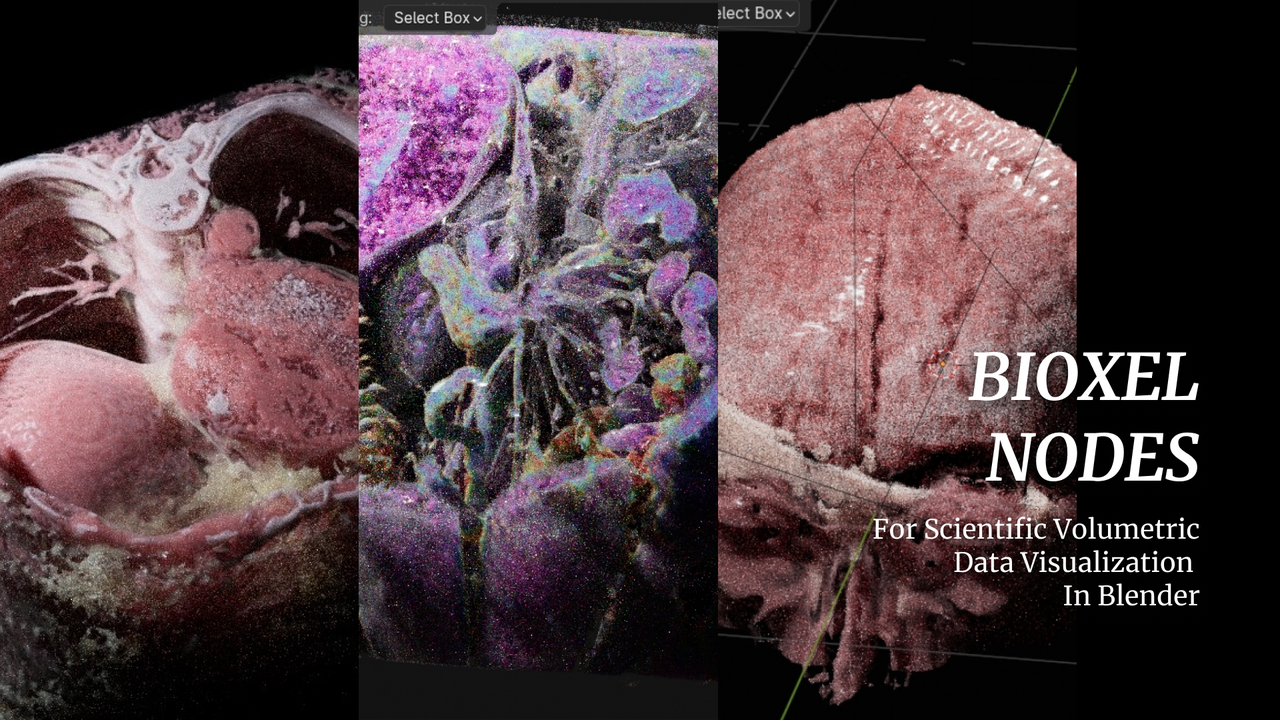
|
||||
|
||||
So how to use this extension? please check [Getting Started](https://omoolab.github.io/BioxelNodes/latest/getting-started)
|
||||
|
||||
## Supported Format
|
||||
|
||||
| Format | EXT | Test |
|
||||
| ------ | ---------------------------------------- | ------- |
|
||||
| DICOM | .dcm, .DICOM | ✅ pass |
|
||||
| BMP | .bmp, .BMP | ✅ pass |
|
||||
| JPEG | .jpg, .JPG, .jpeg, .JPEG | ✅ pass |
|
||||
| PNG | .png, .PNG | ✅ pass |
|
||||
| TIFF | .tif, .TIF, .tiff, .TIFF | ✅ pass |
|
||||
| Nifti | .nia, .nii, .nii.gz, .hdr, .img, .img.gz | ✅ pass |
|
||||
| Nrrd | .nrrd, .nhdr | ✅ pass |
|
||||
| Meta | .mha, .mhd | yet |
|
||||
| HDF5 | .hdf, .h4, .hdf4, .he2, .h5, .hdf5, .he5 | ✅ pass |
|
||||
| VTK | .vtk | yet |
|
||||
| BioRad | .PIC, .pic | yet |
|
||||
| Gipl | .gipl, .gipl.gz | yet |
|
||||
| LSM | .lsm, .LSM | yet |
|
||||
| MINC | .mnc, .MNC | yet |
|
||||
| MRC | .mrc, .rec | yet |
|
||||
|
||||
## Known Limitations
|
||||
|
||||
- Cycles CPUs only, Cycles GPUs (Optix), EEVEE (partial support)
|
||||
- Sections cannot be generated (will be supported soon)
|
||||
- Time sequence volume not supported (will be supported soon)
|
||||
|
||||
## Compatibility to Newer Version
|
||||
|
||||
Addon are updating, and it is possible that newer versions of the addon will not work on old project files properly. In order to make the old files work, you can do the following:
|
||||
|
||||
### For project files that need to be archived
|
||||
|
||||
Persistently save the Addon nodes before the addon is updated. This will put the nodes out of sync with the addon functionality, but it will ensure that the entire file can be calculated and rendered correctly, it fit to project files that you need to archive.
|
||||
Bioxel Nodes > Save All Staged Data
|
||||
|
||||
### For working project files
|
||||
|
||||
If you've ever done a persistent save of Bioxel Nodes nodes, it's possible that after the addon update, there may be new features of the addon that don't synergize with the saved nodes. In order for the new version to work with the old nodes, you need to relink them.
|
||||
Bioxel Nodes > Relink Nodes to Addon
|
||||
|
||||
## About EEVEE Render
|
||||
|
||||
Bioxel Nodes is designed for Cycles Render. However, it does support eevee render partially.Also, there are some limitations:
|
||||
|
||||
1. Only one cutter supported.
|
||||
2. EEVEE Render result is not that great as Cycles does.
|
||||
|
||||
> Volume Shader is not work properly in EEVEE Next since 4.2. It is because EEVEE Next is not support attributes from instances of volume shader by now. But Blender 4.3 is ok, so I suppose this issue will eventually be fixed.
|
||||
|
||||
@@ -1,19 +1,18 @@
|
||||
from .nodes import custom_nodes
|
||||
from . import auto_load
|
||||
from . import menu
|
||||
|
||||
import bpy
|
||||
|
||||
from . import auto_load
|
||||
from . import menus
|
||||
|
||||
|
||||
bl_info = {
|
||||
"name": "BiovelNodes",
|
||||
"name": "Bioxel Nodes",
|
||||
"author": "Ma Nan",
|
||||
"description": "",
|
||||
"blender": (4, 0, 0),
|
||||
"version": (0, 1, 0),
|
||||
"blender": (4, 1, 0),
|
||||
"version": (0, 2, 6),
|
||||
"location": "File -> Import",
|
||||
"warning": "",
|
||||
"category": "Import-Export"
|
||||
"category": "Node"
|
||||
}
|
||||
|
||||
auto_load.init()
|
||||
@@ -21,14 +20,9 @@ auto_load.init()
|
||||
|
||||
def register():
|
||||
auto_load.register()
|
||||
custom_nodes.register()
|
||||
menu.create_menu()
|
||||
menus.add()
|
||||
|
||||
|
||||
def unregister():
|
||||
try:
|
||||
menu.remove_menu()
|
||||
custom_nodes.unregister()
|
||||
auto_load.unregister()
|
||||
except RuntimeError:
|
||||
pass
|
||||
menus.remove()
|
||||
auto_load.unregister()
|
||||
|
||||
BIN
bioxelnodes/assets/Nodes.blend
LFS
BIN
bioxelnodes/assets/Nodes/BioxelNodes_4.1.blend
LFS
Normal file
@@ -16,6 +16,7 @@ blender_version = bpy.app.version
|
||||
modules = None
|
||||
ordered_classes = None
|
||||
|
||||
|
||||
def init():
|
||||
global modules
|
||||
global ordered_classes
|
||||
@@ -23,6 +24,7 @@ def init():
|
||||
modules = get_all_submodules(Path(__file__).parent)
|
||||
ordered_classes = get_ordered_classes_to_register(modules)
|
||||
|
||||
|
||||
def register():
|
||||
for cls in ordered_classes:
|
||||
bpy.utils.register_class(cls)
|
||||
@@ -33,27 +35,36 @@ def register():
|
||||
if hasattr(module, "register"):
|
||||
module.register()
|
||||
|
||||
|
||||
def unregister():
|
||||
for cls in reversed(ordered_classes):
|
||||
bpy.utils.unregister_class(cls)
|
||||
try:
|
||||
bpy.utils.unregister_class(cls)
|
||||
except Exception as e:
|
||||
print(f"Fail to unregister {cls}, skiped")
|
||||
|
||||
for module in modules:
|
||||
if module.__name__ == __name__:
|
||||
continue
|
||||
if hasattr(module, "unregister"):
|
||||
module.unregister()
|
||||
try:
|
||||
if module.__name__ == __name__:
|
||||
continue
|
||||
if hasattr(module, "unregister"):
|
||||
module.unregister()
|
||||
except Exception as e:
|
||||
print(f"Fail to unregister {module}, skiped")
|
||||
|
||||
|
||||
# Import modules
|
||||
#################################################
|
||||
|
||||
def get_all_submodules(directory):
|
||||
return list(iter_submodules(directory, directory.name))
|
||||
return list(iter_submodules(directory, __package__))
|
||||
|
||||
|
||||
def iter_submodules(path, package_name):
|
||||
for name in sorted(iter_submodule_names(path)):
|
||||
yield importlib.import_module("." + name, package_name)
|
||||
|
||||
|
||||
def iter_submodule_names(path, root=""):
|
||||
for _, module_name, is_package in pkgutil.iter_modules([str(path)]):
|
||||
if is_package:
|
||||
@@ -70,19 +81,24 @@ def iter_submodule_names(path, root=""):
|
||||
def get_ordered_classes_to_register(modules):
|
||||
return toposort(get_register_deps_dict(modules))
|
||||
|
||||
|
||||
def get_register_deps_dict(modules):
|
||||
my_classes = set(iter_my_classes(modules))
|
||||
my_classes_by_idname = {cls.bl_idname : cls for cls in my_classes if hasattr(cls, "bl_idname")}
|
||||
my_classes_by_idname = {
|
||||
cls.bl_idname: cls for cls in my_classes if hasattr(cls, "bl_idname")}
|
||||
|
||||
deps_dict = {}
|
||||
for cls in my_classes:
|
||||
deps_dict[cls] = set(iter_my_register_deps(cls, my_classes, my_classes_by_idname))
|
||||
deps_dict[cls] = set(iter_my_register_deps(
|
||||
cls, my_classes, my_classes_by_idname))
|
||||
return deps_dict
|
||||
|
||||
|
||||
def iter_my_register_deps(cls, my_classes, my_classes_by_idname):
|
||||
yield from iter_my_deps_from_annotations(cls, my_classes)
|
||||
yield from iter_my_deps_from_parent_id(cls, my_classes_by_idname)
|
||||
|
||||
|
||||
def iter_my_deps_from_annotations(cls, my_classes):
|
||||
for value in typing.get_type_hints(cls, {}, {}).values():
|
||||
dependency = get_dependency_from_annotation(value)
|
||||
@@ -90,6 +106,7 @@ def iter_my_deps_from_annotations(cls, my_classes):
|
||||
if dependency in my_classes:
|
||||
yield dependency
|
||||
|
||||
|
||||
def get_dependency_from_annotation(value):
|
||||
if blender_version >= (2, 93):
|
||||
if isinstance(value, bpy.props._PropertyDeferred):
|
||||
@@ -100,6 +117,7 @@ def get_dependency_from_annotation(value):
|
||||
return value[1]["type"]
|
||||
return None
|
||||
|
||||
|
||||
def iter_my_deps_from_parent_id(cls, my_classes_by_idname):
|
||||
if bpy.types.Panel in cls.__bases__:
|
||||
parent_idname = getattr(cls, "bl_parent_id", None)
|
||||
@@ -108,6 +126,7 @@ def iter_my_deps_from_parent_id(cls, my_classes_by_idname):
|
||||
if parent_cls is not None:
|
||||
yield parent_cls
|
||||
|
||||
|
||||
def iter_my_classes(modules):
|
||||
base_types = get_register_base_types()
|
||||
for cls in get_classes_in_modules(modules):
|
||||
@@ -115,6 +134,7 @@ def iter_my_classes(modules):
|
||||
if not getattr(cls, "is_registered", False):
|
||||
yield cls
|
||||
|
||||
|
||||
def get_classes_in_modules(modules):
|
||||
classes = set()
|
||||
for module in modules:
|
||||
@@ -122,11 +142,13 @@ def get_classes_in_modules(modules):
|
||||
classes.add(cls)
|
||||
return classes
|
||||
|
||||
|
||||
def iter_classes_in_module(module):
|
||||
for value in module.__dict__.values():
|
||||
if inspect.isclass(value):
|
||||
yield value
|
||||
|
||||
|
||||
def get_register_base_types():
|
||||
return set(getattr(bpy.types, name) for name in [
|
||||
"Panel", "Operator", "PropertyGroup", "FileHandler",
|
||||
@@ -134,7 +156,7 @@ def get_register_base_types():
|
||||
"Node", "NodeSocket", "NodeTree",
|
||||
"UIList", "RenderEngine",
|
||||
"Gizmo", "GizmoGroup",
|
||||
])
|
||||
] if hasattr(bpy.types, name))
|
||||
|
||||
|
||||
# Find order to register to solve dependencies
|
||||
@@ -151,5 +173,6 @@ def toposort(deps_dict):
|
||||
sorted_values.add(value)
|
||||
else:
|
||||
unsorted.append(value)
|
||||
deps_dict = {value : deps_dict[value] - sorted_values for value in unsorted}
|
||||
deps_dict = {value: deps_dict[value] -
|
||||
sorted_values for value in unsorted}
|
||||
return sorted_list
|
||||
|
||||
@@ -1,46 +0,0 @@
|
||||
import bpy
|
||||
from .utils import get_bioxels_obj
|
||||
|
||||
|
||||
class ConvertToMesh(bpy.types.Operator):
|
||||
bl_idname = "bioxelnodes.convert_to_mesh"
|
||||
bl_label = "Bioxels To Mesh"
|
||||
bl_description = "Convert Bioxels To Mesh."
|
||||
bl_options = {'UNDO'}
|
||||
|
||||
def execute(self, context):
|
||||
bioxels_objs = []
|
||||
|
||||
for obj in bpy.context.selected_objects:
|
||||
bioxels_obj = get_bioxels_obj(obj)
|
||||
if bioxels_obj:
|
||||
bioxels_objs.append(bioxels_obj)
|
||||
|
||||
if len(bioxels_objs)==0:
|
||||
self.report({"WARNING"}, "Cannot find any bioxels.")
|
||||
return {'FINISHED'}
|
||||
|
||||
for bioxels_obj in bioxels_objs:
|
||||
bpy.ops.mesh.primitive_cube_add(
|
||||
size=2, enter_editmode=False, align='WORLD', location=(0, 0, 0), scale=(1, 1, 1))
|
||||
mesh_obj = bpy.context.active_object
|
||||
|
||||
mesh_obj.name = f"{bioxels_obj.parent.name}_Mesh"
|
||||
bpy.ops.node.new_geometry_nodes_modifier()
|
||||
modifier = mesh_obj.modifiers[0]
|
||||
nodes = modifier.node_group.nodes
|
||||
links = modifier.node_group.links
|
||||
|
||||
output_node = nodes.get("Group Output")
|
||||
object_node = nodes.new("GeometryNodeObjectInfo")
|
||||
realize_nodes = nodes.new("GeometryNodeRealizeInstances")
|
||||
object_node.inputs[0].default_value = bioxels_obj
|
||||
object_node.transform_space = 'RELATIVE'
|
||||
|
||||
links.new(object_node.outputs['Geometry'], realize_nodes.inputs[0])
|
||||
links.new(realize_nodes.outputs[0], output_node.inputs[0])
|
||||
bpy.ops.object.convert(target='MESH')
|
||||
bpy.context.object.active_material_index = 1
|
||||
bpy.ops.object.material_slot_remove()
|
||||
|
||||
return {'FINISHED'}
|
||||
@@ -1 +0,0 @@
|
||||
from .node_menu import CustomNodes
|
||||
1
bioxelnodes/customnodes/__init__.py
Normal file
@@ -0,0 +1 @@
|
||||
from .menus import CustomNodes
|
||||
@@ -1,3 +1,4 @@
|
||||
import shutil
|
||||
import bpy
|
||||
from pathlib import Path
|
||||
from .nodes import AddCustomNode
|
||||
@@ -8,17 +9,19 @@ class CustomNodes():
|
||||
self,
|
||||
menu_items,
|
||||
nodes_file,
|
||||
class_prefix="CUSTOMNODES_MT_NODES",
|
||||
root_label='CustomNodes',
|
||||
root_icon='NONE'
|
||||
) -> None:
|
||||
if not Path(nodes_file).is_file():
|
||||
raise FileNotFoundError(Path(nodes_file).resolve().as_posix())
|
||||
raise FileNotFoundError(str(Path(nodes_file).resolve()))
|
||||
|
||||
self.menu_items = menu_items
|
||||
self.nodes_file = Path(nodes_file).resolve().as_posix()
|
||||
|
||||
self.nodes_file = str(Path(nodes_file).resolve())
|
||||
self.class_prefix = class_prefix
|
||||
self.root_label = root_label
|
||||
self.root_icon = root_icon
|
||||
self.class_prefix = class_prefix
|
||||
|
||||
menu_classes = []
|
||||
self._create_menu_class(
|
||||
@@ -28,7 +31,7 @@ class CustomNodes():
|
||||
)
|
||||
self.menu_classes = menu_classes
|
||||
|
||||
idname = f"CUSTOMNODES_MT_NODES__{root_label.replace(' ', '').upper()}"
|
||||
idname = f"{class_prefix}_{root_label.replace(' ', '').upper()}"
|
||||
|
||||
def add_node_menu(self, context):
|
||||
if ('GeometryNodeTree' == bpy.context.area.spaces[0].tree_type):
|
||||
@@ -40,7 +43,7 @@ class CustomNodes():
|
||||
|
||||
def _create_menu_class(self, menu_classes, items, label='CustomNodes', icon=0, idname_namespace=None):
|
||||
nodes_file = self.nodes_file
|
||||
idname_namespace = idname_namespace or "CUSTOMNODES_MT_NODES_"
|
||||
idname_namespace = idname_namespace or self.class_prefix
|
||||
idname = f"{idname_namespace}_{label.replace(' ', '').upper()}"
|
||||
|
||||
# create submenu class if item is menu.
|
||||
@@ -60,6 +63,7 @@ class CustomNodes():
|
||||
class Menu(bpy.types.Menu):
|
||||
bl_idname = idname
|
||||
bl_label = label
|
||||
nodes_file = self.nodes_file
|
||||
|
||||
def draw(self, context):
|
||||
layout = self.layout
|
||||
@@ -93,10 +97,13 @@ class CustomNodes():
|
||||
def _find_item(self, found_items, menu_items, node_type: str):
|
||||
|
||||
for item in menu_items:
|
||||
if item == 'separator':
|
||||
continue
|
||||
|
||||
if item.get("node_type") == node_type:
|
||||
found_items.append(item)
|
||||
|
||||
item_items = item.get('items') if item != 'separator' else None
|
||||
item_items = item.get('items')
|
||||
if item_items:
|
||||
self._find_item(found_items, item_items, node_type)
|
||||
|
||||
@@ -105,30 +112,37 @@ class CustomNodes():
|
||||
self._find_item(found_items, self.menu_items, node_type)
|
||||
return found_items[0] if len(found_items) > 0 else None
|
||||
|
||||
def add_node(self, node_tree, node_type: str):
|
||||
def add_node(self, node_group, node_type: str):
|
||||
item = self.find_item(node_type)
|
||||
op = AddCustomNode()
|
||||
op.nodes_file = self.nodes_file
|
||||
op.node_type = node_type
|
||||
if item:
|
||||
op = AddCustomNode()
|
||||
op.nodes_file = self.nodes_file
|
||||
op.node_type = item['node_type']
|
||||
op.node_label = item.get('label') or ""
|
||||
op.node_link = item.get('link') or True
|
||||
op.node_callback = item.get('node_callback') or ""
|
||||
return op.add_node(node_tree)
|
||||
else:
|
||||
raise RuntimeError("No custom node type found.")
|
||||
op.node_label = ""
|
||||
op.node_link = True
|
||||
op.node_callback = ""
|
||||
return op.add_node(node_group)
|
||||
|
||||
def register(self):
|
||||
for cls in self.menu_classes:
|
||||
bpy.utils.register_class(cls)
|
||||
|
||||
bpy.types.NODE_MT_add.append(self.add_node_menu)
|
||||
bpy.types.Scene.customnodes_node_dir = bpy.props.StringProperty(
|
||||
name="Node Directory",
|
||||
subtype='DIR_PATH',
|
||||
default="//"
|
||||
)
|
||||
|
||||
def unregister(self):
|
||||
bpy.types.NODE_MT_add.remove(self.add_node_menu)
|
||||
try:
|
||||
for cls in reversed(self.menu_classes):
|
||||
bpy.utils.unregister_class(cls)
|
||||
|
||||
bpy.types.NODE_MT_add.remove(self.add_node_menu)
|
||||
except RuntimeError:
|
||||
pass
|
||||
@@ -85,9 +85,14 @@ class AddCustomNode():
|
||||
except:
|
||||
...
|
||||
|
||||
def add_node(self, node_tree):
|
||||
def add_node(self, node_group):
|
||||
# Deselect all nodes first
|
||||
for node in node_group.nodes:
|
||||
if node.select:
|
||||
node.select = False
|
||||
|
||||
self.get_node_tree(self.node_type, self.node_link)
|
||||
node = node_tree.new("GeometryNodeGroup")
|
||||
node = node_group.nodes.new("GeometryNodeGroup")
|
||||
self.assign_node_tree(node)
|
||||
|
||||
return node
|
||||
@@ -1 +0,0 @@
|
||||
from .preferences import ExternalPackagePreferences
|
||||
2
bioxelnodes/externalpackage/__init__.py
Normal file
@@ -0,0 +1,2 @@
|
||||
from .preferences import ExternalPackagePreferences
|
||||
from .package import PackageInstaller
|
||||
@@ -42,12 +42,13 @@ class InstallationError(Exception):
|
||||
class PackageInstaller():
|
||||
def __init__(
|
||||
self,
|
||||
log_dir: str,
|
||||
requirements_dir: str,
|
||||
log_dir: str = None,
|
||||
pypi_mirror_provider='Default',
|
||||
) -> None:
|
||||
self.pypi_mirror_provider = pypi_mirror_provider
|
||||
self.log_path: Path = Path(log_dir)
|
||||
self.log_path: Path = Path(log_dir) if log_dir \
|
||||
else Path.home() / '.externalpackage' / 'logs'
|
||||
self.requirements_path: Path = Path(requirements_dir)
|
||||
|
||||
def start_logging(self, logfile_name: str = 'side-packages-install') -> logging.Logger:
|
||||
@@ -75,7 +76,8 @@ class PackageInstaller():
|
||||
|
||||
# Set up logging configuration
|
||||
logfile_path = Path(self.log_path, f"{logfile_name}.log")
|
||||
logging.basicConfig(filename=logfile_path, level=logging.INFO)
|
||||
logging.basicConfig(filename=logfile_path,
|
||||
level=logging.INFO, encoding='utf-8')
|
||||
|
||||
# Return logger object
|
||||
return logging.getLogger()
|
||||
@@ -231,7 +233,7 @@ class PackageInstaller():
|
||||
"""
|
||||
|
||||
# path to python.exe
|
||||
python_exe = Path(sys.executable).resolve().as_posix()
|
||||
python_exe = str(Path(sys.executable).resolve())
|
||||
|
||||
# build the command list
|
||||
cmd_list = [python_exe] + cmd_list
|
||||
@@ -247,13 +249,16 @@ class PackageInstaller():
|
||||
result = subprocess.run(cmd_list, timeout=timeout,
|
||||
stdout=subprocess.PIPE, stderr=subprocess.PIPE)
|
||||
|
||||
if result.returncode != 0:
|
||||
log.error('Command failed: %s', cmd_list)
|
||||
log.error('stdout: %s', result.stdout.decode())
|
||||
log.error('stderr: %s', result.stderr.decode())
|
||||
else:
|
||||
log.info('Command succeeded: %s', cmd_list)
|
||||
log.info('stdout: %s', result.stdout.decode())
|
||||
try:
|
||||
if result.returncode != 0:
|
||||
log.error('Command failed: %s', cmd_list)
|
||||
log.error('stdout: %s', result.stdout.decode())
|
||||
log.error('stderr: %s', result.stderr.decode(errors='ignore'))
|
||||
else:
|
||||
log.info('Command succeeded: %s', cmd_list)
|
||||
log.info('stdout: %s', result.stdout.decode())
|
||||
except:
|
||||
...
|
||||
# return the command list, return code, stdout, and stderr as a tuple
|
||||
return result
|
||||
|
||||
@@ -350,6 +355,7 @@ class EXTERNALPACKAGE_OT_Install_Package(bpy.types.Operator):
|
||||
name='Python Package',
|
||||
description='Python Package to Install'
|
||||
) # type: ignore
|
||||
|
||||
version: bpy.props.StringProperty(
|
||||
name='Python Package',
|
||||
description='Python Package to Install'
|
||||
@@ -373,7 +379,7 @@ class EXTERNALPACKAGE_OT_Install_Package(bpy.types.Operator):
|
||||
)
|
||||
|
||||
result = installer.install_package(f"{self.package}=={self.version}")
|
||||
if result.returncode == 0 and installer.is_installed(self.package):
|
||||
if result.returncode == 0 or installer.is_installed(self.package):
|
||||
self.report(
|
||||
{'INFO'},
|
||||
f"Successfully installed {self.package} v{self.version}"
|
||||
@@ -381,9 +387,7 @@ class EXTERNALPACKAGE_OT_Install_Package(bpy.types.Operator):
|
||||
else:
|
||||
self.report(
|
||||
{'ERROR'},
|
||||
f"""
|
||||
Error installing package. Please check the log files
|
||||
in {preferences.log_dir}.
|
||||
"""
|
||||
f"""Error installing package. Please check the log files
|
||||
in {preferences.log_dir}."""
|
||||
)
|
||||
return {'FINISHED'}
|
||||
@@ -1,4 +1,5 @@
|
||||
import bpy
|
||||
import subprocess
|
||||
from pathlib import Path
|
||||
from .package import PackageInstaller, PYPI_MIRROR
|
||||
|
||||
@@ -10,17 +11,36 @@ def get_pypi_mirrors(self, context, edit_text):
|
||||
return PYPI_MIRROR.keys()
|
||||
|
||||
|
||||
class RebootBlender(bpy.types.Operator):
|
||||
bl_idname = "externalpackage.reboot_blender"
|
||||
bl_label = "Reboot Blender"
|
||||
bl_description = "Reboot Blender"
|
||||
bl_options = {'UNDO'}
|
||||
|
||||
def invoke(self, context, event):
|
||||
context.window_manager.invoke_confirm(self, event)
|
||||
return {'RUNNING_MODAL'}
|
||||
|
||||
def execute(self, context):
|
||||
blender_launcher = Path(
|
||||
bpy.app.binary_path).parent / "blender-launcher.exe"
|
||||
subprocess.run([str(blender_launcher), "-con", "--python-expr",
|
||||
"import bpy; bpy.ops.wm.recover_last_session()"])
|
||||
bpy.ops.wm.quit_blender()
|
||||
return {'FINISHED'}
|
||||
|
||||
|
||||
class ExternalPackagePreferences():
|
||||
requirements_dir: bpy.props.StringProperty(
|
||||
name="requirements.txt Directory",
|
||||
subtype='DIR_PATH',
|
||||
default=Path(__file__).parent.as_posix()
|
||||
default=str(Path(__file__).parent)
|
||||
) # type: ignore
|
||||
|
||||
log_dir: bpy.props.StringProperty(
|
||||
name="Python Log Directory",
|
||||
subtype='DIR_PATH',
|
||||
default=Path(Path.home(), '.externalpackage', 'logs').as_posix()
|
||||
default=str(Path(Path.home(), '.externalpackage', 'logs'))
|
||||
) # type: ignore
|
||||
|
||||
pypi_mirror_provider: bpy.props.StringProperty(
|
||||
@@ -34,13 +54,13 @@ class ExternalPackagePreferences():
|
||||
|
||||
def draw(self, context):
|
||||
layout = self.layout
|
||||
layout.label(text="Install the required packages.")
|
||||
layout.label(
|
||||
text='**Install the required packages, then hit "Reboot Blender"**')
|
||||
|
||||
col_main = layout.column(heading='', align=False)
|
||||
row_import = col_main.row()
|
||||
row_import.prop(self, 'pypi_mirror_provider', text='Set PyPI Mirror')
|
||||
row_import.prop(self, 'pypi_mirror_provider', text='PyPI Mirror')
|
||||
|
||||
|
||||
installer = PackageInstaller(
|
||||
pypi_mirror_provider=self.pypi_mirror_provider,
|
||||
log_dir=self.log_dir,
|
||||
@@ -71,3 +91,5 @@ class ExternalPackagePreferences():
|
||||
op.package = name
|
||||
op.version = version
|
||||
op.description = f'Install required python package: {name}'
|
||||
|
||||
layout.operator(RebootBlender.bl_idname)
|
||||
25
bioxelnodes/io_points.py
Normal file
@@ -0,0 +1,25 @@
|
||||
# TODO: WIP
|
||||
import bpy
|
||||
import bmesh
|
||||
|
||||
|
||||
def create_points_obj(points, name="points"):
|
||||
bpy.ops.mesh.primitive_cube_add(
|
||||
enter_editmode=False, align='WORLD', location=(0, 0, 0), scale=(1, 1, 1)
|
||||
)
|
||||
obj = bpy.context.active_object
|
||||
mesh = obj.data
|
||||
|
||||
bm = bmesh.new()
|
||||
value_layer = bm.verts.layers.float.new('value')
|
||||
|
||||
for point in points:
|
||||
pos = point['pos']
|
||||
value = point['value']
|
||||
vert = bm.verts.new(pos) # add a new vert
|
||||
vert[value_layer] = value
|
||||
|
||||
# make the bmesh the object's mesh
|
||||
bm.to_mesh(mesh)
|
||||
bm.free() # always do this when finished
|
||||
return obj
|
||||
@@ -1,33 +0,0 @@
|
||||
import bpy
|
||||
from .convert import ConvertToMesh
|
||||
from .io import ExportVDB, ImportDICOM
|
||||
|
||||
|
||||
def TOPBAR_FILE_IMPORT(self, context):
|
||||
layout = self.layout
|
||||
layout.separator()
|
||||
layout.operator(ImportDICOM.bl_idname)
|
||||
|
||||
|
||||
def TOPBAR_FILE_EXPORT(self, context):
|
||||
layout = self.layout
|
||||
layout.separator()
|
||||
layout.operator(ExportVDB.bl_idname)
|
||||
|
||||
|
||||
def VIEW3D_OBJECT(self, context):
|
||||
layout = self.layout
|
||||
layout.operator(ConvertToMesh.bl_idname)
|
||||
layout.separator()
|
||||
|
||||
|
||||
def create_menu():
|
||||
bpy.types.TOPBAR_MT_file_import.append(TOPBAR_FILE_IMPORT)
|
||||
bpy.types.TOPBAR_MT_file_export.append(TOPBAR_FILE_EXPORT)
|
||||
bpy.types.VIEW3D_MT_object_context_menu.prepend(VIEW3D_OBJECT)
|
||||
|
||||
|
||||
def remove_menu():
|
||||
bpy.types.TOPBAR_MT_file_import.remove(TOPBAR_FILE_IMPORT)
|
||||
bpy.types.TOPBAR_MT_file_export.remove(TOPBAR_FILE_EXPORT)
|
||||
bpy.types.VIEW3D_MT_object_context_menu.remove(VIEW3D_OBJECT)
|
||||
130
bioxelnodes/menus.py
Normal file
@@ -0,0 +1,130 @@
|
||||
import bpy
|
||||
|
||||
from .operators import (AddPlaneCutter, AddCylinderCutter, AddCubeCutter, AddSphereCutter, CombineLabels,
|
||||
ConvertToMesh, InvertScalar, FillByLabel, FillByThreshold, FillByRange)
|
||||
from .io import ExportVolumeData, ImportAsLabelLayer, ImportAsScalarLayer, ImportVolumeData, AddVolumeData
|
||||
from .save import ReLinkNodes, SaveLayers, SaveAllToShare
|
||||
|
||||
|
||||
class ModifyLayer(bpy.types.Menu):
|
||||
bl_idname = "BIOXELNODES_MT_MODIFY_LAYERS"
|
||||
bl_label = "Modify Layer"
|
||||
|
||||
def draw(self, context):
|
||||
layout = self.layout
|
||||
layout.operator(InvertScalar.bl_idname)
|
||||
layout.operator(FillByThreshold.bl_idname)
|
||||
layout.operator(FillByRange.bl_idname)
|
||||
layout.operator(FillByLabel.bl_idname)
|
||||
layout.operator(CombineLabels.bl_idname)
|
||||
|
||||
|
||||
class AddCutterMenu(bpy.types.Menu):
|
||||
bl_idname = "BIOXELNODES_MT_CUTTERS"
|
||||
bl_label = "Add a Cutter to Container"
|
||||
|
||||
def draw(self, context):
|
||||
layout = self.layout
|
||||
layout.operator(AddPlaneCutter.bl_idname)
|
||||
layout.operator(AddCylinderCutter.bl_idname)
|
||||
layout.operator(AddCubeCutter.bl_idname)
|
||||
layout.operator(AddSphereCutter.bl_idname)
|
||||
|
||||
|
||||
class ImportLayerMenu(bpy.types.Menu):
|
||||
bl_idname = "BIOXELNODES_MT_LAYERS"
|
||||
bl_label = "Import Volume Data as Bioxel"
|
||||
|
||||
def draw(self, context):
|
||||
layout = self.layout
|
||||
layout.operator(ImportAsScalarLayer.bl_idname)
|
||||
layout.operator(ImportAsLabelLayer.bl_idname)
|
||||
|
||||
|
||||
class BioxelNodesView3DMenu(bpy.types.Menu):
|
||||
bl_idname = "BIOXELNODES_MT_VIEW3D"
|
||||
bl_label = "Bioxel Nodes"
|
||||
|
||||
def draw(self, context):
|
||||
layout = self.layout
|
||||
layout.menu(ImportLayerMenu.bl_idname)
|
||||
layout.menu(AddCutterMenu.bl_idname)
|
||||
layout.operator(ConvertToMesh.bl_idname)
|
||||
layout.separator()
|
||||
layout.operator(SaveLayers.bl_idname)
|
||||
|
||||
|
||||
class BioxelNodesOutlinerMenu(bpy.types.Menu):
|
||||
bl_idname = "BIOXELNODES_MT_OUTLINER"
|
||||
bl_label = "Bioxel Nodes"
|
||||
|
||||
def draw(self, context):
|
||||
layout = self.layout
|
||||
layout.menu(ImportLayerMenu.bl_idname)
|
||||
layout.menu(AddCutterMenu.bl_idname)
|
||||
layout.operator(ConvertToMesh.bl_idname)
|
||||
layout.separator()
|
||||
layout.menu(ModifyLayer.bl_idname)
|
||||
layout.separator()
|
||||
layout.operator(SaveLayers.bl_idname)
|
||||
|
||||
|
||||
def TOPBAR_FILE_IMPORT(self, context):
|
||||
layout = self.layout
|
||||
layout.separator()
|
||||
layout.menu(ImportLayerMenu.bl_idname)
|
||||
|
||||
|
||||
def TOPBAR_FILE_EXPORT(self, context):
|
||||
layout = self.layout
|
||||
layout.separator()
|
||||
layout.operator(ExportVolumeData.bl_idname)
|
||||
|
||||
|
||||
def VIEW3D_OBJECT(self, context):
|
||||
layout = self.layout
|
||||
layout.separator()
|
||||
layout.menu(BioxelNodesView3DMenu.bl_idname, icon="FILE_VOLUME")
|
||||
|
||||
|
||||
def OUTLINER_OBJECT(self, context):
|
||||
layout = self.layout
|
||||
layout.separator()
|
||||
layout.menu(BioxelNodesOutlinerMenu.bl_idname, icon="FILE_VOLUME")
|
||||
|
||||
|
||||
class BioxelNodesTopbarMenu(bpy.types.Menu):
|
||||
bl_idname = "BIOXELNODES_MT_TOPBAR"
|
||||
bl_label = "Bioxel Nodes"
|
||||
|
||||
def draw(self, context):
|
||||
layout = self.layout
|
||||
layout.menu(ImportLayerMenu.bl_idname)
|
||||
layout.operator(ExportVolumeData.bl_idname)
|
||||
layout.separator()
|
||||
layout.menu(AddCutterMenu.bl_idname)
|
||||
layout.operator(ConvertToMesh.bl_idname)
|
||||
layout.separator()
|
||||
layout.operator(SaveAllToShare.bl_idname)
|
||||
layout.operator(ReLinkNodes.bl_idname)
|
||||
|
||||
|
||||
def TOPBAR(self, context):
|
||||
layout = self.layout
|
||||
layout.menu(BioxelNodesTopbarMenu.bl_idname)
|
||||
|
||||
|
||||
def add():
|
||||
bpy.types.TOPBAR_MT_file_import.append(TOPBAR_FILE_IMPORT)
|
||||
bpy.types.TOPBAR_MT_file_export.append(TOPBAR_FILE_EXPORT)
|
||||
bpy.types.OUTLINER_MT_object.append(OUTLINER_OBJECT)
|
||||
bpy.types.VIEW3D_MT_object_context_menu.append(VIEW3D_OBJECT)
|
||||
bpy.types.TOPBAR_MT_editor_menus.append(TOPBAR)
|
||||
|
||||
|
||||
def remove():
|
||||
bpy.types.TOPBAR_MT_file_import.remove(TOPBAR_FILE_IMPORT)
|
||||
bpy.types.TOPBAR_MT_file_export.remove(TOPBAR_FILE_EXPORT)
|
||||
bpy.types.OUTLINER_MT_object.remove(OUTLINER_OBJECT)
|
||||
bpy.types.VIEW3D_MT_object_context_menu.remove(VIEW3D_OBJECT)
|
||||
bpy.types.TOPBAR_MT_editor_menus.remove(TOPBAR)
|
||||
@@ -1,146 +1,276 @@
|
||||
|
||||
from pathlib import Path
|
||||
from .custom_nodes import CustomNodes
|
||||
from .customnodes import CustomNodes
|
||||
import bpy
|
||||
|
||||
|
||||
def add_driver_to_node_factory(source_prop, target_prop):
|
||||
callback_str = f"""
|
||||
import bpy
|
||||
from bioxelnodes.utils import add_direct_driver, get_bioxels_obj
|
||||
bioxels_obj = get_bioxels_obj(bpy.context.active_object)
|
||||
container_obj = bioxels_obj.parent
|
||||
if bioxels_obj:
|
||||
add_direct_driver(
|
||||
target=node,
|
||||
target_prop='{target_prop}',
|
||||
source=container_obj,
|
||||
source_prop='{source_prop}'
|
||||
)
|
||||
else:
|
||||
print('Cannot find any bioxels.')
|
||||
"""
|
||||
return callback_str
|
||||
# def set_object_to_node_factory(object_type:str):
|
||||
# if object_type == "plane":
|
||||
# create_object = """
|
||||
# bpy.ops.mesh.primitive_plane_add(size=2, enter_editmode=False, align='WORLD', location=(0, 0, 0), scale=(1, 1, 1))
|
||||
# """
|
||||
# callback_str = f"""
|
||||
# import bpy
|
||||
# from ..utils import get_container
|
||||
# container = get_container(bpy.context.active_object)
|
||||
# if container:
|
||||
# {create_object}
|
||||
# object = bpy.context.active_object
|
||||
# node.inputs[0].default_value = object
|
||||
# else:
|
||||
# print('Cannot find any Bioxel Container.')
|
||||
# """
|
||||
# return callback_str
|
||||
|
||||
|
||||
def set_prop_to_node_factory(source_prop, target_prop):
|
||||
callback_str = f"""
|
||||
import bpy
|
||||
from bioxelnodes.utils import get_bioxels_obj
|
||||
bioxels_obj = get_bioxels_obj(bpy.context.active_object)
|
||||
container_obj = bioxels_obj.parent
|
||||
if bioxels_obj:
|
||||
node.inputs.get('{target_prop}').default_value = container_obj.get('{source_prop}')
|
||||
else:
|
||||
print('Cannot find any bioxels.')
|
||||
"""
|
||||
return callback_str
|
||||
# def add_driver_to_node_factory(source_prop, target_prop):
|
||||
# callback_str = f"""
|
||||
# import bpy
|
||||
# from .utils import add_direct_driver, get_bioxels_obj
|
||||
# bioxels_obj = get_bioxels_obj(bpy.context.active_object)
|
||||
# if bioxels_obj:
|
||||
# container_obj = bioxels_obj.parent
|
||||
# add_direct_driver(
|
||||
# target=node,
|
||||
# target_prop='{target_prop}',
|
||||
# source=container_obj,
|
||||
# source_prop='{source_prop}'
|
||||
# )
|
||||
# else:
|
||||
# print('Cannot find any bioxels.')
|
||||
# """
|
||||
# return callback_str
|
||||
|
||||
|
||||
# def set_prop_to_node_factory(source_prop, target_prop):
|
||||
# callback_str = f"""
|
||||
# import bpy
|
||||
# from .utils import get_bioxels_obj
|
||||
# bioxels_obj = get_bioxels_obj(bpy.context.active_object)
|
||||
# if bioxels_obj:
|
||||
# container_obj = bioxels_obj.parent
|
||||
# node.inputs.get('{target_prop}').default_value = container_obj.get(
|
||||
# '{source_prop}')
|
||||
# else:
|
||||
# print('Cannot find any bioxels.')
|
||||
# """
|
||||
# return callback_str
|
||||
|
||||
|
||||
NODE_FILE = "BioxelNodes_4.1"
|
||||
|
||||
MENU_ITEMS = [
|
||||
{
|
||||
'label': 'Present',
|
||||
'icon': 'MESH_MONKEY',
|
||||
'items': [
|
||||
{
|
||||
'label': 'Segment',
|
||||
'icon': 'OUTLINER_OB_META',
|
||||
'node_type': 'BioxelNodes_Segment',
|
||||
'node_description': '',
|
||||
'node_callback': "\n".join([
|
||||
set_prop_to_node_factory("bioxel_size", "Detail Size"),
|
||||
set_prop_to_node_factory("bioxels_offset", "Offset"),
|
||||
])
|
||||
},
|
||||
{
|
||||
'label': 'Anatomy',
|
||||
'icon': 'OUTLINER_OB_META',
|
||||
'node_type': 'BioxelNodes_Anatomy',
|
||||
'node_description': '',
|
||||
'node_callback': "\n".join([
|
||||
set_prop_to_node_factory("bioxel_size", "Detail Size"),
|
||||
set_prop_to_node_factory("bioxels_offset", "Offset"),
|
||||
])
|
||||
}
|
||||
]
|
||||
},
|
||||
{
|
||||
'label': 'Segment',
|
||||
'label': 'Methods',
|
||||
'icon': 'OUTLINER_DATA_VOLUME',
|
||||
'items': [
|
||||
{
|
||||
'label': 'Segment by Level',
|
||||
'icon': 'AREA_JOIN',
|
||||
'node_type': 'BioxelNodes_SegmentByLevel',
|
||||
'node_description': '',
|
||||
'node_callback': "\n".join([
|
||||
set_prop_to_node_factory("bioxel_size", "Detail Size"),
|
||||
set_prop_to_node_factory("bioxels_offset", "Offset"),
|
||||
])
|
||||
'label': 'Mask by Threshold',
|
||||
'icon': 'EMPTY_SINGLE_ARROW',
|
||||
'node_type': 'BioxelNodes_MaskByThreshold',
|
||||
'node_description': ''
|
||||
},
|
||||
{
|
||||
'label': 'Segment by Range',
|
||||
'icon': 'AREA_SWAP',
|
||||
'node_type': 'BioxelNodes_SegmentByRange',
|
||||
'node_description': '',
|
||||
'node_callback': "\n".join([
|
||||
set_prop_to_node_factory("bioxel_size", "Detail Size"),
|
||||
set_prop_to_node_factory("bioxels_offset", "Offset"),
|
||||
])
|
||||
'label': 'Mask by Range',
|
||||
'icon': 'IPO_CONSTANT',
|
||||
'node_type': 'BioxelNodes_MaskByRange',
|
||||
'node_description': ''
|
||||
},
|
||||
{
|
||||
'label': 'Segment by Layers',
|
||||
'icon': 'OUTLINER_OB_FORCE_FIELD',
|
||||
'node_type': 'BioxelNodes_SegmentsByLayers',
|
||||
'node_description': '',
|
||||
'node_callback': "\n".join([
|
||||
set_prop_to_node_factory("bioxel_size", "Detail Size"),
|
||||
set_prop_to_node_factory("bioxels_offset", "Offset"),
|
||||
])
|
||||
'label': 'Mask by Label',
|
||||
'icon': 'MESH_CAPSULE',
|
||||
'node_type': 'BioxelNodes_MaskByLabel',
|
||||
'node_description': ''
|
||||
}
|
||||
]
|
||||
},
|
||||
{
|
||||
'label': 'Shader',
|
||||
'label': 'Shaders',
|
||||
'icon': 'SHADING_RENDERED',
|
||||
'items': [
|
||||
{
|
||||
'label': 'Segment Shader',
|
||||
'icon': 'OUTLINER_OB_VOLUME',
|
||||
'node_type': 'BioxelNodes_SegmentShader',
|
||||
'label': 'Membrane Shader',
|
||||
'icon': 'NODE_MATERIAL',
|
||||
'node_type': 'BioxelNodes_AssignMembraneShader',
|
||||
'node_description': ''
|
||||
},
|
||||
{
|
||||
'label': 'Solid Shader',
|
||||
'icon': 'SHADING_SOLID',
|
||||
'node_type': 'BioxelNodes_AssignSolidShader',
|
||||
'node_description': ''
|
||||
},
|
||||
{
|
||||
'label': 'Slime Shader',
|
||||
'icon': 'OUTLINER_DATA_META',
|
||||
'node_type': 'BioxelNodes_AssignSlimeShader',
|
||||
'node_description': ''
|
||||
},
|
||||
{
|
||||
'label': 'Volume Shader',
|
||||
'icon': 'VOLUME_DATA',
|
||||
'node_type': 'BioxelNodes_AssignVolumeShader',
|
||||
'node_description': ''
|
||||
},
|
||||
{
|
||||
'label': 'Universal Shader',
|
||||
'icon': 'MATSHADERBALL',
|
||||
'node_type': 'BioxelNodes_AssignUniversalShader',
|
||||
'node_description': ''
|
||||
}
|
||||
]
|
||||
},
|
||||
{
|
||||
'label': 'Slicer',
|
||||
'icon': 'CLIPUV_DEHLT',
|
||||
'label': 'Colors',
|
||||
'icon': 'COLOR',
|
||||
'items': [
|
||||
{
|
||||
'label': 'RAS Slicer',
|
||||
'icon': 'EMPTY_DATA',
|
||||
'node_type': 'BioxelNodes_RAS-Slicer',
|
||||
'label': 'Color Presets',
|
||||
'icon': 'COLOR',
|
||||
'node_type': 'BioxelNodes_ColorPresets',
|
||||
'node_description': ''
|
||||
},
|
||||
{
|
||||
'label': 'Axis Slicer',
|
||||
'icon': 'OUTLINER_OB_EMPTY',
|
||||
'node_type': 'BioxelNodes_AxisSlicer',
|
||||
'label': 'Color Presets MRI',
|
||||
'icon': 'COLOR',
|
||||
'node_type': 'BioxelNodes_ColorPresets_MRI',
|
||||
'node_description': ''
|
||||
},
|
||||
"separator",
|
||||
{
|
||||
'label': 'Color Ramp 2',
|
||||
'icon': 'IPO_QUAD',
|
||||
'node_type': 'BioxelNodes_SetColorRamp2',
|
||||
'node_description': ''
|
||||
},
|
||||
{
|
||||
'label': 'Color Ramp 3',
|
||||
'icon': 'IPO_CUBIC',
|
||||
'node_type': 'BioxelNodes_SetColorRamp3',
|
||||
'node_description': ''
|
||||
},
|
||||
{
|
||||
'label': 'Color Ramp 4',
|
||||
'icon': 'IPO_QUART',
|
||||
'node_type': 'BioxelNodes_SetColorRamp4',
|
||||
'node_description': ''
|
||||
},
|
||||
{
|
||||
'label': 'Color Ramp 5',
|
||||
'icon': 'IPO_QUINT',
|
||||
'node_type': 'BioxelNodes_SetColorRamp5',
|
||||
'node_description': ''
|
||||
}
|
||||
]
|
||||
},
|
||||
{
|
||||
'label': 'Cutters',
|
||||
'icon': 'MOD_BEVEL',
|
||||
'items': [
|
||||
{
|
||||
'label': 'Cut',
|
||||
'icon': 'MOD_BEVEL',
|
||||
'node_type': 'BioxelNodes_Cut',
|
||||
'node_description': ''
|
||||
},
|
||||
"separator",
|
||||
{
|
||||
'label': 'Primitive Cutter',
|
||||
'icon': 'MOD_LINEART',
|
||||
'node_type': 'BioxelNodes_PrimitiveCutter',
|
||||
'node_description': ''
|
||||
},
|
||||
"separator",
|
||||
{
|
||||
'label': 'Plane Cutter',
|
||||
'icon': 'MESH_PLANE',
|
||||
'node_type': 'BioxelNodes_PlaneObjectCutter',
|
||||
'node_description': ''
|
||||
},
|
||||
{
|
||||
'label': 'Cylinder Cutter',
|
||||
'icon': 'MESH_CYLINDER',
|
||||
'node_type': 'BioxelNodes_CylinderObjectCutter',
|
||||
'node_description': '',
|
||||
},
|
||||
{
|
||||
'label': 'Box Slicer',
|
||||
'icon': 'MOD_WIREFRAME',
|
||||
'node_type': 'BioxelNodes_BoxSlicer',
|
||||
'label': 'Cube Cutter',
|
||||
'icon': 'MESH_CUBE',
|
||||
'node_type': 'BioxelNodes_CubeObjectCutter',
|
||||
'node_description': '',
|
||||
},
|
||||
{
|
||||
'label': 'Sphere Cutter',
|
||||
'icon': 'MESH_UVSPHERE',
|
||||
'node_type': 'BioxelNodes_SphereObjectCutter',
|
||||
'node_description': '',
|
||||
}
|
||||
]
|
||||
},
|
||||
{
|
||||
'label': 'Utils',
|
||||
'icon': 'MODIFIER',
|
||||
'items': [
|
||||
{
|
||||
'label': 'Join Component',
|
||||
'icon': 'CONSTRAINT_BONE',
|
||||
'node_type': 'BioxelNodes_JoinComponent',
|
||||
'node_description': ''
|
||||
},
|
||||
"separator",
|
||||
{
|
||||
'label': 'Pick Mesh',
|
||||
'icon': 'OUTLINER_OB_MESH',
|
||||
'node_type': 'BioxelNodes_PickMesh',
|
||||
'node_description': ''
|
||||
},
|
||||
{
|
||||
'label': 'Pick Volume',
|
||||
'icon': 'OUTLINER_OB_VOLUME',
|
||||
'node_type': 'BioxelNodes_PickVolume',
|
||||
'node_description': ''
|
||||
},
|
||||
{
|
||||
'label': 'Pick Bbox Wire',
|
||||
'icon': 'MESH_CUBE',
|
||||
'node_type': 'BioxelNodes_PickBboxWire',
|
||||
'node_description': ''
|
||||
},
|
||||
"separator",
|
||||
{
|
||||
'label': 'Inflate',
|
||||
'icon': 'OUTLINER_OB_META',
|
||||
'node_type': 'BioxelNodes_M_Inflate',
|
||||
'node_description': ''
|
||||
},
|
||||
{
|
||||
'label': 'Smooth',
|
||||
'icon': 'MOD_SMOOTH',
|
||||
'node_type': 'BioxelNodes_M_Smooth',
|
||||
'node_description': ''
|
||||
},
|
||||
{
|
||||
'label': 'Remove Small Island',
|
||||
'icon': 'FORCE_LENNARDJONES',
|
||||
'node_type': 'BioxelNodes_M_RemoveSmallIsland',
|
||||
'node_description': ''
|
||||
}
|
||||
]
|
||||
}
|
||||
]
|
||||
|
||||
|
||||
custom_nodes = CustomNodes(
|
||||
menu_items=MENU_ITEMS,
|
||||
nodes_file=Path(__file__).parent/"assets/Nodes.blend",
|
||||
root_label='BioxelNodes',
|
||||
nodes_file=Path(__file__).parent / f"assets/Nodes/{NODE_FILE}.blend",
|
||||
class_prefix="BIOXELNODES_MT_NODES",
|
||||
root_label='Bioxel Nodes',
|
||||
root_icon="FILE_VOLUME",
|
||||
)
|
||||
|
||||
|
||||
def register():
|
||||
custom_nodes.register()
|
||||
|
||||
|
||||
def unregister():
|
||||
custom_nodes.unregister()
|
||||
|
||||
754
bioxelnodes/operators.py
Normal file
@@ -0,0 +1,754 @@
|
||||
from pathlib import Path
|
||||
import random
|
||||
import bpy
|
||||
import pyopenvdb as vdb
|
||||
import numpy as np
|
||||
|
||||
from . import skimage as ski
|
||||
from . import scipy
|
||||
from .nodes import custom_nodes
|
||||
from .utils import (get_container, get_container_from_selection, get_container_layers,
|
||||
get_layer, get_nodes_by_type, hide_in_ray, lock_transform, move_node_between_nodes, move_node_to_node, save_vdb)
|
||||
|
||||
|
||||
def get_layer_name(layer):
|
||||
container = layer.parent
|
||||
return layer.name.removeprefix(container.name).replace("_", "")
|
||||
|
||||
|
||||
def get_grids(layer):
|
||||
layer_dir = bpy.path.abspath(layer.data.filepath)
|
||||
grids, base_metadata = vdb.readAll(layer_dir)
|
||||
return grids
|
||||
|
||||
|
||||
def set_volume(grids, index, volume):
|
||||
grids[index].clear()
|
||||
grids[index].copyFromArray(volume.copy().astype(np.float32))
|
||||
|
||||
|
||||
def get_volume(grids, index, shape):
|
||||
volume = np.ndarray(shape, np.float32)
|
||||
volume.fill(index)
|
||||
grids[0].copyToArray(volume)
|
||||
return volume
|
||||
|
||||
|
||||
def get_shape(layer):
|
||||
layer_node = layer.modifiers[0].node_group.nodes['BioxelNodes__ConvertToLayer']
|
||||
return [int(a)
|
||||
for a in layer_node.inputs['Shape'].default_value]
|
||||
|
||||
|
||||
def get_layer_meta(layer, key: str):
|
||||
layer_node = layer.modifiers[0].node_group.nodes['BioxelNodes__ConvertToLayer']
|
||||
return layer_node.inputs[key].default_value
|
||||
|
||||
|
||||
def set_layer_meta(layer, key: str, value):
|
||||
layer_node = layer.modifiers[0].node_group.nodes['BioxelNodes__ConvertToLayer']
|
||||
layer_node.inputs[key].default_value = value
|
||||
|
||||
|
||||
def add_mask_node(container, layer, node_type: str, node_label: str):
|
||||
modifier = container.modifiers[0]
|
||||
container_node_group = modifier.node_group
|
||||
|
||||
mask_node = custom_nodes.add_node(container_node_group, node_type)
|
||||
mask_node.label = node_label
|
||||
mask_node.inputs[0].default_value = layer
|
||||
|
||||
# Connect to output if no output linked
|
||||
output_node = get_nodes_by_type(container_node_group,
|
||||
'NodeGroupOutput')[0]
|
||||
|
||||
if len(output_node.inputs[0].links) == 0:
|
||||
container_node_group.links.new(mask_node.outputs[0],
|
||||
output_node.inputs[0])
|
||||
move_node_to_node(mask_node, output_node, (-300, 0))
|
||||
else:
|
||||
move_node_to_node(mask_node, output_node, (0, -100))
|
||||
|
||||
return mask_node
|
||||
|
||||
|
||||
def deep_copy_layer(vdb_path, base_layer, name):
|
||||
# Read VDB
|
||||
print(f"Loading the cache to Blender scene...")
|
||||
bpy.ops.object.volume_import(
|
||||
filepath=str(vdb_path), align='WORLD', location=(0, 0, 0), scale=(1, 1, 1))
|
||||
|
||||
copyed_layer = bpy.context.active_object
|
||||
|
||||
# Set props to VDB object
|
||||
copyed_layer.name = name
|
||||
copyed_layer.data.name = name
|
||||
|
||||
lock_transform(copyed_layer)
|
||||
hide_in_ray(copyed_layer)
|
||||
copyed_layer.hide_select = True
|
||||
copyed_layer.hide_render = True
|
||||
copyed_layer.hide_viewport = True
|
||||
copyed_layer.data.display.use_slice = True
|
||||
copyed_layer.data.display.density = 1e-05
|
||||
|
||||
copyed_layer['bioxel_layer'] = True
|
||||
copyed_layer['bioxel_layer_type'] = base_layer['bioxel_layer_type']
|
||||
copyed_layer.parent = base_layer.parent
|
||||
|
||||
for collection in copyed_layer.users_collection:
|
||||
collection.objects.unlink(copyed_layer)
|
||||
|
||||
for collection in base_layer.users_collection:
|
||||
collection.objects.link(copyed_layer)
|
||||
|
||||
# add convert to layer node
|
||||
base_layer_node = base_layer.modifiers[0].node_group.nodes['BioxelNodes__ConvertToLayer']
|
||||
|
||||
dtype_index = base_layer_node.inputs['Data Type'].default_value
|
||||
bioxel_size = base_layer_node.inputs['Bioxel Size'].default_value
|
||||
layer_shape = base_layer_node.inputs['Shape'].default_value
|
||||
layer_origin = base_layer_node.inputs['Origin'].default_value
|
||||
layer_rotation = base_layer_node.inputs['Rotation'].default_value
|
||||
scalar_offset = base_layer_node.inputs['Scalar Offset'].default_value
|
||||
scalar_min = base_layer_node.inputs['Scalar Min'].default_value
|
||||
scalar_max = base_layer_node.inputs['Scalar Max'].default_value
|
||||
|
||||
bpy.ops.node.new_geometry_nodes_modifier()
|
||||
node_group = copyed_layer.modifiers[0].node_group
|
||||
|
||||
input_node = get_nodes_by_type(node_group, 'NodeGroupInput')[0]
|
||||
output_node = get_nodes_by_type(node_group, 'NodeGroupOutput')[0]
|
||||
|
||||
copyed_layer_node = custom_nodes.add_node(node_group,
|
||||
"BioxelNodes__ConvertToLayer")
|
||||
|
||||
node_group.links.new(input_node.outputs[0], copyed_layer_node.inputs[0])
|
||||
node_group.links.new(copyed_layer_node.outputs[0], output_node.inputs[0])
|
||||
|
||||
# for compatibility to old vdb
|
||||
copyed_layer_node.inputs['Not Transfromed'].default_value = True
|
||||
copyed_layer_node.inputs['Layer ID'].default_value = random.randint(-200000000,
|
||||
200000000)
|
||||
copyed_layer_node.inputs['Data Type'].default_value = dtype_index
|
||||
copyed_layer_node.inputs['Bioxel Size'].default_value = bioxel_size
|
||||
copyed_layer_node.inputs['Shape'].default_value = layer_shape
|
||||
copyed_layer_node.inputs['Origin'].default_value = layer_origin
|
||||
copyed_layer_node.inputs['Rotation'].default_value = layer_rotation
|
||||
copyed_layer_node.inputs['Scalar Offset'].default_value = scalar_offset
|
||||
copyed_layer_node.inputs['Scalar Min'].default_value = scalar_min
|
||||
copyed_layer_node.inputs['Scalar Max'].default_value = scalar_max
|
||||
|
||||
return copyed_layer
|
||||
|
||||
|
||||
def get_scalar_layer_selection(self, context):
|
||||
items = [("None", "None", "")]
|
||||
container = get_container(bpy.context.active_object)
|
||||
for layer in get_container_layers(container):
|
||||
if layer.get("bioxel_layer_type") == "scalar":
|
||||
items.append((
|
||||
layer.name,
|
||||
layer.name,
|
||||
""
|
||||
))
|
||||
|
||||
return items
|
||||
|
||||
|
||||
def get_label_layer_selection(self, context):
|
||||
items = [("None", "None", "")]
|
||||
container = get_container(bpy.context.active_object)
|
||||
for layer in get_container_layers(container):
|
||||
if layer.get("bioxel_layer_type") == "label":
|
||||
items.append((
|
||||
layer.name,
|
||||
layer.name,
|
||||
""
|
||||
))
|
||||
|
||||
return items
|
||||
|
||||
|
||||
# class JoinLayers(bpy.types.Operator):
|
||||
# bl_idname = "bioxelnodes.join_layers"
|
||||
# bl_label = "Join Bioxel Layers"
|
||||
# bl_description = "Join Additional Bioxel Layers"
|
||||
# bl_options = {'UNDO'}
|
||||
|
||||
# base_layer: bpy.props.StringProperty(
|
||||
# options={"HIDDEN"}
|
||||
# ) # type: ignore
|
||||
|
||||
# scalar_layer: bpy.props.EnumProperty(
|
||||
# name="Scalar Layer",
|
||||
# items=get_scalar_layer_selection
|
||||
# ) # type: ignore
|
||||
|
||||
# label_layer: bpy.props.EnumProperty(
|
||||
# name="Label Layer",
|
||||
# items=get_label_layer_selection
|
||||
# ) # type: ignore
|
||||
# # color_layer: bpy.props.StringProperty() # type: ignore
|
||||
|
||||
# @classmethod
|
||||
# def poll(cls, context):
|
||||
# layer = get_layer(bpy.context.active_object)
|
||||
# return True if layer else False
|
||||
|
||||
# def execute(self, context):
|
||||
# base_layer = bpy.data.objects[self.base_layer]
|
||||
|
||||
# if not base_layer:
|
||||
# self.report({"WARNING"}, "Cannot find any bioxel layer as base.")
|
||||
# return {'FINISHED'}
|
||||
|
||||
# base_layer_dir = bpy.path.abspath(base_layer.data.filepath)
|
||||
# base_grids, base_metadata = vdb.readAll(base_layer_dir)
|
||||
|
||||
# layers = []
|
||||
# if self.scalar_layer != "None":
|
||||
# scalar_layer = bpy.data.objects[self.scalar_layer]
|
||||
# layers.append(scalar_layer)
|
||||
|
||||
# if self.label_layer != "None":
|
||||
# label_layer = bpy.data.objects[self.label_layer]
|
||||
# layers.append(label_layer)
|
||||
|
||||
# # TODO: add color and vector
|
||||
|
||||
# if len(layers) == 0:
|
||||
# self.report({"WARNING"}, "No additinal layers setted.")
|
||||
# return {'FINISHED'}
|
||||
|
||||
# for layer in layers:
|
||||
# layer_dir = bpy.path.abspath(layer.data.filepath)
|
||||
# grids, metadata = vdb.readAll(layer_dir)
|
||||
# base_grids.extend(grids)
|
||||
|
||||
# vdb_path = save_vdb(base_grids, context)
|
||||
|
||||
# joined_layer = deep_copy_layer(vdb_path,
|
||||
# base_layer,
|
||||
# f"{base_layer.name}_Joined")
|
||||
|
||||
# return {'FINISHED'}
|
||||
|
||||
# def invoke(self, context, event):
|
||||
# base_layer = get_layer(bpy.context.active_object)
|
||||
# self.base_layer = base_layer.name
|
||||
# context.window_manager.invoke_props_dialog(self, width=400)
|
||||
# return {'RUNNING_MODAL'}
|
||||
|
||||
|
||||
class InvertScalar(bpy.types.Operator):
|
||||
bl_idname = "bioxelnodes.invert_scalar"
|
||||
bl_label = "Invert Scalar"
|
||||
bl_description = "Invert the scalar value"
|
||||
bl_options = {'UNDO'}
|
||||
|
||||
@classmethod
|
||||
def poll(cls, context):
|
||||
layer = get_layer(bpy.context.active_object)
|
||||
if layer:
|
||||
return layer.get("bioxel_layer_type") == "scalar"
|
||||
else:
|
||||
return False
|
||||
|
||||
def execute(self, context):
|
||||
base_layer = get_layer(bpy.context.active_object)
|
||||
|
||||
container = base_layer.parent
|
||||
inverted_layer_name = f"{get_layer_name(base_layer)}_Inverted"
|
||||
|
||||
base_shape = get_shape(base_layer)
|
||||
scalar_offset = get_layer_meta(base_layer, "Scalar Offset")
|
||||
|
||||
base_grids = get_grids(base_layer)
|
||||
base_volume = get_volume(base_grids, 0, base_shape)
|
||||
|
||||
base_volume = -(base_volume - scalar_offset)
|
||||
|
||||
base_min = float(np.min(base_volume))
|
||||
base_max = float(np.max(base_volume))
|
||||
|
||||
scalar_offset = 0
|
||||
if base_min < 0:
|
||||
scalar_offset = -base_min
|
||||
base_volume = base_volume + scalar_offset
|
||||
|
||||
set_volume(base_grids, 0, base_volume)
|
||||
vdb_path = save_vdb(base_grids, context)
|
||||
inverted_layer = deep_copy_layer(vdb_path,
|
||||
base_layer,
|
||||
f"{container.name}_{inverted_layer_name}")
|
||||
set_layer_meta(inverted_layer, 'Scalar Offset', scalar_offset)
|
||||
set_layer_meta(inverted_layer, 'Scalar Min', base_min)
|
||||
set_layer_meta(inverted_layer, 'Scalar Max', base_max)
|
||||
|
||||
add_mask_node(container,
|
||||
inverted_layer,
|
||||
"BioxelNodes_MaskByThreshold",
|
||||
inverted_layer_name)
|
||||
|
||||
bpy.context.view_layer.objects.active = container
|
||||
|
||||
return {'FINISHED'}
|
||||
|
||||
|
||||
class FillByThreshold(bpy.types.Operator):
|
||||
bl_idname = "bioxelnodes.fill_by_threshold"
|
||||
bl_label = "Fill by Threshold"
|
||||
bl_description = "Fill Value by Threshold"
|
||||
bl_options = {'UNDO'}
|
||||
|
||||
threshold: bpy.props.FloatProperty(
|
||||
name="Threshold",
|
||||
soft_min=0, soft_max=1024,
|
||||
default=128,
|
||||
) # type: ignore
|
||||
|
||||
fill_value: bpy.props.FloatProperty(
|
||||
name="Fill Value",
|
||||
soft_min=0, soft_max=1024.0,
|
||||
default=0,
|
||||
) # type: ignore
|
||||
|
||||
invert: bpy.props.BoolProperty(
|
||||
name="Invert Area",
|
||||
default=True,
|
||||
) # type: ignore
|
||||
|
||||
@classmethod
|
||||
def poll(cls, context):
|
||||
layer = get_layer(bpy.context.active_object)
|
||||
if layer:
|
||||
return layer.get("bioxel_layer_type") == "scalar"
|
||||
else:
|
||||
return False
|
||||
|
||||
def execute(self, context):
|
||||
base_layer = get_layer(bpy.context.active_object)
|
||||
|
||||
container = base_layer.parent
|
||||
filled_layer_name = f"{get_layer_name(base_layer)}_{self.threshold}-Filled"
|
||||
scalar_offset = get_layer_meta(base_layer, "Scalar Offset")
|
||||
base_shape = get_shape(base_layer)
|
||||
|
||||
base_grids = get_grids(base_layer)
|
||||
base_volume = get_volume(base_grids, 0, base_shape)
|
||||
mask = base_volume > (self.threshold + scalar_offset)
|
||||
mask = scipy.median_filter(mask.astype(np.float32), size=2)
|
||||
if self.invert:
|
||||
base_volume = mask * base_volume + \
|
||||
(1-mask) * (self.fill_value + scalar_offset)
|
||||
else:
|
||||
base_volume = (1-mask) * base_volume + \
|
||||
mask * (self.fill_value + scalar_offset)
|
||||
|
||||
set_volume(base_grids, 0, base_volume)
|
||||
vdb_path = save_vdb(base_grids, context)
|
||||
filled_layer = deep_copy_layer(vdb_path,
|
||||
base_layer,
|
||||
f"{container.name}_{filled_layer_name}")
|
||||
mask_node = add_mask_node(container,
|
||||
filled_layer,
|
||||
"BioxelNodes_MaskByThreshold",
|
||||
filled_layer_name)
|
||||
|
||||
mask_node.inputs[1].default_value = self.threshold
|
||||
|
||||
bpy.context.view_layer.objects.active = container
|
||||
|
||||
return {'FINISHED'}
|
||||
|
||||
def invoke(self, context, event):
|
||||
base_layer = get_layer(bpy.context.active_object)
|
||||
scalar_min = get_layer_meta(base_layer, "Scalar Min")
|
||||
self.fill_value = scalar_min
|
||||
context.window_manager.invoke_props_dialog(self, width=400)
|
||||
return {'RUNNING_MODAL'}
|
||||
|
||||
|
||||
class FillByRange(bpy.types.Operator):
|
||||
bl_idname = "bioxelnodes.fill_by_range"
|
||||
bl_label = "Fill by Range"
|
||||
bl_description = "Fill Value by Range"
|
||||
bl_options = {'UNDO'}
|
||||
|
||||
from_min: bpy.props.FloatProperty(
|
||||
name="From Min",
|
||||
soft_min=0, soft_max=1024,
|
||||
default=128,
|
||||
) # type: ignore
|
||||
|
||||
from_max: bpy.props.FloatProperty(
|
||||
name="From Max",
|
||||
soft_min=0, soft_max=1024,
|
||||
default=256,
|
||||
) # type: ignore
|
||||
|
||||
fill_value: bpy.props.FloatProperty(
|
||||
name="Fill Value",
|
||||
soft_min=0, soft_max=1024.0,
|
||||
default=0,
|
||||
) # type: ignore
|
||||
|
||||
invert: bpy.props.BoolProperty(
|
||||
name="Invert Area",
|
||||
default=True,
|
||||
) # type: ignore
|
||||
|
||||
@classmethod
|
||||
def poll(cls, context):
|
||||
layer = get_layer(bpy.context.active_object)
|
||||
if layer:
|
||||
return layer.get("bioxel_layer_type") == "scalar"
|
||||
else:
|
||||
return False
|
||||
|
||||
def execute(self, context):
|
||||
base_layer = get_layer(bpy.context.active_object)
|
||||
|
||||
container = base_layer.parent
|
||||
filled_layer_name = f"{get_layer_name(base_layer)}_{self.from_min}-{self.from_max}-Filled"
|
||||
scalar_offset = get_layer_meta(base_layer, "Scalar Offset")
|
||||
base_shape = get_shape(base_layer)
|
||||
|
||||
base_grids = get_grids(base_layer)
|
||||
base_volume = get_volume(base_grids, 0, base_shape)
|
||||
|
||||
mask = (base_volume > self.from_min + scalar_offset) \
|
||||
& (base_volume < self.from_max + scalar_offset)
|
||||
mask = scipy.median_filter(mask.astype(np.float32), size=2)
|
||||
|
||||
if self.invert:
|
||||
base_volume = mask * base_volume + \
|
||||
(1-mask) * (self.fill_value + scalar_offset)
|
||||
else:
|
||||
base_volume = (1-mask) * base_volume + \
|
||||
mask * (self.fill_value + scalar_offset)
|
||||
|
||||
set_volume(base_grids, 0, base_volume)
|
||||
vdb_path = save_vdb(base_grids, context)
|
||||
filled_layer = deep_copy_layer(vdb_path,
|
||||
base_layer,
|
||||
f"{container.name}_{filled_layer_name}")
|
||||
mask_node = add_mask_node(container,
|
||||
filled_layer,
|
||||
"BioxelNodes_MaskByThreshold",
|
||||
filled_layer_name)
|
||||
|
||||
mask_node.inputs[1].default_value = self.from_min
|
||||
|
||||
bpy.context.view_layer.objects.active = container
|
||||
|
||||
return {'FINISHED'}
|
||||
|
||||
def invoke(self, context, event):
|
||||
base_layer = get_layer(bpy.context.active_object)
|
||||
scalar_min = get_layer_meta(base_layer, "Scalar Min")
|
||||
self.fill_value = scalar_min
|
||||
context.window_manager.invoke_props_dialog(self, width=400)
|
||||
return {'RUNNING_MODAL'}
|
||||
|
||||
|
||||
class FillByLabel(bpy.types.Operator):
|
||||
bl_idname = "bioxelnodes.fill_by_label"
|
||||
bl_label = "Fill by Label"
|
||||
bl_description = "Fill Value by Label Area"
|
||||
bl_options = {'UNDO'}
|
||||
|
||||
label_layer: bpy.props.EnumProperty(
|
||||
name="Label Layer",
|
||||
items=get_label_layer_selection
|
||||
) # type: ignore
|
||||
|
||||
fill_value: bpy.props.FloatProperty(
|
||||
name="Fill Value",
|
||||
soft_min=0, soft_max=1024.0,
|
||||
default=0,
|
||||
) # type: ignore
|
||||
|
||||
invert: bpy.props.BoolProperty(
|
||||
name="Invert Label",
|
||||
default=True,
|
||||
) # type: ignore
|
||||
|
||||
@classmethod
|
||||
def poll(cls, context):
|
||||
layer = get_layer(bpy.context.active_object)
|
||||
if layer:
|
||||
return layer.get("bioxel_layer_type") == "scalar"
|
||||
else:
|
||||
return False
|
||||
|
||||
def execute(self, context):
|
||||
base_layer = get_layer(bpy.context.active_object)
|
||||
label_layer = bpy.data.objects[self.label_layer]
|
||||
|
||||
if not label_layer:
|
||||
self.report({"WARNING"}, "Cannot find any label layer.")
|
||||
return {'FINISHED'}
|
||||
|
||||
container = base_layer.parent
|
||||
filled_layer_name = f"{get_layer_name(base_layer)}_{get_layer_name(label_layer)}-Filled"
|
||||
scalar_offset = get_layer_meta(base_layer, "Scalar Offset")
|
||||
base_shape = get_shape(base_layer)
|
||||
label_shape = get_shape(label_layer)
|
||||
|
||||
base_grids = get_grids(base_layer)
|
||||
base_volume = get_volume(base_grids, 0, base_shape)
|
||||
|
||||
label_grids = get_grids(label_layer)
|
||||
mask = get_volume(label_grids, 0, label_shape)
|
||||
mask = ski.resize(mask,
|
||||
base_shape,
|
||||
preserve_range=True,
|
||||
anti_aliasing=True)
|
||||
mask = scipy.median_filter(mask.astype(np.float32), size=2)
|
||||
|
||||
if self.invert:
|
||||
base_volume = mask * base_volume + \
|
||||
(1-mask) * (self.fill_value + scalar_offset)
|
||||
else:
|
||||
base_volume = (1-mask) * base_volume + \
|
||||
mask * (self.fill_value + scalar_offset)
|
||||
|
||||
set_volume(base_grids, 0, base_volume)
|
||||
vdb_path = save_vdb(base_grids, context)
|
||||
filled_layer = deep_copy_layer(vdb_path,
|
||||
base_layer,
|
||||
f"{container.name}_{filled_layer_name}")
|
||||
add_mask_node(container,
|
||||
filled_layer,
|
||||
"BioxelNodes_MaskByThreshold",
|
||||
filled_layer_name)
|
||||
|
||||
bpy.context.view_layer.objects.active = container
|
||||
|
||||
return {'FINISHED'}
|
||||
|
||||
def invoke(self, context, event):
|
||||
base_layer = get_layer(bpy.context.active_object)
|
||||
scalar_min = get_layer_meta(base_layer, "Scalar Min")
|
||||
self.fill_value = scalar_min
|
||||
context.window_manager.invoke_props_dialog(self, width=400)
|
||||
return {'RUNNING_MODAL'}
|
||||
|
||||
|
||||
class CombineLabels(bpy.types.Operator):
|
||||
bl_idname = "bioxelnodes.combine_labels"
|
||||
bl_label = "Combine Labels"
|
||||
bl_description = "Combine all selected labels"
|
||||
bl_options = {'UNDO'}
|
||||
|
||||
@classmethod
|
||||
def poll(cls, context):
|
||||
labels = [obj for obj in context.selected_ids
|
||||
if obj.get("bioxel_layer_type") == "label"]
|
||||
return True if len(labels) > 1 else False
|
||||
|
||||
def execute(self, context):
|
||||
labels = [obj for obj in context.selected_ids
|
||||
if obj.get("bioxel_layer_type") == "label"]
|
||||
base_layer = labels[0]
|
||||
labels = labels[1:]
|
||||
container = base_layer.parent
|
||||
label_names = [get_layer_name(base_layer)]
|
||||
base_shape = get_shape(base_layer)
|
||||
|
||||
base_grids = get_grids(base_layer)
|
||||
base_volume = get_volume(base_grids, 0, base_shape)
|
||||
base_volume = base_volume
|
||||
|
||||
for label in labels:
|
||||
label_shape = get_shape(label)
|
||||
label_grids = get_grids(label)
|
||||
label_volume = get_volume(label_grids, 0, label_shape)
|
||||
label_volume = ski.resize(label_volume,
|
||||
base_shape,
|
||||
preserve_range=True,
|
||||
anti_aliasing=True)
|
||||
base_volume = np.maximum(base_volume, label_volume)
|
||||
label_names.append(get_layer_name(label))
|
||||
|
||||
set_volume(base_grids, 0, base_volume)
|
||||
|
||||
combined_layer_name = f"{'-'.join(label_names)}-Combined"
|
||||
vdb_path = save_vdb(base_grids, context)
|
||||
combined_layer = deep_copy_layer(vdb_path,
|
||||
base_layer,
|
||||
f"{container.name}_{combined_layer_name}")
|
||||
add_mask_node(container,
|
||||
combined_layer,
|
||||
"BioxelNodes_MaskByLabel",
|
||||
combined_layer_name)
|
||||
|
||||
bpy.context.view_layer.objects.active = container
|
||||
return {'FINISHED'}
|
||||
|
||||
|
||||
class ConvertToMesh(bpy.types.Operator):
|
||||
bl_idname = "bioxelnodes.convert_to_mesh"
|
||||
bl_label = "Convert Container To Mesh"
|
||||
bl_description = "Convert Bioxel Container To Mesh"
|
||||
bl_options = {'UNDO'}
|
||||
|
||||
@classmethod
|
||||
def poll(cls, context):
|
||||
containers = get_container_from_selection()
|
||||
return len(containers) > 0
|
||||
|
||||
def execute(self, context):
|
||||
containers = get_container_from_selection()
|
||||
|
||||
if len(containers) == 0:
|
||||
self.report({"WARNING"}, "Cannot find any bioxel container.")
|
||||
return {'FINISHED'}
|
||||
|
||||
container = containers[0]
|
||||
|
||||
bpy.ops.mesh.primitive_cube_add(
|
||||
size=2, enter_editmode=False, align='WORLD', location=(0, 0, 0), scale=(1, 1, 1))
|
||||
mesh = bpy.context.active_object
|
||||
|
||||
mesh.name = f"Mesh_{container.name}"
|
||||
|
||||
# bpy.ops.object.constraint_add(type='COPY_TRANSFORMS')
|
||||
# mesh.constraints[0].target = container
|
||||
|
||||
bpy.ops.node.new_geometry_nodes_modifier()
|
||||
modifier = mesh.modifiers[0]
|
||||
node_group = modifier.node_group
|
||||
|
||||
output_node = get_nodes_by_type(node_group, 'NodeGroupOutput')[0]
|
||||
to_mesh_node = custom_nodes.add_node(node_group,
|
||||
"BioxelNodes_PickMesh")
|
||||
|
||||
to_mesh_node.inputs[0].default_value = container
|
||||
node_group.links.new(to_mesh_node.outputs[0], output_node.inputs[0])
|
||||
|
||||
# bpy.ops.constraint.apply(
|
||||
# constraint=mesh.constraints[0].name, owner='OBJECT')
|
||||
bpy.ops.object.modifier_apply(modifier=mesh.modifiers[0].name)
|
||||
|
||||
bpy.context.object.active_material_index = 1
|
||||
bpy.ops.object.material_slot_remove()
|
||||
|
||||
bpy.context.view_layer.objects.active = mesh
|
||||
|
||||
self.report({"INFO"}, f"Successfully convert to mesh")
|
||||
|
||||
return {'FINISHED'}
|
||||
|
||||
|
||||
class AddCutter():
|
||||
bl_options = {'UNDO'}
|
||||
|
||||
@classmethod
|
||||
def poll(cls, context):
|
||||
containers = get_container_from_selection()
|
||||
return len(containers) > 0
|
||||
|
||||
def execute(self, context):
|
||||
containers = get_container_from_selection()
|
||||
|
||||
if len(containers) == 0:
|
||||
self.report({"WARNING"}, "Cannot find any bioxel container.")
|
||||
return {'FINISHED'}
|
||||
|
||||
container = containers[0]
|
||||
|
||||
if self.object_type == "plane":
|
||||
node_type = "BioxelNodes_PlaneObjectCutter"
|
||||
bpy.ops.mesh.primitive_plane_add(
|
||||
size=2, enter_editmode=False, align='WORLD', location=(0, 0, 0), scale=(1, 1, 1))
|
||||
elif self.object_type == "cylinder":
|
||||
node_type = "BioxelNodes_CylinderObjectCutter"
|
||||
bpy.ops.mesh.primitive_cylinder_add(
|
||||
radius=1, depth=2, enter_editmode=False, align='WORLD', location=(0, 0, 0), scale=(1, 1, 1))
|
||||
bpy.context.object.rotation_euler[0] = container.rotation_euler[0]
|
||||
elif self.object_type == "cube":
|
||||
node_type = "BioxelNodes_CubeObjectCutter"
|
||||
bpy.ops.mesh.primitive_cube_add(
|
||||
size=2, enter_editmode=False, align='WORLD', location=(0, 0, 0), scale=(1, 1, 1))
|
||||
elif self.object_type == "sphere":
|
||||
node_type = "BioxelNodes_SphereObjectCutter"
|
||||
bpy.ops.mesh.primitive_ico_sphere_add(
|
||||
radius=1, enter_editmode=False, align='WORLD', location=(0, 0, 0), scale=(1, 1, 1))
|
||||
|
||||
cutter = bpy.context.active_object
|
||||
cutter.visible_camera = False
|
||||
cutter.visible_diffuse = False
|
||||
cutter.visible_glossy = False
|
||||
cutter.visible_transmission = False
|
||||
cutter.visible_volume_scatter = False
|
||||
cutter.visible_shadow = False
|
||||
cutter.hide_render = True
|
||||
cutter.display_type = 'WIRE'
|
||||
|
||||
modifier = container.modifiers[0]
|
||||
node_group = modifier.node_group
|
||||
cutter_node = custom_nodes.add_node(node_group, node_type)
|
||||
cutter_node.inputs[0].default_value = cutter
|
||||
|
||||
cut_nodes = get_nodes_by_type(node_group,
|
||||
'BioxelNodes_Cut')
|
||||
output_node = get_nodes_by_type(node_group, 'NodeGroupOutput')[0]
|
||||
if len(cut_nodes) == 0:
|
||||
cut_node = custom_nodes.add_node(node_group, 'BioxelNodes_Cut')
|
||||
if len(output_node.inputs[0].links) == 0:
|
||||
node_group.links.new(cut_node.outputs[0],
|
||||
output_node.inputs[0])
|
||||
move_node_to_node(cut_node, output_node, (-300, 0))
|
||||
else:
|
||||
pre_output_node = output_node.inputs[0].links[0].from_node
|
||||
node_group.links.new(pre_output_node.outputs[0],
|
||||
cut_node.inputs[0])
|
||||
node_group.links.new(cut_node.outputs[0],
|
||||
output_node.inputs[0])
|
||||
move_node_between_nodes(cut_node,
|
||||
[pre_output_node, output_node])
|
||||
|
||||
node_group.links.new(cutter_node.outputs[0],
|
||||
cut_node.inputs[1])
|
||||
|
||||
move_node_to_node(cutter_node, cut_node, (-300, -300))
|
||||
else:
|
||||
move_node_to_node(cutter_node, output_node, (0, -100))
|
||||
bpy.context.view_layer.objects.active = container
|
||||
|
||||
return {'FINISHED'}
|
||||
|
||||
|
||||
class AddPlaneCutter(bpy.types.Operator, AddCutter):
|
||||
bl_idname = "bioxelnodes.add_plane_cutter"
|
||||
bl_label = "Add a Plane Cutter"
|
||||
bl_description = "Add a Plane Cutter to Container"
|
||||
bl_options = {'UNDO'}
|
||||
object_type = "plane"
|
||||
|
||||
|
||||
class AddCylinderCutter(bpy.types.Operator, AddCutter):
|
||||
bl_idname = "bioxelnodes.add_cylinder_cutter"
|
||||
bl_label = "Add a Cylinder Cutter"
|
||||
bl_description = "Add a Cylinder Cutter to Container"
|
||||
bl_options = {'UNDO'}
|
||||
object_type = "cylinder"
|
||||
|
||||
|
||||
class AddCubeCutter(bpy.types.Operator, AddCutter):
|
||||
bl_idname = "bioxelnodes.add_cube_cutter"
|
||||
bl_label = "Add a Cube Cutter"
|
||||
bl_description = "Add a Cube Cutter to Container"
|
||||
bl_options = {'UNDO'}
|
||||
object_type = "cube"
|
||||
|
||||
|
||||
class AddSphereCutter(bpy.types.Operator, AddCutter):
|
||||
bl_idname = "bioxelnodes.add_sphere_cutter"
|
||||
bl_label = "Add a Sphere Cutter"
|
||||
bl_description = "Add a Sphere Cutter to Container"
|
||||
bl_options = {'UNDO'}
|
||||
object_type = "sphere"
|
||||
@@ -1,23 +1,29 @@
|
||||
import bpy
|
||||
from pathlib import Path
|
||||
from .external_package import ExternalPackagePreferences
|
||||
from .externalpackage import ExternalPackagePreferences
|
||||
|
||||
|
||||
class BioxelNodesPreferences(bpy.types.AddonPreferences, ExternalPackagePreferences):
|
||||
bl_idname = __package__
|
||||
|
||||
|
||||
cache_dir: bpy.props.StringProperty(
|
||||
name="Python Log Directory",
|
||||
name="Set Cache Directory",
|
||||
subtype='DIR_PATH',
|
||||
default=Path(Path.home(), '.bioxelnodes').as_posix()
|
||||
default=str(Path(Path.home(), '.bioxelnodes'))
|
||||
) # type: ignore
|
||||
|
||||
do_change_render_setting: bpy.props.BoolProperty(
|
||||
name="Change Render Setting",
|
||||
default=True,
|
||||
) # type: ignore
|
||||
|
||||
|
||||
def draw(self, context):
|
||||
layout = self.layout
|
||||
layout.label(text="Configuration")
|
||||
layout.prop(self, 'cache_dir', text='Set Cache Directory')
|
||||
|
||||
|
||||
# ExternalPackagePreferences Config
|
||||
self.requirements_dir = Path(__file__).parent.as_posix()
|
||||
self.requirements_dir = str(Path(__file__).parent)
|
||||
super().draw(context)
|
||||
|
||||
layout.label(text="Configuration")
|
||||
layout.prop(self, 'cache_dir')
|
||||
layout.prop(self, "do_change_render_setting")
|
||||
|
||||
5
bioxelnodes/props.py
Normal file
@@ -0,0 +1,5 @@
|
||||
import bpy
|
||||
|
||||
class BIOXELNODES_Series(bpy.types.PropertyGroup):
|
||||
id: bpy.props.StringProperty() # type: ignore
|
||||
label: bpy.props.StringProperty() # type: ignore
|
||||
172
bioxelnodes/save.py
Normal file
@@ -0,0 +1,172 @@
|
||||
import bpy
|
||||
from pathlib import Path
|
||||
import shutil
|
||||
from .utils import get_all_layers, get_container, get_container_layers
|
||||
from .nodes import custom_nodes
|
||||
|
||||
CLASS_PREFIX = "BIOXELNODES_MT_NODES"
|
||||
|
||||
|
||||
class ReLinkNodes(bpy.types.Operator):
|
||||
bl_idname = "bioxelnodes.relink_nodes"
|
||||
bl_label = "Relink Nodes to Addon"
|
||||
bl_description = "Relink all nodes to addon source"
|
||||
|
||||
def execute(self, context):
|
||||
file_name = Path(custom_nodes.nodes_file).name
|
||||
for lib in bpy.data.libraries:
|
||||
lib_path = Path(bpy.path.abspath(lib.filepath)).resolve()
|
||||
lib_name = lib_path.name
|
||||
if lib_name == file_name:
|
||||
if str(lib_path) != custom_nodes.nodes_file:
|
||||
lib.filepath = custom_nodes.nodes_file
|
||||
|
||||
self.report({"INFO"}, f"Successfully relinked.")
|
||||
|
||||
return {'FINISHED'}
|
||||
|
||||
|
||||
class SaveAllToShare(bpy.types.Operator):
|
||||
bl_idname = "bioxelnodes.save_all_to_share"
|
||||
bl_label = "Save All Staged Data"
|
||||
bl_description = "Save all staged data for sharing"
|
||||
|
||||
save_layer: bpy.props.BoolProperty(
|
||||
name="Save Layer VDB Cache",
|
||||
default=True,
|
||||
) # type: ignore
|
||||
|
||||
layer_dir: bpy.props.StringProperty(
|
||||
name="Layer Directory",
|
||||
subtype='DIR_PATH',
|
||||
default="//"
|
||||
) # type: ignore
|
||||
|
||||
save_lib: bpy.props.BoolProperty(
|
||||
name="Save Node Library File",
|
||||
default=True,
|
||||
) # type: ignore
|
||||
|
||||
lib_dir: bpy.props.StringProperty(
|
||||
name="Library Directory",
|
||||
subtype='DIR_PATH',
|
||||
default="//"
|
||||
) # type: ignore
|
||||
|
||||
def execute(self, context):
|
||||
if self.save_lib:
|
||||
files = []
|
||||
for classname in dir(bpy.types):
|
||||
if CLASS_PREFIX in classname:
|
||||
cls = getattr(bpy.types, classname)
|
||||
files.append(cls.nodes_file)
|
||||
files = list(set(files))
|
||||
|
||||
for file in files:
|
||||
file_name = Path(file).name
|
||||
# "//"
|
||||
lib_dir = bpy.path.abspath(self.lib_dir)
|
||||
|
||||
output_path: Path = Path(lib_dir, file_name).resolve()
|
||||
source_path: Path = Path(file).resolve()
|
||||
|
||||
if output_path != source_path:
|
||||
shutil.copy(source_path, output_path)
|
||||
|
||||
for lib in bpy.data.libraries:
|
||||
lib_path = Path(bpy.path.abspath(lib.filepath)).resolve()
|
||||
if lib_path == source_path:
|
||||
blend_path = Path(bpy.path.abspath("//")).resolve()
|
||||
lib.filepath = bpy.path.relpath(
|
||||
str(output_path), start=str(blend_path))
|
||||
|
||||
self.report({"INFO"}, f"Successfully saved to {output_path}")
|
||||
|
||||
if self.save_layer:
|
||||
layers = get_all_layers()
|
||||
for layer in layers:
|
||||
try:
|
||||
save_layer(layer, self.layer_dir)
|
||||
except:
|
||||
self.report(
|
||||
{"WARNING"}, f"Fail to save {layer.name}, skiped")
|
||||
|
||||
self.report({"INFO"}, f"Successfully saved bioxel layers.")
|
||||
|
||||
return {'FINISHED'}
|
||||
|
||||
def invoke(self, context, event):
|
||||
context.window_manager.invoke_props_dialog(self,
|
||||
width=500)
|
||||
return {'RUNNING_MODAL'}
|
||||
|
||||
@classmethod
|
||||
def poll(cls, context):
|
||||
return bpy.data.is_saved
|
||||
|
||||
def draw(self, context):
|
||||
layout = self.layout
|
||||
panel = layout.box()
|
||||
panel.prop(self, "save_layer")
|
||||
panel.prop(self, "layer_dir")
|
||||
panel = layout.box()
|
||||
panel.prop(self, "save_lib")
|
||||
panel.prop(self, "lib_dir")
|
||||
|
||||
|
||||
def save_layer(layer, output_dir):
|
||||
name = layer.name
|
||||
|
||||
# "//"
|
||||
output_dir = bpy.path.abspath(output_dir)
|
||||
source_dir = bpy.path.abspath(layer.data.filepath)
|
||||
|
||||
output_path: Path = Path(output_dir, f"{name}.vdb").resolve()
|
||||
source_path: Path = Path(source_dir).resolve()
|
||||
|
||||
if output_path != source_path:
|
||||
shutil.copy(source_path, output_path)
|
||||
|
||||
blend_path = Path(bpy.path.abspath("//")).resolve()
|
||||
layer.data.filepath = bpy.path.relpath(
|
||||
str(output_path), start=str(blend_path))
|
||||
|
||||
|
||||
class SaveLayers(bpy.types.Operator):
|
||||
bl_idname = "bioxelnodes.save_layers"
|
||||
bl_label = "Save Container's Layers"
|
||||
bl_description = "Save Bioxel Layers to Directory."
|
||||
|
||||
layer_dir: bpy.props.StringProperty(
|
||||
name="Layer Directory",
|
||||
subtype='DIR_PATH',
|
||||
default="//"
|
||||
) # type: ignore
|
||||
|
||||
@classmethod
|
||||
def poll(cls, context):
|
||||
container = get_container(bpy.context.active_object)
|
||||
return True if container else False
|
||||
|
||||
def execute(self, context):
|
||||
container = get_container(bpy.context.active_object)
|
||||
|
||||
if not container:
|
||||
self.report({"WARNING"}, "Cannot find any bioxel container.")
|
||||
return {'FINISHED'}
|
||||
|
||||
for layer in get_container_layers(container):
|
||||
try:
|
||||
save_layer(layer, self.layer_dir)
|
||||
except:
|
||||
self.report(
|
||||
{"WARNING"}, f"Fail to save {layer.name}, skiped")
|
||||
|
||||
self.report({"INFO"}, f"Successfully saved bioxel layers.")
|
||||
|
||||
return {'FINISHED'}
|
||||
|
||||
def invoke(self, context, event):
|
||||
context.window_manager.invoke_props_dialog(self,
|
||||
width=500)
|
||||
return {'RUNNING_MODAL'}
|
||||
2
bioxelnodes/scipy/__init__.py
Normal file
@@ -0,0 +1,2 @@
|
||||
from ._interpolation import zoom
|
||||
from ._filters import gaussian_filter, median_filter
|
||||
1849
bioxelnodes/scipy/_filters.py
Normal file
313
bioxelnodes/scipy/_interpolation.py
Normal file
@@ -0,0 +1,313 @@
|
||||
import numpy as np
|
||||
import warnings
|
||||
|
||||
from . import _ni_support
|
||||
from . import _nd_image
|
||||
from ._utils import normalize_axis_index
|
||||
|
||||
|
||||
def _prepad_for_spline_filter(input, mode, cval):
|
||||
if mode in ['nearest', 'grid-constant']:
|
||||
npad = 12
|
||||
if mode == 'grid-constant':
|
||||
padded = np.pad(input, npad, mode='constant',
|
||||
constant_values=cval)
|
||||
elif mode == 'nearest':
|
||||
padded = np.pad(input, npad, mode='edge')
|
||||
else:
|
||||
# other modes have exact boundary conditions implemented so
|
||||
# no prepadding is needed
|
||||
npad = 0
|
||||
padded = input
|
||||
return padded, npad
|
||||
|
||||
def spline_filter1d(input, order=3, axis=-1, output=np.float64,
|
||||
mode='mirror'):
|
||||
"""
|
||||
Calculate a 1-D spline filter along the given axis.
|
||||
|
||||
The lines of the array along the given axis are filtered by a
|
||||
spline filter. The order of the spline must be >= 2 and <= 5.
|
||||
|
||||
Parameters
|
||||
----------
|
||||
%(input)s
|
||||
order : int, optional
|
||||
The order of the spline, default is 3.
|
||||
axis : int, optional
|
||||
The axis along which the spline filter is applied. Default is the last
|
||||
axis.
|
||||
output : ndarray or dtype, optional
|
||||
The array in which to place the output, or the dtype of the returned
|
||||
array. Default is ``numpy.float64``.
|
||||
%(mode_interp_mirror)s
|
||||
|
||||
Returns
|
||||
-------
|
||||
spline_filter1d : ndarray
|
||||
The filtered input.
|
||||
|
||||
See Also
|
||||
--------
|
||||
spline_filter : Multidimensional spline filter.
|
||||
|
||||
Notes
|
||||
-----
|
||||
All of the interpolation functions in `ndimage` do spline interpolation of
|
||||
the input image. If using B-splines of `order > 1`, the input image
|
||||
values have to be converted to B-spline coefficients first, which is
|
||||
done by applying this 1-D filter sequentially along all
|
||||
axes of the input. All functions that require B-spline coefficients
|
||||
will automatically filter their inputs, a behavior controllable with
|
||||
the `prefilter` keyword argument. For functions that accept a `mode`
|
||||
parameter, the result will only be correct if it matches the `mode`
|
||||
used when filtering.
|
||||
|
||||
For complex-valued `input`, this function processes the real and imaginary
|
||||
components independently.
|
||||
|
||||
.. versionadded:: 1.6.0
|
||||
Complex-valued support added.
|
||||
|
||||
Examples
|
||||
--------
|
||||
We can filter an image using 1-D spline along the given axis:
|
||||
|
||||
>>> from scipy.ndimage import spline_filter1d
|
||||
>>> import numpy as np
|
||||
>>> import matplotlib.pyplot as plt
|
||||
>>> orig_img = np.eye(20) # create an image
|
||||
>>> orig_img[10, :] = 1.0
|
||||
>>> sp_filter_axis_0 = spline_filter1d(orig_img, axis=0)
|
||||
>>> sp_filter_axis_1 = spline_filter1d(orig_img, axis=1)
|
||||
>>> f, ax = plt.subplots(1, 3, sharex=True)
|
||||
>>> for ind, data in enumerate([[orig_img, "original image"],
|
||||
... [sp_filter_axis_0, "spline filter (axis=0)"],
|
||||
... [sp_filter_axis_1, "spline filter (axis=1)"]]):
|
||||
... ax[ind].imshow(data[0], cmap='gray_r')
|
||||
... ax[ind].set_title(data[1])
|
||||
>>> plt.tight_layout()
|
||||
>>> plt.show()
|
||||
|
||||
"""
|
||||
if order < 0 or order > 5:
|
||||
raise RuntimeError('spline order not supported')
|
||||
input = np.asarray(input)
|
||||
complex_output = np.iscomplexobj(input)
|
||||
output = _ni_support._get_output(output, input,
|
||||
complex_output=complex_output)
|
||||
if complex_output:
|
||||
spline_filter1d(input.real, order, axis, output.real, mode)
|
||||
spline_filter1d(input.imag, order, axis, output.imag, mode)
|
||||
return output
|
||||
if order in [0, 1]:
|
||||
output[...] = np.array(input)
|
||||
else:
|
||||
mode = _ni_support._extend_mode_to_code(mode)
|
||||
axis = normalize_axis_index(axis, input.ndim)
|
||||
_nd_image.spline_filter1d(input, order, axis, output, mode)
|
||||
return output
|
||||
|
||||
|
||||
def spline_filter(input, order=3, output=np.float64, mode='mirror'):
|
||||
"""
|
||||
Multidimensional spline filter.
|
||||
|
||||
Parameters
|
||||
----------
|
||||
%(input)s
|
||||
order : int, optional
|
||||
The order of the spline, default is 3.
|
||||
output : ndarray or dtype, optional
|
||||
The array in which to place the output, or the dtype of the returned
|
||||
array. Default is ``numpy.float64``.
|
||||
%(mode_interp_mirror)s
|
||||
|
||||
Returns
|
||||
-------
|
||||
spline_filter : ndarray
|
||||
Filtered array. Has the same shape as `input`.
|
||||
|
||||
See Also
|
||||
--------
|
||||
spline_filter1d : Calculate a 1-D spline filter along the given axis.
|
||||
|
||||
Notes
|
||||
-----
|
||||
The multidimensional filter is implemented as a sequence of
|
||||
1-D spline filters. The intermediate arrays are stored
|
||||
in the same data type as the output. Therefore, for output types
|
||||
with a limited precision, the results may be imprecise because
|
||||
intermediate results may be stored with insufficient precision.
|
||||
|
||||
For complex-valued `input`, this function processes the real and imaginary
|
||||
components independently.
|
||||
|
||||
.. versionadded:: 1.6.0
|
||||
Complex-valued support added.
|
||||
|
||||
Examples
|
||||
--------
|
||||
We can filter an image using multidimentional splines:
|
||||
|
||||
>>> from scipy.ndimage import spline_filter
|
||||
>>> import numpy as np
|
||||
>>> import matplotlib.pyplot as plt
|
||||
>>> orig_img = np.eye(20) # create an image
|
||||
>>> orig_img[10, :] = 1.0
|
||||
>>> sp_filter = spline_filter(orig_img, order=3)
|
||||
>>> f, ax = plt.subplots(1, 2, sharex=True)
|
||||
>>> for ind, data in enumerate([[orig_img, "original image"],
|
||||
... [sp_filter, "spline filter"]]):
|
||||
... ax[ind].imshow(data[0], cmap='gray_r')
|
||||
... ax[ind].set_title(data[1])
|
||||
>>> plt.tight_layout()
|
||||
>>> plt.show()
|
||||
|
||||
"""
|
||||
if order < 2 or order > 5:
|
||||
raise RuntimeError('spline order not supported')
|
||||
input = np.asarray(input)
|
||||
complex_output = np.iscomplexobj(input)
|
||||
output = _ni_support._get_output(output, input,
|
||||
complex_output=complex_output)
|
||||
if complex_output:
|
||||
spline_filter(input.real, order, output.real, mode)
|
||||
spline_filter(input.imag, order, output.imag, mode)
|
||||
return output
|
||||
if order not in [0, 1] and input.ndim > 0:
|
||||
for axis in range(input.ndim):
|
||||
spline_filter1d(input, order, axis, output=output, mode=mode)
|
||||
input = output
|
||||
else:
|
||||
output[...] = input[...]
|
||||
return output
|
||||
|
||||
|
||||
def zoom(input, zoom, output=None, order=3, mode='constant', cval=0.0,
|
||||
prefilter=True, *, grid_mode=False):
|
||||
"""
|
||||
Zoom an array.
|
||||
|
||||
The array is zoomed using spline interpolation of the requested order.
|
||||
|
||||
Parameters
|
||||
----------
|
||||
%(input)s
|
||||
zoom : float or sequence
|
||||
The zoom factor along the axes. If a float, `zoom` is the same for each
|
||||
axis. If a sequence, `zoom` should contain one value for each axis.
|
||||
%(output)s
|
||||
order : int, optional
|
||||
The order of the spline interpolation, default is 3.
|
||||
The order has to be in the range 0-5.
|
||||
%(mode_interp_constant)s
|
||||
%(cval)s
|
||||
%(prefilter)s
|
||||
grid_mode : bool, optional
|
||||
If False, the distance from the pixel centers is zoomed. Otherwise, the
|
||||
distance including the full pixel extent is used. For example, a 1d
|
||||
signal of length 5 is considered to have length 4 when `grid_mode` is
|
||||
False, but length 5 when `grid_mode` is True. See the following
|
||||
visual illustration:
|
||||
|
||||
.. code-block:: text
|
||||
|
||||
| pixel 1 | pixel 2 | pixel 3 | pixel 4 | pixel 5 |
|
||||
|<-------------------------------------->|
|
||||
vs.
|
||||
|<----------------------------------------------->|
|
||||
|
||||
The starting point of the arrow in the diagram above corresponds to
|
||||
coordinate location 0 in each mode.
|
||||
|
||||
Returns
|
||||
-------
|
||||
zoom : ndarray
|
||||
The zoomed input.
|
||||
|
||||
Notes
|
||||
-----
|
||||
For complex-valued `input`, this function zooms the real and imaginary
|
||||
components independently.
|
||||
|
||||
.. versionadded:: 1.6.0
|
||||
Complex-valued support added.
|
||||
|
||||
Examples
|
||||
--------
|
||||
>>> from scipy import ndimage, datasets
|
||||
>>> import matplotlib.pyplot as plt
|
||||
|
||||
>>> fig = plt.figure()
|
||||
>>> ax1 = fig.add_subplot(121) # left side
|
||||
>>> ax2 = fig.add_subplot(122) # right side
|
||||
>>> ascent = datasets.ascent()
|
||||
>>> result = ndimage.zoom(ascent, 3.0)
|
||||
>>> ax1.imshow(ascent, vmin=0, vmax=255)
|
||||
>>> ax2.imshow(result, vmin=0, vmax=255)
|
||||
>>> plt.show()
|
||||
|
||||
>>> print(ascent.shape)
|
||||
(512, 512)
|
||||
|
||||
>>> print(result.shape)
|
||||
(1536, 1536)
|
||||
"""
|
||||
if order < 0 or order > 5:
|
||||
raise RuntimeError('spline order not supported')
|
||||
input = np.asarray(input)
|
||||
if input.ndim < 1:
|
||||
raise RuntimeError('input and output rank must be > 0')
|
||||
zoom = _ni_support._normalize_sequence(zoom, input.ndim)
|
||||
output_shape = tuple(
|
||||
[int(round(ii * jj)) for ii, jj in zip(input.shape, zoom)])
|
||||
complex_output = np.iscomplexobj(input)
|
||||
output = _ni_support._get_output(output, input, shape=output_shape,
|
||||
complex_output=complex_output)
|
||||
if complex_output:
|
||||
# import under different name to avoid confusion with zoom parameter
|
||||
from scipy.ndimage._interpolation import zoom as _zoom
|
||||
|
||||
kwargs = dict(order=order, mode=mode, prefilter=prefilter)
|
||||
_zoom(input.real, zoom, output=output.real,
|
||||
cval=np.real(cval), **kwargs)
|
||||
_zoom(input.imag, zoom, output=output.imag,
|
||||
cval=np.imag(cval), **kwargs)
|
||||
return output
|
||||
if prefilter and order > 1:
|
||||
padded, npad = _prepad_for_spline_filter(input, mode, cval)
|
||||
filtered = spline_filter(padded, order, output=np.float64, mode=mode)
|
||||
else:
|
||||
npad = 0
|
||||
filtered = input
|
||||
if grid_mode:
|
||||
# warn about modes that may have surprising behavior
|
||||
suggest_mode = None
|
||||
if mode == 'constant':
|
||||
suggest_mode = 'grid-constant'
|
||||
elif mode == 'wrap':
|
||||
suggest_mode = 'grid-wrap'
|
||||
if suggest_mode is not None:
|
||||
warnings.warn(
|
||||
(f"It is recommended to use mode = {suggest_mode} instead of {mode} "
|
||||
f"when grid_mode is True."),
|
||||
stacklevel=2
|
||||
)
|
||||
mode = _ni_support._extend_mode_to_code(mode)
|
||||
|
||||
zoom_div = np.array(output_shape)
|
||||
zoom_nominator = np.array(input.shape)
|
||||
if not grid_mode:
|
||||
zoom_div -= 1
|
||||
zoom_nominator -= 1
|
||||
|
||||
# Zooming to infinite values is unpredictable, so just choose
|
||||
# zoom factor 1 instead
|
||||
zoom = np.divide(zoom_nominator, zoom_div,
|
||||
out=np.ones_like(input.shape, dtype=np.float64),
|
||||
where=zoom_div != 0)
|
||||
zoom = np.ascontiguousarray(zoom)
|
||||
_nd_image.zoom_shift(filtered, zoom, None, output, order, mode, cval, npad,
|
||||
grid_mode)
|
||||
return output
|
||||
BIN
bioxelnodes/scipy/_nd_image.cp311-win_amd64.dll.a
Normal file
BIN
bioxelnodes/scipy/_nd_image.cp311-win_amd64.pyd
Normal file
119
bioxelnodes/scipy/_ni_support.py
Normal file
@@ -0,0 +1,119 @@
|
||||
# Copyright (C) 2003-2005 Peter J. Verveer
|
||||
#
|
||||
# Redistribution and use in source and binary forms, with or without
|
||||
# modification, are permitted provided that the following conditions
|
||||
# are met:
|
||||
#
|
||||
# 1. Redistributions of source code must retain the above copyright
|
||||
# notice, this list of conditions and the following disclaimer.
|
||||
#
|
||||
# 2. Redistributions in binary form must reproduce the above
|
||||
# copyright notice, this list of conditions and the following
|
||||
# disclaimer in the documentation and/or other materials provided
|
||||
# with the distribution.
|
||||
#
|
||||
# 3. The name of the author may not be used to endorse or promote
|
||||
# products derived from this software without specific prior
|
||||
# written permission.
|
||||
#
|
||||
# THIS SOFTWARE IS PROVIDED BY THE AUTHOR ``AS IS'' AND ANY EXPRESS
|
||||
# OR IMPLIED WARRANTIES, INCLUDING, BUT NOT LIMITED TO, THE IMPLIED
|
||||
# WARRANTIES OF MERCHANTABILITY AND FITNESS FOR A PARTICULAR PURPOSE
|
||||
# ARE DISCLAIMED. IN NO EVENT SHALL THE AUTHOR BE LIABLE FOR ANY
|
||||
# DIRECT, INDIRECT, INCIDENTAL, SPECIAL, EXEMPLARY, OR CONSEQUENTIAL
|
||||
# DAMAGES (INCLUDING, BUT NOT LIMITED TO, PROCUREMENT OF SUBSTITUTE
|
||||
# GOODS OR SERVICES; LOSS OF USE, DATA, OR PROFITS; OR BUSINESS
|
||||
# INTERRUPTION) HOWEVER CAUSED AND ON ANY THEORY OF LIABILITY,
|
||||
# WHETHER IN CONTRACT, STRICT LIABILITY, OR TORT (INCLUDING
|
||||
# NEGLIGENCE OR OTHERWISE) ARISING IN ANY WAY OUT OF THE USE OF THIS
|
||||
# SOFTWARE, EVEN IF ADVISED OF THE POSSIBILITY OF SUCH DAMAGE.
|
||||
|
||||
from collections.abc import Iterable
|
||||
import operator
|
||||
import warnings
|
||||
import numpy as np
|
||||
|
||||
|
||||
def _extend_mode_to_code(mode):
|
||||
"""Convert an extension mode to the corresponding integer code.
|
||||
"""
|
||||
if mode == 'nearest':
|
||||
return 0
|
||||
elif mode == 'wrap':
|
||||
return 1
|
||||
elif mode in ['reflect', 'grid-mirror']:
|
||||
return 2
|
||||
elif mode == 'mirror':
|
||||
return 3
|
||||
elif mode == 'constant':
|
||||
return 4
|
||||
elif mode == 'grid-wrap':
|
||||
return 5
|
||||
elif mode == 'grid-constant':
|
||||
return 6
|
||||
else:
|
||||
raise RuntimeError('boundary mode not supported')
|
||||
|
||||
|
||||
def _normalize_sequence(input, rank):
|
||||
"""If input is a scalar, create a sequence of length equal to the
|
||||
rank by duplicating the input. If input is a sequence,
|
||||
check if its length is equal to the length of array.
|
||||
"""
|
||||
is_str = isinstance(input, str)
|
||||
if not is_str and isinstance(input, Iterable):
|
||||
normalized = list(input)
|
||||
if len(normalized) != rank:
|
||||
err = "sequence argument must have length equal to input rank"
|
||||
raise RuntimeError(err)
|
||||
else:
|
||||
normalized = [input] * rank
|
||||
return normalized
|
||||
|
||||
|
||||
def _get_output(output, input, shape=None, complex_output=False):
|
||||
if shape is None:
|
||||
shape = input.shape
|
||||
if output is None:
|
||||
if not complex_output:
|
||||
output = np.zeros(shape, dtype=input.dtype.name)
|
||||
else:
|
||||
complex_type = np.promote_types(input.dtype, np.complex64)
|
||||
output = np.zeros(shape, dtype=complex_type)
|
||||
elif isinstance(output, (type, np.dtype)):
|
||||
# Classes (like `np.float32`) and dtypes are interpreted as dtype
|
||||
if complex_output and np.dtype(output).kind != 'c':
|
||||
warnings.warn("promoting specified output dtype to complex", stacklevel=3)
|
||||
output = np.promote_types(output, np.complex64)
|
||||
output = np.zeros(shape, dtype=output)
|
||||
elif isinstance(output, str):
|
||||
output = np.dtype(output)
|
||||
if complex_output and output.kind != 'c':
|
||||
raise RuntimeError("output must have complex dtype")
|
||||
elif not issubclass(output.type, np.number):
|
||||
raise RuntimeError("output must have numeric dtype")
|
||||
output = np.zeros(shape, dtype=output)
|
||||
elif output.shape != shape:
|
||||
raise RuntimeError("output shape not correct")
|
||||
elif complex_output and output.dtype.kind != 'c':
|
||||
raise RuntimeError("output must have complex dtype")
|
||||
return output
|
||||
|
||||
|
||||
def _check_axes(axes, ndim):
|
||||
if axes is None:
|
||||
return tuple(range(ndim))
|
||||
elif np.isscalar(axes):
|
||||
axes = (operator.index(axes),)
|
||||
elif isinstance(axes, Iterable):
|
||||
for ax in axes:
|
||||
axes = tuple(operator.index(ax) for ax in axes)
|
||||
if ax < -ndim or ax > ndim - 1:
|
||||
raise ValueError(f"specified axis: {ax} is out of range")
|
||||
axes = tuple(ax % ndim if ax < 0 else ax for ax in axes)
|
||||
else:
|
||||
message = "axes must be an integer, iterable of integers, or None"
|
||||
raise ValueError(message)
|
||||
if len(tuple(set(axes))) != len(axes):
|
||||
raise ValueError("axes must be unique")
|
||||
return axes
|
||||
10
bioxelnodes/scipy/_utils.py
Normal file
@@ -0,0 +1,10 @@
|
||||
|
||||
def normalize_axis_index(axis, ndim):
|
||||
# Check if `axis` is in the correct range and normalize it
|
||||
if axis < -ndim or axis >= ndim:
|
||||
msg = f"axis {axis} is out of bounds for array of dimension {ndim}"
|
||||
raise Exception(msg)
|
||||
|
||||
if axis < 0:
|
||||
axis = axis + ndim
|
||||
return axis
|
||||
1
bioxelnodes/skimage/__init__.py
Normal file
@@ -0,0 +1 @@
|
||||
from ._warps import resize
|
||||
37
bioxelnodes/skimage/_utils.py
Normal file
@@ -0,0 +1,37 @@
|
||||
import numpy as np
|
||||
|
||||
|
||||
def convert_to_float(image, preserve_range):
|
||||
"""Convert input image to float image with the appropriate range.
|
||||
|
||||
Parameters
|
||||
----------
|
||||
image : ndarray
|
||||
Input image.
|
||||
preserve_range : bool
|
||||
Determines if the range of the image should be kept or transformed
|
||||
using img_as_float. Also see
|
||||
https://scikit-image.org/docs/dev/user_guide/data_types.html
|
||||
|
||||
Notes
|
||||
-----
|
||||
* Input images with `float32` data type are not upcast.
|
||||
|
||||
Returns
|
||||
-------
|
||||
image : ndarray
|
||||
Transformed version of the input.
|
||||
|
||||
"""
|
||||
if image.dtype == np.float16:
|
||||
return image.astype(np.float32)
|
||||
if preserve_range:
|
||||
# Convert image to double only if it is not single or double
|
||||
# precision float
|
||||
if image.dtype.char not in 'df':
|
||||
image = image.astype(float)
|
||||
else:
|
||||
from .dtype import img_as_float
|
||||
|
||||
image = img_as_float(image)
|
||||
return image
|
||||
318
bioxelnodes/skimage/_warps.py
Normal file
@@ -0,0 +1,318 @@
|
||||
import warnings
|
||||
import numpy as np
|
||||
from .. import scipy as ndi
|
||||
from ._utils import convert_to_float
|
||||
|
||||
def _clip_warp_output(input_image, output_image, mode, cval, clip):
|
||||
"""Clip output image to range of values of input image.
|
||||
|
||||
Note that this function modifies the values of `output_image` in-place
|
||||
and it is only modified if ``clip=True``.
|
||||
|
||||
Parameters
|
||||
----------
|
||||
input_image : ndarray
|
||||
Input image.
|
||||
output_image : ndarray
|
||||
Output image, which is modified in-place.
|
||||
|
||||
Other parameters
|
||||
----------------
|
||||
mode : {'constant', 'edge', 'symmetric', 'reflect', 'wrap'}
|
||||
Points outside the boundaries of the input are filled according
|
||||
to the given mode. Modes match the behaviour of `numpy.pad`.
|
||||
cval : float
|
||||
Used in conjunction with mode 'constant', the value outside
|
||||
the image boundaries.
|
||||
clip : bool
|
||||
Whether to clip the output to the range of values of the input image.
|
||||
This is enabled by default, since higher order interpolation may
|
||||
produce values outside the given input range.
|
||||
|
||||
"""
|
||||
if clip:
|
||||
min_val = np.min(input_image)
|
||||
if np.isnan(min_val):
|
||||
# NaNs detected, use NaN-safe min/max
|
||||
min_func = np.nanmin
|
||||
max_func = np.nanmax
|
||||
min_val = min_func(input_image)
|
||||
else:
|
||||
min_func = np.min
|
||||
max_func = np.max
|
||||
max_val = max_func(input_image)
|
||||
|
||||
# Check if cval has been used such that it expands the effective input
|
||||
# range
|
||||
preserve_cval = (
|
||||
mode == 'constant'
|
||||
and not min_val <= cval <= max_val
|
||||
and min_func(output_image) <= cval <= max_func(output_image)
|
||||
)
|
||||
|
||||
# expand min/max range to account for cval
|
||||
if preserve_cval:
|
||||
# cast cval to the same dtype as the input image
|
||||
cval = input_image.dtype.type(cval)
|
||||
min_val = min(min_val, cval)
|
||||
max_val = max(max_val, cval)
|
||||
|
||||
# Convert array-like types to ndarrays (gh-7159)
|
||||
min_val, max_val = np.asarray(min_val), np.asarray(max_val)
|
||||
np.clip(output_image, min_val, max_val, out=output_image)
|
||||
|
||||
|
||||
def _validate_interpolation_order(image_dtype, order):
|
||||
"""Validate and return spline interpolation's order.
|
||||
|
||||
Parameters
|
||||
----------
|
||||
image_dtype : dtype
|
||||
Image dtype.
|
||||
order : int, optional
|
||||
The order of the spline interpolation. The order has to be in
|
||||
the range 0-5. See `skimage.transform.warp` for detail.
|
||||
|
||||
Returns
|
||||
-------
|
||||
order : int
|
||||
if input order is None, returns 0 if image_dtype is bool and 1
|
||||
otherwise. Otherwise, image_dtype is checked and input order
|
||||
is validated accordingly (order > 0 is not supported for bool
|
||||
image dtype)
|
||||
|
||||
"""
|
||||
|
||||
if order is None:
|
||||
return 0 if image_dtype == bool else 1
|
||||
|
||||
if order < 0 or order > 5:
|
||||
raise ValueError(
|
||||
"Spline interpolation order has to be in the " "range 0-5.")
|
||||
|
||||
if image_dtype == bool and order != 0:
|
||||
raise ValueError(
|
||||
"Input image dtype is bool. Interpolation is not defined "
|
||||
"with bool data type. Please set order to 0 or explicitly "
|
||||
"cast input image to another data type."
|
||||
)
|
||||
|
||||
return order
|
||||
|
||||
|
||||
def _preprocess_resize_output_shape(image, output_shape):
|
||||
"""Validate resize output shape according to input image.
|
||||
|
||||
Parameters
|
||||
----------
|
||||
image: ndarray
|
||||
Image to be resized.
|
||||
output_shape: iterable
|
||||
Size of the generated output image `(rows, cols[, ...][, dim])`. If
|
||||
`dim` is not provided, the number of channels is preserved.
|
||||
|
||||
Returns
|
||||
-------
|
||||
image: ndarray
|
||||
The input image, but with additional singleton dimensions appended in
|
||||
the case where ``len(output_shape) > input.ndim``.
|
||||
output_shape: tuple
|
||||
The output image converted to tuple.
|
||||
|
||||
Raises
|
||||
------
|
||||
ValueError:
|
||||
If output_shape length is smaller than the image number of
|
||||
dimensions
|
||||
|
||||
Notes
|
||||
-----
|
||||
The input image is reshaped if its number of dimensions is not
|
||||
equal to output_shape_length.
|
||||
|
||||
"""
|
||||
output_shape = tuple(output_shape)
|
||||
output_ndim = len(output_shape)
|
||||
input_shape = image.shape
|
||||
if output_ndim > image.ndim:
|
||||
# append dimensions to input_shape
|
||||
input_shape += (1,) * (output_ndim - image.ndim)
|
||||
image = np.reshape(image, input_shape)
|
||||
elif output_ndim == image.ndim - 1:
|
||||
# multichannel case: append shape of last axis
|
||||
output_shape = output_shape + (image.shape[-1],)
|
||||
elif output_ndim < image.ndim:
|
||||
raise ValueError(
|
||||
"output_shape length cannot be smaller than the "
|
||||
"image number of dimensions"
|
||||
)
|
||||
|
||||
return image, output_shape
|
||||
|
||||
|
||||
def _to_ndimage_mode(mode):
|
||||
"""Convert from `numpy.pad` mode name to the corresponding ndimage mode."""
|
||||
mode_translation_dict = dict(
|
||||
constant='constant',
|
||||
edge='nearest',
|
||||
symmetric='reflect',
|
||||
reflect='mirror',
|
||||
wrap='wrap',
|
||||
)
|
||||
if mode not in mode_translation_dict:
|
||||
raise ValueError(
|
||||
f"Unknown mode: '{mode}', or cannot translate mode. The "
|
||||
f"mode should be one of 'constant', 'edge', 'symmetric', "
|
||||
f"'reflect', or 'wrap'. See the documentation of numpy.pad for "
|
||||
f"more info."
|
||||
)
|
||||
return _fix_ndimage_mode(mode_translation_dict[mode])
|
||||
|
||||
|
||||
def _fix_ndimage_mode(mode):
|
||||
# SciPy 1.6.0 introduced grid variants of constant and wrap which
|
||||
# have less surprising behavior for images. Use these when available
|
||||
grid_modes = {'constant': 'grid-constant', 'wrap': 'grid-wrap'}
|
||||
return grid_modes.get(mode, mode)
|
||||
|
||||
|
||||
def resize(
|
||||
image,
|
||||
output_shape,
|
||||
order=None,
|
||||
mode='reflect',
|
||||
cval=0,
|
||||
clip=True,
|
||||
preserve_range=False,
|
||||
anti_aliasing=None,
|
||||
anti_aliasing_sigma=None,
|
||||
):
|
||||
"""Resize image to match a certain size.
|
||||
|
||||
Performs interpolation to up-size or down-size N-dimensional images. Note
|
||||
that anti-aliasing should be enabled when down-sizing images to avoid
|
||||
aliasing artifacts. For downsampling with an integer factor also see
|
||||
`skimage.transform.downscale_local_mean`.
|
||||
|
||||
Parameters
|
||||
----------
|
||||
image : ndarray
|
||||
Input image.
|
||||
output_shape : iterable
|
||||
Size of the generated output image `(rows, cols[, ...][, dim])`. If
|
||||
`dim` is not provided, the number of channels is preserved. In case the
|
||||
number of input channels does not equal the number of output channels a
|
||||
n-dimensional interpolation is applied.
|
||||
|
||||
Returns
|
||||
-------
|
||||
resized : ndarray
|
||||
Resized version of the input.
|
||||
|
||||
Other parameters
|
||||
----------------
|
||||
order : int, optional
|
||||
The order of the spline interpolation, default is 0 if
|
||||
image.dtype is bool and 1 otherwise. The order has to be in
|
||||
the range 0-5. See `skimage.transform.warp` for detail.
|
||||
mode : {'constant', 'edge', 'symmetric', 'reflect', 'wrap'}, optional
|
||||
Points outside the boundaries of the input are filled according
|
||||
to the given mode. Modes match the behaviour of `numpy.pad`.
|
||||
cval : float, optional
|
||||
Used in conjunction with mode 'constant', the value outside
|
||||
the image boundaries.
|
||||
clip : bool, optional
|
||||
Whether to clip the output to the range of values of the input image.
|
||||
This is enabled by default, since higher order interpolation may
|
||||
produce values outside the given input range.
|
||||
preserve_range : bool, optional
|
||||
Whether to keep the original range of values. Otherwise, the input
|
||||
image is converted according to the conventions of `img_as_float`.
|
||||
Also see https://scikit-image.org/docs/dev/user_guide/data_types.html
|
||||
anti_aliasing : bool, optional
|
||||
Whether to apply a Gaussian filter to smooth the image prior
|
||||
to downsampling. It is crucial to filter when downsampling
|
||||
the image to avoid aliasing artifacts. If not specified, it is set to
|
||||
True when downsampling an image whose data type is not bool.
|
||||
It is also set to False when using nearest neighbor interpolation
|
||||
(``order`` == 0) with integer input data type.
|
||||
anti_aliasing_sigma : {float, tuple of floats}, optional
|
||||
Standard deviation for Gaussian filtering used when anti-aliasing.
|
||||
By default, this value is chosen as (s - 1) / 2 where s is the
|
||||
downsampling factor, where s > 1. For the up-size case, s < 1, no
|
||||
anti-aliasing is performed prior to rescaling.
|
||||
|
||||
Notes
|
||||
-----
|
||||
Modes 'reflect' and 'symmetric' are similar, but differ in whether the edge
|
||||
pixels are duplicated during the reflection. As an example, if an array
|
||||
has values [0, 1, 2] and was padded to the right by four values using
|
||||
symmetric, the result would be [0, 1, 2, 2, 1, 0, 0], while for reflect it
|
||||
would be [0, 1, 2, 1, 0, 1, 2].
|
||||
|
||||
Examples
|
||||
--------
|
||||
>>> from skimage import data
|
||||
>>> from skimage.transform import resize
|
||||
>>> image = data.camera()
|
||||
>>> resize(image, (100, 100)).shape
|
||||
(100, 100)
|
||||
|
||||
"""
|
||||
|
||||
image, output_shape = _preprocess_resize_output_shape(image, output_shape)
|
||||
input_shape = image.shape
|
||||
input_type = image.dtype
|
||||
|
||||
if input_type == np.float16:
|
||||
image = image.astype(np.float32)
|
||||
|
||||
if anti_aliasing is None:
|
||||
anti_aliasing = (
|
||||
not input_type == bool
|
||||
and not (np.issubdtype(input_type, np.integer) and order == 0)
|
||||
and any(x < y for x, y in zip(output_shape, input_shape))
|
||||
)
|
||||
|
||||
if input_type == bool and anti_aliasing:
|
||||
raise ValueError("anti_aliasing must be False for boolean images")
|
||||
|
||||
factors = np.divide(input_shape, output_shape)
|
||||
order = _validate_interpolation_order(input_type, order)
|
||||
if order > 0:
|
||||
image = convert_to_float(image, preserve_range)
|
||||
|
||||
# Translate modes used by np.pad to those used by scipy.ndimage
|
||||
ndi_mode = _to_ndimage_mode(mode)
|
||||
if anti_aliasing:
|
||||
if anti_aliasing_sigma is None:
|
||||
anti_aliasing_sigma = np.maximum(0, (factors - 1) / 2)
|
||||
else:
|
||||
anti_aliasing_sigma = np.atleast_1d(anti_aliasing_sigma) * np.ones_like(
|
||||
factors
|
||||
)
|
||||
if np.any(anti_aliasing_sigma < 0):
|
||||
raise ValueError(
|
||||
"Anti-aliasing standard deviation must be "
|
||||
"greater than or equal to zero"
|
||||
)
|
||||
elif np.any((anti_aliasing_sigma > 0) & (factors <= 1)):
|
||||
warnings.warn(
|
||||
"Anti-aliasing standard deviation greater than zero but "
|
||||
"not down-sampling along all axes",
|
||||
stacklevel=2
|
||||
)
|
||||
filtered = ndi.gaussian_filter(
|
||||
image, anti_aliasing_sigma, cval=cval, mode=ndi_mode
|
||||
)
|
||||
else:
|
||||
filtered = image
|
||||
|
||||
zoom_factors = [1 / f for f in factors]
|
||||
out = ndi.zoom(
|
||||
filtered, zoom_factors, order=order, mode=ndi_mode, cval=cval, grid_mode=True
|
||||
)
|
||||
|
||||
_clip_warp_output(image, out, mode, cval, clip)
|
||||
|
||||
return out
|
||||
600
bioxelnodes/skimage/dtype.py
Normal file
@@ -0,0 +1,600 @@
|
||||
import warnings
|
||||
from warnings import warn
|
||||
|
||||
import numpy as np
|
||||
|
||||
|
||||
__all__ = [
|
||||
'img_as_float32',
|
||||
'img_as_float64',
|
||||
'img_as_float',
|
||||
'img_as_int',
|
||||
'img_as_uint',
|
||||
'img_as_ubyte',
|
||||
'img_as_bool',
|
||||
'dtype_limits',
|
||||
]
|
||||
|
||||
# Some of these may or may not be aliases depending on architecture & platform
|
||||
_integer_types = (
|
||||
np.int8,
|
||||
np.byte,
|
||||
np.int16,
|
||||
np.short,
|
||||
np.int32,
|
||||
np.int64,
|
||||
np.longlong,
|
||||
np.int_,
|
||||
np.intp,
|
||||
np.intc,
|
||||
int,
|
||||
np.uint8,
|
||||
np.ubyte,
|
||||
np.uint16,
|
||||
np.ushort,
|
||||
np.uint32,
|
||||
np.uint64,
|
||||
np.ulonglong,
|
||||
np.uint,
|
||||
np.uintp,
|
||||
np.uintc,
|
||||
)
|
||||
_integer_ranges = {t: (np.iinfo(t).min, np.iinfo(t).max) for t in _integer_types}
|
||||
dtype_range = {
|
||||
bool: (False, True),
|
||||
np.bool_: (False, True),
|
||||
float: (-1, 1),
|
||||
np.float16: (-1, 1),
|
||||
np.float32: (-1, 1),
|
||||
np.float64: (-1, 1),
|
||||
}
|
||||
|
||||
with warnings.catch_warnings():
|
||||
warnings.filterwarnings('ignore', category=DeprecationWarning)
|
||||
|
||||
# np.bool8 is a deprecated alias of np.bool_
|
||||
if hasattr(np, 'bool8'):
|
||||
dtype_range[np.bool8] = (False, True)
|
||||
|
||||
dtype_range.update(_integer_ranges)
|
||||
|
||||
_supported_types = list(dtype_range.keys())
|
||||
|
||||
|
||||
def dtype_limits(image, clip_negative=False):
|
||||
"""Return intensity limits, i.e. (min, max) tuple, of the image's dtype.
|
||||
|
||||
Parameters
|
||||
----------
|
||||
image : ndarray
|
||||
Input image.
|
||||
clip_negative : bool, optional
|
||||
If True, clip the negative range (i.e. return 0 for min intensity)
|
||||
even if the image dtype allows negative values.
|
||||
|
||||
Returns
|
||||
-------
|
||||
imin, imax : tuple
|
||||
Lower and upper intensity limits.
|
||||
"""
|
||||
imin, imax = dtype_range[image.dtype.type]
|
||||
if clip_negative:
|
||||
imin = 0
|
||||
return imin, imax
|
||||
|
||||
|
||||
def _dtype_itemsize(itemsize, *dtypes):
|
||||
"""Return first of `dtypes` with itemsize greater than `itemsize`
|
||||
|
||||
Parameters
|
||||
----------
|
||||
itemsize: int
|
||||
The data type object element size.
|
||||
|
||||
Other Parameters
|
||||
----------------
|
||||
*dtypes:
|
||||
Any Object accepted by `np.dtype` to be converted to a data
|
||||
type object
|
||||
|
||||
Returns
|
||||
-------
|
||||
dtype: data type object
|
||||
First of `dtypes` with itemsize greater than `itemsize`.
|
||||
|
||||
"""
|
||||
return next(dt for dt in dtypes if np.dtype(dt).itemsize >= itemsize)
|
||||
|
||||
|
||||
def _dtype_bits(kind, bits, itemsize=1):
|
||||
"""Return dtype of `kind` that can store a `bits` wide unsigned int
|
||||
|
||||
Parameters:
|
||||
kind: str
|
||||
Data type kind.
|
||||
bits: int
|
||||
Desired number of bits.
|
||||
itemsize: int
|
||||
The data type object element size.
|
||||
|
||||
Returns
|
||||
-------
|
||||
dtype: data type object
|
||||
Data type of `kind` that can store a `bits` wide unsigned int
|
||||
|
||||
"""
|
||||
|
||||
s = next(
|
||||
i
|
||||
for i in (itemsize,) + (2, 4, 8)
|
||||
if bits < (i * 8) or (bits == (i * 8) and kind == 'u')
|
||||
)
|
||||
|
||||
return np.dtype(kind + str(s))
|
||||
|
||||
|
||||
def _scale(a, n, m, copy=True):
|
||||
"""Scale an array of unsigned/positive integers from `n` to `m` bits.
|
||||
|
||||
Numbers can be represented exactly only if `m` is a multiple of `n`.
|
||||
|
||||
Parameters
|
||||
----------
|
||||
a : ndarray
|
||||
Input image array.
|
||||
n : int
|
||||
Number of bits currently used to encode the values in `a`.
|
||||
m : int
|
||||
Desired number of bits to encode the values in `out`.
|
||||
copy : bool, optional
|
||||
If True, allocates and returns new array. Otherwise, modifies
|
||||
`a` in place.
|
||||
|
||||
Returns
|
||||
-------
|
||||
out : array
|
||||
Output image array. Has the same kind as `a`.
|
||||
"""
|
||||
kind = a.dtype.kind
|
||||
if n > m and a.max() < 2**m:
|
||||
mnew = int(np.ceil(m / 2) * 2)
|
||||
if mnew > m:
|
||||
dtype = f'int{mnew}'
|
||||
else:
|
||||
dtype = f'uint{mnew}'
|
||||
n = int(np.ceil(n / 2) * 2)
|
||||
warn(
|
||||
f'Downcasting {a.dtype} to {dtype} without scaling because max '
|
||||
f'value {a.max()} fits in {dtype}',
|
||||
stacklevel=3,
|
||||
)
|
||||
return a.astype(_dtype_bits(kind, m))
|
||||
elif n == m:
|
||||
return a.copy() if copy else a
|
||||
elif n > m:
|
||||
# downscale with precision loss
|
||||
if copy:
|
||||
b = np.empty(a.shape, _dtype_bits(kind, m))
|
||||
np.floor_divide(a, 2 ** (n - m), out=b, dtype=a.dtype, casting='unsafe')
|
||||
return b
|
||||
else:
|
||||
a //= 2 ** (n - m)
|
||||
return a
|
||||
elif m % n == 0:
|
||||
# exact upscale to a multiple of `n` bits
|
||||
if copy:
|
||||
b = np.empty(a.shape, _dtype_bits(kind, m))
|
||||
np.multiply(a, (2**m - 1) // (2**n - 1), out=b, dtype=b.dtype)
|
||||
return b
|
||||
else:
|
||||
a = a.astype(_dtype_bits(kind, m, a.dtype.itemsize), copy=False)
|
||||
a *= (2**m - 1) // (2**n - 1)
|
||||
return a
|
||||
else:
|
||||
# upscale to a multiple of `n` bits,
|
||||
# then downscale with precision loss
|
||||
o = (m // n + 1) * n
|
||||
if copy:
|
||||
b = np.empty(a.shape, _dtype_bits(kind, o))
|
||||
np.multiply(a, (2**o - 1) // (2**n - 1), out=b, dtype=b.dtype)
|
||||
b //= 2 ** (o - m)
|
||||
return b
|
||||
else:
|
||||
a = a.astype(_dtype_bits(kind, o, a.dtype.itemsize), copy=False)
|
||||
a *= (2**o - 1) // (2**n - 1)
|
||||
a //= 2 ** (o - m)
|
||||
return a
|
||||
|
||||
|
||||
def _convert(image, dtype, force_copy=False, uniform=False):
|
||||
"""
|
||||
Convert an image to the requested data-type.
|
||||
|
||||
Warnings are issued in case of precision loss, or when negative values
|
||||
are clipped during conversion to unsigned integer types (sign loss).
|
||||
|
||||
Floating point values are expected to be normalized and will be clipped
|
||||
to the range [0.0, 1.0] or [-1.0, 1.0] when converting to unsigned or
|
||||
signed integers respectively.
|
||||
|
||||
Numbers are not shifted to the negative side when converting from
|
||||
unsigned to signed integer types. Negative values will be clipped when
|
||||
converting to unsigned integers.
|
||||
|
||||
Parameters
|
||||
----------
|
||||
image : ndarray
|
||||
Input image.
|
||||
dtype : dtype
|
||||
Target data-type.
|
||||
force_copy : bool, optional
|
||||
Force a copy of the data, irrespective of its current dtype.
|
||||
uniform : bool, optional
|
||||
Uniformly quantize the floating point range to the integer range.
|
||||
By default (uniform=False) floating point values are scaled and
|
||||
rounded to the nearest integers, which minimizes back and forth
|
||||
conversion errors.
|
||||
|
||||
.. versionchanged:: 0.15
|
||||
``_convert`` no longer warns about possible precision or sign
|
||||
information loss. See discussions on these warnings at:
|
||||
https://github.com/scikit-image/scikit-image/issues/2602
|
||||
https://github.com/scikit-image/scikit-image/issues/543#issuecomment-208202228
|
||||
https://github.com/scikit-image/scikit-image/pull/3575
|
||||
|
||||
References
|
||||
----------
|
||||
.. [1] DirectX data conversion rules.
|
||||
https://msdn.microsoft.com/en-us/library/windows/desktop/dd607323%28v=vs.85%29.aspx
|
||||
.. [2] Data Conversions. In "OpenGL ES 2.0 Specification v2.0.25",
|
||||
pp 7-8. Khronos Group, 2010.
|
||||
.. [3] Proper treatment of pixels as integers. A.W. Paeth.
|
||||
In "Graphics Gems I", pp 249-256. Morgan Kaufmann, 1990.
|
||||
.. [4] Dirty Pixels. J. Blinn. In "Jim Blinn's corner: Dirty Pixels",
|
||||
pp 47-57. Morgan Kaufmann, 1998.
|
||||
|
||||
"""
|
||||
image = np.asarray(image)
|
||||
dtypeobj_in = image.dtype
|
||||
if dtype is np.floating:
|
||||
dtypeobj_out = np.dtype('float64')
|
||||
else:
|
||||
dtypeobj_out = np.dtype(dtype)
|
||||
dtype_in = dtypeobj_in.type
|
||||
dtype_out = dtypeobj_out.type
|
||||
kind_in = dtypeobj_in.kind
|
||||
kind_out = dtypeobj_out.kind
|
||||
itemsize_in = dtypeobj_in.itemsize
|
||||
itemsize_out = dtypeobj_out.itemsize
|
||||
|
||||
# Below, we do an `issubdtype` check. Its purpose is to find out
|
||||
# whether we can get away without doing any image conversion. This happens
|
||||
# when:
|
||||
#
|
||||
# - the output and input dtypes are the same or
|
||||
# - when the output is specified as a type, and the input dtype
|
||||
# is a subclass of that type (e.g. `np.floating` will allow
|
||||
# `float32` and `float64` arrays through)
|
||||
|
||||
if np.issubdtype(dtype_in, dtype):
|
||||
if force_copy:
|
||||
image = image.copy()
|
||||
return image
|
||||
|
||||
if not (dtype_in in _supported_types and dtype_out in _supported_types):
|
||||
raise ValueError(f'Cannot convert from {dtypeobj_in} to ' f'{dtypeobj_out}.')
|
||||
|
||||
if kind_in in 'ui':
|
||||
imin_in = np.iinfo(dtype_in).min
|
||||
imax_in = np.iinfo(dtype_in).max
|
||||
if kind_out in 'ui':
|
||||
imin_out = np.iinfo(dtype_out).min
|
||||
imax_out = np.iinfo(dtype_out).max
|
||||
|
||||
# any -> binary
|
||||
if kind_out == 'b':
|
||||
return image > dtype_in(dtype_range[dtype_in][1] / 2)
|
||||
|
||||
# binary -> any
|
||||
if kind_in == 'b':
|
||||
result = image.astype(dtype_out)
|
||||
if kind_out != 'f':
|
||||
result *= dtype_out(dtype_range[dtype_out][1])
|
||||
return result
|
||||
|
||||
# float -> any
|
||||
if kind_in == 'f':
|
||||
if kind_out == 'f':
|
||||
# float -> float
|
||||
return image.astype(dtype_out)
|
||||
|
||||
if np.min(image) < -1.0 or np.max(image) > 1.0:
|
||||
raise ValueError("Images of type float must be between -1 and 1.")
|
||||
# floating point -> integer
|
||||
# use float type that can represent output integer type
|
||||
computation_type = _dtype_itemsize(
|
||||
itemsize_out, dtype_in, np.float32, np.float64
|
||||
)
|
||||
|
||||
if not uniform:
|
||||
if kind_out == 'u':
|
||||
image_out = np.multiply(image, imax_out, dtype=computation_type)
|
||||
else:
|
||||
image_out = np.multiply(
|
||||
image, (imax_out - imin_out) / 2, dtype=computation_type
|
||||
)
|
||||
image_out -= 1.0 / 2.0
|
||||
np.rint(image_out, out=image_out)
|
||||
np.clip(image_out, imin_out, imax_out, out=image_out)
|
||||
elif kind_out == 'u':
|
||||
image_out = np.multiply(image, imax_out + 1, dtype=computation_type)
|
||||
np.clip(image_out, 0, imax_out, out=image_out)
|
||||
else:
|
||||
image_out = np.multiply(
|
||||
image, (imax_out - imin_out + 1.0) / 2.0, dtype=computation_type
|
||||
)
|
||||
np.floor(image_out, out=image_out)
|
||||
np.clip(image_out, imin_out, imax_out, out=image_out)
|
||||
return image_out.astype(dtype_out)
|
||||
|
||||
# signed/unsigned int -> float
|
||||
if kind_out == 'f':
|
||||
# use float type that can exactly represent input integers
|
||||
computation_type = _dtype_itemsize(
|
||||
itemsize_in, dtype_out, np.float32, np.float64
|
||||
)
|
||||
|
||||
if kind_in == 'u':
|
||||
# using np.divide or np.multiply doesn't copy the data
|
||||
# until the computation time
|
||||
image = np.multiply(image, 1.0 / imax_in, dtype=computation_type)
|
||||
# DirectX uses this conversion also for signed ints
|
||||
# if imin_in:
|
||||
# np.maximum(image, -1.0, out=image)
|
||||
elif kind_in == 'i':
|
||||
# From DirectX conversions:
|
||||
# The most negative value maps to -1.0f
|
||||
# Every other value is converted to a float (call it c)
|
||||
# and then result = c * (1.0f / (2⁽ⁿ⁻¹⁾-1)).
|
||||
|
||||
image = np.multiply(image, 1.0 / imax_in, dtype=computation_type)
|
||||
np.maximum(image, -1.0, out=image)
|
||||
|
||||
else:
|
||||
image = np.add(image, 0.5, dtype=computation_type)
|
||||
image *= 2 / (imax_in - imin_in)
|
||||
|
||||
return np.asarray(image, dtype_out)
|
||||
|
||||
# unsigned int -> signed/unsigned int
|
||||
if kind_in == 'u':
|
||||
if kind_out == 'i':
|
||||
# unsigned int -> signed int
|
||||
image = _scale(image, 8 * itemsize_in, 8 * itemsize_out - 1)
|
||||
return image.view(dtype_out)
|
||||
else:
|
||||
# unsigned int -> unsigned int
|
||||
return _scale(image, 8 * itemsize_in, 8 * itemsize_out)
|
||||
|
||||
# signed int -> unsigned int
|
||||
if kind_out == 'u':
|
||||
image = _scale(image, 8 * itemsize_in - 1, 8 * itemsize_out)
|
||||
result = np.empty(image.shape, dtype_out)
|
||||
np.maximum(image, 0, out=result, dtype=image.dtype, casting='unsafe')
|
||||
return result
|
||||
|
||||
# signed int -> signed int
|
||||
if itemsize_in > itemsize_out:
|
||||
return _scale(image, 8 * itemsize_in - 1, 8 * itemsize_out - 1)
|
||||
|
||||
image = image.astype(_dtype_bits('i', itemsize_out * 8))
|
||||
image -= imin_in
|
||||
image = _scale(image, 8 * itemsize_in, 8 * itemsize_out, copy=False)
|
||||
image += imin_out
|
||||
return image.astype(dtype_out)
|
||||
|
||||
|
||||
def convert(image, dtype, force_copy=False, uniform=False):
|
||||
warn(
|
||||
"The use of this function is discouraged as its behavior may change "
|
||||
"dramatically in scikit-image 1.0. This function will be removed "
|
||||
"in scikit-image 1.0.",
|
||||
FutureWarning,
|
||||
stacklevel=2,
|
||||
)
|
||||
return _convert(image=image, dtype=dtype, force_copy=force_copy, uniform=uniform)
|
||||
|
||||
|
||||
if _convert.__doc__ is not None:
|
||||
convert.__doc__ = (
|
||||
_convert.__doc__
|
||||
+ """
|
||||
|
||||
Warns
|
||||
-----
|
||||
FutureWarning:
|
||||
.. versionadded:: 0.17
|
||||
|
||||
The use of this function is discouraged as its behavior may change
|
||||
dramatically in scikit-image 1.0. This function will be removed
|
||||
in scikit-image 1.0.
|
||||
"""
|
||||
)
|
||||
|
||||
|
||||
def img_as_float32(image, force_copy=False):
|
||||
"""Convert an image to single-precision (32-bit) floating point format.
|
||||
|
||||
Parameters
|
||||
----------
|
||||
image : ndarray
|
||||
Input image.
|
||||
force_copy : bool, optional
|
||||
Force a copy of the data, irrespective of its current dtype.
|
||||
|
||||
Returns
|
||||
-------
|
||||
out : ndarray of float32
|
||||
Output image.
|
||||
|
||||
Notes
|
||||
-----
|
||||
The range of a floating point image is [0.0, 1.0] or [-1.0, 1.0] when
|
||||
converting from unsigned or signed datatypes, respectively.
|
||||
If the input image has a float type, intensity values are not modified
|
||||
and can be outside the ranges [0.0, 1.0] or [-1.0, 1.0].
|
||||
|
||||
"""
|
||||
return _convert(image, np.float32, force_copy)
|
||||
|
||||
|
||||
def img_as_float64(image, force_copy=False):
|
||||
"""Convert an image to double-precision (64-bit) floating point format.
|
||||
|
||||
Parameters
|
||||
----------
|
||||
image : ndarray
|
||||
Input image.
|
||||
force_copy : bool, optional
|
||||
Force a copy of the data, irrespective of its current dtype.
|
||||
|
||||
Returns
|
||||
-------
|
||||
out : ndarray of float64
|
||||
Output image.
|
||||
|
||||
Notes
|
||||
-----
|
||||
The range of a floating point image is [0.0, 1.0] or [-1.0, 1.0] when
|
||||
converting from unsigned or signed datatypes, respectively.
|
||||
If the input image has a float type, intensity values are not modified
|
||||
and can be outside the ranges [0.0, 1.0] or [-1.0, 1.0].
|
||||
|
||||
"""
|
||||
return _convert(image, np.float64, force_copy)
|
||||
|
||||
|
||||
def img_as_float(image, force_copy=False):
|
||||
"""Convert an image to floating point format.
|
||||
|
||||
This function is similar to `img_as_float64`, but will not convert
|
||||
lower-precision floating point arrays to `float64`.
|
||||
|
||||
Parameters
|
||||
----------
|
||||
image : ndarray
|
||||
Input image.
|
||||
force_copy : bool, optional
|
||||
Force a copy of the data, irrespective of its current dtype.
|
||||
|
||||
Returns
|
||||
-------
|
||||
out : ndarray of float
|
||||
Output image.
|
||||
|
||||
Notes
|
||||
-----
|
||||
The range of a floating point image is [0.0, 1.0] or [-1.0, 1.0] when
|
||||
converting from unsigned or signed datatypes, respectively.
|
||||
If the input image has a float type, intensity values are not modified
|
||||
and can be outside the ranges [0.0, 1.0] or [-1.0, 1.0].
|
||||
|
||||
"""
|
||||
return _convert(image, np.floating, force_copy)
|
||||
|
||||
|
||||
def img_as_uint(image, force_copy=False):
|
||||
"""Convert an image to 16-bit unsigned integer format.
|
||||
|
||||
Parameters
|
||||
----------
|
||||
image : ndarray
|
||||
Input image.
|
||||
force_copy : bool, optional
|
||||
Force a copy of the data, irrespective of its current dtype.
|
||||
|
||||
Returns
|
||||
-------
|
||||
out : ndarray of uint16
|
||||
Output image.
|
||||
|
||||
Notes
|
||||
-----
|
||||
Negative input values will be clipped.
|
||||
Positive values are scaled between 0 and 65535.
|
||||
|
||||
"""
|
||||
return _convert(image, np.uint16, force_copy)
|
||||
|
||||
|
||||
def img_as_int(image, force_copy=False):
|
||||
"""Convert an image to 16-bit signed integer format.
|
||||
|
||||
Parameters
|
||||
----------
|
||||
image : ndarray
|
||||
Input image.
|
||||
force_copy : bool, optional
|
||||
Force a copy of the data, irrespective of its current dtype.
|
||||
|
||||
Returns
|
||||
-------
|
||||
out : ndarray of int16
|
||||
Output image.
|
||||
|
||||
Notes
|
||||
-----
|
||||
The values are scaled between -32768 and 32767.
|
||||
If the input data-type is positive-only (e.g., uint8), then
|
||||
the output image will still only have positive values.
|
||||
|
||||
"""
|
||||
return _convert(image, np.int16, force_copy)
|
||||
|
||||
|
||||
def img_as_ubyte(image, force_copy=False):
|
||||
"""Convert an image to 8-bit unsigned integer format.
|
||||
|
||||
Parameters
|
||||
----------
|
||||
image : ndarray
|
||||
Input image.
|
||||
force_copy : bool, optional
|
||||
Force a copy of the data, irrespective of its current dtype.
|
||||
|
||||
Returns
|
||||
-------
|
||||
out : ndarray of ubyte (uint8)
|
||||
Output image.
|
||||
|
||||
Notes
|
||||
-----
|
||||
Negative input values will be clipped.
|
||||
Positive values are scaled between 0 and 255.
|
||||
|
||||
"""
|
||||
return _convert(image, np.uint8, force_copy)
|
||||
|
||||
|
||||
def img_as_bool(image, force_copy=False):
|
||||
"""Convert an image to boolean format.
|
||||
|
||||
Parameters
|
||||
----------
|
||||
image : ndarray
|
||||
Input image.
|
||||
force_copy : bool, optional
|
||||
Force a copy of the data, irrespective of its current dtype.
|
||||
|
||||
Returns
|
||||
-------
|
||||
out : ndarray of bool (`bool_`)
|
||||
Output image.
|
||||
|
||||
Notes
|
||||
-----
|
||||
The upper half of the input dtype's positive range is True, and the lower
|
||||
half is False. All negative values (if present) are False.
|
||||
|
||||
"""
|
||||
return _convert(image, bool, force_copy)
|
||||
@@ -1,5 +1,36 @@
|
||||
import bpy
|
||||
import mathutils
|
||||
from pathlib import Path
|
||||
import pyopenvdb as vdb
|
||||
from uuid import uuid4
|
||||
|
||||
|
||||
def move_node_to_node(node, target_node, offset=(0, 0)):
|
||||
node.location.x = target_node.location.x + offset[0]
|
||||
node.location.y = target_node.location.y + offset[1]
|
||||
|
||||
|
||||
def move_node_between_nodes(node, target_nodes, offset=(0, 0)):
|
||||
xs = []
|
||||
ys = []
|
||||
for target_node in target_nodes:
|
||||
xs.append(target_node.location.x)
|
||||
ys.append(target_node.location.y)
|
||||
|
||||
node.location.x = sum(xs) / len(xs) + offset[0]
|
||||
node.location.y = sum(ys) / len(ys) + offset[1]
|
||||
|
||||
|
||||
def get_node_type(node):
|
||||
node_type = type(node).__name__
|
||||
if node_type == "GeometryNodeGroup":
|
||||
node_type = node.node_tree.name
|
||||
|
||||
return node_type
|
||||
|
||||
|
||||
def get_nodes_by_type(node_group, type_name: str):
|
||||
return [node for node in node_group.nodes if get_node_type(node) == type_name]
|
||||
|
||||
|
||||
def show_message(message="", title="Message Box", icon='INFO'):
|
||||
@@ -60,25 +91,85 @@ def calc_bbox_verts(origin, size):
|
||||
return bbox_verts
|
||||
|
||||
|
||||
def get_bioxels_obj(current_obj):
|
||||
bioxels_obj = None
|
||||
if current_obj.get('bioxels_container'):
|
||||
bioxels_values = []
|
||||
for obj in bpy.data.objects:
|
||||
if obj.parent == current_obj and obj.get('bioxels'):
|
||||
bioxels_values.append(obj)
|
||||
|
||||
if len(bioxels_values) > 0:
|
||||
bioxels_obj = bioxels_values[0]
|
||||
|
||||
elif current_obj.get('bioxels') and current_obj.parent:
|
||||
if current_obj.parent.get('bioxels_container'):
|
||||
bioxels_obj = current_obj
|
||||
|
||||
return bioxels_obj
|
||||
def lock_transform(obj):
|
||||
obj.lock_location[0] = True
|
||||
obj.lock_location[1] = True
|
||||
obj.lock_location[2] = True
|
||||
obj.lock_rotation[0] = True
|
||||
obj.lock_rotation[1] = True
|
||||
obj.lock_rotation[2] = True
|
||||
obj.lock_scale[0] = True
|
||||
obj.lock_scale[1] = True
|
||||
obj.lock_scale[2] = True
|
||||
|
||||
|
||||
def extract_last_number(text):
|
||||
def hide_in_ray(obj):
|
||||
obj.visible_camera = False
|
||||
obj.visible_diffuse = False
|
||||
obj.visible_glossy = False
|
||||
obj.visible_transmission = False
|
||||
obj.visible_volume_scatter = False
|
||||
obj.visible_shadow = False
|
||||
|
||||
|
||||
def save_vdb(grids, context):
|
||||
preferences = context.preferences.addons[__package__].preferences
|
||||
cache_dir = Path(preferences.cache_dir, 'VDBs')
|
||||
cache_dir.mkdir(parents=True, exist_ok=True)
|
||||
|
||||
vdb_path = Path(cache_dir, f"{uuid4()}.vdb")
|
||||
print(f"Storing the VDB file ({str(vdb_path)})...")
|
||||
vdb.write(str(vdb_path), grids=grids)
|
||||
|
||||
return vdb_path
|
||||
|
||||
|
||||
def get_container_from_selection():
|
||||
containers = []
|
||||
for obj in bpy.context.selected_objects:
|
||||
if get_container(obj):
|
||||
containers.append(obj)
|
||||
|
||||
return containers
|
||||
|
||||
|
||||
def get_container(current_obj):
|
||||
if current_obj:
|
||||
if current_obj.get('bioxel_container'):
|
||||
return current_obj
|
||||
elif current_obj.get('bioxel_layer'):
|
||||
parent = current_obj.parent
|
||||
return parent if parent.get('bioxel_container') else None
|
||||
return None
|
||||
|
||||
|
||||
def get_layer(current_obj):
|
||||
if current_obj:
|
||||
if current_obj.get('bioxel_layer') and current_obj.parent:
|
||||
if current_obj.parent.get('bioxel_container'):
|
||||
return current_obj
|
||||
return None
|
||||
|
||||
|
||||
def get_container_layers(container):
|
||||
layers = []
|
||||
for obj in bpy.data.objects:
|
||||
if obj.parent == container and get_layer(obj):
|
||||
layers.append(obj)
|
||||
|
||||
return layers
|
||||
|
||||
|
||||
def get_all_layers():
|
||||
layers = []
|
||||
for obj in bpy.data.objects:
|
||||
if get_layer(obj):
|
||||
layers.append(obj)
|
||||
|
||||
return layers
|
||||
|
||||
|
||||
def get_text_index_str(text):
|
||||
# Initialize an empty string to store the digits
|
||||
digits = ""
|
||||
|
||||
@@ -97,7 +188,7 @@ def extract_last_number(text):
|
||||
# Reverse the digits string to get the correct order
|
||||
last_number = digits[::-1]
|
||||
|
||||
return int(last_number)
|
||||
return last_number
|
||||
|
||||
|
||||
def add_driver(target_prop, var_sources, expression):
|
||||
|
||||
BIN
docs/assets/cover.png
Normal file

|
After Width: | Height: | Size: 2.0 MiB |
BIN
docs/assets/features_as-scalar.png
Normal file

|
After Width: | Height: | Size: 9.1 KiB |
BIN
docs/assets/features_concept.png
Normal file

|
After Width: | Height: | Size: 148 KiB |
BIN
docs/assets/features_container.png
Normal file

|
After Width: | Height: | Size: 423 KiB |
BIN
docs/assets/features_import-others.png
Normal file

|
After Width: | Height: | Size: 8.6 KiB |
BIN
docs/assets/features_resample.png
Normal file

|
After Width: | Height: | Size: 19 KiB |
BIN
docs/assets/gallery.png
Normal file

|
After Width: | Height: | Size: 2.3 MiB |
BIN
docs/assets/getting-started_dependency.png
Normal file

|
After Width: | Height: | Size: 22 KiB |
BIN
docs/assets/getting-started_graph.png
Normal file

|
After Width: | Height: | Size: 96 KiB |
BIN
docs/assets/getting-started_importing.png
Normal file

|
After Width: | Height: | Size: 252 KiB |
BIN
docs/assets/getting-started_result.png
Normal file

|
After Width: | Height: | Size: 770 KiB |
BIN
docs/assets/getting-started_share-file.png
Normal file

|
After Width: | Height: | Size: 30 KiB |
BIN
docs/assets/logo.png
Normal file

|
After Width: | Height: | Size: 31 KiB |
BIN
docs/assets/nodes_bake.png
Normal file

|
After Width: | Height: | Size: 174 KiB |
BIN
docs/assets/nodes_color-presets.png
Normal file

|
After Width: | Height: | Size: 45 KiB |
BIN
docs/assets/nodes_color-ramp-2.png
Normal file

|
After Width: | Height: | Size: 66 KiB |
BIN
docs/assets/nodes_color-ramp-3.png
Normal file

|
After Width: | Height: | Size: 71 KiB |
BIN
docs/assets/nodes_color-ramp-4.png
Normal file

|
After Width: | Height: | Size: 77 KiB |
BIN
docs/assets/nodes_color-ramp-5.png
Normal file

|
After Width: | Height: | Size: 81 KiB |
BIN
docs/assets/nodes_concept.png
Normal file

|
After Width: | Height: | Size: 75 KiB |
BIN
docs/assets/nodes_cut.png
Normal file

|
After Width: | Height: | Size: 45 KiB |
BIN
docs/assets/nodes_example.png
Normal file

|
After Width: | Height: | Size: 140 KiB |
BIN
docs/assets/nodes_join-component.png
Normal file

|
After Width: | Height: | Size: 62 KiB |
BIN
docs/assets/nodes_mask-by-label.png
Normal file

|
After Width: | Height: | Size: 57 KiB |
BIN
docs/assets/nodes_mask-by-range.png
Normal file

|
After Width: | Height: | Size: 96 KiB |
BIN
docs/assets/nodes_mask-by-threshold.png
Normal file

|
After Width: | Height: | Size: 86 KiB |
BIN
docs/assets/nodes_plane-cutter.png
Normal file

|
After Width: | Height: | Size: 53 KiB |
BIN
docs/assets/nodes_plane-object-cutter.png
Normal file

|
After Width: | Height: | Size: 41 KiB |
BIN
docs/assets/nodes_separate-component.png
Normal file

|
After Width: | Height: | Size: 40 KiB |
BIN
docs/assets/nodes_slime-shader.png
Normal file

|
After Width: | Height: | Size: 75 KiB |
BIN
docs/assets/nodes_solid-shader.png
Normal file

|
After Width: | Height: | Size: 75 KiB |
BIN
docs/assets/nodes_universal-shader.png
Normal file

|
After Width: | Height: | Size: 75 KiB |
BIN
docs/assets/nodes_volume-shader.png
Normal file

|
After Width: | Height: | Size: 59 KiB |
81
docs/features.md
Normal file
@@ -0,0 +1,81 @@
|
||||
# Features & Options
|
||||
|
||||
## Bioxel Design Concept
|
||||
|
||||
According to Bioxel design concept, Bioxel Nodes imports volume data and put it into a **Container** as a **Layer**. One container may has more than one layer, and each layer stores the information of different fields under the same location, which is similar to the view layers in map app, except that here it is in 3D space. In order to render the volume the way we want it to, we need to build renderable objects from layers. We call those objects **Component**. The following diagram shows the relationship of **Container**, **Layer**, and **Component**:
|
||||
|
||||

|
||||
|
||||
Bioxel Nodes staging the layer as an openvdb file. The process of building from layers to a component is taking place in blender geometry nodes graph with blender native geometry nodes. Therefore, **the blender file works without Bioxel Nodes.**
|
||||
|
||||
## Container Structure
|
||||
|
||||
In Blender, container structure is like this:
|
||||
|
||||
```bash
|
||||
Case_0000 # Container
|
||||
|-- Case_0000_CT # Layer
|
||||
|-- Case_0000_Label_1 # Layer
|
||||
`-- Case_0000_Label_2 # Layer
|
||||
```
|
||||
|
||||
The container also stores the build process in geometry nodes:
|
||||
|
||||

|
||||
|
||||
The layer is categorized into these by data type:
|
||||
|
||||
- Scalar
|
||||
- Label
|
||||
- Vector (Not implemented yet)
|
||||
- Color (Not implemented yet)
|
||||
|
||||
## First Time Import Volume Data
|
||||
|
||||
File > Import > Volume Data as Bioxel Layer
|
||||
|
||||
### Resample
|
||||
|
||||

|
||||
|
||||
Sometimes the original data is too big, or the spacing in the original data is not reasonable, you can modify the `Bioxel Size` and `Original Spacing` to adjust the Shape of the layer.
|
||||
|
||||
A bioxel is like a pixel, the larger the `Bioxel Size`, the lower the resolution of the image, Original Spacing will be read from the original data record, but sometimes the image doesn't have original spacing, you may need to input it manually to get the correct shape.
|
||||
|
||||
### Read as
|
||||
|
||||
- as Scalar
|
||||
|
||||

|
||||
|
||||
In some cases the environment value is higher than the value of the target object, you can check `Invert Scalar` to adjust the value for better result.
|
||||
|
||||
- as Labels
|
||||
|
||||
Many AI segmentation task datasets, provide segmentation data, which are often an integer value representing a layer of segmentation labels. You can set it to `Labels` to load them.
|
||||
|
||||
- _as Vector (Not implemented yet)_
|
||||
|
||||
- _as Color (Not implemented yet)_
|
||||
|
||||
### Others
|
||||
|
||||

|
||||
|
||||
`Scene Scale` determines how many units of length in the Blender world correspond to one unit of length in the Bioxel world. Since Blender defaults to meters, and the default size of blender primitives are around 1 blender unit. Therefore `Scene Scale` set to 0.01 is appropriate.
|
||||
|
||||
`Orient to RAS` determines whether the layer should be converted to the RAS coordinate system. Regardless of the format of the medical image data, the coordinate system is mostly the LPS coordinate system. Bioxel, however, are in the RAS coordinate system and therefore need to be transformed in most cases.
|
||||
|
||||
## Adding Volume Data to an existing container
|
||||
|
||||
In 3D view or outliner panel, select the container and right click, Bioxel Nodes > Add Volume Data to Container.
|
||||
The import settings are the same as for the first time import.
|
||||
|
||||
## Convert Bioxel Components to Mesh
|
||||
|
||||
In 3D view or outliner panel, select the container and right click, Bioxel Nodes > Bioxel Components To Mesh
|
||||
Once it has been turned into a mesh model, you can perform any traditional 3D editing operations on it, such as sculpting, boolean, etc.
|
||||
|
||||
## Export Biovel Layer as VDB
|
||||
|
||||
File > Export > Biovel Layer as VDB
|
||||
72
docs/getting-started.md
Normal file
@@ -0,0 +1,72 @@
|
||||
# Getting Started
|
||||
|
||||
Currently only support Blender 4.0 or above, make sure you have the correct version of Blender.
|
||||
|
||||
## Add-on Installation
|
||||
|
||||
#### For Blender 4.2 or higher
|
||||
|
||||
Download the **Extension** version `BioxelNodes_Extension_{version}.zip` from https://github.com/OmooLab/BioxelNodes/releases/latest
|
||||
In Blender, Edit > Preferences > Extensions > Install from Disk, select the zip file you just downloaded.
|
||||
|
||||
Thats it!
|
||||
|
||||
> If it cannot be enable, just reboot blender.
|
||||
|
||||
#### For Blender 4.0 or 4.1
|
||||
|
||||
Download the **Addon** version `BioxelNodes_Addon_{version}.zip` from https://github.com/OmooLab/BioxelNodes/releases/latest
|
||||
In Blender, Edit > Preferences > Add-ons > Install, select the zip file you just downloaded.
|
||||
|
||||
The add-on requires a third-party python dependency called SimpleITK, click `Install SimpleITK` button below to install the dependency. After clicking, blender may get stuck, it is downloading and installing, just wait for a moment. After that, click `Reboot Blender` button.
|
||||
|
||||

|
||||
|
||||
This step may have failed due to network factors, just click "Set PyPI Mirror" to change the mirror.
|
||||
|
||||
## Prepare Your Data
|
||||
|
||||
First you need to have your volumetric data ready. If not, you can access open research data from list below.
|
||||
|
||||
> Note that just because they are open and available for download does not mean you can use them for anything! Be sure to look at the description of the available scopes from website.
|
||||
|
||||
| Source | Object |
|
||||
| ------------------------------------------------------------------------------------ | ------------------ |
|
||||
| [Dryad](https://datadryad.org) | Open Research Data |
|
||||
| [OpenOrganelle](https://openorganelle.janelia.org/datasets) | Cells |
|
||||
| [Embodi3D](https://www.embodi3d.com/files/category/37-medical-scans/) | Medical Images |
|
||||
| [Github](https://github.com/sfikas/medical-imaging-datasets) | Medical Images |
|
||||
| [NIHR](https://nhsx.github.io/open-source-imaging-data-sets/) | Medical Images |
|
||||
| [Medical Segmentation Decathlon](http://medicaldecathlon.com/) | Medical Images |
|
||||
| [Allen Cell Explorer](https://www.allencell.org/3d-cell-viewer.html) | Cells |
|
||||
| [Visible Human Project](https://www.nlm.nih.gov/research/visible/visible_human.html) | Medical Images |
|
||||
|
||||
## Import Volume Data
|
||||
|
||||
File > Import > Volume Data as Bioxel Layer, select **one** of the .dcm files and click on "Volume Data as Bioxel Layer" (you can also drag one of the .dcm files directly into the 3D viewport to trigger the import)
|
||||
|
||||

|
||||
|
||||
It may take a while to read data. After finishing reading, it will pop up a dialog box. Ignore all the options, just click OK (we will tell about these options later).
|
||||
|
||||
After importing the data, the add-on will automatically add the necessary nodes to build the component. Click on the new created object in outliner, open the geometry nodes panel, set `Threshold` in "Mask by Threshold" node to 200, and then connect a Slime Shader node (Add > Bioxel Nodes > Slime Shader) after it. The node graph should be as following:
|
||||
|
||||

|
||||
|
||||
and then turned on the cycles rendering to directly see the result.
|
||||
|
||||

|
||||
|
||||
You can change the "Threshold" to modify the preview model, or change the "Color", "Density" to modify the shader effect. All the parameters are straightforward, you can understand them by changing the values.
|
||||
|
||||
## Share Your File
|
||||
|
||||
The VDB cache and the Bioxel nodes are not reachable to other computers if you don't save them. If you want to give your blender file to someone else, you will need to perform the following steps first:
|
||||
|
||||
1. Save your blender file
|
||||
2. Click Scene > Bioxels > Save All Bioxels in the properties panel.
|
||||
3. Click Scene > Custom Nodes > Save All Custom Nodes in the properties panel.
|
||||
|
||||

|
||||
|
||||
After that, both the VDB cache and the Bioxel nodes are restored in relative locations. When you share this file with someone, pack the entire directory so that the resources will be not lost. The other person will be able to open it correctly, regardless of whether they have Bioxel Nodes installed or not.
|
||||
68
docs/index.md
Normal file
@@ -0,0 +1,68 @@
|
||||
# Bioxel Nodes
|
||||
|
||||

|
||||

|
||||

|
||||

|
||||
|
||||
Bioxel Nodes is a Blender add-on for scientific volumetric data visualization. It using Blender's powerful Geometry Nodes | Cycles to process and render volumetric data.
|
||||
|
||||
## About
|
||||
|
||||
Before us, there have been many tutorials and add-ons for importing volumetric data into Blender. However, we found that there were many details that were not addressed in place, some scientific facts were ignored, and the volume rendering was not pretty enough. With Bioxel Nodes, you can easily import the volumetric data into Blender, and more importantly, it can quickly make a beautiful realistic rendering of it.
|
||||
|
||||
Below are some examples with Bioxel Nodes. Thanks to Cycles Render, the volumetric data can be rendered with great detail:
|
||||
|
||||

|
||||
|
||||
The "Bioxel" in "Bioxel Nodes", is a combination of the words "Bio-" and "Voxel". Bioxel is a voxel that stores biological data. We are developing a toolkit around Bioxel for better biological data visualization. but before its release, we made this Blender version of bioxels toolkit first, in order to let more people to have fun with volumetric data. [Getting Started](https://omoolab.github.io/BioxelNodes/latest/getting-started)
|
||||
|
||||
## Supported Format
|
||||
|
||||
| Format | EXT | Test |
|
||||
| ------ | ---------------------------------------- | ------- |
|
||||
| DICOM | .dcm, .DICOM | ✅ pass |
|
||||
| BMP | .bmp, .BMP | ✅ pass |
|
||||
| JPEG | .jpg, .JPG, .jpeg, .JPEG | ✅ pass |
|
||||
| PNG | .png, .PNG | ✅ pass |
|
||||
| TIFF | .tif, .TIF, .tiff, .TIFF | ✅ pass |
|
||||
| Nifti | .nia, .nii, .nii.gz, .hdr, .img, .img.gz | ✅ pass |
|
||||
| Nrrd | .nrrd, .nhdr | ✅ pass |
|
||||
| Meta | .mha, .mhd | yet |
|
||||
| HDF5 | .hdf, .h4, .hdf4, .he2, .h5, .hdf5, .he5 | ✅ pass |
|
||||
| VTK | .vtk | yet |
|
||||
| BioRad | .PIC, .pic | yet |
|
||||
| Gipl | .gipl, .gipl.gz | yet |
|
||||
| LSM | .lsm, .LSM | yet |
|
||||
| MINC | .mnc, .MNC | yet |
|
||||
| MRC | .mrc, .rec | yet |
|
||||
|
||||
## Known Limitations
|
||||
|
||||
- Sections cannot be generated (will be supported soon)
|
||||
- Time sequence volume not supported (will be supported soon)
|
||||
|
||||
## To Upgrade Add-on
|
||||
|
||||
To upgrade from an older version of the add-on to the latest, you need to do the following:
|
||||
|
||||
1. Remove the old version of Bioxel Nodes at Preferences > Add-ons
|
||||
2. Add the new version and restart Blender.
|
||||
|
||||
It is not support editing the same blender file across add-on versions. In order to make sure that the previous file works properly. You need to save the staged data before upgrading ( read the last section of [Getting Started](https://omoolab.github.io/BioxelNodes/latest/getting-started/#share-your-file) ).
|
||||
|
||||
But even then, there is still no guarantee that the new version of the add-on will work on the old blender file. Therefore, it is highly recommended to open a new blender file to start the creating, not based on the old one.
|
||||
|
||||
Alternatively, objects from the old file that have nothing to do with Bioxel Nodes could be append to the new blender file.
|
||||
|
||||
## About EEVEE Render
|
||||
|
||||
Bioxel Nodes is designed for Cycles Render. However, it does support eevee render partially. "Solid Shader" node and "Volume Shader" node have a toggle called "EEVEE Render". If you want to render Bioxel Component in real-time, turn it on.
|
||||
|
||||
Also, there are some limitations:
|
||||
|
||||
1. Only one cutter supported.
|
||||
2. You cannot use "Color Ramp" over 2 colors.
|
||||
3. EEVEE Render result is not that great as Cycles does.
|
||||
|
||||
> "Volume Shader" node is not work properly in EEVEE Next since 4.2. It is because EEVEE Next is not support attributes from instances of volume shader by now. But the Blender 4.2 docs still say attributes reading is ok, so I suppose this feature will eventually be implemented.
|
||||
20
docs/misc.md
Normal file
@@ -0,0 +1,20 @@
|
||||
# Future Features
|
||||
|
||||
- Support more volumetric data formats (.map, .txm...)
|
||||
- Generate sections
|
||||
- More segmentation methods, e.g. AI segmentation.
|
||||
- Even better shader for volumetric rendering
|
||||
|
||||
### Bioxels
|
||||
|
||||
Bioxels is based on the RAS coordinate system, Right Aanterior Superior, which was chosen over LPS because it is more compatible with most 3D CG software coordinate systems, and is in line with the 3D artist's understanding of space.
|
||||
|
||||
All distances within Bioxels are in Units, and are specified in Meter pre unit. However, when Bioxels is imported into 3D CG software, its size in the software is not scaled by reading the Meter pre unit directly. The reason for this is that many 3D operations in software require that the primtives not be too large or too small.
|
||||
|
||||
### Based on OpenVDB
|
||||
|
||||
Bioxels is based entirely on OpenVDB for storage and rendering. The main reason for choosing OpenVDB is that as a volumetric data format, it is the fastest way to work with most CG renderers.
|
||||
|
||||
### Based on Geometry Nodes
|
||||
|
||||
Bioxel Nodes relies on Blender Geometry Nodes to reconstruct and render volumetric data. Node-based operations ensure that the original data is not permanently altered during reconstruction and rendering operations. The fact that the processing is based on Geometry Nodes without any additional dependencies also ensures that Blender can open files without this plugin installed. Look for more support for OpenVDB in GeometryNodes so that Bioxel Nodes can do more in the future.
|
||||
391
docs/nodes.md
Normal file
@@ -0,0 +1,391 @@
|
||||
# Nodes
|
||||
|
||||
## Nodes Design Concept
|
||||
|
||||
In order to build a component, the general process is to first use a "Mask Method" node to build the surface of the component based on its layers, and then connect to a "Assign Shader" node to add the material physical properties. Finally, if you need to cut the cross-section, then connect to a "Cut" node. The whole process is shown in the following diagram
|
||||
|
||||

|
||||
|
||||
A typical example looks like this:
|
||||
|
||||

|
||||
|
||||
The "Mask Method" node tends to be very computationally intensive, and if it consumes too much time, then you can bake it with a "Bake" node after it (but you need to save the Blender file first).
|
||||
|
||||

|
||||
|
||||
## Mask Methods
|
||||
|
||||
This type of node is responsible for culling out the extent of the component that does not need to be rendered, forming the interface between the object and the object, or the surface of the object (i.e., the interface between the object and the air)
|
||||
|
||||
### ⬆️ Mask by Threshold
|
||||
|
||||
<div class="grid cards" markdown>
|
||||
|
||||
- 
|
||||
|
||||
- Generate a mask by keeping only the positions that exceed the threshold (this only works with scalar)
|
||||
|
||||
***
|
||||
|
||||
Node Parameter:
|
||||
|
||||
- **Layer**, _the input scalar_
|
||||
- **Threshold**, _the threshold value_
|
||||
- Preview
|
||||
- **Detail Factor**, _the fineness of the preview, the larger the factor, the coarser preview is_
|
||||
- (Label Mask)
|
||||
- **Layer**, _the input label_
|
||||
- **Invert**, _invert mask_
|
||||
- **Sample Size**, _the mask sample size_
|
||||
- (Replacement)
|
||||
- **Joined**, _the joined layer_
|
||||
|
||||
</div>
|
||||
|
||||
### ↕ Mask by Range
|
||||
|
||||
<div class="grid cards" markdown>
|
||||
|
||||
- 
|
||||
|
||||
- Generate a mask by keeping only the positions that in range (this only works with scalar)
|
||||
|
||||
***
|
||||
|
||||
Node Parameter:
|
||||
|
||||
- **Layer**, _the input scalar_
|
||||
- **Fram Min**, _the lower limit_
|
||||
- **Fram Max**, _the upper limit_
|
||||
- Preview
|
||||
- **Detail Factor**, _the fineness of the preview, the larger the factor, the coarser preview is_
|
||||
- (Label Mask)
|
||||
- **Layer**, _the input label_
|
||||
- **Invert**, _invert mask_
|
||||
- **Sample Size**, _the mask sample size_
|
||||
- (Replacement)
|
||||
- **Joined**, _the joined layer_
|
||||
|
||||
</div>
|
||||
|
||||
### 🔤 Mask by Label
|
||||
|
||||
<div class="grid cards" markdown>
|
||||
|
||||
- 
|
||||
|
||||
- Generate a mask by keeping only the positions that in label (this only works with label)
|
||||
|
||||
***
|
||||
|
||||
Node Parameter:
|
||||
|
||||
- **Layer**, _the input label_
|
||||
- Preview
|
||||
- **Detail Factor**, _the fineness of the preview, the larger the factor, the coarser preview is_
|
||||
- (Replacement)
|
||||
- **Joined**, _the joined layer_
|
||||
|
||||
</div>
|
||||
|
||||
## Shaders
|
||||
|
||||
This type of node is responsible for setting material physical properties to the component to reflect the differences in rendering effects of different components.
|
||||
|
||||
### 🥚 Solid Shader
|
||||
|
||||
<div class="grid cards" markdown>
|
||||
|
||||
- 
|
||||
|
||||
- Assign a opaque shader based on a preview mesh with no inclusions visible. Fastest rendering speed. Does not support cross-section and color ramp.
|
||||
|
||||
***
|
||||
|
||||
Node Parameter:
|
||||
|
||||
- **Component**, _the upstream component_
|
||||
- Base
|
||||
- **Color**, _albedo or emission color_
|
||||
- **Subsurface**, _the subsurface scale_
|
||||
- **Opacity**, _the opacity of all_
|
||||
- Specular
|
||||
- **Specular**, _the specular of surface_
|
||||
- **Roughness**, _the roughness of surface_
|
||||
- Emission
|
||||
- **Emission**, _the emission strength_
|
||||
|
||||
</div>
|
||||
|
||||
### 🦠 Slime Shader
|
||||
|
||||
<div class="grid cards" markdown>
|
||||
|
||||
- 
|
||||
|
||||
- Assign a semi-transparent shader based on the preview mesh with visible inclusions. Does not support cross-section and color ramp.
|
||||
|
||||
***
|
||||
|
||||
Node Parameter:
|
||||
|
||||
- **Component**, _the upstream component_
|
||||
- Base
|
||||
- **Color**, _albedo or emission color_
|
||||
- **Density**, _the degree of solidity_
|
||||
- **Anisotropy**, _the anisotropy of scatting_
|
||||
- Specular
|
||||
- **Specular**, _the specular of surface_
|
||||
- **Roughness**, _the roughness of surface_
|
||||
- Emission
|
||||
- **Emission**, _the emission strength_
|
||||
|
||||
</div>
|
||||
|
||||
### ☁️ Volume Shader
|
||||
|
||||
<div class="grid cards" markdown>
|
||||
|
||||
- 
|
||||
|
||||
- Assign a volume-based shader with support for cross-section and color ramp.
|
||||
|
||||
***
|
||||
|
||||
Node Parameter:
|
||||
|
||||
- **Component**, _the upstream component_
|
||||
- Base
|
||||
- **Color**, _albedo or emission color_
|
||||
- **Density**, _the degree of solidity_
|
||||
- **Anisotropy**, _the anisotropy of scatting_
|
||||
- Emission
|
||||
- **Emission**, _the emission strength_
|
||||
|
||||
</div>
|
||||
|
||||
### 🔬 Universal Shader
|
||||
|
||||
<div class="grid cards" markdown>
|
||||
|
||||
- 
|
||||
|
||||
- Assign a ultimate shader, supporting all features of Bioxel Nodes. Of course, the price is slow rendering, which can be greatly improved by adjusting the Volumes > Step Rate to 100 in the Render Settings Panel.
|
||||
|
||||
***
|
||||
|
||||
Node Parameter:
|
||||
|
||||
- **Component**, _the upstream component_
|
||||
- Base
|
||||
- **Color**, _albedo or emission color_
|
||||
- **Density**, _the degree of solidity_
|
||||
- **Anisotropy**, _the anisotropy of scatting_
|
||||
- Specular
|
||||
- **Specular**, _the specular of surface_
|
||||
- **Roughness**, _the roughness of surface_
|
||||
- Emission
|
||||
- **Emission**, _the emission strength_
|
||||
|
||||
</div>
|
||||
|
||||
## Cutters
|
||||
|
||||
This type of node is responsible for cutting components to present cross-section
|
||||
|
||||
### 🪚 Cut
|
||||
|
||||
<div class="grid cards" markdown>
|
||||
|
||||
- 
|
||||
|
||||
- Execute all cutters on one component.
|
||||
|
||||
***
|
||||
|
||||
Node Parameter:
|
||||
|
||||
- **Component**, _the upstream component_
|
||||
- **Cutter 0~4**, _the cutters_
|
||||
- **Hide Guide**, _hide the cutter guide_
|
||||
|
||||
</div>
|
||||
|
||||
### 🧀 Plane Cutter
|
||||
|
||||
<div class="grid cards" markdown>
|
||||
|
||||
- 
|
||||
|
||||
- Flat plane cutter, cuts off above Z-axis in local.
|
||||
|
||||
***
|
||||
|
||||
Node Parameter:
|
||||
|
||||
- **Origin**, _plane cutter position_
|
||||
- **Direction**, _plane cutter orientation_
|
||||
- Guide
|
||||
- **Show**, _show the cutter guide_
|
||||
- **Scale**, _scale the cutter guide_
|
||||
|
||||
</div>
|
||||
|
||||
### 🧀 Plane Object Cutter
|
||||
|
||||
<div class="grid cards" markdown>
|
||||
|
||||
- 
|
||||
|
||||
- Also a plane cutter, but origin and direction are based on exist object.
|
||||
|
||||
***
|
||||
|
||||
Node Parameter:
|
||||
|
||||
- **Plane**, _the plane object_
|
||||
- Guide
|
||||
- **Show**, _show the cutter guide_
|
||||
- **Scale**, _scale the cutter guide_
|
||||
|
||||
</div>
|
||||
|
||||
## Colors
|
||||
|
||||
This type of node is responsible for setting the color properties of the shader
|
||||
|
||||
### 🎨 Color Presents
|
||||
|
||||
<div class="grid cards" markdown>
|
||||
|
||||
- 
|
||||
|
||||
- Set color from presets.
|
||||
|
||||
***
|
||||
|
||||
Node Parameter:
|
||||
|
||||
- **Component**, _the upstream component_
|
||||
- **Presets**, _select color presents_
|
||||
- **Fram Min**, _ramp factor lower limit_
|
||||
- **Fram Max**, _ramp factor upper limit_
|
||||
|
||||
</div>
|
||||
|
||||
### 2️⃣ Color Ramp 2
|
||||
|
||||
<div class="grid cards" markdown>
|
||||
|
||||
- 
|
||||
|
||||
- Set color ramp base on scalar value.
|
||||
|
||||
***
|
||||
|
||||
Node Parameter:
|
||||
|
||||
- **Component**, _the upstream component_
|
||||
- **Fram Min**, _ramp factor lower limit_
|
||||
- **Fram Max**, _ramp factor upper limit_
|
||||
- Ramp
|
||||
- **Pos0 Color**, _position 0% Color_
|
||||
- **Pos1 Color**, _position 100% Color_
|
||||
- **Gamma**, _non-linear coefficient, the larger the coefficient, the more lower value color_
|
||||
- **Contrast**, _the larger the contrast, the harder color ramp will be_
|
||||
|
||||
</div>
|
||||
|
||||
### 3️⃣ Color Ramp 3
|
||||
|
||||
<div class="grid cards" markdown>
|
||||
|
||||
- 
|
||||
|
||||
- Set color ramp base on scalar value.
|
||||
|
||||
***
|
||||
|
||||
Node Parameter:
|
||||
|
||||
- **Component**, _the upstream component_
|
||||
- **Fram Min**, _ramp factor lower limit_
|
||||
- **Fram Max**, _ramp factor upper limit_
|
||||
- Ramp
|
||||
- **Pos0 Color**, _position 0% Color_
|
||||
- **Pos1 Color**, _position 50% Color_
|
||||
- **Pos2 Color**, _position 100% Color_
|
||||
- **Gamma**, _non-linear coefficient, the larger the coefficient, the more lower value color_
|
||||
- **Contrast**, _the larger the contrast, the harder color ramp will be_
|
||||
|
||||
</div>
|
||||
|
||||
### 4️⃣ Color Ramp 4
|
||||
|
||||
<div class="grid cards" markdown>
|
||||
|
||||
- 
|
||||
|
||||
- Set color ramp base on scalar value.
|
||||
|
||||
***
|
||||
|
||||
Node Parameter:
|
||||
|
||||
- **Component**, _the upstream component_
|
||||
- **Fram Min**, _ramp factor lower limit_
|
||||
- **Fram Max**, _ramp factor upper limit_
|
||||
- Ramp
|
||||
- **Pos0 Color**, _position 0% Color_
|
||||
- **Pos1 Color**, _position 33.3% Color_
|
||||
- **Pos2 Color**, _position 66.6% Color_
|
||||
- **Pos3 Color**, _position 100% Color_
|
||||
- **Gamma**, _non-linear coefficient, the larger the coefficient, the more lower value color_
|
||||
- **Contrast**, _the larger the contrast, the harder color ramp will be_
|
||||
|
||||
</div>
|
||||
|
||||
### 5️⃣ Color Ramp 5
|
||||
|
||||
<div class="grid cards" markdown>
|
||||
|
||||
- 
|
||||
|
||||
- Set color ramp base on scalar value.
|
||||
|
||||
***
|
||||
|
||||
Node Parameter:
|
||||
|
||||
- **Component**, _the upstream component_
|
||||
- **Fram Min**, _ramp factor lower limit_
|
||||
- **Fram Max**, _ramp factor upper limit_
|
||||
- Ramp
|
||||
- **Pos0 Color**, _position 0% Color_
|
||||
- **Pos1 Color**, _position 25% Color_
|
||||
- **Pos2 Color**, _position 50% Color_
|
||||
- **Pos3 Color**, _position 75% Color_
|
||||
- **Pos4 Color**, _position 100% Color_
|
||||
- **Gamma**, _non-linear coefficient, the larger the coefficient, the more lower value color_
|
||||
- **Contrast**, _the larger the contrast, the harder color ramp will be_
|
||||
|
||||
</div>
|
||||
|
||||
## Utils
|
||||
|
||||
### 📦 Join Component
|
||||
|
||||
<div class="grid cards" markdown>
|
||||
|
||||
- 
|
||||
|
||||
- Components' combination should not be done by "Join Geometry" node because Blender Cycles can't render volumes in the same position, so the node will slightly offset all components randomly to avoid this problem.
|
||||
|
||||
***
|
||||
|
||||
Node Parameter:
|
||||
|
||||
- **Component 0~4**, _the components_
|
||||
|
||||
</div>
|
||||
20
docs/stylesheets/extra.css
Normal file
@@ -0,0 +1,20 @@
|
||||
[data-md-color-scheme="slate"] {
|
||||
--md-code-hl-string-color: #8b8b8b;
|
||||
--md-code-hl-keyword-color: white;
|
||||
--md-code-hl-number-color: white;
|
||||
--md-typeset-a-color: white;
|
||||
}
|
||||
|
||||
[data-md-color-scheme="default"] {
|
||||
--md-code-hl-string-color: #444444;
|
||||
--md-code-hl-keyword-color: black;
|
||||
--md-code-hl-number-color: black;
|
||||
}
|
||||
|
||||
[data-md-color-scheme=slate][data-md-color-primary=black] {
|
||||
--md-typeset-a-color: white;
|
||||
}
|
||||
|
||||
[data-md-color-scheme=default][data-md-color-primary=black] {
|
||||
--md-typeset-a-color: black;
|
||||
}
|
||||
17
extension/__init__.py
Normal file
@@ -0,0 +1,17 @@
|
||||
import bpy
|
||||
|
||||
from . import auto_load
|
||||
from . import menus
|
||||
|
||||
|
||||
auto_load.init()
|
||||
|
||||
|
||||
def register():
|
||||
auto_load.register()
|
||||
menus.add()
|
||||
|
||||
|
||||
def unregister():
|
||||
menus.remove()
|
||||
auto_load.unregister()
|
||||
69
extension/blender_manifest.toml
Normal file
@@ -0,0 +1,69 @@
|
||||
schema_version = "1.0.0"
|
||||
|
||||
# Example of manifest file for a Blender extension
|
||||
# Change the values according to your extension
|
||||
id = "bioxelnodes"
|
||||
version = "0.2.6"
|
||||
name = "Bioxel Nodes"
|
||||
tagline = "For scientific volumetric data visualization in Blender"
|
||||
maintainer = "Ma Nan <icrdr2010@outlook.com>"
|
||||
# Supported types: "add-on", "theme"
|
||||
type = "add-on"
|
||||
|
||||
# Optional link to documentation, support, source files, etc
|
||||
website = "https://omoolab.github.io/BioxelNodes/latest"
|
||||
|
||||
# Optional list defined by Blender and server, see:
|
||||
# https://docs.blender.org/manual/en/dev/advanced/extensions/tags.html
|
||||
tags = ["Geometry Nodes", "Render"]
|
||||
|
||||
blender_version_min = "4.2.0"
|
||||
# Optional: maximum supported Blender version
|
||||
# blender_version_max = "5.1.0"
|
||||
|
||||
# License conforming to https://spdx.org/licenses/ (use "SPDX: prefix)
|
||||
# https://docs.blender.org/manual/en/dev/advanced/extensions/licenses.html
|
||||
license = [
|
||||
"SPDX:MIT",
|
||||
]
|
||||
# Optional: required by some licenses.
|
||||
copyright = [
|
||||
"2024 OmooLab"
|
||||
]
|
||||
|
||||
# Optional list of supported platforms. If omitted, the extension will be available in all operating systems.
|
||||
platforms = ["windows-x64"]
|
||||
# Other supported platforms: "windows-arm64", "macos-x64"
|
||||
|
||||
# Optional: bundle 3rd party Python modules.
|
||||
# https://docs.blender.org/manual/en/dev/advanced/extensions/python_wheels.html
|
||||
wheels = [
|
||||
"./wheels/SimpleITK-2.3.1-cp311-cp311-win_amd64.whl"
|
||||
]
|
||||
|
||||
|
||||
## Optional: add-ons can list which resources they will require:
|
||||
## * files (for access of any filesystem operations)
|
||||
## * network (for internet access)
|
||||
## * clipboard (to read and/or write the system clipboard)
|
||||
## * camera (to capture photos and videos)
|
||||
## * microphone (to capture audio)
|
||||
##
|
||||
## If using network, remember to also check `bpy.app.online_access`
|
||||
## https://docs.blender.org/manual/en/dev/advanced/extensions/addons.html#internet-access
|
||||
##
|
||||
## For each permission it is important to also specify the reason why it is required.
|
||||
## Keep this a single short sentence without a period (.) at the end.
|
||||
## For longer explanations use the documentation or detail page.
|
||||
#
|
||||
[permissions]
|
||||
files = "Import/export volume data from/to disk"
|
||||
|
||||
# Optional: build settings.
|
||||
# https://docs.blender.org/manual/en/dev/advanced/extensions/command_line_arguments.html#command-line-args-extension-build
|
||||
# [build]
|
||||
# paths_exclude_pattern = [
|
||||
# "__pycache__/",
|
||||
# "/.git/",
|
||||
# "/*.zip",
|
||||
# ]
|
||||
23
extension/preferences.py
Normal file
@@ -0,0 +1,23 @@
|
||||
import bpy
|
||||
from pathlib import Path
|
||||
|
||||
class BioxelNodesPreferences(bpy.types.AddonPreferences):
|
||||
bl_idname = __package__
|
||||
|
||||
cache_dir: bpy.props.StringProperty(
|
||||
name="Set Cache Directory",
|
||||
subtype='DIR_PATH',
|
||||
default=str(Path(Path.home(), '.bioxelnodes'))
|
||||
) # type: ignore
|
||||
|
||||
do_change_render_setting: bpy.props.BoolProperty(
|
||||
name="Change Render Setting",
|
||||
default=True,
|
||||
) # type: ignore
|
||||
|
||||
def draw(self, context):
|
||||
layout = self.layout
|
||||
|
||||
layout.label(text="Configuration")
|
||||
layout.prop(self, 'cache_dir')
|
||||
layout.prop(self, "do_change_render_setting")
|
||||
85
mkdocs.yml
Normal file
@@ -0,0 +1,85 @@
|
||||
site_name: Bioxel Nodes Docs
|
||||
site_url: https://omoolab.github.io/BioxelNodes/
|
||||
site_author: OmooLab
|
||||
site_description: Bioxel Nodes is a Blender add-on for scientific volumetric data visualization.
|
||||
|
||||
repo_name: OmooLab/BioxelNodes
|
||||
repo_url: https://github.com/OmooLab/BioxelNodes
|
||||
|
||||
nav:
|
||||
- BioxelNodes:
|
||||
- index.md
|
||||
- Getting Started: getting-started.md
|
||||
- Features & Options: features.md
|
||||
- Nodes: nodes.md
|
||||
- Future Features: misc.md
|
||||
|
||||
theme:
|
||||
name: material
|
||||
logo: assets/logo.png
|
||||
language: en
|
||||
font:
|
||||
text: Open Sans
|
||||
code: Cascadia Code
|
||||
palette:
|
||||
# Palette toggle for automatic mode
|
||||
- media: "(prefers-color-scheme)"
|
||||
primary: black
|
||||
toggle:
|
||||
icon: fontawesome/solid/circle-half-stroke
|
||||
name: Switch to light mode
|
||||
|
||||
# Palette toggle for light mode
|
||||
- media: "(prefers-color-scheme: light)"
|
||||
scheme: default
|
||||
primary: black
|
||||
toggle:
|
||||
icon: fontawesome/regular/moon
|
||||
name: Switch to dark mode
|
||||
|
||||
# Palette toggle for dark mode
|
||||
- media: "(prefers-color-scheme: dark)"
|
||||
scheme: slate
|
||||
primary: black
|
||||
toggle:
|
||||
icon: fontawesome/solid/moon
|
||||
name: Switch to system preference
|
||||
features:
|
||||
- header.autohide
|
||||
- navigation.footer
|
||||
- navigation.indexes
|
||||
- navigation.sections
|
||||
- navigation.tabs
|
||||
- navigation.tabs.sticky
|
||||
- content.code.copy
|
||||
- content.code.select
|
||||
|
||||
extra:
|
||||
version:
|
||||
provider: mike
|
||||
default: latest
|
||||
|
||||
extra_css:
|
||||
- stylesheets/extra.css
|
||||
|
||||
copyright: Copyright © 2020 - 2024 Omoolab
|
||||
|
||||
plugins:
|
||||
- search
|
||||
- mkdocstrings
|
||||
|
||||
markdown_extensions:
|
||||
- attr_list
|
||||
- md_in_html
|
||||
- mkdocs-click
|
||||
- admonition
|
||||
- pymdownx.highlight:
|
||||
anchor_linenums: true
|
||||
line_spans: __span
|
||||
pygments_lang_class: true
|
||||
- pymdownx.inlinehilite
|
||||
- pymdownx.snippets
|
||||
- pymdownx.details
|
||||
- pymdownx.superfences
|
||||
- pymdownx.tabbed:
|
||||
alternate_style: true
|
||||
2228
poetry.lock
generated
Normal file
30
pyproject.toml
Normal file
@@ -0,0 +1,30 @@
|
||||
[tool.poetry]
|
||||
name = "bioxelnodes"
|
||||
version = "0.2.6"
|
||||
description = ""
|
||||
authors = ["Ma Nan <icrdr2010@outlook.com>"]
|
||||
license = "MIT"
|
||||
readme = "README.md"
|
||||
|
||||
[tool.poetry.dependencies]
|
||||
python = "~=3.10.0"
|
||||
bpy = "~=4.0"
|
||||
simpleitk = "^2.3.1"
|
||||
scikit-image = "^0.24.0"
|
||||
|
||||
[tool.poetry.group.dev.dependencies]
|
||||
ipykernel = "^6.25.2"
|
||||
pytest = "^7.4.2"
|
||||
pytest-dependency = "^0.5.1"
|
||||
mkdocs = "^1.5.3"
|
||||
mkdocs-material = "^9.4.6"
|
||||
mkdocstrings = { extras = ["python"], version = "^0.23.0" }
|
||||
mkdocs-click = "^0.8.1"
|
||||
autopep8 = "^2.0.4"
|
||||
pytest-cov = "^4.1.0"
|
||||
mike = "^2.0.0"
|
||||
|
||||
|
||||
[build-system]
|
||||
requires = ["poetry-core"]
|
||||
build-backend = "poetry.core.masonry.api"
|
||||