Compare commits
8 Commits
| Author | SHA1 | Date | |
|---|---|---|---|

|
b6e7ae0c8b | ||
| 854af4c3bc | |||
|
|
0eaba42f27 | ||
| b2791e3aae | |||
|
|
2eb2358589 | ||
| 8b862b3fe0 | |||
|
|
5922269f7e | ||
| 99ce5c28d0 |

10
.github/workflows/upload-assets.yml
vendored
@@ -88,7 +88,15 @@ jobs:
|
||||
python-version: 3.11
|
||||
- name: Zip Extension
|
||||
run: |
|
||||
pip download SimpleITK==2.3.1 --dest bioxelnodes/wheels --only-binary=:all: --python-version=3.11 --platform=win_amd64
|
||||
pip download SimpleITK==2.3.1 --dest wheels --only-binary=:all: --python-version=3.11 --platform=win_amd64
|
||||
pip download pyometiff==1.0.0 --dest wheels --only-binary=:all: --python-version=3.11 --platform=win_amd64
|
||||
pip download mrcfile==1.5.1 --dest wheels --only-binary=:all: --python-version=3.11 --platform=win_amd64
|
||||
mkdir bioxelnodes/wheels
|
||||
cp wheels/SimpleITK-2.3.1-cp311-cp311-win_amd64.whl bioxelnodes/wheels/SimpleITK-2.3.1-cp311-cp311-win_amd64.whl
|
||||
cp wheels/lxml-5.2.2-cp311-cp311-win_amd64.whl bioxelnodes/wheels/lxml-5.2.2-cp311-cp311-win_amd64.whl
|
||||
cp wheels/tifffile-2024.7.21-py3-none-any.whl bioxelnodes/wheels/tifffile-2024.7.21-py3-none-any.whl
|
||||
cp wheels/pyometiff-1.0.0-py3-none-any.whl bioxelnodes/wheels/pyometiff-1.0.0-py3-none-any.whl
|
||||
cp wheels/mrcfile-1.5.1-py2.py3-none-any.whl bioxelnodes/wheels/mrcfile-1.5.1-py2.py3-none-any.whl
|
||||
rm -r bioxelnodes/externalpackage
|
||||
cp extension/__init__.py bioxelnodes/__init__.py
|
||||
cp extension/preferences.py bioxelnodes/preferences.py
|
||||
|
||||
74
README.md
@@ -1,25 +1,26 @@
|
||||
[中文文档](https://uj6xfhbzp0.feishu.cn/wiki/Qx3VwHuNPimeI8kr6nDcvl1DnHf?from=from_copylink)
|
||||
|
||||
# 🦖 Bioxel Nodes
|
||||
# Bioxel Nodes
|
||||
|
||||

|
||||

|
||||

|
||||

|
||||
|
||||
Bioxel Nodes is a Blender extension for scientific volumetric data visualization. It using Blender's powerful Geometry Nodes and Cycles to process and render volumetric data. You are free to share your blender file to anyone who does not install this extension, since most processes were done by Blender's native nodes.
|
||||
|
||||
## About
|
||||
|
||||
Before us, there have been many tutorials and extensions for importing volumetric data into Blender. However, we found that there were many scientific issues that were not addressed in place, and the volume render results were not epic. With Bioxel Nodes, you can easily import any format volumetric data into Blender, and more importantly, make a beautiful realistic volume rendering quickly.
|
||||
|
||||
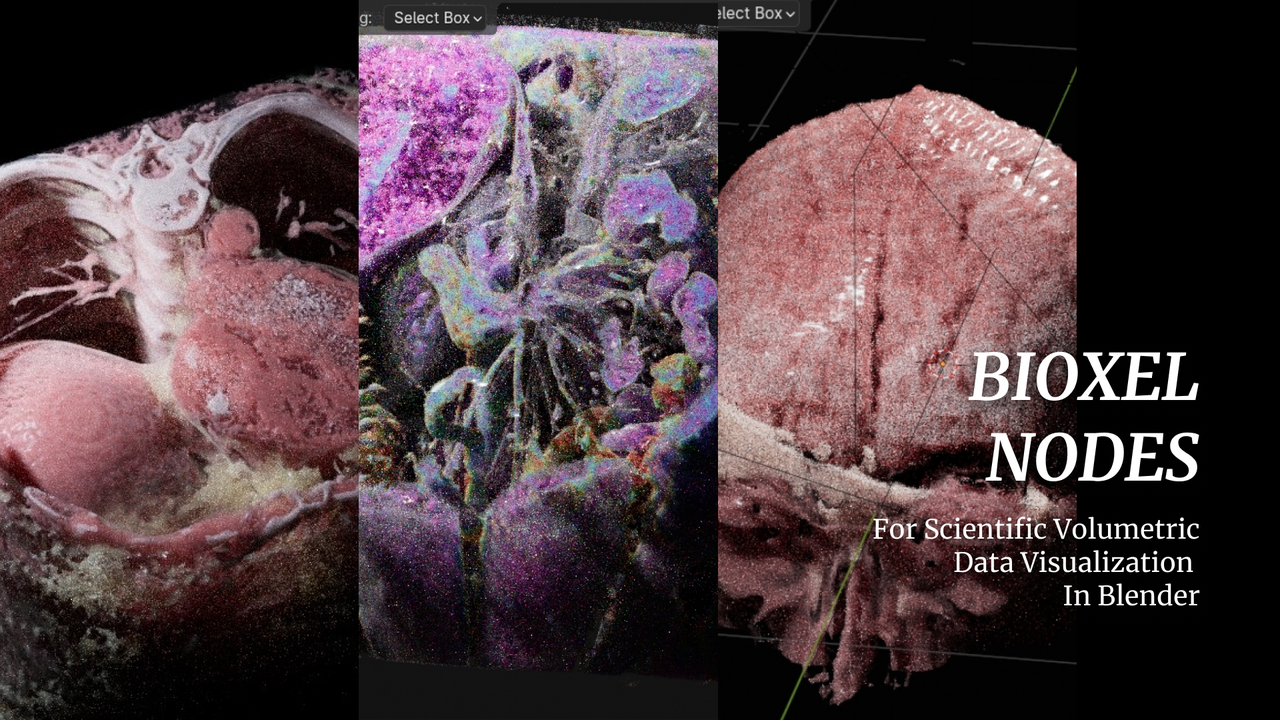
Below are some examples with Bioxel Nodes. Thanks to Cycles Render, the volumetric data can be rendered with great detail:
|
||||
Bioxel Nodes is a Blender addon for scientific volumetric data visualization. It using Blender's powerful **Geometry Nodes** and **Cycles** to process and render volumetric data.
|
||||
|
||||
|
||||
|
||||
So how to use this extension? please check [Getting Started](https://omoolab.github.io/BioxelNodes/latest/getting-started)
|
||||
- Fantastic rendering result, also support EEVEE NEXT
|
||||
- Support multiple formats
|
||||
- Support 4D volumetric data
|
||||
- All kinds of cutters
|
||||
- Simple and powerful nodes
|
||||
- Based on blender natively, can work without addon.
|
||||
|
||||
## Supported Format
|
||||
**Click [Getting Started](https://omoolab.github.io/BioxelNodes/latest/installation) to begin your journey into visualizing volumetric data!**
|
||||
|
||||
## Support Multiple Formats
|
||||
|
||||
| Format | EXT | Test |
|
||||
| ------ | ---------------------------------------- | ------- |
|
||||
@@ -30,41 +31,40 @@ So how to use this extension? please check [Getting Started](https://omoolab.git
|
||||
| TIFF | .tif, .TIF, .tiff, .TIFF | ✅ pass |
|
||||
| Nifti | .nia, .nii, .nii.gz, .hdr, .img, .img.gz | ✅ pass |
|
||||
| Nrrd | .nrrd, .nhdr | ✅ pass |
|
||||
| Meta | .mha, .mhd | yet |
|
||||
| HDF5 | .hdf, .h4, .hdf4, .he2, .h5, .hdf5, .he5 | ✅ pass |
|
||||
| VTK | .vtk | yet |
|
||||
| BioRad | .PIC, .pic | yet |
|
||||
| Gipl | .gipl, .gipl.gz | yet |
|
||||
| LSM | .lsm, .LSM | yet |
|
||||
| MINC | .mnc, .MNC | yet |
|
||||
| MRC | .mrc, .rec | yet |
|
||||
|
||||
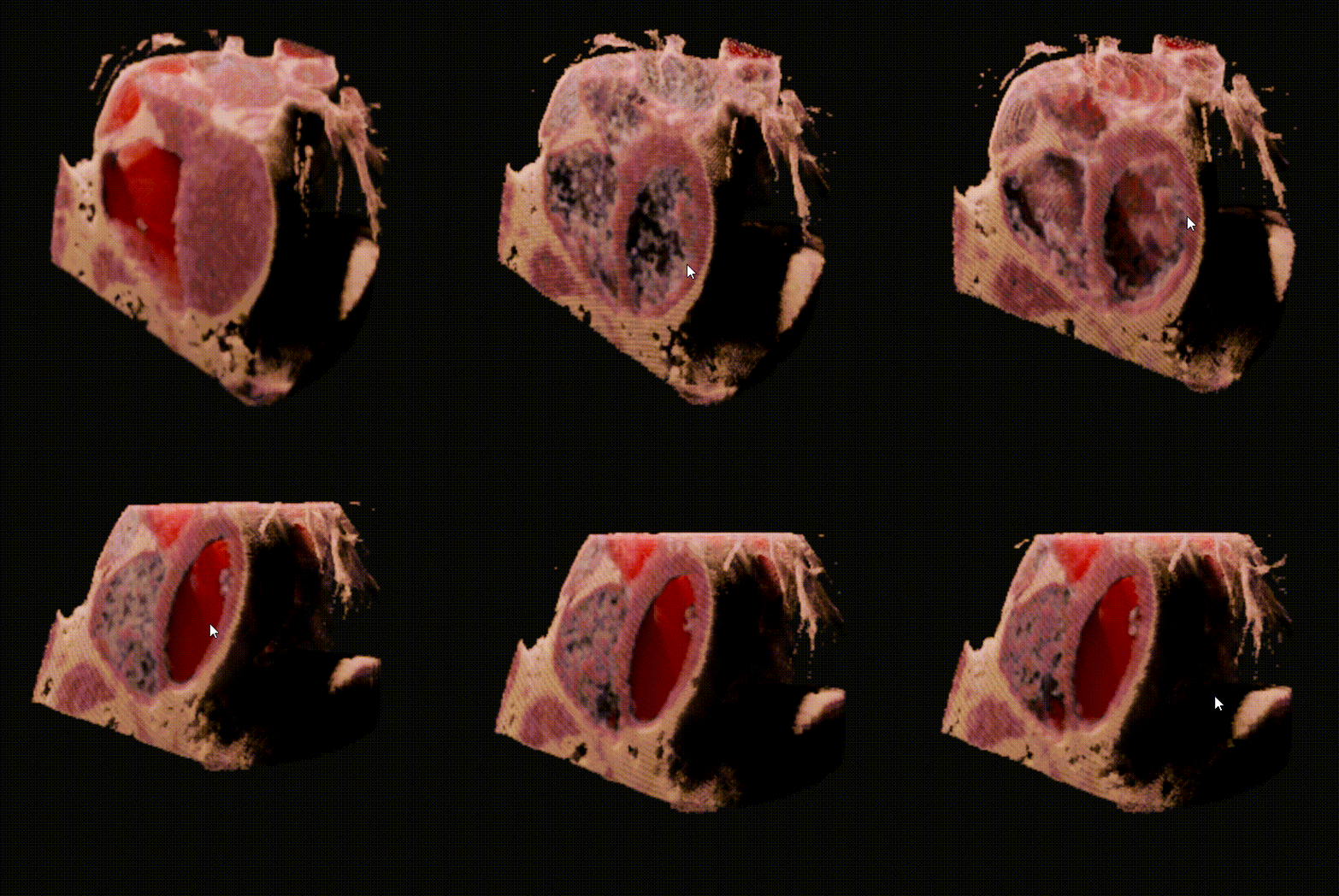
## Support 4D volumetric data
|
||||
|
||||
|
||||
|
||||
🥰 4D volumetric data can also be imported into Blender.
|
||||
|
||||
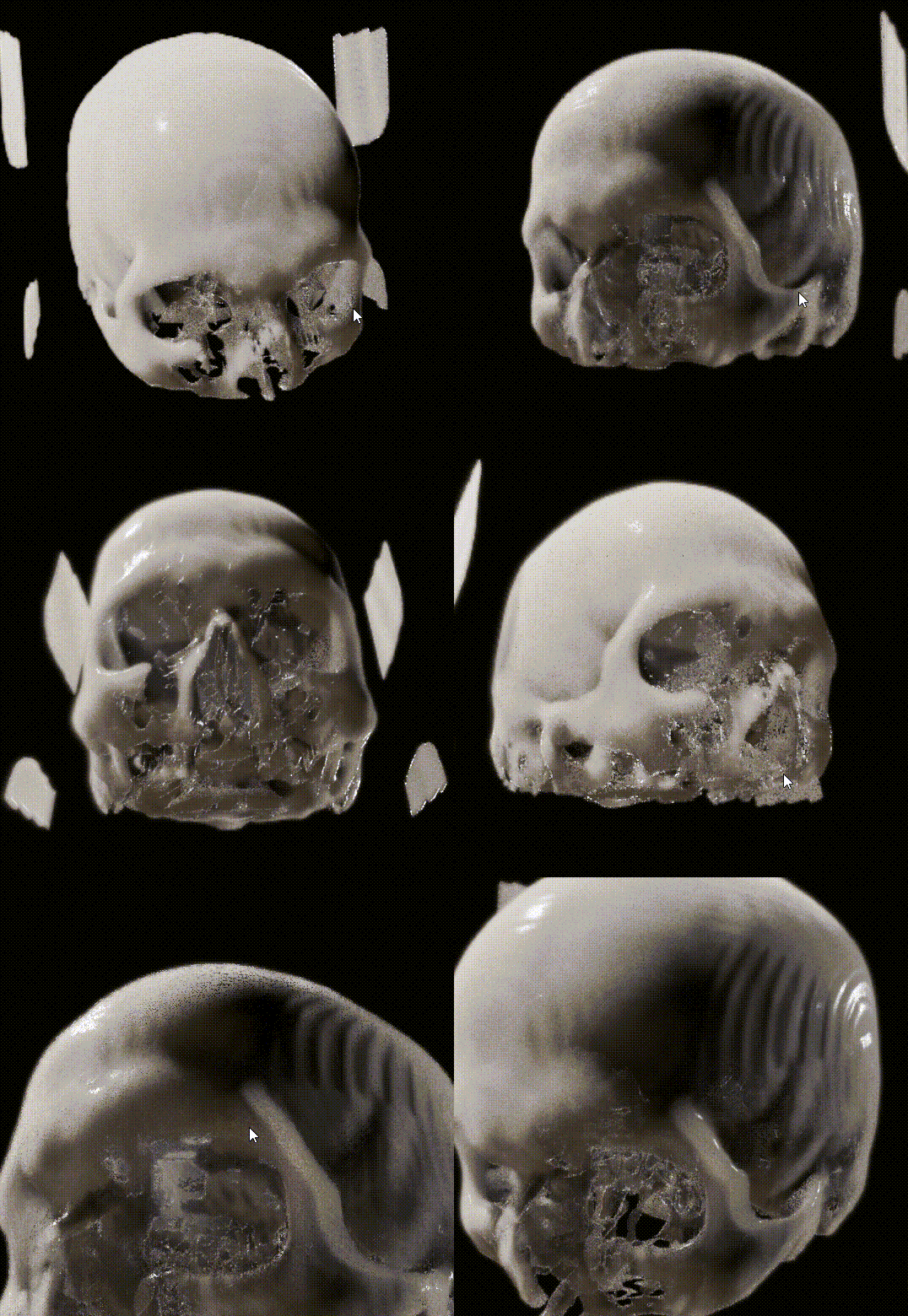
## Support EEVEE NEXT
|
||||
|
||||
|
||||
|
||||
👍 EEVEE NEXT is absolutely AWESOME! Bioxel Nodes is fully support EEVEE NEXT now! However, there are some limitations:
|
||||
|
||||
1. Only one cutter supported.
|
||||
2. EEVEE result is not that great as Cycles does.
|
||||
|
||||
## Known Limitations
|
||||
|
||||
- Sections cannot be generated (will be supported soon)
|
||||
- Time sequence volume not supported (will be supported soon)
|
||||
- Only works with Cycles CPU , Cycles GPU (OptiX), EEVEE
|
||||
- Section surface cannot be generated when convert to mesh (will be supported soon)
|
||||
|
||||
## Upgrade from 0.1.x to 0.2.x
|
||||
## Compatibile to Newer Version
|
||||
|
||||
You need to do the following:
|
||||
**Updating this addon may break old files, so read the following carefully before updating**
|
||||
|
||||
1. Remove the old version of Bioxel Nodes at Preferences > Add-ons
|
||||
2. Add the new version and restart Blender.
|
||||
Before updating this addon, you need to ask yourself whether this project file will be modified again or not, if it's an archived project file, I would recommend that you run **Bioxel Nodes > Save Staged Data** to make the addon nodes permanent. In this way, there will be no potential problem with the nodes not functioning due to the addon update.
|
||||
|
||||
It is not support editing the same blender file across extension versions. In order to make sure that the previous file works properly. You need to save the staged data before upgrading ( read the last section of [Getting Started](https://omoolab.github.io/BioxelNodes/latest/getting-started/#share-your-file) ).
|
||||
After the addon update, your old project files may not work either, this may be because you had executed **Save Staged Data**. If so, you need to execute **Bioxel Nodes > Relink Nodes to Addon** to relink them to make sure that the addon's new functionality and the addon nodes are synchronized.
|
||||
|
||||
But even then, there is still no guarantee that the new version of the extension will work on the old blender file. Therefore, it is highly recommended to open a new blender file to start the creating, not based on the old one.
|
||||
Also, unlike the newer versions, the older shaders are not based on OSL, so if you find that you can't render volumes, you need to turn on **Open Shading Language (OSL)** in the Render Settings.
|
||||
|
||||
Alternatively, objects from the old file that have nothing to do with Bioxel Nodes could be append to the new blender file.
|
||||
## Roadmap
|
||||
|
||||
## About EEVEE Render
|
||||
|
||||
Bioxel Nodes is designed for Cycles Render. However, it does support eevee render partially. "Solid Shader" node and "Volume Shader" node have a toggle called "EEVEE Render". If you want to render Bioxel Component in real-time, turn it on.
|
||||
|
||||
Also, there are some limitations:
|
||||
|
||||
1. Only one cutter supported.
|
||||
2. You cannot use "Color Ramp" over 2 colors.
|
||||
3. EEVEE Render result is not that great as Cycles does.
|
||||
|
||||
> "Volume Shader" node is not work properly in EEVEE Next since 4.2. It is because EEVEE Next is not support attributes from instances of volume shader by now. But the Blender 4.2 docs still say attributes reading is ok, so I suppose this feature will eventually be implemented.
|
||||
- Better multi-format import experience
|
||||
- One-click bake model with texture
|
||||
- AI Segmentation to Generate Labels
|
||||
|
||||
@@ -8,8 +8,8 @@ bl_info = {
|
||||
"name": "Bioxel Nodes",
|
||||
"author": "Ma Nan",
|
||||
"description": "",
|
||||
"blender": (4, 0, 0),
|
||||
"version": (0, 2, 4),
|
||||
"blender": (4, 1, 0),
|
||||
"version": (0, 2, 8),
|
||||
"location": "File -> Import",
|
||||
"warning": "",
|
||||
"category": "Node"
|
||||
@@ -20,12 +20,9 @@ auto_load.init()
|
||||
|
||||
def register():
|
||||
auto_load.register()
|
||||
bpy.types.WindowManager.bioxelnodes_progress_factor = bpy.props.FloatProperty()
|
||||
bpy.types.WindowManager.bioxelnodes_progress_text = bpy.props.StringProperty()
|
||||
menus.add()
|
||||
bpy.types.Scene.bioxel_layer_dir = bpy.props.StringProperty(
|
||||
name="Layer Directory",
|
||||
subtype='DIR_PATH',
|
||||
default="//"
|
||||
)
|
||||
|
||||
|
||||
def unregister():
|
||||
|
||||
@@ -4,62 +4,12 @@ from pathlib import Path
|
||||
from .nodes import AddCustomNode
|
||||
|
||||
|
||||
class SaveAllNodes(bpy.types.Operator):
|
||||
bl_idname = "customnodes.save_all_nodes"
|
||||
bl_label = "Save All Nodes"
|
||||
bl_description = "Save All Custom Nodes to Directory."
|
||||
bl_options = {'UNDO'}
|
||||
|
||||
def execute(self, context):
|
||||
files = []
|
||||
for classname in dir(bpy.types):
|
||||
if "CUSTOMNODES_MT_NODES_" in classname:
|
||||
cls = getattr(bpy.types, classname)
|
||||
files.append(cls.nodes_file)
|
||||
files = list(set(files))
|
||||
|
||||
for file in files:
|
||||
file_name = Path(file).name
|
||||
# "//"
|
||||
customnodes_node_dir = bpy.path.abspath(context.scene.customnodes_node_dir)
|
||||
|
||||
output_path: Path = Path(customnodes_node_dir, file_name).resolve()
|
||||
source_path: Path = Path(file).resolve()
|
||||
|
||||
if output_path != source_path:
|
||||
shutil.copy(source_path, output_path)
|
||||
|
||||
for lib in bpy.data.libraries:
|
||||
lib_path = str(Path(bpy.path.abspath(lib.filepath)).resolve())
|
||||
if lib_path == file:
|
||||
blend_path = Path(bpy.path.abspath("//")).resolve()
|
||||
lib.filepath = bpy.path.relpath(
|
||||
str(output_path), start=str(blend_path))
|
||||
|
||||
self.report({"INFO"}, f"Successfully saved to {output_path}")
|
||||
|
||||
return {'FINISHED'}
|
||||
|
||||
|
||||
class CUSTOMNODES_PT_CustomNodes(bpy.types.Panel):
|
||||
bl_idname = "CUSTOMNODES_PT_CustomNodes"
|
||||
bl_label = "Custom Nodes"
|
||||
bl_space_type = "PROPERTIES"
|
||||
bl_region_type = "WINDOW"
|
||||
bl_context = "scene"
|
||||
|
||||
def draw(self, context):
|
||||
layout = self.layout
|
||||
scene = context.scene
|
||||
layout.prop(scene, 'customnodes_node_dir')
|
||||
layout.operator(SaveAllNodes.bl_idname)
|
||||
|
||||
|
||||
class CustomNodes():
|
||||
def __init__(
|
||||
self,
|
||||
menu_items,
|
||||
nodes_file,
|
||||
class_prefix="CUSTOMNODES_MT_NODES",
|
||||
root_label='CustomNodes',
|
||||
root_icon='NONE'
|
||||
) -> None:
|
||||
@@ -68,9 +18,10 @@ class CustomNodes():
|
||||
|
||||
self.menu_items = menu_items
|
||||
self.nodes_file = str(Path(nodes_file).resolve())
|
||||
|
||||
self.class_prefix = class_prefix
|
||||
self.root_label = root_label
|
||||
self.root_icon = root_icon
|
||||
self.class_prefix = class_prefix
|
||||
|
||||
menu_classes = []
|
||||
self._create_menu_class(
|
||||
@@ -80,7 +31,7 @@ class CustomNodes():
|
||||
)
|
||||
self.menu_classes = menu_classes
|
||||
|
||||
idname = f"CUSTOMNODES_MT_NODES_{root_label.replace(' ', '').upper()}"
|
||||
idname = f"{class_prefix}_{root_label.replace(' ', '').upper()}"
|
||||
|
||||
def add_node_menu(self, context):
|
||||
if ('GeometryNodeTree' == bpy.context.area.spaces[0].tree_type):
|
||||
@@ -92,7 +43,7 @@ class CustomNodes():
|
||||
|
||||
def _create_menu_class(self, menu_classes, items, label='CustomNodes', icon=0, idname_namespace=None):
|
||||
nodes_file = self.nodes_file
|
||||
idname_namespace = idname_namespace or "CUSTOMNODES_MT_NODES"
|
||||
idname_namespace = idname_namespace or self.class_prefix
|
||||
idname = f"{idname_namespace}_{label.replace(' ', '').upper()}"
|
||||
|
||||
# create submenu class if item is menu.
|
||||
@@ -161,7 +112,7 @@ class CustomNodes():
|
||||
self._find_item(found_items, self.menu_items, node_type)
|
||||
return found_items[0] if len(found_items) > 0 else None
|
||||
|
||||
def add_node(self, node_tree, node_type: str):
|
||||
def add_node(self, node_group, node_type: str):
|
||||
item = self.find_item(node_type)
|
||||
op = AddCustomNode()
|
||||
op.nodes_file = self.nodes_file
|
||||
@@ -174,7 +125,7 @@ class CustomNodes():
|
||||
op.node_label = ""
|
||||
op.node_link = True
|
||||
op.node_callback = ""
|
||||
return op.add_node(node_tree)
|
||||
return op.add_node(node_group)
|
||||
|
||||
def register(self):
|
||||
for cls in self.menu_classes:
|
||||
|
||||
@@ -85,9 +85,14 @@ class AddCustomNode():
|
||||
except:
|
||||
...
|
||||
|
||||
def add_node(self, node_tree):
|
||||
def add_node(self, node_group):
|
||||
# Deselect all nodes first
|
||||
for node in node_group.nodes:
|
||||
if node.select:
|
||||
node.select = False
|
||||
|
||||
self.get_node_tree(self.node_type, self.node_link)
|
||||
node = node_tree.new("GeometryNodeGroup")
|
||||
node = node_group.nodes.new("GeometryNodeGroup")
|
||||
self.assign_node_tree(node)
|
||||
|
||||
return node
|
||||
|
||||
4
bioxelnodes/exceptions.py
Normal file
@@ -0,0 +1,4 @@
|
||||
class CancelledByUser(Exception):
|
||||
def __init__(self):
|
||||
message = 'Cancelled by user'
|
||||
super().__init__(message)
|
||||
1338
bioxelnodes/io.py
@@ -1,11 +1,24 @@
|
||||
import bpy
|
||||
from .operators import (AddPlaneCutter, AddCylinderCutter, AddCubeCutter, AddSphereCutter, CombineLabels,
|
||||
ConvertToMesh, InvertScalar, FillByLabel, FillByThreshold, FillByRange)
|
||||
from .io import ExportVolumeData, ImportAsLabelLayer, ImportAsScalarLayer, ImportVolumeData, AddVolumeData
|
||||
from .misc import SaveLayers
|
||||
|
||||
from .utils import get_container_from_selection
|
||||
from .operators import (AddPieCutter, AddPlaneCutter, AddCylinderCutter, AddCubeCutter, AddSphereCutter, CombineLabels,
|
||||
ConvertToMesh, InvertScalar, FillByLabel, FillByThreshold, FillByRange, PickBboxWire, PickMesh, PickVolume)
|
||||
from .io import ExportVolumetricData, ImportAsLabelLayer, ImportAsScalarLayer
|
||||
from .save import CleanAllCaches, ReLinkNodes, SaveLayers, SaveStagedData
|
||||
|
||||
|
||||
class ModifyLayer(bpy.types.Menu):
|
||||
class PickFromContainerMenu(bpy.types.Menu):
|
||||
bl_idname = "BIOXELNODES_MT_PICK"
|
||||
bl_label = "Pick from Container"
|
||||
|
||||
def draw(self, context):
|
||||
layout = self.layout
|
||||
layout.operator(PickMesh.bl_idname)
|
||||
layout.operator(PickVolume.bl_idname)
|
||||
layout.operator(PickBboxWire.bl_idname)
|
||||
|
||||
|
||||
class ModifyLayerMenu(bpy.types.Menu):
|
||||
bl_idname = "BIOXELNODES_MT_MODIFY_LAYERS"
|
||||
bl_label = "Modify Layer"
|
||||
|
||||
@@ -20,24 +33,25 @@ class ModifyLayer(bpy.types.Menu):
|
||||
|
||||
class AddCutterMenu(bpy.types.Menu):
|
||||
bl_idname = "BIOXELNODES_MT_CUTTERS"
|
||||
bl_label = "Add Cutter"
|
||||
bl_label = "Add a Cutter to Container"
|
||||
|
||||
def draw(self, context):
|
||||
layout = self.layout
|
||||
layout.operator(AddPlaneCutter.bl_idname)
|
||||
layout.operator(AddCylinderCutter.bl_idname)
|
||||
layout.operator(AddCubeCutter.bl_idname)
|
||||
layout.operator(AddSphereCutter.bl_idname)
|
||||
layout.operator(AddPlaneCutter.bl_idname, text="Plane Cutter")
|
||||
layout.operator(AddCylinderCutter.bl_idname, text="Cylinder Cutter")
|
||||
layout.operator(AddCubeCutter.bl_idname, text="Cube Cutter")
|
||||
layout.operator(AddSphereCutter.bl_idname, text="Sphere Cutter")
|
||||
layout.operator(AddPieCutter.bl_idname, text="Pie Cutter")
|
||||
|
||||
|
||||
class ImportLayerMenu(bpy.types.Menu):
|
||||
bl_idname = "BIOXELNODES_MT_LAYERS"
|
||||
bl_label = "Import Layer"
|
||||
bl_label = "Import Volumetric Data"
|
||||
|
||||
def draw(self, context):
|
||||
layout = self.layout
|
||||
layout.operator(ImportAsScalarLayer.bl_idname)
|
||||
layout.operator(ImportAsLabelLayer.bl_idname)
|
||||
layout.operator(ImportAsScalarLayer.bl_idname, text="as Scalar")
|
||||
layout.operator(ImportAsLabelLayer.bl_idname, text="as Label")
|
||||
|
||||
|
||||
class BioxelNodesView3DMenu(bpy.types.Menu):
|
||||
@@ -46,9 +60,24 @@ class BioxelNodesView3DMenu(bpy.types.Menu):
|
||||
|
||||
def draw(self, context):
|
||||
layout = self.layout
|
||||
layout.menu(ImportLayerMenu.bl_idname)
|
||||
layout.menu(AddCutterMenu.bl_idname)
|
||||
layout.operator(ConvertToMesh.bl_idname)
|
||||
containers = get_container_from_selection()
|
||||
is_selected = len(containers) > 0
|
||||
layout.operator(ImportAsScalarLayer.bl_idname,
|
||||
text=ImportAsScalarLayer.bl_label+" (Add to)"
|
||||
if is_selected else ImportAsScalarLayer.bl_label+" (Init)")
|
||||
layout.operator(ImportAsLabelLayer.bl_idname,
|
||||
text=ImportAsLabelLayer.bl_label+" (Add to)"
|
||||
if is_selected else ImportAsLabelLayer.bl_label+" (Init)")
|
||||
layout.separator()
|
||||
layout.operator(AddPlaneCutter.bl_idname)
|
||||
layout.operator(AddCylinderCutter.bl_idname)
|
||||
layout.operator(AddCubeCutter.bl_idname)
|
||||
layout.operator(AddSphereCutter.bl_idname)
|
||||
layout.operator(AddPieCutter.bl_idname)
|
||||
layout.separator()
|
||||
layout.operator(PickMesh.bl_idname)
|
||||
layout.operator(PickVolume.bl_idname)
|
||||
layout.operator(PickBboxWire.bl_idname)
|
||||
layout.separator()
|
||||
layout.operator(SaveLayers.bl_idname)
|
||||
|
||||
@@ -59,37 +88,63 @@ class BioxelNodesOutlinerMenu(bpy.types.Menu):
|
||||
|
||||
def draw(self, context):
|
||||
layout = self.layout
|
||||
layout.menu(ImportLayerMenu.bl_idname)
|
||||
layout.menu(AddCutterMenu.bl_idname)
|
||||
layout.operator(ConvertToMesh.bl_idname)
|
||||
containers = get_container_from_selection()
|
||||
is_selected = len(containers) > 0
|
||||
layout.operator(ImportAsScalarLayer.bl_idname,
|
||||
text=ImportAsScalarLayer.bl_label+" (Add to)"
|
||||
if is_selected else ImportAsScalarLayer.bl_label+" (Init)")
|
||||
layout.operator(ImportAsLabelLayer.bl_idname,
|
||||
text=ImportAsLabelLayer.bl_label+" (Add to)"
|
||||
if is_selected else ImportAsLabelLayer.bl_label+" (Init)")
|
||||
layout.separator()
|
||||
layout.menu(ModifyLayer.bl_idname)
|
||||
layout.operator(AddPlaneCutter.bl_idname)
|
||||
layout.operator(AddCylinderCutter.bl_idname)
|
||||
layout.operator(AddCubeCutter.bl_idname)
|
||||
layout.operator(AddSphereCutter.bl_idname)
|
||||
layout.operator(AddPieCutter.bl_idname)
|
||||
layout.separator()
|
||||
layout.operator(PickMesh.bl_idname)
|
||||
layout.operator(PickVolume.bl_idname)
|
||||
layout.operator(PickBboxWire.bl_idname)
|
||||
layout.separator()
|
||||
layout.operator(SaveLayers.bl_idname)
|
||||
layout.separator()
|
||||
layout.operator(InvertScalar.bl_idname)
|
||||
layout.operator(FillByThreshold.bl_idname)
|
||||
layout.operator(FillByRange.bl_idname)
|
||||
layout.operator(FillByLabel.bl_idname)
|
||||
layout.operator(CombineLabels.bl_idname)
|
||||
layout.separator()
|
||||
layout.operator(ExportVolumetricData.bl_idname)
|
||||
|
||||
|
||||
# def TOPBAR_FILE_IMPORT(self, context):
|
||||
# layout = self.layout
|
||||
# layout.separator()
|
||||
# layout.operator(ImportVolumeData.bl_idname)
|
||||
def TOPBAR_FILE_IMPORT(self, context):
|
||||
layout = self.layout
|
||||
containers = get_container_from_selection()
|
||||
is_selected = len(containers) > 0
|
||||
|
||||
layout.separator()
|
||||
layout.menu(ImportLayerMenu.bl_idname, text="Volumetric Data as Bioxel (Add to)"
|
||||
if is_selected else "Volumetric Data as Bioxel (Init)")
|
||||
|
||||
|
||||
# def TOPBAR_FILE_EXPORT(self, context):
|
||||
# layout = self.layout
|
||||
# layout.separator()
|
||||
# layout.operator(ExportVolumeData.bl_idname)
|
||||
def TOPBAR_FILE_EXPORT(self, context):
|
||||
layout = self.layout
|
||||
layout.separator()
|
||||
layout.operator(ExportVolumetricData.bl_idname,
|
||||
text="Bioxel Layer (.vdb)")
|
||||
|
||||
|
||||
def VIEW3D_OBJECT(self, context):
|
||||
layout = self.layout
|
||||
layout.menu(BioxelNodesView3DMenu.bl_idname)
|
||||
layout.separator()
|
||||
layout.menu(BioxelNodesView3DMenu.bl_idname, icon="FILE_VOLUME")
|
||||
|
||||
|
||||
def OUTLINER_OBJECT(self, context):
|
||||
layout = self.layout
|
||||
layout.menu(BioxelNodesOutlinerMenu.bl_idname)
|
||||
layout.separator()
|
||||
layout.menu(BioxelNodesOutlinerMenu.bl_idname, icon="FILE_VOLUME")
|
||||
|
||||
|
||||
class BioxelNodesTopbarMenu(bpy.types.Menu):
|
||||
@@ -98,31 +153,37 @@ class BioxelNodesTopbarMenu(bpy.types.Menu):
|
||||
|
||||
def draw(self, context):
|
||||
layout = self.layout
|
||||
layout.menu(ImportLayerMenu.bl_idname)
|
||||
layout.operator(ExportVolumeData.bl_idname)
|
||||
containers = get_container_from_selection()
|
||||
is_selected = len(containers) > 0
|
||||
|
||||
layout.menu(ImportLayerMenu.bl_idname, text=ImportLayerMenu.bl_label+" (Add to)"
|
||||
if is_selected else ImportLayerMenu.bl_label+" (Init)")
|
||||
layout.separator()
|
||||
layout.menu(AddCutterMenu.bl_idname)
|
||||
layout.operator(ConvertToMesh.bl_idname)
|
||||
layout.menu(PickFromContainerMenu.bl_idname)
|
||||
layout.separator()
|
||||
layout.operator(SaveLayers.bl_idname)
|
||||
layout.operator(SaveStagedData.bl_idname)
|
||||
layout.operator(ReLinkNodes.bl_idname)
|
||||
layout.separator()
|
||||
layout.operator(CleanAllCaches.bl_idname)
|
||||
|
||||
|
||||
def TOPBAR(self, context):
|
||||
layout = self.layout
|
||||
layout.menu(BioxelNodesTopbarMenu.bl_idname)
|
||||
|
||||
|
||||
|
||||
|
||||
def add():
|
||||
# bpy.types.TOPBAR_MT_file_import.append(TOPBAR_FILE_IMPORT)
|
||||
# bpy.types.TOPBAR_MT_file_export.append(TOPBAR_FILE_EXPORT)
|
||||
bpy.types.OUTLINER_MT_object.prepend(OUTLINER_OBJECT)
|
||||
bpy.types.VIEW3D_MT_object_context_menu.prepend(VIEW3D_OBJECT)
|
||||
bpy.types.TOPBAR_MT_file_import.append(TOPBAR_FILE_IMPORT)
|
||||
bpy.types.TOPBAR_MT_file_export.append(TOPBAR_FILE_EXPORT)
|
||||
bpy.types.OUTLINER_MT_object.append(OUTLINER_OBJECT)
|
||||
bpy.types.VIEW3D_MT_object_context_menu.append(VIEW3D_OBJECT)
|
||||
bpy.types.TOPBAR_MT_editor_menus.append(TOPBAR)
|
||||
|
||||
|
||||
def remove():
|
||||
# bpy.types.TOPBAR_MT_file_import.remove(TOPBAR_FILE_IMPORT)
|
||||
# bpy.types.TOPBAR_MT_file_export.remove(TOPBAR_FILE_EXPORT)
|
||||
bpy.types.TOPBAR_MT_file_import.remove(TOPBAR_FILE_IMPORT)
|
||||
bpy.types.TOPBAR_MT_file_export.remove(TOPBAR_FILE_EXPORT)
|
||||
bpy.types.OUTLINER_MT_object.remove(OUTLINER_OBJECT)
|
||||
bpy.types.VIEW3D_MT_object_context_menu.remove(VIEW3D_OBJECT)
|
||||
bpy.types.TOPBAR_MT_editor_menus.remove(TOPBAR)
|
||||
|
||||
@@ -1,92 +0,0 @@
|
||||
import bpy
|
||||
from pathlib import Path
|
||||
import shutil
|
||||
from .utils import get_all_layers, get_container, get_container_layers
|
||||
|
||||
|
||||
def save_layer(layer, output_dir):
|
||||
name = layer.name
|
||||
|
||||
# "//"
|
||||
output_dir = bpy.path.abspath(output_dir)
|
||||
source_dir = bpy.path.abspath(layer.data.filepath)
|
||||
|
||||
output_path: Path = Path(output_dir, f"{name}.vdb").resolve()
|
||||
source_path: Path = Path(source_dir).resolve()
|
||||
|
||||
if output_path != source_path:
|
||||
shutil.copy(source_path, output_path)
|
||||
|
||||
blend_path = Path(bpy.path.abspath("//")).resolve()
|
||||
layer.data.filepath = bpy.path.relpath(
|
||||
str(output_path), start=str(blend_path))
|
||||
|
||||
|
||||
class SaveLayers(bpy.types.Operator):
|
||||
bl_idname = "bioxelnodes.save_layers"
|
||||
bl_label = "Save Layers"
|
||||
bl_description = "Save Bioxel Layers to Directory."
|
||||
bl_options = {'UNDO'}
|
||||
|
||||
@classmethod
|
||||
def poll(cls, context):
|
||||
container = get_container(bpy.context.active_object)
|
||||
return True if container else False
|
||||
|
||||
def execute(self, context):
|
||||
container = get_container(bpy.context.active_object)
|
||||
|
||||
if not container:
|
||||
self.report({"WARNING"}, "Cannot find any bioxel container.")
|
||||
return {'FINISHED'}
|
||||
|
||||
for layer in get_container_layers(container):
|
||||
try:
|
||||
save_layer(layer, context.scene.bioxel_layer_dir)
|
||||
except:
|
||||
self.report(
|
||||
{"WARNING"}, f"Fail to save {layer.name}, skiped")
|
||||
|
||||
self.report({"INFO"}, f"Successfully saved bioxel layers.")
|
||||
|
||||
return {'FINISHED'}
|
||||
|
||||
|
||||
class SaveAllLayers(bpy.types.Operator):
|
||||
bl_idname = "bioxelnodes.save_all_layers"
|
||||
bl_label = "Save All Layers"
|
||||
bl_description = "Save All Bioxel Layers to Directory."
|
||||
bl_options = {'UNDO'}
|
||||
|
||||
def execute(self, context):
|
||||
|
||||
layers = get_all_layers()
|
||||
|
||||
if len(layers) == 0:
|
||||
self.report({"WARNING"}, "Cannot find any bioxel layer.")
|
||||
return {'FINISHED'}
|
||||
|
||||
for layer in layers:
|
||||
try:
|
||||
save_layer(layer, context.scene.bioxel_layer_dir)
|
||||
except:
|
||||
self.report(
|
||||
{"WARNING"}, f"Fail to save {layer.name}, skiped")
|
||||
|
||||
self.report({"INFO"}, f"Successfully saved bioxel layers.")
|
||||
|
||||
return {'FINISHED'}
|
||||
|
||||
|
||||
class BIOXELNODES_PT_Bioxels(bpy.types.Panel):
|
||||
bl_idname = "BIOXELNODES_PT_Bioxels"
|
||||
bl_label = "Bioxel Nodes"
|
||||
bl_space_type = "PROPERTIES"
|
||||
bl_region_type = "WINDOW"
|
||||
bl_context = "scene"
|
||||
|
||||
def draw(self, context):
|
||||
layout = self.layout
|
||||
scene = context.scene
|
||||
layout.prop(scene, 'bioxel_layer_dir')
|
||||
layout.operator(SaveAllLayers.bl_idname)
|
||||
@@ -56,338 +56,219 @@ import bpy
|
||||
# return callback_str
|
||||
|
||||
|
||||
if bpy.app.version >= (4, 1, 0):
|
||||
NODE_FILE = "BioxelNodes_4.1"
|
||||
NODE_FILE = "BioxelNodes_4.1"
|
||||
|
||||
MENU_ITEMS = [
|
||||
{
|
||||
'label': 'Methods',
|
||||
'icon': 'OUTLINER_DATA_VOLUME',
|
||||
'items': [
|
||||
{
|
||||
'label': 'Mask by Threshold',
|
||||
'icon': 'EMPTY_SINGLE_ARROW',
|
||||
'node_type': 'BioxelNodes_MaskByThreshold',
|
||||
'node_description': ''
|
||||
},
|
||||
{
|
||||
'label': 'Mask by Range',
|
||||
'icon': 'IPO_CONSTANT',
|
||||
'node_type': 'BioxelNodes_MaskByRange',
|
||||
'node_description': ''
|
||||
},
|
||||
{
|
||||
'label': 'Mask by Label',
|
||||
'icon': 'MESH_CAPSULE',
|
||||
'node_type': 'BioxelNodes_MaskByLabel',
|
||||
'node_description': ''
|
||||
}
|
||||
]
|
||||
},
|
||||
{
|
||||
'label': 'Shaders',
|
||||
'icon': 'SHADING_RENDERED',
|
||||
'items': [
|
||||
{
|
||||
'label': 'Membrane Shader',
|
||||
'icon': 'NODE_MATERIAL',
|
||||
'node_type': 'BioxelNodes_AssignMembraneShader',
|
||||
'node_description': ''
|
||||
},
|
||||
{
|
||||
'label': 'Solid Shader',
|
||||
'icon': 'SHADING_SOLID',
|
||||
'node_type': 'BioxelNodes_AssignSolidShader',
|
||||
'node_description': ''
|
||||
},
|
||||
{
|
||||
'label': 'Slime Shader',
|
||||
'icon': 'OUTLINER_DATA_META',
|
||||
'node_type': 'BioxelNodes_AssignSlimeShader',
|
||||
'node_description': ''
|
||||
},
|
||||
{
|
||||
'label': 'Volume Shader',
|
||||
'icon': 'VOLUME_DATA',
|
||||
'node_type': 'BioxelNodes_AssignVolumeShader',
|
||||
'node_description': ''
|
||||
},
|
||||
{
|
||||
'label': 'Universal Shader',
|
||||
'icon': 'MATSHADERBALL',
|
||||
'node_type': 'BioxelNodes_AssignUniversalShader',
|
||||
'node_description': ''
|
||||
}
|
||||
]
|
||||
},
|
||||
{
|
||||
'label': 'Colors',
|
||||
'icon': 'COLOR',
|
||||
'items': [
|
||||
{
|
||||
'label': 'Color Presets',
|
||||
'icon': 'COLOR',
|
||||
'node_type': 'BioxelNodes_SetColorPresets',
|
||||
'node_description': ''
|
||||
},
|
||||
"separator",
|
||||
{
|
||||
'label': 'Color Ramp 2',
|
||||
'icon': 'IPO_QUAD',
|
||||
'node_type': 'BioxelNodes_SetColorRamp2',
|
||||
'node_description': ''
|
||||
},
|
||||
{
|
||||
'label': 'Color Ramp 3',
|
||||
'icon': 'IPO_CUBIC',
|
||||
'node_type': 'BioxelNodes_SetColorRamp3',
|
||||
'node_description': ''
|
||||
},
|
||||
{
|
||||
'label': 'Color Ramp 4',
|
||||
'icon': 'IPO_QUART',
|
||||
'node_type': 'BioxelNodes_SetColorRamp4',
|
||||
'node_description': ''
|
||||
},
|
||||
{
|
||||
'label': 'Color Ramp 5',
|
||||
'icon': 'IPO_QUINT',
|
||||
'node_type': 'BioxelNodes_SetColorRamp5',
|
||||
'node_description': ''
|
||||
}
|
||||
]
|
||||
},
|
||||
{
|
||||
'label': 'Cutters',
|
||||
'icon': 'MOD_BEVEL',
|
||||
'items': [
|
||||
{
|
||||
'label': 'Cut',
|
||||
'icon': 'MOD_BEVEL',
|
||||
'node_type': 'BioxelNodes_Cut',
|
||||
'node_description': ''
|
||||
},
|
||||
"separator",
|
||||
{
|
||||
'label': 'Plane Cutter',
|
||||
'icon': 'MESH_PLANE',
|
||||
'node_type': 'BioxelNodes_PlaneObjectCutter',
|
||||
'node_description': ''
|
||||
},
|
||||
{
|
||||
'label': 'Cylinder Cutter',
|
||||
'icon': 'MESH_CYLINDER',
|
||||
'node_type': 'BioxelNodes_CylinderObjectCutter',
|
||||
'node_description': '',
|
||||
},
|
||||
{
|
||||
'label': 'Cube Cutter',
|
||||
'icon': 'MESH_CUBE',
|
||||
'node_type': 'BioxelNodes_CubeObjectCutter',
|
||||
'node_description': '',
|
||||
},
|
||||
{
|
||||
'label': 'Sphere Cutter',
|
||||
'icon': 'MESH_UVSPHERE',
|
||||
'node_type': 'BioxelNodes_SphereObjectCutter',
|
||||
'node_description': '',
|
||||
}
|
||||
]
|
||||
},
|
||||
{
|
||||
'label': 'Utils',
|
||||
'icon': 'MODIFIER',
|
||||
'items': [
|
||||
{
|
||||
'label': 'Join Component',
|
||||
'icon': 'CONSTRAINT_BONE',
|
||||
'node_type': 'BioxelNodes_JoinComponent',
|
||||
'node_description': ''
|
||||
},
|
||||
"separator",
|
||||
{
|
||||
'label': 'To Mesh',
|
||||
'icon': 'OUTLINER_OB_MESH',
|
||||
'node_type': 'BioxelNodes_ToMesh',
|
||||
'node_description': ''
|
||||
},
|
||||
{
|
||||
'label': 'To Volume',
|
||||
'icon': 'OUTLINER_OB_VOLUME',
|
||||
'node_type': 'BioxelNodes_ToVolume',
|
||||
'node_description': ''
|
||||
},
|
||||
{
|
||||
'label': 'To Bbox Wire',
|
||||
'icon': 'MESH_CUBE',
|
||||
'node_type': 'BioxelNodes_ToBboxWire',
|
||||
'node_description': ''
|
||||
},
|
||||
"separator",
|
||||
{
|
||||
'label': 'Inflate',
|
||||
'icon': 'OUTLINER_OB_META',
|
||||
'node_type': 'META_DATA',
|
||||
'node_description': ''
|
||||
},
|
||||
{
|
||||
'label': 'Smooth',
|
||||
'icon': 'MOD_SMOOTH',
|
||||
'node_type': 'BioxelNodes_M_Smooth',
|
||||
'node_description': ''
|
||||
},
|
||||
{
|
||||
'label': 'Remove Small Island',
|
||||
'icon': 'FORCE_LENNARDJONES',
|
||||
'node_type': 'BioxelNodes_M_RemoveSmallIsland',
|
||||
'node_description': ''
|
||||
}
|
||||
]
|
||||
}
|
||||
]
|
||||
|
||||
else:
|
||||
NODE_FILE = "BioxelNodes_4.0"
|
||||
MENU_ITEMS = [
|
||||
{
|
||||
'label': 'Methods',
|
||||
'icon': 'OUTLINER_DATA_VOLUME',
|
||||
'items': [
|
||||
{
|
||||
'label': 'Mask by Threshold',
|
||||
'icon': 'EMPTY_SINGLE_ARROW',
|
||||
'node_type': 'BioxelNodes_MaskByThreshold',
|
||||
'node_description': ''
|
||||
},
|
||||
{
|
||||
'label': 'Mask by Range',
|
||||
'icon': 'IPO_CONSTANT',
|
||||
'node_type': 'BioxelNodes_MaskByRange',
|
||||
'node_description': ''
|
||||
},
|
||||
{
|
||||
'label': 'Mask by Label',
|
||||
'icon': 'MESH_CAPSULE',
|
||||
'node_type': 'BioxelNodes_MaskByLabel',
|
||||
'node_description': ''
|
||||
}
|
||||
]
|
||||
},
|
||||
{
|
||||
'label': 'Shaders',
|
||||
'icon': 'SHADING_RENDERED',
|
||||
'items': [
|
||||
{
|
||||
'label': 'Solid Shader',
|
||||
'icon': 'SHADING_SOLID',
|
||||
'node_type': 'BioxelNodes_AssignSolidShader',
|
||||
'node_description': ''
|
||||
},
|
||||
{
|
||||
'label': 'Slime Shader',
|
||||
'icon': 'OUTLINER_OB_META',
|
||||
'node_type': 'BioxelNodes_AssignSlimeShader',
|
||||
'node_description': ''
|
||||
},
|
||||
{
|
||||
'label': 'Volume Shader',
|
||||
'icon': 'OUTLINER_OB_VOLUME',
|
||||
'node_type': 'BioxelNodes_AssignVolumeShader',
|
||||
'node_description': ''
|
||||
},
|
||||
{
|
||||
'label': 'Universal Shader',
|
||||
'icon': 'SHADING_RENDERED',
|
||||
'node_type': 'BioxelNodes_AssignUniversalShader',
|
||||
'node_description': ''
|
||||
}
|
||||
]
|
||||
},
|
||||
{
|
||||
'label': 'Colors',
|
||||
'icon': 'COLOR',
|
||||
'items': [
|
||||
{
|
||||
'label': 'Color Ramp 2',
|
||||
'icon': 'IPO_QUAD',
|
||||
'node_type': 'BioxelNodes_SetColorRamp2',
|
||||
'node_description': ''
|
||||
},
|
||||
{
|
||||
'label': 'Color Ramp 3',
|
||||
'icon': 'IPO_CUBIC',
|
||||
'node_type': 'BioxelNodes_SetColorRamp3',
|
||||
'node_description': ''
|
||||
},
|
||||
{
|
||||
'label': 'Color Ramp 4',
|
||||
'icon': 'IPO_QUART',
|
||||
'node_type': 'BioxelNodes_SetColorRamp4',
|
||||
'node_description': ''
|
||||
},
|
||||
{
|
||||
'label': 'Color Ramp 5',
|
||||
'icon': 'IPO_QUINT',
|
||||
'node_type': 'BioxelNodes_SetColorRamp5',
|
||||
'node_description': ''
|
||||
}
|
||||
]
|
||||
},
|
||||
{
|
||||
'label': 'Cutters',
|
||||
'icon': 'MOD_BEVEL',
|
||||
'items': [
|
||||
{
|
||||
'label': 'Cut',
|
||||
'icon': 'MOD_BEVEL',
|
||||
'node_type': 'BioxelNodes_Cut',
|
||||
'node_description': ''
|
||||
},
|
||||
"separator",
|
||||
{
|
||||
'label': 'Plane Cutter',
|
||||
'icon': 'MESH_PLANE',
|
||||
'node_type': 'BioxelNodes_PlaneObjectCutter',
|
||||
'node_description': ''
|
||||
},
|
||||
{
|
||||
'label': 'Cylinder Cutter',
|
||||
'icon': 'MESH_CYLINDER',
|
||||
'node_type': 'BioxelNodes_CylinderObjectCutter',
|
||||
'node_description': '',
|
||||
},
|
||||
{
|
||||
'label': 'Cube Cutter',
|
||||
'icon': 'MESH_CUBE',
|
||||
'node_type': 'BioxelNodes_CubeObjectCutter',
|
||||
'node_description': '',
|
||||
},
|
||||
{
|
||||
'label': 'Sphere Cutter',
|
||||
'icon': 'MESH_UVSPHERE',
|
||||
'node_type': 'BioxelNodes_SphereObjectCutter',
|
||||
'node_description': '',
|
||||
}
|
||||
]
|
||||
},
|
||||
{
|
||||
'label': 'Utils',
|
||||
'icon': 'MODIFIER',
|
||||
'items': [
|
||||
{
|
||||
'label': 'Join Component',
|
||||
'icon': 'CONSTRAINT_BONE',
|
||||
'node_type': 'BioxelNodes_JoinComponent',
|
||||
'node_description': ''
|
||||
}
|
||||
]
|
||||
}
|
||||
]
|
||||
MENU_ITEMS = [
|
||||
{
|
||||
'label': 'Methods',
|
||||
'icon': 'OUTLINER_DATA_VOLUME',
|
||||
'items': [
|
||||
{
|
||||
'label': 'Mask by Threshold',
|
||||
'icon': 'EMPTY_SINGLE_ARROW',
|
||||
'node_type': 'BioxelNodes_MaskByThreshold',
|
||||
'node_description': ''
|
||||
},
|
||||
{
|
||||
'label': 'Mask by Range',
|
||||
'icon': 'IPO_CONSTANT',
|
||||
'node_type': 'BioxelNodes_MaskByRange',
|
||||
'node_description': ''
|
||||
},
|
||||
{
|
||||
'label': 'Mask by Label',
|
||||
'icon': 'MESH_CAPSULE',
|
||||
'node_type': 'BioxelNodes_MaskByLabel',
|
||||
'node_description': ''
|
||||
}
|
||||
]
|
||||
},
|
||||
{
|
||||
'label': 'Shaders',
|
||||
'icon': 'SHADING_RENDERED',
|
||||
'items': [
|
||||
{
|
||||
'label': 'Membrane Shader',
|
||||
'icon': 'NODE_MATERIAL',
|
||||
'node_type': 'BioxelNodes_AssignMembraneShader',
|
||||
'node_description': ''
|
||||
},
|
||||
{
|
||||
'label': 'Solid Shader',
|
||||
'icon': 'SHADING_SOLID',
|
||||
'node_type': 'BioxelNodes_AssignSolidShader',
|
||||
'node_description': ''
|
||||
},
|
||||
{
|
||||
'label': 'Slime Shader',
|
||||
'icon': 'OUTLINER_DATA_META',
|
||||
'node_type': 'BioxelNodes_AssignSlimeShader',
|
||||
'node_description': ''
|
||||
},
|
||||
{
|
||||
'label': 'Volume Shader',
|
||||
'icon': 'VOLUME_DATA',
|
||||
'node_type': 'BioxelNodes_AssignVolumeShader',
|
||||
'node_description': ''
|
||||
},
|
||||
{
|
||||
'label': 'Universal Shader',
|
||||
'icon': 'MATSHADERBALL',
|
||||
'node_type': 'BioxelNodes_AssignUniversalShader',
|
||||
'node_description': ''
|
||||
}
|
||||
]
|
||||
},
|
||||
{
|
||||
'label': 'Colors',
|
||||
'icon': 'COLOR',
|
||||
'items': [
|
||||
{
|
||||
'label': 'Color Presets',
|
||||
'icon': 'COLOR',
|
||||
'node_type': 'BioxelNodes_ColorPresets',
|
||||
'node_description': ''
|
||||
},
|
||||
{
|
||||
'label': 'Color Presets MRI',
|
||||
'icon': 'COLOR',
|
||||
'node_type': 'BioxelNodes_ColorPresets_MRI',
|
||||
'node_description': ''
|
||||
},
|
||||
"separator",
|
||||
{
|
||||
'label': 'Color Ramp 2',
|
||||
'icon': 'IPO_QUAD',
|
||||
'node_type': 'BioxelNodes_SetColorRamp2',
|
||||
'node_description': ''
|
||||
},
|
||||
{
|
||||
'label': 'Color Ramp 3',
|
||||
'icon': 'IPO_CUBIC',
|
||||
'node_type': 'BioxelNodes_SetColorRamp3',
|
||||
'node_description': ''
|
||||
},
|
||||
{
|
||||
'label': 'Color Ramp 4',
|
||||
'icon': 'IPO_QUART',
|
||||
'node_type': 'BioxelNodes_SetColorRamp4',
|
||||
'node_description': ''
|
||||
},
|
||||
{
|
||||
'label': 'Color Ramp 5',
|
||||
'icon': 'IPO_QUINT',
|
||||
'node_type': 'BioxelNodes_SetColorRamp5',
|
||||
'node_description': ''
|
||||
}
|
||||
]
|
||||
},
|
||||
{
|
||||
'label': 'Cutters',
|
||||
'icon': 'MOD_BEVEL',
|
||||
'items': [
|
||||
{
|
||||
'label': 'Cut',
|
||||
'icon': 'MOD_BEVEL',
|
||||
'node_type': 'BioxelNodes_Cut',
|
||||
'node_description': ''
|
||||
},
|
||||
"separator",
|
||||
{
|
||||
'label': 'Primitive Cutter',
|
||||
'icon': 'MOD_LINEART',
|
||||
'node_type': 'BioxelNodes_PrimitiveCutter',
|
||||
'node_description': ''
|
||||
},
|
||||
"separator",
|
||||
{
|
||||
'label': 'Plane Cutter',
|
||||
'icon': 'MESH_PLANE',
|
||||
'node_type': 'BioxelNodes_PlaneObjectCutter',
|
||||
'node_description': ''
|
||||
},
|
||||
{
|
||||
'label': 'Cylinder Cutter',
|
||||
'icon': 'MESH_CYLINDER',
|
||||
'node_type': 'BioxelNodes_CylinderObjectCutter',
|
||||
'node_description': '',
|
||||
},
|
||||
{
|
||||
'label': 'Cube Cutter',
|
||||
'icon': 'MESH_CUBE',
|
||||
'node_type': 'BioxelNodes_CubeObjectCutter',
|
||||
'node_description': '',
|
||||
},
|
||||
{
|
||||
'label': 'Sphere Cutter',
|
||||
'icon': 'MESH_UVSPHERE',
|
||||
'node_type': 'BioxelNodes_SphereObjectCutter',
|
||||
'node_description': '',
|
||||
},
|
||||
{
|
||||
'label': 'Pie Cutter',
|
||||
'icon': 'MESH_CONE',
|
||||
'node_type': 'BioxelNodes_PieObjectCutter',
|
||||
'node_description': '',
|
||||
}
|
||||
]
|
||||
},
|
||||
{
|
||||
'label': 'Utils',
|
||||
'icon': 'MODIFIER',
|
||||
'items': [
|
||||
{
|
||||
'label': 'Join Component',
|
||||
'icon': 'CONSTRAINT_BONE',
|
||||
'node_type': 'BioxelNodes_JoinComponent',
|
||||
'node_description': ''
|
||||
},
|
||||
"separator",
|
||||
{
|
||||
'label': 'Pick Mesh',
|
||||
'icon': 'OUTLINER_OB_MESH',
|
||||
'node_type': 'BioxelNodes_PickMesh',
|
||||
'node_description': ''
|
||||
},
|
||||
{
|
||||
'label': 'Pick Volume',
|
||||
'icon': 'OUTLINER_OB_VOLUME',
|
||||
'node_type': 'BioxelNodes_PickVolume',
|
||||
'node_description': ''
|
||||
},
|
||||
{
|
||||
'label': 'Pick Bbox Wire',
|
||||
'icon': 'MESH_CUBE',
|
||||
'node_type': 'BioxelNodes_PickBboxWire',
|
||||
'node_description': ''
|
||||
},
|
||||
"separator",
|
||||
{
|
||||
'label': 'Inflate',
|
||||
'icon': 'OUTLINER_OB_META',
|
||||
'node_type': 'BioxelNodes_M_Inflate',
|
||||
'node_description': ''
|
||||
},
|
||||
{
|
||||
'label': 'Smooth',
|
||||
'icon': 'MOD_SMOOTH',
|
||||
'node_type': 'BioxelNodes_M_Smooth',
|
||||
'node_description': ''
|
||||
},
|
||||
{
|
||||
'label': 'Remove Small Island',
|
||||
'icon': 'FORCE_LENNARDJONES',
|
||||
'node_type': 'BioxelNodes_M_RemoveSmallIsland',
|
||||
'node_description': ''
|
||||
}
|
||||
]
|
||||
}
|
||||
]
|
||||
|
||||
|
||||
custom_nodes = CustomNodes(
|
||||
menu_items=MENU_ITEMS,
|
||||
nodes_file=Path(__file__).parent / f"assets/Nodes/{NODE_FILE}.blend",
|
||||
class_prefix="BIOXELNODES_MT_NODES",
|
||||
root_label='Bioxel Nodes',
|
||||
root_icon="FILE_VOLUME",
|
||||
)
|
||||
|
||||
@@ -3,12 +3,12 @@ import random
|
||||
import bpy
|
||||
import pyopenvdb as vdb
|
||||
import numpy as np
|
||||
|
||||
import bmesh
|
||||
from . import skimage as ski
|
||||
from . import scipy
|
||||
from .nodes import custom_nodes
|
||||
from .utils import (get_container, get_container_from_selection, get_container_layers,
|
||||
get_layer, get_node_by_type, hide_in_ray, lock_transform, save_vdb)
|
||||
get_layer, get_nodes_by_type, hide_in_ray, lock_transform, move_node_between_nodes, move_node_to_node, save_vdb, select_object)
|
||||
|
||||
|
||||
def get_layer_name(layer):
|
||||
@@ -52,23 +52,22 @@ def set_layer_meta(layer, key: str, value):
|
||||
|
||||
def add_mask_node(container, layer, node_type: str, node_label: str):
|
||||
modifier = container.modifiers[0]
|
||||
node_tree = modifier.node_group
|
||||
|
||||
# Deselect all nodes first
|
||||
for node in node_tree.nodes:
|
||||
if node.select:
|
||||
node.select = False
|
||||
|
||||
mask_node = custom_nodes.add_node(node_tree.nodes, node_type)
|
||||
container_node_group = modifier.node_group
|
||||
|
||||
mask_node = custom_nodes.add_node(container_node_group, node_type)
|
||||
mask_node.label = node_label
|
||||
mask_node.inputs[0].default_value = layer
|
||||
|
||||
# Connect to output if no output linked
|
||||
output_node = get_node_by_type(node_tree.nodes,
|
||||
'NodeGroupOutput')[0]
|
||||
output_node = get_nodes_by_type(container_node_group,
|
||||
'NodeGroupOutput')[0]
|
||||
|
||||
if len(output_node.inputs[0].links) == 0:
|
||||
node_tree.links.new(mask_node.outputs[0],
|
||||
output_node.inputs[0])
|
||||
container_node_group.links.new(mask_node.outputs[0],
|
||||
output_node.inputs[0])
|
||||
move_node_to_node(mask_node, output_node, (-300, 0))
|
||||
else:
|
||||
move_node_to_node(mask_node, output_node, (0, -100))
|
||||
|
||||
return mask_node
|
||||
|
||||
@@ -106,6 +105,8 @@ def deep_copy_layer(vdb_path, base_layer, name):
|
||||
# add convert to layer node
|
||||
base_layer_node = base_layer.modifiers[0].node_group.nodes['BioxelNodes__ConvertToLayer']
|
||||
|
||||
not_transformed = base_layer_node.inputs['Not Transfromed'].default_value
|
||||
dtype_index = base_layer_node.inputs['Data Type'].default_value
|
||||
bioxel_size = base_layer_node.inputs['Bioxel Size'].default_value
|
||||
layer_shape = base_layer_node.inputs['Shape'].default_value
|
||||
layer_origin = base_layer_node.inputs['Origin'].default_value
|
||||
@@ -115,19 +116,22 @@ def deep_copy_layer(vdb_path, base_layer, name):
|
||||
scalar_max = base_layer_node.inputs['Scalar Max'].default_value
|
||||
|
||||
bpy.ops.node.new_geometry_nodes_modifier()
|
||||
node_tree = copyed_layer.modifiers[0].node_group
|
||||
node_group = copyed_layer.modifiers[0].node_group
|
||||
|
||||
input_node = get_node_by_type(node_tree.nodes, 'NodeGroupInput')[0]
|
||||
output_node = get_node_by_type(node_tree.nodes, 'NodeGroupOutput')[0]
|
||||
input_node = get_nodes_by_type(node_group, 'NodeGroupInput')[0]
|
||||
output_node = get_nodes_by_type(node_group, 'NodeGroupOutput')[0]
|
||||
|
||||
copyed_layer_node = custom_nodes.add_node(node_tree.nodes,
|
||||
copyed_layer_node = custom_nodes.add_node(node_group,
|
||||
"BioxelNodes__ConvertToLayer")
|
||||
|
||||
node_tree.links.new(input_node.outputs[0], copyed_layer_node.inputs[0])
|
||||
node_tree.links.new(copyed_layer_node.outputs[0], output_node.inputs[0])
|
||||
node_group.links.new(input_node.outputs[0], copyed_layer_node.inputs[0])
|
||||
node_group.links.new(copyed_layer_node.outputs[0], output_node.inputs[0])
|
||||
|
||||
# for compatibility to old vdb
|
||||
copyed_layer_node.inputs['Not Transfromed'].default_value = not_transformed
|
||||
copyed_layer_node.inputs['Layer ID'].default_value = random.randint(-200000000,
|
||||
200000000)
|
||||
copyed_layer_node.inputs['Data Type'].default_value = dtype_index
|
||||
copyed_layer_node.inputs['Bioxel Size'].default_value = bioxel_size
|
||||
copyed_layer_node.inputs['Shape'].default_value = layer_shape
|
||||
copyed_layer_node.inputs['Origin'].default_value = layer_origin
|
||||
@@ -288,14 +292,14 @@ class InvertScalar(bpy.types.Operator):
|
||||
"BioxelNodes_MaskByThreshold",
|
||||
inverted_layer_name)
|
||||
|
||||
bpy.context.view_layer.objects.active = container
|
||||
select_object(container)
|
||||
|
||||
return {'FINISHED'}
|
||||
|
||||
|
||||
class FillByThreshold(bpy.types.Operator):
|
||||
bl_idname = "bioxelnodes.fill_by_threshold"
|
||||
bl_label = "Fill by Threshold"
|
||||
bl_label = "Fill Value by Threshold"
|
||||
bl_description = "Fill Value by Threshold"
|
||||
bl_options = {'UNDO'}
|
||||
|
||||
@@ -355,21 +359,21 @@ class FillByThreshold(bpy.types.Operator):
|
||||
|
||||
mask_node.inputs[1].default_value = self.threshold
|
||||
|
||||
bpy.context.view_layer.objects.active = container
|
||||
select_object(container)
|
||||
|
||||
return {'FINISHED'}
|
||||
|
||||
def invoke(self, context, event):
|
||||
base_layer = get_layer(bpy.context.active_object)
|
||||
scalar_min = get_layer_meta(base_layer, "Scalar Min")
|
||||
self.fill_value = scalar_min
|
||||
self.fill_value = min(scalar_min,0)
|
||||
context.window_manager.invoke_props_dialog(self, width=400)
|
||||
return {'RUNNING_MODAL'}
|
||||
|
||||
|
||||
class FillByRange(bpy.types.Operator):
|
||||
bl_idname = "bioxelnodes.fill_by_range"
|
||||
bl_label = "Fill by Range"
|
||||
bl_label = "Fill Value by Range"
|
||||
bl_description = "Fill Value by Range"
|
||||
bl_options = {'UNDO'}
|
||||
|
||||
@@ -438,21 +442,21 @@ class FillByRange(bpy.types.Operator):
|
||||
|
||||
mask_node.inputs[1].default_value = self.from_min
|
||||
|
||||
bpy.context.view_layer.objects.active = container
|
||||
select_object(container)
|
||||
|
||||
return {'FINISHED'}
|
||||
|
||||
def invoke(self, context, event):
|
||||
base_layer = get_layer(bpy.context.active_object)
|
||||
scalar_min = get_layer_meta(base_layer, "Scalar Min")
|
||||
self.fill_value = scalar_min
|
||||
self.fill_value = min(scalar_min,0)
|
||||
context.window_manager.invoke_props_dialog(self, width=400)
|
||||
return {'RUNNING_MODAL'}
|
||||
|
||||
|
||||
class FillByLabel(bpy.types.Operator):
|
||||
bl_idname = "bioxelnodes.fill_by_label"
|
||||
bl_label = "Fill by Label"
|
||||
bl_label = "Fill Value by Label"
|
||||
bl_description = "Fill Value by Label Area"
|
||||
bl_options = {'UNDO'}
|
||||
|
||||
@@ -501,6 +505,7 @@ class FillByLabel(bpy.types.Operator):
|
||||
mask = get_volume(label_grids, 0, label_shape)
|
||||
mask = ski.resize(mask,
|
||||
base_shape,
|
||||
preserve_range=True,
|
||||
anti_aliasing=True)
|
||||
mask = scipy.median_filter(mask.astype(np.float32), size=2)
|
||||
|
||||
@@ -521,14 +526,14 @@ class FillByLabel(bpy.types.Operator):
|
||||
"BioxelNodes_MaskByThreshold",
|
||||
filled_layer_name)
|
||||
|
||||
bpy.context.view_layer.objects.active = container
|
||||
select_object(container)
|
||||
|
||||
return {'FINISHED'}
|
||||
|
||||
def invoke(self, context, event):
|
||||
base_layer = get_layer(bpy.context.active_object)
|
||||
scalar_min = get_layer_meta(base_layer, "Scalar Min")
|
||||
self.fill_value = scalar_min
|
||||
self.fill_value = min(scalar_min,0)
|
||||
context.window_manager.invoke_props_dialog(self, width=400)
|
||||
return {'RUNNING_MODAL'}
|
||||
|
||||
@@ -564,6 +569,7 @@ class CombineLabels(bpy.types.Operator):
|
||||
label_volume = get_volume(label_grids, 0, label_shape)
|
||||
label_volume = ski.resize(label_volume,
|
||||
base_shape,
|
||||
preserve_range=True,
|
||||
anti_aliasing=True)
|
||||
base_volume = np.maximum(base_volume, label_volume)
|
||||
label_names.append(get_layer_name(label))
|
||||
@@ -580,14 +586,14 @@ class CombineLabels(bpy.types.Operator):
|
||||
"BioxelNodes_MaskByLabel",
|
||||
combined_layer_name)
|
||||
|
||||
bpy.context.view_layer.objects.active = container
|
||||
select_object(container)
|
||||
return {'FINISHED'}
|
||||
|
||||
|
||||
class ConvertToMesh(bpy.types.Operator):
|
||||
bl_idname = "bioxelnodes.convert_to_mesh"
|
||||
bl_label = "Convert To Mesh"
|
||||
bl_description = "Convert Bioxel Components To Mesh"
|
||||
bl_description = "Convert Container To Mesh"
|
||||
bl_options = {'UNDO'}
|
||||
|
||||
@classmethod
|
||||
@@ -615,26 +621,160 @@ class ConvertToMesh(bpy.types.Operator):
|
||||
|
||||
bpy.ops.node.new_geometry_nodes_modifier()
|
||||
modifier = mesh.modifiers[0]
|
||||
node_tree = modifier.node_group
|
||||
node_group = modifier.node_group
|
||||
|
||||
output_node = get_node_by_type(node_tree.nodes, 'NodeGroupOutput')[0]
|
||||
to_mesh_node = custom_nodes.add_node(node_tree.nodes,
|
||||
"BioxelNodes_ToMesh")
|
||||
output_node = get_nodes_by_type(node_group, 'NodeGroupOutput')[0]
|
||||
to_mesh_node = custom_nodes.add_node(node_group,
|
||||
"BioxelNodes_PickMesh")
|
||||
|
||||
to_mesh_node.inputs[0].default_value = container
|
||||
node_tree.links.new(to_mesh_node.outputs[0], output_node.inputs[0])
|
||||
node_group.links.new(to_mesh_node.outputs[0], output_node.inputs[0])
|
||||
|
||||
bpy.ops.object.convert(target='MESH')
|
||||
# bpy.ops.constraint.apply(
|
||||
# constraint=mesh.constraints[0].name, owner='OBJECT')
|
||||
bpy.context.object.active_material_index = 1
|
||||
bpy.ops.object.material_slot_remove()
|
||||
bpy.ops.object.modifier_apply(modifier=mesh.modifiers[0].name)
|
||||
|
||||
select_object(mesh)
|
||||
|
||||
self.report({"INFO"}, f"Successfully convert to mesh")
|
||||
|
||||
return {'FINISHED'}
|
||||
|
||||
|
||||
class PickMesh(bpy.types.Operator):
|
||||
bl_idname = "bioxelnodes.pick_mesh"
|
||||
bl_label = "Pick Mesh"
|
||||
bl_description = "Pick Container Mesh"
|
||||
bl_options = {'UNDO'}
|
||||
|
||||
@classmethod
|
||||
def poll(cls, context):
|
||||
containers = get_container_from_selection()
|
||||
return len(containers) > 0
|
||||
|
||||
def execute(self, context):
|
||||
containers = get_container_from_selection()
|
||||
|
||||
if len(containers) == 0:
|
||||
self.report({"WARNING"}, "Cannot find any bioxel container.")
|
||||
return {'FINISHED'}
|
||||
|
||||
container = containers[0]
|
||||
|
||||
bpy.ops.mesh.primitive_cube_add(
|
||||
size=2, enter_editmode=False, align='WORLD', location=(0, 0, 0), scale=(1, 1, 1))
|
||||
mesh = bpy.context.active_object
|
||||
|
||||
mesh.name = f"Mesh_{container.name}"
|
||||
|
||||
bpy.ops.node.new_geometry_nodes_modifier()
|
||||
modifier = mesh.modifiers[0]
|
||||
node_group = modifier.node_group
|
||||
|
||||
output_node = get_nodes_by_type(node_group, 'NodeGroupOutput')[0]
|
||||
pick_mesh_node = custom_nodes.add_node(node_group,
|
||||
"BioxelNodes_PickMesh")
|
||||
|
||||
pick_mesh_node.inputs[0].default_value = container
|
||||
node_group.links.new(pick_mesh_node.outputs[0], output_node.inputs[0])
|
||||
|
||||
select_object(mesh)
|
||||
|
||||
self.report({"INFO"}, f"Successfully picked mesh")
|
||||
|
||||
return {'FINISHED'}
|
||||
|
||||
|
||||
class PickVolume(bpy.types.Operator):
|
||||
bl_idname = "bioxelnodes.pick_volume"
|
||||
bl_label = "Pick Volume"
|
||||
bl_description = "Pick Container Volume"
|
||||
bl_options = {'UNDO'}
|
||||
|
||||
@classmethod
|
||||
def poll(cls, context):
|
||||
containers = get_container_from_selection()
|
||||
return len(containers) > 0
|
||||
|
||||
def execute(self, context):
|
||||
containers = get_container_from_selection()
|
||||
|
||||
if len(containers) == 0:
|
||||
self.report({"WARNING"}, "Cannot find any bioxel container.")
|
||||
return {'FINISHED'}
|
||||
|
||||
container = containers[0]
|
||||
|
||||
bpy.ops.mesh.primitive_cube_add(
|
||||
size=2, enter_editmode=False, align='WORLD', location=(0, 0, 0), scale=(1, 1, 1))
|
||||
volume = bpy.context.active_object
|
||||
|
||||
volume.name = f"Volume_{container.name}"
|
||||
|
||||
bpy.ops.node.new_geometry_nodes_modifier()
|
||||
modifier = volume.modifiers[0]
|
||||
node_group = modifier.node_group
|
||||
|
||||
output_node = get_nodes_by_type(node_group, 'NodeGroupOutput')[0]
|
||||
pick_volume_node = custom_nodes.add_node(node_group,
|
||||
"BioxelNodes_PickVolume")
|
||||
|
||||
pick_volume_node.inputs[0].default_value = container
|
||||
node_group.links.new(
|
||||
pick_volume_node.outputs[0], output_node.inputs[0])
|
||||
|
||||
select_object(volume)
|
||||
|
||||
self.report({"INFO"}, f"Successfully picked volume")
|
||||
|
||||
return {'FINISHED'}
|
||||
|
||||
|
||||
class PickBboxWire(bpy.types.Operator):
|
||||
bl_idname = "bioxelnodes.pick_bbox_wire"
|
||||
bl_label = "Pick Bbox Wire"
|
||||
bl_description = "Pick Container Bbox Wire"
|
||||
bl_options = {'UNDO'}
|
||||
|
||||
@classmethod
|
||||
def poll(cls, context):
|
||||
containers = get_container_from_selection()
|
||||
return len(containers) > 0
|
||||
|
||||
def execute(self, context):
|
||||
containers = get_container_from_selection()
|
||||
|
||||
if len(containers) == 0:
|
||||
self.report({"WARNING"}, "Cannot find any bioxel container.")
|
||||
return {'FINISHED'}
|
||||
|
||||
container = containers[0]
|
||||
|
||||
bpy.ops.mesh.primitive_cube_add(
|
||||
size=2, enter_editmode=False, align='WORLD', location=(0, 0, 0), scale=(1, 1, 1))
|
||||
bbox_wire = bpy.context.active_object
|
||||
|
||||
bbox_wire.name = f"Wire_{container.name}"
|
||||
|
||||
bpy.ops.node.new_geometry_nodes_modifier()
|
||||
modifier = bbox_wire.modifiers[0]
|
||||
node_group = modifier.node_group
|
||||
|
||||
output_node = get_nodes_by_type(node_group, 'NodeGroupOutput')[0]
|
||||
pick_bbox_wire_node = custom_nodes.add_node(node_group,
|
||||
"BioxelNodes_PickBboxWire")
|
||||
|
||||
pick_bbox_wire_node.inputs[0].default_value = container
|
||||
node_group.links.new(
|
||||
pick_bbox_wire_node.outputs[0], output_node.inputs[0])
|
||||
|
||||
select_object(bbox_wire)
|
||||
|
||||
self.report({"INFO"}, f"Successfully picked bbox wire")
|
||||
|
||||
return {'FINISHED'}
|
||||
|
||||
|
||||
class AddCutter():
|
||||
bl_options = {'UNDO'}
|
||||
|
||||
@@ -669,6 +809,40 @@ class AddCutter():
|
||||
node_type = "BioxelNodes_SphereObjectCutter"
|
||||
bpy.ops.mesh.primitive_ico_sphere_add(
|
||||
radius=1, enter_editmode=False, align='WORLD', location=(0, 0, 0), scale=(1, 1, 1))
|
||||
elif self.object_type == "pie":
|
||||
node_type = "BioxelNodes_PieObjectCutter"
|
||||
# Create mesh
|
||||
pie_mesh = bpy.data.meshes.new('Pie')
|
||||
|
||||
# Create object
|
||||
pie = bpy.data.objects.new('Pie', pie_mesh)
|
||||
|
||||
# Link object to scene
|
||||
bpy.context.scene.collection.objects.link(pie)
|
||||
# Get a BMesh representation
|
||||
bm = bmesh.new() # create an empty BMesh
|
||||
bm.from_mesh(pie_mesh) # fill it in from a Mesh
|
||||
|
||||
# Hot to create vertices
|
||||
v_0 = bm.verts.new((0.0, -1.0, 0.0))
|
||||
v_1 = bm.verts.new((-1.0, -1.0, 1.0))
|
||||
v_2 = bm.verts.new((0.0, 1.0, 0.0))
|
||||
v_3 = bm.verts.new((-1.0, 1.0, 1.0))
|
||||
v_4 = bm.verts.new((1.0, -1.0, 1.0))
|
||||
v_5 = bm.verts.new((1.0, 1.0, 1.0))
|
||||
|
||||
# Initialize the index values of this sequence.
|
||||
bm.verts.index_update()
|
||||
|
||||
# How to create a face
|
||||
# it's not necessary to create the edges before, I made it only to show how create
|
||||
# edges too
|
||||
bm.faces.new((v_0, v_1, v_3, v_2))
|
||||
bm.faces.new((v_0, v_2, v_5, v_4))
|
||||
|
||||
# Finish up, write the bmesh back to the mesh
|
||||
bm.to_mesh(pie_mesh)
|
||||
bpy.context.view_layer.objects.active = pie
|
||||
|
||||
cutter = bpy.context.active_object
|
||||
cutter.visible_camera = False
|
||||
@@ -681,42 +855,75 @@ class AddCutter():
|
||||
cutter.display_type = 'WIRE'
|
||||
|
||||
modifier = container.modifiers[0]
|
||||
node_tree = modifier.node_group
|
||||
cutter_node = custom_nodes.add_node(node_tree.nodes, node_type)
|
||||
node_group = modifier.node_group
|
||||
cutter_node = custom_nodes.add_node(node_group, node_type)
|
||||
cutter_node.inputs[0].default_value = cutter
|
||||
|
||||
bpy.context.view_layer.objects.active = container
|
||||
cut_nodes = get_nodes_by_type(node_group,
|
||||
'BioxelNodes_Cut')
|
||||
output_node = get_nodes_by_type(node_group, 'NodeGroupOutput')[0]
|
||||
if len(cut_nodes) == 0:
|
||||
cut_node = custom_nodes.add_node(node_group, 'BioxelNodes_Cut')
|
||||
if len(output_node.inputs[0].links) == 0:
|
||||
node_group.links.new(cut_node.outputs[0],
|
||||
output_node.inputs[0])
|
||||
move_node_to_node(cut_node, output_node, (-300, 0))
|
||||
else:
|
||||
pre_output_node = output_node.inputs[0].links[0].from_node
|
||||
node_group.links.new(pre_output_node.outputs[0],
|
||||
cut_node.inputs[0])
|
||||
node_group.links.new(cut_node.outputs[0],
|
||||
output_node.inputs[0])
|
||||
move_node_between_nodes(cut_node,
|
||||
[pre_output_node, output_node])
|
||||
|
||||
node_group.links.new(cutter_node.outputs[0],
|
||||
cut_node.inputs[1])
|
||||
|
||||
move_node_to_node(cutter_node, cut_node, (-300, -300))
|
||||
select_object(cutter)
|
||||
else:
|
||||
move_node_to_node(cutter_node, output_node, (0, -100))
|
||||
select_object(container)
|
||||
|
||||
return {'FINISHED'}
|
||||
|
||||
|
||||
class AddPlaneCutter(bpy.types.Operator, AddCutter):
|
||||
bl_idname = "bioxelnodes.add_plane_cutter"
|
||||
bl_label = "Add Plane Cutter"
|
||||
bl_description = "Add Plane Cutter to Container"
|
||||
bl_label = "Add a Plane Cutter"
|
||||
bl_description = "Add a Plane Cutter to Container"
|
||||
bl_options = {'UNDO'}
|
||||
object_type = "plane"
|
||||
|
||||
|
||||
class AddCylinderCutter(bpy.types.Operator, AddCutter):
|
||||
bl_idname = "bioxelnodes.add_cylinder_cutter"
|
||||
bl_label = "Add Cylinder Cutter"
|
||||
bl_description = "Add Cylinder Cutter to Container"
|
||||
bl_label = "Add a Cylinder Cutter"
|
||||
bl_description = "Add a Cylinder Cutter to Container"
|
||||
bl_options = {'UNDO'}
|
||||
object_type = "cylinder"
|
||||
|
||||
|
||||
class AddCubeCutter(bpy.types.Operator, AddCutter):
|
||||
bl_idname = "bioxelnodes.add_cube_cutter"
|
||||
bl_label = "Add Cube Cutter"
|
||||
bl_description = "Add Cube Cutter to Container"
|
||||
bl_label = "Add a Cube Cutter"
|
||||
bl_description = "Add a Cube Cutter to Container"
|
||||
bl_options = {'UNDO'}
|
||||
object_type = "cube"
|
||||
|
||||
|
||||
class AddSphereCutter(bpy.types.Operator, AddCutter):
|
||||
bl_idname = "bioxelnodes.add_sphere_cutter"
|
||||
bl_label = "Add Sphere Cutter"
|
||||
bl_description = "Add Sphere Cutter to Container"
|
||||
bl_label = "Add a Sphere Cutter"
|
||||
bl_description = "Add a Sphere Cutter to Container"
|
||||
bl_options = {'UNDO'}
|
||||
object_type = "sphere"
|
||||
|
||||
|
||||
class AddPieCutter(bpy.types.Operator, AddCutter):
|
||||
bl_idname = "bioxelnodes.add_pie_cutter"
|
||||
bl_label = "Add a Pie Cutter"
|
||||
bl_description = "Add a Pie Cutter to Container"
|
||||
bl_options = {'UNDO'}
|
||||
object_type = "pie"
|
||||
|
||||
369
bioxelnodes/parse.py
Normal file
@@ -0,0 +1,369 @@
|
||||
from pathlib import Path
|
||||
import numpy as np
|
||||
|
||||
from .exceptions import CancelledByUser
|
||||
from .utils import get_text_index_str
|
||||
|
||||
try:
|
||||
import SimpleITK as sitk
|
||||
from pyometiff import OMETIFFReader
|
||||
import mrcfile
|
||||
except:
|
||||
...
|
||||
|
||||
|
||||
SUPPORT_EXTS = ['', '.dcm', '.DCM', '.DICOM', '.ima', '.IMA',
|
||||
'.bmp', '.BMP',
|
||||
'.PIC', '.pic',
|
||||
'.gipl', '.gipl.gz',
|
||||
'.jpg', '.JPG', '.jpeg', '.JPEG',
|
||||
'.lsm', '.LSM',
|
||||
'.tif', '.TIF', '.tiff', '.TIFF',
|
||||
'.mnc', '.MNC',
|
||||
'.mrc', '.rec',
|
||||
'.mha', '.mhd',
|
||||
'.hdf', '.h4', '.hdf4', '.he2', '.h5', '.hdf5', '.he5',
|
||||
'.nia', '.nii', '.nii.gz', '.hdr', '.img', '.img.gz',
|
||||
'.nrrd', '.nhdr',
|
||||
'.png', '.PNG',
|
||||
'.vtk',
|
||||
'.ome.tiff', '.ome.tif',
|
||||
'.mrc', '.mrc.gz', '.map', '.map.gz']
|
||||
|
||||
OME_EXTS = ['.ome.tiff', '.ome.tif',
|
||||
'.tif', '.TIF', '.tiff', '.TIFF']
|
||||
|
||||
MRC_EXTS = ['.mrc', '.mrc.gz', '.map', '.map.gz']
|
||||
|
||||
SEQUENCE_EXTS = ['.bmp', '.BMP',
|
||||
'.jpg', '.JPG', '.jpeg', '.JPEG',
|
||||
'.tif', '.TIF', '.tiff', '.TIFF',
|
||||
'.png', '.PNG']
|
||||
|
||||
DICOM_EXTS = ['', '.dcm', '.DCM', '.DICOM']
|
||||
|
||||
FH_EXTS = ['', '.dcm', '.DCM', '.DICOM', '.ima', '.IMA',
|
||||
'.gipl', '.gipl.gz',
|
||||
'.mnc', '.MNC',
|
||||
'.mrc', '.rec',
|
||||
'.mha', '.mhd',
|
||||
'.nia', '.nii', '.nii.gz', '.hdr', '.img', '.img.gz',
|
||||
'.hdf', '.h4', '.hdf4', '.he2', '.h5', '.hdf5', '.he5',
|
||||
'.nrrd', '.nhdr',
|
||||
'.vtk',
|
||||
'.gz']
|
||||
|
||||
|
||||
def get_ext(filepath: str) -> str:
|
||||
file_path = Path(filepath)
|
||||
if file_path.name.endswith(".nii.gz"):
|
||||
return ".nii.gz"
|
||||
elif file_path.name.endswith(".img.gz"):
|
||||
return ".img.gz"
|
||||
elif file_path.name.endswith(".gipl.gz"):
|
||||
return ".gipl.gz"
|
||||
elif file_path.name.endswith(".ome.tiff"):
|
||||
return ".ome.tiff"
|
||||
elif file_path.name.endswith(".ome.tif"):
|
||||
return ".ome.tif"
|
||||
elif file_path.name.endswith(".mrc.gz"):
|
||||
return ".mrc.gz"
|
||||
elif file_path.name.endswith(".map.gz"):
|
||||
return ".map.gz"
|
||||
else:
|
||||
return file_path.suffix
|
||||
|
||||
|
||||
def get_sequence_name(filepath: str) -> str:
|
||||
ext = get_ext(filepath)
|
||||
filename = Path(filepath).name.removesuffix(ext)
|
||||
index: str = get_text_index_str(filename)
|
||||
return filename.removesuffix(index)
|
||||
|
||||
|
||||
def get_sequence_index(filepath: str) -> int:
|
||||
ext = get_ext(filepath)
|
||||
filename = Path(filepath).name.removesuffix(ext)
|
||||
index: str = get_text_index_str(filename)
|
||||
return int(index) if index else 0
|
||||
|
||||
|
||||
def collect_sequence(filepath: str):
|
||||
file_path = Path(filepath).resolve()
|
||||
|
||||
files = list(file_path.parent.iterdir())
|
||||
file_dict = {}
|
||||
for file in files:
|
||||
if file.is_file() \
|
||||
and get_ext(file_path) == get_ext(file) \
|
||||
and get_sequence_name(file_path) == get_sequence_name(file):
|
||||
file_dict[get_sequence_index(file)] = file
|
||||
|
||||
for key in file_dict.copy().keys():
|
||||
if not file_dict.get(key+1) \
|
||||
and not file_dict.get(key-1):
|
||||
del file_dict[key]
|
||||
|
||||
file_dict = dict(sorted(file_dict.items()))
|
||||
sequence = [str(f) for f in file_dict.values()]
|
||||
|
||||
if len(sequence) == 0:
|
||||
sequence = [str(file_path)]
|
||||
|
||||
return sequence
|
||||
|
||||
|
||||
def parse_volumetric_data(filepath: str, series_id="", progress_callback=None):
|
||||
"""Parse any volumetric data to numpy with shap (T,X,Y,Z,C)
|
||||
|
||||
Args:
|
||||
filepath (str): file path
|
||||
series_id (str, optional): DICOM series id. Defaults to "".
|
||||
|
||||
Returns:
|
||||
_type_: _description_
|
||||
"""
|
||||
ext = get_ext(filepath)
|
||||
|
||||
if progress_callback:
|
||||
progressing = progress_callback(0, "Reading the Data...")
|
||||
if not progressing:
|
||||
raise CancelledByUser
|
||||
|
||||
is_sequence = False
|
||||
if ext in SEQUENCE_EXTS:
|
||||
sequence = collect_sequence(filepath)
|
||||
if len(sequence) > 1:
|
||||
is_sequence = True
|
||||
|
||||
if ext in MRC_EXTS and not is_sequence:
|
||||
# TODO: much to do with mrc
|
||||
with mrcfile.open(filepath) as mrc:
|
||||
volume = mrc.data
|
||||
# mrc.print_header()
|
||||
# print(volume.shape)
|
||||
# print(mrc.voxel_size)
|
||||
|
||||
if mrc.is_single_image():
|
||||
volume = np.expand_dims(volume, axis=0) # expend frame
|
||||
volume = np.expand_dims(volume, axis=-1) # expend Z
|
||||
volume = np.expand_dims(volume, axis=-1) # expend channel
|
||||
|
||||
elif mrc.is_image_stack():
|
||||
volume = np.expand_dims(volume, axis=-1) # expend Z
|
||||
volume = np.expand_dims(volume, axis=-1) # expend channel
|
||||
|
||||
elif mrc.is_volume():
|
||||
volume = np.expand_dims(volume, axis=0) # expend frame
|
||||
volume = np.expand_dims(volume, axis=-1) # expend channel
|
||||
|
||||
elif mrc.is_volume_stack():
|
||||
volume = np.expand_dims(volume, axis=-1) # expend channel
|
||||
|
||||
name = Path(filepath).name.removesuffix(ext).replace(" ", "-")
|
||||
shape = volume.shape[1:4]
|
||||
spacing = (mrc.voxel_size.x, mrc.voxel_size.y, mrc.voxel_size.z)
|
||||
meta = {
|
||||
"name": name,
|
||||
"description": "",
|
||||
"shape": shape,
|
||||
"spacing": spacing,
|
||||
"origin": (0, 0, 0),
|
||||
"direction": (1, 0, 0, 0, 1, 0, 0, 0, 1),
|
||||
"frame_count": volume.shape[0],
|
||||
"channel_count": volume.shape[-1],
|
||||
"is_oriented": False
|
||||
}
|
||||
|
||||
elif ext in OME_EXTS and not is_sequence:
|
||||
reader = OMETIFFReader(fpath=filepath)
|
||||
ome_volume, metadata, xml_metadata = reader.read()
|
||||
|
||||
if progress_callback:
|
||||
progressing = progress_callback(0.5, "Transpose to 'TXYZC'...")
|
||||
if not progressing:
|
||||
raise CancelledByUser
|
||||
|
||||
try:
|
||||
# print(ome_volume.shape)
|
||||
# for key in metadata:
|
||||
# print(f"{key},{metadata[key]}")
|
||||
ome_order = metadata['DimOrder BF Array']
|
||||
except:
|
||||
ome_order = "TCZYX"
|
||||
|
||||
if ome_volume.ndim == 2:
|
||||
ome_order = ome_order.replace("T", "")\
|
||||
.replace("C", "").replace("Z", "")
|
||||
bioxel_order = (ome_order.index('X'),
|
||||
ome_order.index('Y'))
|
||||
volume = np.transpose(ome_volume, bioxel_order)
|
||||
volume = np.expand_dims(volume, axis=0) # expend frame
|
||||
volume = np.expand_dims(volume, axis=-1) # expend Z
|
||||
volume = np.expand_dims(volume, axis=-1) # expend channel
|
||||
|
||||
elif ome_volume.ndim == 3:
|
||||
# -> XYZC
|
||||
ome_order = ome_order.replace("T", "").replace("C", "")
|
||||
bioxel_order = (ome_order.index('X'),
|
||||
ome_order.index('Y'),
|
||||
ome_order.index('Z'))
|
||||
volume = np.transpose(ome_volume, bioxel_order)
|
||||
volume = np.expand_dims(volume, axis=0) # expend frame
|
||||
volume = np.expand_dims(volume, axis=-1) # expend channel
|
||||
elif ome_volume.ndim == 4:
|
||||
# -> XYZC
|
||||
ome_order = ome_order.replace("T", "")
|
||||
bioxel_order = (ome_order.index('X'),
|
||||
ome_order.index('Y'),
|
||||
ome_order.index('Z'),
|
||||
ome_order.index('C'))
|
||||
volume = np.transpose(ome_volume, bioxel_order)
|
||||
volume = np.expand_dims(volume, axis=0) # expend frame
|
||||
elif ome_volume.ndim == 5:
|
||||
# -> TXYZC
|
||||
bioxel_order = (ome_order.index('T'),
|
||||
ome_order.index('X'),
|
||||
ome_order.index('Y'),
|
||||
ome_order.index('Z'),
|
||||
ome_order.index('C'))
|
||||
volume = np.transpose(ome_volume, bioxel_order)
|
||||
|
||||
shape = volume.shape[1:4]
|
||||
|
||||
try:
|
||||
spacing = (metadata['PhysicalSizeX'],
|
||||
metadata['PhysicalSizeY'],
|
||||
metadata['PhysicalSizeZ'])
|
||||
except:
|
||||
spacing = (1, 1, 1)
|
||||
|
||||
name = Path(filepath).name.removesuffix(ext).replace(" ", "-")
|
||||
meta = {
|
||||
"name": name,
|
||||
"description": "",
|
||||
"shape": shape,
|
||||
"spacing": spacing,
|
||||
"origin": (0, 0, 0),
|
||||
"direction": (1, 0, 0, 0, 1, 0, 0, 0, 1),
|
||||
"frame_count": volume.shape[0],
|
||||
"channel_count": volume.shape[-1],
|
||||
"is_oriented": False
|
||||
}
|
||||
|
||||
else:
|
||||
if ext in DICOM_EXTS:
|
||||
dir_path = Path(filepath).resolve().parent
|
||||
reader = sitk.ImageSeriesReader()
|
||||
reader.MetaDataDictionaryArrayUpdateOn()
|
||||
reader.LoadPrivateTagsOn()
|
||||
series_files = reader.GetGDCMSeriesFileNames(
|
||||
str(dir_path), series_id)
|
||||
reader.SetFileNames(series_files)
|
||||
|
||||
itk_volume = reader.Execute()
|
||||
# for k in reader.GetMetaDataKeys(0):
|
||||
# v = reader.GetMetaData(0, k)
|
||||
# print(f'({k}) = = "{v}"')
|
||||
|
||||
def get_meta(key):
|
||||
try:
|
||||
stirng = reader.GetMetaData(0, key).removesuffix(" ")
|
||||
if stirng in ["No study description",
|
||||
"No series description"]:
|
||||
return None
|
||||
else:
|
||||
return stirng
|
||||
except:
|
||||
return None
|
||||
|
||||
study_description = get_meta("0008|1030")
|
||||
series_description = get_meta("0008|103e")
|
||||
series_modality = get_meta("0008|0060")
|
||||
|
||||
name = study_description or dir_path.name
|
||||
if series_description and series_modality:
|
||||
description = f"{series_description}-{series_modality}"
|
||||
elif series_description:
|
||||
description = series_description
|
||||
elif series_modality:
|
||||
description = series_modality
|
||||
else:
|
||||
description = ""
|
||||
|
||||
name = name.replace(" ", "-")
|
||||
description = description.replace(" ", "-")
|
||||
|
||||
elif ext in SEQUENCE_EXTS:
|
||||
itk_volume = sitk.ReadImage(sequence)
|
||||
name = get_sequence_name(filepath).replace(" ", "-")
|
||||
description = ""
|
||||
else:
|
||||
itk_volume = sitk.ReadImage(filepath)
|
||||
name = Path(filepath).name.removesuffix(ext).replace(" ", "-")
|
||||
description = ""
|
||||
|
||||
# for key in itk_volume.GetMetaDataKeys():
|
||||
# print(f"{key},{itk_volume.GetMetaData(key)}")
|
||||
|
||||
if progress_callback:
|
||||
progressing = progress_callback(0.5, "Transpose to 'TXYZC'...")
|
||||
if not progressing:
|
||||
raise CancelledByUser
|
||||
|
||||
if itk_volume.GetDimension() == 3:
|
||||
itk_volume = sitk.DICOMOrient(itk_volume, 'RAS')
|
||||
|
||||
volume = sitk.GetArrayFromImage(itk_volume)
|
||||
|
||||
# transpose ijk to kji
|
||||
if volume.ndim == 4:
|
||||
volume = np.transpose(volume, (2, 1, 0, 3))
|
||||
else:
|
||||
volume = np.transpose(volume)
|
||||
volume = np.expand_dims(volume, axis=-1) # expend channel
|
||||
|
||||
volume = np.expand_dims(volume, axis=0) # expend frame
|
||||
|
||||
meta = {
|
||||
"name": name,
|
||||
"description": description,
|
||||
"shape": tuple(itk_volume.GetSize()),
|
||||
"spacing": tuple(itk_volume.GetSpacing()),
|
||||
"origin": tuple(itk_volume.GetOrigin()),
|
||||
"direction": tuple(itk_volume.GetDirection()),
|
||||
"frame_count": volume.shape[0],
|
||||
"channel_count": volume.shape[-1],
|
||||
"is_oriented": True
|
||||
}
|
||||
|
||||
if itk_volume.GetDimension() == 4:
|
||||
# FIXME: not sure...
|
||||
direction = np.array(itk_volume.GetDirection())
|
||||
direction = direction.reshape(3, 3) if itk_volume.GetDimension() == 3 \
|
||||
else direction.reshape(4, 4)
|
||||
|
||||
direction = direction[1:, 1:]
|
||||
direction = tuple(direction.flatten())
|
||||
|
||||
volume = sitk.GetArrayFromImage(itk_volume)
|
||||
|
||||
if volume.ndim == 5:
|
||||
volume = np.transpose(volume, (0, 3, 2, 1, 4))
|
||||
else:
|
||||
volume = np.transpose(volume, (0, 3, 2, 1))
|
||||
volume = np.expand_dims(volume, axis=-1)
|
||||
|
||||
meta = {
|
||||
"name": name,
|
||||
"description": description,
|
||||
"shape": tuple(itk_volume.GetSize()[:3]),
|
||||
"spacing": tuple(itk_volume.GetSpacing()[:3]),
|
||||
"origin": tuple(itk_volume.GetOrigin()[:3]),
|
||||
"direction": direction,
|
||||
"frame_count": volume.shape[0],
|
||||
"channel_count": volume.shape[-1],
|
||||
"is_oriented": False
|
||||
}
|
||||
|
||||
return volume, meta
|
||||
@@ -1 +1,3 @@
|
||||
SimpleITK==2.3.1 # Insight Segmentation and Registration Toolkit.
|
||||
SimpleITK==2.3.1 # Insight Segmentation and Registration Toolkit.
|
||||
pyometiff==1.0.0 # .ome.tiff
|
||||
mrcfile==1.5.1 # .map
|
||||
212
bioxelnodes/save.py
Normal file
@@ -0,0 +1,212 @@
|
||||
import re
|
||||
import bpy
|
||||
from pathlib import Path
|
||||
import shutil
|
||||
from .utils import copy_to_dir, get_all_layers, get_container, get_container_from_selection, get_container_layers
|
||||
from .nodes import custom_nodes
|
||||
|
||||
CLASS_PREFIX = "BIOXELNODES_MT_NODES"
|
||||
|
||||
|
||||
class ReLinkNodes(bpy.types.Operator):
|
||||
bl_idname = "bioxelnodes.relink_nodes"
|
||||
bl_label = "Relink Nodes to Addon"
|
||||
bl_description = "Relink all nodes to addon source"
|
||||
|
||||
def execute(self, context):
|
||||
file_name = Path(custom_nodes.nodes_file).name
|
||||
for lib in bpy.data.libraries:
|
||||
lib_path = Path(bpy.path.abspath(lib.filepath)).resolve()
|
||||
lib_name = lib_path.name
|
||||
if lib_name == file_name:
|
||||
if str(lib_path) != custom_nodes.nodes_file:
|
||||
lib.filepath = custom_nodes.nodes_file
|
||||
|
||||
self.report({"INFO"}, f"Successfully relinked.")
|
||||
|
||||
return {'FINISHED'}
|
||||
|
||||
|
||||
class SaveStagedData(bpy.types.Operator):
|
||||
bl_idname = "bioxelnodes.save_staged_data"
|
||||
bl_label = "Save Staged Data"
|
||||
bl_description = "Save all staged data in this file for sharing"
|
||||
|
||||
save_layer: bpy.props.BoolProperty(
|
||||
name="Save Layer VDB Cache",
|
||||
default=True,
|
||||
) # type: ignore
|
||||
|
||||
cache_dir: bpy.props.StringProperty(
|
||||
name="Cache Directory",
|
||||
subtype='DIR_PATH',
|
||||
default="//"
|
||||
) # type: ignore
|
||||
|
||||
save_lib: bpy.props.BoolProperty(
|
||||
name="Save Node Library File",
|
||||
default=True,
|
||||
) # type: ignore
|
||||
|
||||
lib_dir: bpy.props.StringProperty(
|
||||
name="Library Directory",
|
||||
subtype='DIR_PATH',
|
||||
default="//"
|
||||
) # type: ignore
|
||||
|
||||
def execute(self, context):
|
||||
if self.save_lib:
|
||||
files = []
|
||||
for classname in dir(bpy.types):
|
||||
if CLASS_PREFIX in classname:
|
||||
cls = getattr(bpy.types, classname)
|
||||
files.append(cls.nodes_file)
|
||||
files = list(set(files))
|
||||
|
||||
for file in files:
|
||||
file_name = Path(file).name
|
||||
# "//"
|
||||
lib_dir = bpy.path.abspath(self.lib_dir)
|
||||
|
||||
output_path: Path = Path(lib_dir, file_name).resolve()
|
||||
source_path: Path = Path(file).resolve()
|
||||
|
||||
if output_path != source_path:
|
||||
shutil.copy(source_path, output_path)
|
||||
|
||||
for lib in bpy.data.libraries:
|
||||
lib_path = Path(bpy.path.abspath(lib.filepath)).resolve()
|
||||
if lib_path == source_path:
|
||||
blend_path = Path(bpy.path.abspath("//")).resolve()
|
||||
lib.filepath = bpy.path.relpath(
|
||||
str(output_path), start=str(blend_path))
|
||||
|
||||
self.report({"INFO"}, f"Successfully saved to {output_path}")
|
||||
|
||||
if self.save_layer:
|
||||
fails = []
|
||||
for layer in get_all_layers():
|
||||
try:
|
||||
save_layer(layer, self.cache_dir)
|
||||
except:
|
||||
fails.append(layer)
|
||||
|
||||
if len(fails) == 0:
|
||||
self.report({"INFO"}, f"Successfully saved bioxel layers.")
|
||||
else:
|
||||
self.report(
|
||||
{"WARNING"}, f"{','.join([layer.name for layer in fails])} fail to save.")
|
||||
|
||||
return {'FINISHED'}
|
||||
|
||||
def invoke(self, context, event):
|
||||
context.window_manager.invoke_props_dialog(self,
|
||||
width=500)
|
||||
return {'RUNNING_MODAL'}
|
||||
|
||||
@classmethod
|
||||
def poll(cls, context):
|
||||
return bpy.data.is_saved
|
||||
|
||||
def draw(self, context):
|
||||
layout = self.layout
|
||||
panel = layout.box()
|
||||
panel.prop(self, "save_layer")
|
||||
panel.prop(self, "cache_dir")
|
||||
panel = layout.box()
|
||||
panel.prop(self, "save_lib")
|
||||
panel.prop(self, "lib_dir")
|
||||
|
||||
|
||||
def save_layer(layer, output_dir):
|
||||
|
||||
pattern = r'\.\d{4}\.'
|
||||
|
||||
# "//"
|
||||
output_dir = bpy.path.abspath(output_dir)
|
||||
source_dir = bpy.path.abspath(layer.data.filepath)
|
||||
|
||||
source_path: Path = Path(source_dir).resolve()
|
||||
is_sequence = re.search(pattern, source_path.name) is not None
|
||||
name = layer.name if is_sequence else f"{layer.name}.vdb"
|
||||
output_path: Path = Path(output_dir, name, source_path.name).resolve() \
|
||||
if is_sequence else Path(output_dir, name).resolve()
|
||||
|
||||
if output_path != source_path:
|
||||
copy_to_dir(source_path.parent if is_sequence else source_path,
|
||||
output_path.parent.parent if is_sequence else output_path.parent,
|
||||
new_name=name)
|
||||
|
||||
blend_path = Path(bpy.path.abspath("//")).resolve()
|
||||
|
||||
layer.data.filepath = bpy.path.relpath(
|
||||
str(output_path), start=str(blend_path))
|
||||
|
||||
|
||||
class SaveLayers(bpy.types.Operator):
|
||||
bl_idname = "bioxelnodes.save_layers"
|
||||
bl_label = "Save Layers"
|
||||
bl_description = "Save Container Layers to Directory."
|
||||
|
||||
cache_dir: bpy.props.StringProperty(
|
||||
name="Layer Directory",
|
||||
subtype='DIR_PATH',
|
||||
default="//"
|
||||
) # type: ignore
|
||||
|
||||
@classmethod
|
||||
def poll(cls, context):
|
||||
containers = get_container_from_selection()
|
||||
return len(containers) > 0
|
||||
|
||||
def execute(self, context):
|
||||
containers = get_container_from_selection()
|
||||
|
||||
if len(containers) == 0:
|
||||
self.report({"WARNING"}, "Cannot find any bioxel container.")
|
||||
return {'FINISHED'}
|
||||
|
||||
fails = []
|
||||
for container in containers:
|
||||
for layer in get_container_layers(container):
|
||||
try:
|
||||
save_layer(layer, self.cache_dir)
|
||||
except:
|
||||
fails.append(layer)
|
||||
|
||||
if len(fails) == 0:
|
||||
self.report({"INFO"}, f"Successfully saved bioxel layers.")
|
||||
else:
|
||||
self.report(
|
||||
{"WARNING"}, f"{','.join([layer.name for layer in fails])} fail to save.")
|
||||
|
||||
return {'FINISHED'}
|
||||
|
||||
def invoke(self, context, event):
|
||||
context.window_manager.invoke_props_dialog(self,
|
||||
width=500)
|
||||
return {'RUNNING_MODAL'}
|
||||
|
||||
|
||||
class CleanAllCaches(bpy.types.Operator):
|
||||
bl_idname = "bioxelnodes.clear_all_caches"
|
||||
bl_label = "Clean All Caches in Temp"
|
||||
bl_description = "Clean all caches saved in temp"
|
||||
|
||||
def execute(self, context):
|
||||
preferences = context.preferences.addons[__package__].preferences
|
||||
cache_dir = Path(preferences.cache_dir, 'VDBs')
|
||||
try:
|
||||
shutil.rmtree(cache_dir)
|
||||
self.report({"INFO"}, f"Successfully cleaned caches.")
|
||||
return {'FINISHED'}
|
||||
except:
|
||||
self.report({"WARNING"},
|
||||
"Fail to clean caches, you may do it manually.")
|
||||
return {'CANCELLED'}
|
||||
|
||||
def invoke(self, context, event):
|
||||
context.window_manager.invoke_confirm(self,
|
||||
event,
|
||||
message="All caches will be cleaned, include other project files, do you still want to clean?")
|
||||
return {'RUNNING_MODAL'}
|
||||
@@ -3,22 +3,88 @@ import mathutils
|
||||
from pathlib import Path
|
||||
import pyopenvdb as vdb
|
||||
from uuid import uuid4
|
||||
import shutil
|
||||
|
||||
|
||||
def get_type(cls):
|
||||
return type(cls).__name__
|
||||
def select_object(target_obj):
|
||||
for obj in bpy.data.objects:
|
||||
obj.select_set(False)
|
||||
|
||||
target_obj.select_set(True)
|
||||
bpy.context.view_layer.objects.active = target_obj
|
||||
|
||||
|
||||
def get_node_by_type(nodes, type_name: str):
|
||||
return [node for node in nodes if get_type(node) == type_name]
|
||||
def copy_to_dir(source_path, dir_path, new_name=None, exist_ok=True):
|
||||
source = Path(source_path)
|
||||
target = Path(dir_path)
|
||||
|
||||
# Check if the source exists
|
||||
if not source.exists():
|
||||
raise FileNotFoundError
|
||||
|
||||
# Check if the target exists
|
||||
if not target.exists():
|
||||
target.mkdir(parents=True, exist_ok=True)
|
||||
|
||||
target_path = target / new_name if new_name else target / source.name
|
||||
# If source is a file, copy it to the target directory
|
||||
if source.is_file():
|
||||
try:
|
||||
shutil.copy(source, target_path)
|
||||
except shutil.SameFileError:
|
||||
if exist_ok:
|
||||
pass
|
||||
else:
|
||||
raise shutil.SameFileError
|
||||
# If source is a directory, copy its contents to the target directory
|
||||
elif source.is_dir():
|
||||
shutil.copytree(source, target_path, dirs_exist_ok=exist_ok)
|
||||
|
||||
if not target_path.exists():
|
||||
raise Exception
|
||||
|
||||
|
||||
def show_message(message="", title="Message Box", icon='INFO'):
|
||||
def move_node_to_node(node, target_node, offset=(0, 0)):
|
||||
node.location.x = target_node.location.x + offset[0]
|
||||
node.location.y = target_node.location.y + offset[1]
|
||||
|
||||
def draw(self, context):
|
||||
self.layout.label(text=message)
|
||||
|
||||
bpy.context.window_manager.popup_menu(draw, title=title, icon=icon)
|
||||
def move_node_between_nodes(node, target_nodes, offset=(0, 0)):
|
||||
xs = []
|
||||
ys = []
|
||||
for target_node in target_nodes:
|
||||
xs.append(target_node.location.x)
|
||||
ys.append(target_node.location.y)
|
||||
|
||||
node.location.x = sum(xs) / len(xs) + offset[0]
|
||||
node.location.y = sum(ys) / len(ys) + offset[1]
|
||||
|
||||
|
||||
def get_node_type(node):
|
||||
node_type = type(node).__name__
|
||||
if node_type == "GeometryNodeGroup":
|
||||
node_type = node.node_tree.name
|
||||
|
||||
return node_type
|
||||
|
||||
|
||||
def get_nodes_by_type(node_group, type_name: str):
|
||||
return [node for node in node_group.nodes if get_node_type(node) == type_name]
|
||||
|
||||
|
||||
def progress_bar(self, context):
|
||||
row = self.layout.row()
|
||||
row.progress(
|
||||
factor=context.window_manager.bioxelnodes_progress_factor,
|
||||
type="BAR",
|
||||
text=context.window_manager.bioxelnodes_progress_text
|
||||
)
|
||||
row.scale_x = 2
|
||||
|
||||
|
||||
def progress_update(context, factor, text=""):
|
||||
context.window_manager.bioxelnodes_progress_factor = factor
|
||||
context.window_manager.bioxelnodes_progress_text = text
|
||||
|
||||
|
||||
def calc_bbox_verts(origin, size):
|
||||
@@ -98,19 +164,41 @@ def save_vdb(grids, context):
|
||||
cache_dir.mkdir(parents=True, exist_ok=True)
|
||||
|
||||
vdb_path = Path(cache_dir, f"{uuid4()}.vdb")
|
||||
print(f"Storing the VDB file ({str(vdb_path)})...")
|
||||
# print(f"Storing the VDB file ({str(vdb_path)})...")
|
||||
vdb.write(str(vdb_path), grids=grids)
|
||||
|
||||
return vdb_path
|
||||
|
||||
|
||||
def save_vdbs(grids_sequence, context):
|
||||
preferences = context.preferences.addons[__package__].preferences
|
||||
cache_dir = Path(preferences.cache_dir, 'VDBs')
|
||||
cache_dir.mkdir(parents=True, exist_ok=True)
|
||||
vdb_name = str(uuid4())
|
||||
vdb_dir_path = Path(cache_dir, vdb_name)
|
||||
vdb_dir_path.mkdir(parents=True, exist_ok=True)
|
||||
|
||||
vdb_paths = []
|
||||
for f, grids in enumerate(grids_sequence):
|
||||
vdb_path = Path(vdb_dir_path, f"{vdb_name}.{str(f+1).zfill(4)}.vdb")
|
||||
# print(f"Storing the VDB file ({str(vdb_path)})...")
|
||||
vdb.write(str(vdb_path), grids=grids)
|
||||
vdb_paths.append(vdb_path)
|
||||
|
||||
return vdb_paths
|
||||
|
||||
|
||||
def get_container_from_selection():
|
||||
containers = []
|
||||
for obj in bpy.context.selected_objects:
|
||||
if get_container(obj):
|
||||
containers.append(obj)
|
||||
# if bpy.context.active_object:
|
||||
# if bpy.context.active_object.get('bioxel_layer'):
|
||||
# if bpy.context.active_object.parent.get('bioxel_container'):
|
||||
# containers.append(bpy.context.active_object.parent)
|
||||
|
||||
return containers
|
||||
return list(set(containers))
|
||||
|
||||
|
||||
def get_container(current_obj):
|
||||
|
||||
BIN
docs/assets/4d-time.gif
Normal file

|
After Width: | Height: | Size: 2.5 MiB |

|
Before Width: | Height: | Size: 2.0 MiB After Width: | Height: | Size: 2.5 MiB |
BIN
docs/assets/eevee.gif
Normal file

|
After Width: | Height: | Size: 3.5 MiB |

|
Before Width: | Height: | Size: 2.3 MiB After Width: | Height: | Size: 5.1 MiB |
BIN
docs/assets/getting-started_convert_to_mesh.png
Normal file

|
After Width: | Height: | Size: 213 KiB |
BIN
docs/assets/getting-started_cutting.png
Normal file

|
After Width: | Height: | Size: 333 KiB |

|
Before Width: | Height: | Size: 252 KiB After Width: | Height: | Size: 63 KiB |
BIN
docs/assets/getting-started_masking.png
Normal file

|
After Width: | Height: | Size: 549 KiB |
BIN
docs/assets/getting-started_save_staged_data.png
Normal file

|
After Width: | Height: | Size: 43 KiB |
BIN
docs/assets/getting-started_shading.png
Normal file

|
After Width: | Height: | Size: 917 KiB |

|
Before Width: | Height: | Size: 22 KiB After Width: | Height: | Size: 22 KiB |
BIN
docs/assets/installation_extension.png
Normal file

|
After Width: | Height: | Size: 40 KiB |

|
Before Width: | Height: | Size: 31 KiB After Width: | Height: | Size: 18 KiB |
0
docs/benchmark.md
Normal file
1
docs/color.md
Normal file
@@ -0,0 +1 @@
|
||||
This type of node is responsible for setting the color properties of the shader
|
||||
46
docs/concept.md
Normal file
@@ -0,0 +1,46 @@
|
||||
# Concepts & Pipeline
|
||||
|
||||
## Container, Layer, Component
|
||||
|
||||
Bioxel Nodes imports volumetric data and put it into a **Container** as a **Layer**. One container may has more than one layer, and each layer stores the information of different fields under the same location, which is similar to the view layers in map app, except that here it is in 3D space.
|
||||
|
||||
In order to visualize the volumetric data the way we want it to, we need to build renderable objects from layers. We call those objects **Component**. The following diagram shows the relationship of **Container**, **Layer**, and **Component**:
|
||||
|
||||

|
||||
|
||||
### Container Structure
|
||||
|
||||
In Blender, container structure is like this:
|
||||
|
||||
```bash
|
||||
Case_0000 # Container
|
||||
|-- Case_0000_CT # Layer
|
||||
|-- Case_0000_Label_1 # Layer
|
||||
`-- Case_0000_Label_2 # Layer
|
||||
```
|
||||
|
||||
The container also stores the build process in geometry nodes:
|
||||
|
||||

|
||||
|
||||
### Layer Type
|
||||
The layer is categorized into these by data type:
|
||||
|
||||
- Scalar
|
||||
- Label
|
||||
- Vector (Not implemented yet)
|
||||
- Color (Not implemented yet)
|
||||
|
||||
## Component Building Pipline
|
||||
|
||||
In order to build a component, the general process is to first use a "Mask Method" node to build the surface of the component based on its layers, and then connect to a "Assign Shader" node to add the physical properties. Finally, if you need to cut the cross-section, then connect to a "Cut" node. The whole process is shown in the following diagram
|
||||
|
||||

|
||||
|
||||
A typical example looks like this:
|
||||
|
||||

|
||||
|
||||
The "Mask Method" node tends to be very computationally intensive, and if it consumes too much time, then you can bake it with a "Bake" node after it (but you need to save the Blender file first).
|
||||
|
||||

|
||||
1
docs/cut.md
Normal file
@@ -0,0 +1 @@
|
||||
This type of node is responsible for cutting components to present cross-section
|
||||
@@ -1,72 +0,0 @@
|
||||
# Getting Started
|
||||
|
||||
Currently only support Blender 4.0 or above, make sure you have the correct version of Blender.
|
||||
|
||||
## Add-on Installation
|
||||
|
||||
#### For Blender 4.2 or higher
|
||||
|
||||
Download the **Extension** version `BioxelNodes_Extension_{version}.zip` from https://github.com/OmooLab/BioxelNodes/releases/latest
|
||||
In Blender, Edit > Preferences > Extensions > Install from Disk, select the zip file you just downloaded.
|
||||
|
||||
Thats it!
|
||||
|
||||
> If it cannot be enable, just reboot blender.
|
||||
|
||||
#### For Blender 4.0 or 4.1
|
||||
|
||||
Download the **Addon** version `BioxelNodes_Addon_{version}.zip` from https://github.com/OmooLab/BioxelNodes/releases/latest
|
||||
In Blender, Edit > Preferences > Add-ons > Install, select the zip file you just downloaded.
|
||||
|
||||
The add-on requires a third-party python dependency called SimpleITK, click `Install SimpleITK` button below to install the dependency. After clicking, blender may get stuck, it is downloading and installing, just wait for a moment. After that, click `Reboot Blender` button.
|
||||
|
||||

|
||||
|
||||
This step may have failed due to network factors, just click "Set PyPI Mirror" to change the mirror.
|
||||
|
||||
## Prepare Your Data
|
||||
|
||||
First you need to have your volumetric data ready. If not, you can access open research data from list below.
|
||||
|
||||
> Note that just because they are open and available for download does not mean you can use them for anything! Be sure to look at the description of the available scopes from website.
|
||||
|
||||
| Source | Object |
|
||||
| ------------------------------------------------------------------------------------ | ------------------ |
|
||||
| [Dryad](https://datadryad.org) | Open Research Data |
|
||||
| [OpenOrganelle](https://openorganelle.janelia.org/datasets) | Cells |
|
||||
| [Embodi3D](https://www.embodi3d.com/files/category/37-medical-scans/) | Medical Images |
|
||||
| [Github](https://github.com/sfikas/medical-imaging-datasets) | Medical Images |
|
||||
| [NIHR](https://nhsx.github.io/open-source-imaging-data-sets/) | Medical Images |
|
||||
| [Medical Segmentation Decathlon](http://medicaldecathlon.com/) | Medical Images |
|
||||
| [Allen Cell Explorer](https://www.allencell.org/3d-cell-viewer.html) | Cells |
|
||||
| [Visible Human Project](https://www.nlm.nih.gov/research/visible/visible_human.html) | Medical Images |
|
||||
|
||||
## Import Volume Data
|
||||
|
||||
File > Import > Volume Data as Bioxel Layer, select **one** of the .dcm files and click on "Volume Data as Bioxel Layer" (you can also drag one of the .dcm files directly into the 3D viewport to trigger the import)
|
||||
|
||||

|
||||
|
||||
It may take a while to read data. After finishing reading, it will pop up a dialog box. Ignore all the options, just click OK (we will tell about these options later).
|
||||
|
||||
After importing the data, the add-on will automatically add the necessary nodes to build the component. Click on the new created object in outliner, open the geometry nodes panel, set `Threshold` in "Mask by Threshold" node to 200, and then connect a Slime Shader node (Add > Bioxel Nodes > Slime Shader) after it. The node graph should be as following:
|
||||
|
||||

|
||||
|
||||
and then turned on the cycles rendering to directly see the result.
|
||||
|
||||

|
||||
|
||||
You can change the "Threshold" to modify the preview model, or change the "Color", "Density" to modify the shader effect. All the parameters are straightforward, you can understand them by changing the values.
|
||||
|
||||
## Share Your File
|
||||
|
||||
The VDB cache and the Bioxel nodes are not reachable to other computers if you don't save them. If you want to give your blender file to someone else, you will need to perform the following steps first:
|
||||
|
||||
1. Save your blender file
|
||||
2. Click Scene > Bioxels > Save All Bioxels in the properties panel.
|
||||
3. Click Scene > Custom Nodes > Save All Custom Nodes in the properties panel.
|
||||
|
||||

|
||||
|
||||
After that, both the VDB cache and the Bioxel nodes are restored in relative locations. When you share this file with someone, pack the entire directory so that the resources will be not lost. The other person will be able to open it correctly, regardless of whether they have Bioxel Nodes installed or not.
|
||||
@@ -1,34 +1,3 @@
|
||||
# Features & Options
|
||||
|
||||
## Bioxel Design Concept
|
||||
|
||||
According to Bioxel design concept, Bioxel Nodes imports volume data and put it into a **Container** as a **Layer**. One container may has more than one layer, and each layer stores the information of different fields under the same location, which is similar to the view layers in map app, except that here it is in 3D space. In order to render the volume the way we want it to, we need to build renderable objects from layers. We call those objects **Component**. The following diagram shows the relationship of **Container**, **Layer**, and **Component**:
|
||||
|
||||

|
||||
|
||||
Bioxel Nodes staging the layer as an openvdb file. The process of building from layers to a component is taking place in blender geometry nodes graph with blender native geometry nodes. Therefore, **the blender file works without Bioxel Nodes.**
|
||||
|
||||
## Container Structure
|
||||
|
||||
In Blender, container structure is like this:
|
||||
|
||||
```bash
|
||||
Case_0000 # Container
|
||||
|-- Case_0000_CT # Layer
|
||||
|-- Case_0000_Label_1 # Layer
|
||||
`-- Case_0000_Label_2 # Layer
|
||||
```
|
||||
|
||||
The container also stores the build process in geometry nodes:
|
||||
|
||||

|
||||
|
||||
The layer is categorized into these by data type:
|
||||
|
||||
- Scalar
|
||||
- Label
|
||||
- Vector (Not implemented yet)
|
||||
- Color (Not implemented yet)
|
||||
|
||||
## First Time Import Volume Data
|
||||
|
||||
@@ -69,13 +38,4 @@ A bioxel is like a pixel, the larger the `Bioxel Size`, the lower the resolution
|
||||
## Adding Volume Data to an existing container
|
||||
|
||||
In 3D view or outliner panel, select the container and right click, Bioxel Nodes > Add Volume Data to Container.
|
||||
The import settings are the same as for the first time import.
|
||||
|
||||
## Convert Bioxel Components to Mesh
|
||||
|
||||
In 3D view or outliner panel, select the container and right click, Bioxel Nodes > Bioxel Components To Mesh
|
||||
Once it has been turned into a mesh model, you can perform any traditional 3D editing operations on it, such as sculpting, boolean, etc.
|
||||
|
||||
## Export Biovel Layer as VDB
|
||||
|
||||
File > Export > Biovel Layer as VDB
|
||||
The import settings are the same as for the first time import.
|
||||
@@ -1,23 +1,19 @@
|
||||
# Bioxel Nodes
|
||||
|
||||

|
||||

|
||||

|
||||

|
||||
|
||||
Bioxel Nodes is a Blender add-on for scientific volumetric data visualization. It using Blender's powerful Geometry Nodes | Cycles to process and render volumetric data.
|
||||
|
||||
## About
|
||||
|
||||
Before us, there have been many tutorials and add-ons for importing volumetric data into Blender. However, we found that there were many details that were not addressed in place, some scientific facts were ignored, and the volume rendering was not pretty enough. With Bioxel Nodes, you can easily import the volumetric data into Blender, and more importantly, it can quickly make a beautiful realistic rendering of it.
|
||||
|
||||
Below are some examples with Bioxel Nodes. Thanks to Cycles Render, the volumetric data can be rendered with great detail:
|
||||
Bioxel Nodes is a Blender addon for scientific volumetric data visualization. It using Blender's powerful **Geometry Nodes** and **Cycles** to process and render volumetric data.
|
||||
|
||||

|
||||
|
||||
The "Bioxel" in "Bioxel Nodes", is a combination of the words "Bio-" and "Voxel". Bioxel is a voxel that stores biological data. We are developing a toolkit around Bioxel for better biological data visualization. but before its release, we made this Blender version of bioxels toolkit first, in order to let more people to have fun with volumetric data. [Getting Started](https://omoolab.github.io/BioxelNodes/latest/getting-started)
|
||||
- Fantastic rendering result, also support EEVEE NEXT
|
||||
- Support multiple formats
|
||||
- Support 4D volumetric data
|
||||
- All kinds of cutters
|
||||
- Simple and powerful nodes
|
||||
- Based on blender natively, can work without addon.
|
||||
|
||||
## Supported Format
|
||||
**Click [Getting Started](https://omoolab.github.io/BioxelNodes/latest/installation) to begin your journey into visualizing volumetric data!**
|
||||
|
||||
## Support Multiple Formats
|
||||
|
||||
| Format | EXT | Test |
|
||||
| ------ | ---------------------------------------- | ------- |
|
||||
@@ -28,41 +24,39 @@ The "Bioxel" in "Bioxel Nodes", is a combination of the words "Bio-" and "Voxel"
|
||||
| TIFF | .tif, .TIF, .tiff, .TIFF | ✅ pass |
|
||||
| Nifti | .nia, .nii, .nii.gz, .hdr, .img, .img.gz | ✅ pass |
|
||||
| Nrrd | .nrrd, .nhdr | ✅ pass |
|
||||
| Meta | .mha, .mhd | yet |
|
||||
| HDF5 | .hdf, .h4, .hdf4, .he2, .h5, .hdf5, .he5 | ✅ pass |
|
||||
| VTK | .vtk | yet |
|
||||
| BioRad | .PIC, .pic | yet |
|
||||
| Gipl | .gipl, .gipl.gz | yet |
|
||||
| LSM | .lsm, .LSM | yet |
|
||||
| MINC | .mnc, .MNC | yet |
|
||||
| MRC | .mrc, .rec | yet |
|
||||
|
||||
## Support 4D volumetric data
|
||||
|
||||

|
||||
|
||||
🥰 4D volumetric data can also be imported into Blender.
|
||||
|
||||
## Support EEVEE NEXT
|
||||
|
||||

|
||||
|
||||
👍 EEVEE NEXT is absolutely AWESOME! Bioxel Nodes is fully support EEVEE NEXT now! However, there are some limitations:
|
||||
|
||||
1. Only one cutter supported.
|
||||
2. EEVEE result is not that great as Cycles does.
|
||||
|
||||
## Known Limitations
|
||||
|
||||
- Sections cannot be generated (will be supported soon)
|
||||
- Time sequence volume not supported (will be supported soon)
|
||||
- Only works with Cycles CPU , Cycles GPU (OptiX), EEVEE
|
||||
- Section surface cannot be generated when convert to mesh (will be supported soon)
|
||||
|
||||
## To Upgrade Add-on
|
||||
## Compatibile to Newer Version
|
||||
|
||||
To upgrade from an older version of the add-on to the latest, you need to do the following:
|
||||
**Updating this addon may break old files, so read the following carefully before updating**
|
||||
|
||||
1. Remove the old version of Bioxel Nodes at Preferences > Add-ons
|
||||
2. Add the new version and restart Blender.
|
||||
Before updating this addon, you need to ask yourself whether this project file will be modified again or not, if it's an archived project file, I would recommend that you run **Bioxel Nodes > Save Staged Data** to make the addon nodes permanent. In this way, there will be no potential problem with the nodes not functioning due to the addon update.
|
||||
|
||||
It is not support editing the same blender file across add-on versions. In order to make sure that the previous file works properly. You need to save the staged data before upgrading ( read the last section of [Getting Started](https://omoolab.github.io/BioxelNodes/latest/getting-started/#share-your-file) ).
|
||||
After the addon update, your old project files may not work either, this may be because you had executed **Save Staged Data**. If so, you need to execute **Bioxel Nodes > Relink Nodes to Addon** to relink them to make sure that the addon's new functionality and the addon nodes are synchronized.
|
||||
|
||||
But even then, there is still no guarantee that the new version of the add-on will work on the old blender file. Therefore, it is highly recommended to open a new blender file to start the creating, not based on the old one.
|
||||
Also, unlike the newer versions, the older shaders are not based on OSL, so if you find that you can't render volumes, you need to turn on **Open Shading Language (OSL)** in the Render Settings.
|
||||
|
||||
Alternatively, objects from the old file that have nothing to do with Bioxel Nodes could be append to the new blender file.
|
||||
|
||||
## About EEVEE Render
|
||||
|
||||
Bioxel Nodes is designed for Cycles Render. However, it does support eevee render partially. "Solid Shader" node and "Volume Shader" node have a toggle called "EEVEE Render". If you want to render Bioxel Component in real-time, turn it on.
|
||||
|
||||
Also, there are some limitations:
|
||||
|
||||
1. Only one cutter supported.
|
||||
2. You cannot use "Color Ramp" over 2 colors.
|
||||
3. EEVEE Render result is not that great as Cycles does.
|
||||
|
||||
> "Volume Shader" node is not work properly in EEVEE Next since 4.2. It is because EEVEE Next is not support attributes from instances of volume shader by now. But the Blender 4.2 docs still say attributes reading is ok, so I suppose this feature will eventually be implemented.
|
||||
## Roadmap
|
||||
- Better multi-format import experience
|
||||
- One-click bake model with texture
|
||||
- AI Segmentation to Generate Labels
|
||||
27
docs/installation.md
Normal file
@@ -0,0 +1,27 @@
|
||||
# Installation
|
||||
|
||||
> **Currently only support Blender 4.1 or above, make sure you have the correct version of Blender.**
|
||||
|
||||
## For Blender 4.2 or higher
|
||||
|
||||
The most recommended way is to open **Edit > Preferences > Extension**, enter "bio" in the search box and click **Install**. since the addon is quite large (20MB) you may need to wait a while!
|
||||
|
||||

|
||||
|
||||
Thats it!
|
||||
|
||||
> If it cannot be enable, reboot blender or install again as administrator
|
||||
|
||||
Also, you can do it maually. Download the **Extension** version `BioxelNodes_Extension_{version}.zip` from https://github.com/OmooLab/BioxelNodes/releases/latest
|
||||
In Blender, **Edit > Preferences > Extensions > Install from Disk**, select the zip file you just downloaded.
|
||||
|
||||
## For Blender 4.1
|
||||
|
||||
Download the **Addon** version `BioxelNodes_Addon_{version}.zip` from https://github.com/OmooLab/BioxelNodes/releases/latest
|
||||
In Blender, Edit > Preferences > Add-ons > Install, select the zip file you just downloaded.
|
||||
|
||||
The add-on requires a third-party python dependency called SimpleITK, click `Install SimpleITK` button below to install the dependency. After clicking, blender may get stuck, it is downloading and installing, just wait for a moment. After that, click `Reboot Blender` button.
|
||||
|
||||

|
||||
|
||||
This step may have failed due to network factors, just click "Set PyPI Mirror" to change the mirror.
|
||||
0
docs/intergration.md
Normal file
1
docs/mask.md
Normal file
@@ -0,0 +1 @@
|
||||
This type of node is responsible for culling out the extent of the component that does not need to be rendered, forming the interface between the object and the object, or the surface of the object (i.e., the interface between the object and the air)
|
||||
20
docs/misc.md
@@ -1,20 +0,0 @@
|
||||
# Future Features
|
||||
|
||||
- Support more volumetric data formats (.map, .txm...)
|
||||
- Generate sections
|
||||
- More segmentation methods, e.g. AI segmentation.
|
||||
- Even better shader for volumetric rendering
|
||||
|
||||
### Bioxels
|
||||
|
||||
Bioxels is based on the RAS coordinate system, Right Aanterior Superior, which was chosen over LPS because it is more compatible with most 3D CG software coordinate systems, and is in line with the 3D artist's understanding of space.
|
||||
|
||||
All distances within Bioxels are in Units, and are specified in Meter pre unit. However, when Bioxels is imported into 3D CG software, its size in the software is not scaled by reading the Meter pre unit directly. The reason for this is that many 3D operations in software require that the primtives not be too large or too small.
|
||||
|
||||
### Based on OpenVDB
|
||||
|
||||
Bioxels is based entirely on OpenVDB for storage and rendering. The main reason for choosing OpenVDB is that as a volumetric data format, it is the fastest way to work with most CG renderers.
|
||||
|
||||
### Based on Geometry Nodes
|
||||
|
||||
Bioxel Nodes relies on Blender Geometry Nodes to reconstruct and render volumetric data. Node-based operations ensure that the original data is not permanently altered during reconstruction and rendering operations. The fact that the processing is based on Geometry Nodes without any additional dependencies also ensures that Blender can open files without this plugin installed. Look for more support for OpenVDB in GeometryNodes so that Bioxel Nodes can do more in the future.
|
||||
@@ -1,23 +1,7 @@
|
||||
# Nodes
|
||||
|
||||
## Nodes Design Concept
|
||||
|
||||
In order to build a component, the general process is to first use a "Mask Method" node to build the surface of the component based on its layers, and then connect to a "Assign Shader" node to add the material physical properties. Finally, if you need to cut the cross-section, then connect to a "Cut" node. The whole process is shown in the following diagram
|
||||
|
||||

|
||||
|
||||
A typical example looks like this:
|
||||
|
||||

|
||||
|
||||
The "Mask Method" node tends to be very computationally intensive, and if it consumes too much time, then you can bake it with a "Bake" node after it (but you need to save the Blender file first).
|
||||
|
||||

|
||||
|
||||
## Mask Methods
|
||||
|
||||
This type of node is responsible for culling out the extent of the component that does not need to be rendered, forming the interface between the object and the object, or the surface of the object (i.e., the interface between the object and the air)
|
||||
|
||||
### ⬆️ Mask by Threshold
|
||||
|
||||
<div class="grid cards" markdown>
|
||||
@@ -91,8 +75,6 @@ This type of node is responsible for culling out the extent of the component tha
|
||||
|
||||
## Shaders
|
||||
|
||||
This type of node is responsible for setting material physical properties to the component to reflect the differences in rendering effects of different components.
|
||||
|
||||
### 🥚 Solid Shader
|
||||
|
||||
<div class="grid cards" markdown>
|
||||
@@ -192,8 +174,6 @@ This type of node is responsible for setting material physical properties to the
|
||||
|
||||
## Cutters
|
||||
|
||||
This type of node is responsible for cutting components to present cross-section
|
||||
|
||||
### 🪚 Cut
|
||||
|
||||
<div class="grid cards" markdown>
|
||||
@@ -212,25 +192,6 @@ This type of node is responsible for cutting components to present cross-section
|
||||
|
||||
</div>
|
||||
|
||||
### 🧀 Plane Cutter
|
||||
|
||||
<div class="grid cards" markdown>
|
||||
|
||||
- 
|
||||
|
||||
- Flat plane cutter, cuts off above Z-axis in local.
|
||||
|
||||
***
|
||||
|
||||
Node Parameter:
|
||||
|
||||
- **Origin**, _plane cutter position_
|
||||
- **Direction**, _plane cutter orientation_
|
||||
- Guide
|
||||
- **Show**, _show the cutter guide_
|
||||
- **Scale**, _scale the cutter guide_
|
||||
|
||||
</div>
|
||||
|
||||
### 🧀 Plane Object Cutter
|
||||
|
||||
@@ -253,8 +214,6 @@ This type of node is responsible for cutting components to present cross-section
|
||||
|
||||
## Colors
|
||||
|
||||
This type of node is responsible for setting the color properties of the shader
|
||||
|
||||
### 🎨 Color Presents
|
||||
|
||||
<div class="grid cards" markdown>
|
||||
|
||||
41
docs/prepare_data.md
Normal file
@@ -0,0 +1,41 @@
|
||||
# Prepare Your Data
|
||||
|
||||
## Support Formats
|
||||
|
||||
First thing first, you need to get your volumetric data ready in disk. Bioxel Nodes is developed based on Simple ITK, so theoretically all formats supported by Simple ITK are supported by the addon. If your data is not in the support list, you may do the data conversion first.
|
||||
|
||||
| Format | EXT | Test |
|
||||
| ------ | ---------------------------------------- | ------- |
|
||||
| DICOM | .dcm, .DICOM | ✅ pass |
|
||||
| BMP | .bmp, .BMP | ✅ pass |
|
||||
| JPEG | .jpg, .JPG, .jpeg, .JPEG | ✅ pass |
|
||||
| PNG | .png, .PNG | ✅ pass |
|
||||
| TIFF | .tif, .TIF, .tiff, .TIFF | ✅ pass |
|
||||
| Nifti | .nia, .nii, .nii.gz, .hdr, .img, .img.gz | ✅ pass |
|
||||
| Nrrd | .nrrd, .nhdr | ✅ pass |
|
||||
| Meta | .mha, .mhd | yet |
|
||||
| HDF5 | .hdf, .h4, .hdf4, .he2, .h5, .hdf5, .he5 | ✅ pass |
|
||||
| VTK | .vtk | yet |
|
||||
| BioRad | .PIC, .pic | yet |
|
||||
| Gipl | .gipl, .gipl.gz | yet |
|
||||
| LSM | .lsm, .LSM | yet |
|
||||
| MINC | .mnc, .MNC | yet |
|
||||
| MRC | .mrc, .rec | yet |
|
||||
|
||||
## Download Data from Internet
|
||||
|
||||
If you don't have any volumetric data, you can access open research data from list below.
|
||||
|
||||
> Note that just because they are open and available for download does not mean you can use them for anything! Be sure to look at the description of the available scopes from website.
|
||||
|
||||
| Source | Object |
|
||||
| ------------------------------------------------------------------------------------ | ------------------ |
|
||||
| [MorphoSource](https://www.morphosource.org/) | Open Research Data |
|
||||
| [Dryad](https://datadryad.org) | Open Research Data |
|
||||
| [OpenOrganelle](https://openorganelle.janelia.org/datasets) | Cells |
|
||||
| [Embodi3D](https://www.embodi3d.com/files/category/37-medical-scans/) | Medical Images |
|
||||
| [Github](https://github.com/sfikas/medical-imaging-datasets) | Medical Images |
|
||||
| [NIHR](https://nhsx.github.io/open-source-imaging-data-sets/) | Medical Images |
|
||||
| [Medical Segmentation Decathlon](http://medicaldecathlon.com/) | Medical Images |
|
||||
| [Allen Cell Explorer](https://www.allencell.org/3d-cell-viewer.html) | Cells |
|
||||
| [Visible Human Project](https://www.nlm.nih.gov/research/visible/visible_human.html) | Medical Images |
|
||||
0
docs/render.md
Normal file
1
docs/shader.md
Normal file
@@ -0,0 +1 @@
|
||||
This type of node is responsible for setting material physical properties to the component to reflect the differences in rendering effects of different components.
|
||||
54
docs/step_by_step.md
Normal file
@@ -0,0 +1,54 @@
|
||||
# Step by Step
|
||||
|
||||
## 1. Import Volumetric Data
|
||||
|
||||
**Bioxel Nodes > Import Volumetric Data (Init) > as Scalar**, select the data file, click on **Import as Scalar**. If the data is a sequence of files in directory, just pick **one** file in that directory, not the whole directory or multiple selection of files.
|
||||
|
||||
> you can also drag one of the data file directly into the 3D viewport to trigger the importing
|
||||
|
||||

|
||||
|
||||
It may take a while to read data. After finishing reading, it will pop up a dialog box. Ignore all the options, just click OK (we will talk about them later).
|
||||
|
||||
After the importing, the add-on will automatically add the necessary nodes to build the preview.
|
||||
|
||||

|
||||
|
||||
If there is nothing in the bbox wireframe, select the wireframe in 3D viewport, open the geometry nodes panel, set **Threshold** in the node lower to modify the preview.
|
||||
|
||||
## 2. Shading the Structure
|
||||
|
||||
The only node "Scalar" is responsible for mask out the unwanted area and generate the structure surface. You need to assign a shader to truly see the structure, connect a **Slime Shader** node (**Add > Bioxel Nodes > Shaders > Slime Shader**) after it. Turned on the cycles rendering to see the result.
|
||||
|
||||

|
||||
|
||||
You may change the **Color**, **Density** to modify the shader effect. All the parameters are straightforward, you can understand them by changing their values.
|
||||
|
||||
## 3. Cut to Cross-section
|
||||
|
||||
We often need to cut the structure to see the inside of the volumetric data. With Bioxel Nodes, it can be done by one click: select the structure in 3D viewport, right click, **Bioxel Nodes > Add a Plane Cutter**
|
||||
. The add-on will add a cut node and a cutter object node to the node graph, which are responsible for the cutting process.
|
||||
|
||||

|
||||
|
||||
> Change the shader from **Slime** to **Universal** to render the cross-section. But it will increase rendering time
|
||||
|
||||
## 4. Save Staged Data (Optional)
|
||||
|
||||
The VDB cache and the custom nodes are not reachable to other computers if you don't save them. Those staged data should be saved, If you want to give your blender file to someone else, or you want to archive your blender file.
|
||||
|
||||
Save your blender file, then just click **Bioxel Nodes > Save Staged Data**
|
||||
|
||||

|
||||
|
||||
Just click **OK**, after that, both the VDB cache and the custom nodes are restored in relative locations. When you share this file with someone, pack the entire directory so that the resources will be not lost. The other person will be able to open it correctly, regardless of whether they have Bioxel Nodes installed or not.
|
||||
|
||||
## 5. Convert to Editable Mesh (Optional)
|
||||
|
||||
If you want digital sculpting, 3D printing, exporting to game engine, you should convert to editable mesh first.
|
||||
|
||||
Select the wireframe in 3D viewport, right click **Bioxel Nodes > Pick Mesh**.
|
||||
|
||||

|
||||
|
||||
It will create a new object with geometry nodes to refer the mesh. You can apply the geometry node to break the connection.
|
||||
7
docs/terms.md
Normal file
@@ -0,0 +1,7 @@
|
||||
# Terms
|
||||
|
||||
### Bioxels
|
||||
|
||||
Bioxels is based on the RAS coordinate system, Right Aanterior Superior, which was chosen over LPS because it is more compatible with most 3D CG software coordinate systems, and is in line with the 3D artist's understanding of space.
|
||||
|
||||
All distances within Bioxels are in Units, and are specified in Meter pre unit. However, when Bioxels is imported into 3D CG software, its size in the software is not scaled by reading the Meter pre unit directly. The reason for this is that many 3D operations in software require that the primtives not be too large or too small.
|
||||
@@ -9,12 +9,9 @@ auto_load.init()
|
||||
|
||||
def register():
|
||||
auto_load.register()
|
||||
bpy.types.WindowManager.bioxelnodes_progress_factor = bpy.props.FloatProperty()
|
||||
bpy.types.WindowManager.bioxelnodes_progress_text = bpy.props.StringProperty()
|
||||
menus.add()
|
||||
bpy.types.Scene.bioxel_layer_dir = bpy.props.StringProperty(
|
||||
name="Layer Directory",
|
||||
subtype='DIR_PATH',
|
||||
default="//"
|
||||
)
|
||||
|
||||
|
||||
def unregister():
|
||||
|
||||
@@ -3,7 +3,7 @@ schema_version = "1.0.0"
|
||||
# Example of manifest file for a Blender extension
|
||||
# Change the values according to your extension
|
||||
id = "bioxelnodes"
|
||||
version = "0.2.4"
|
||||
version = "0.2.8"
|
||||
name = "Bioxel Nodes"
|
||||
tagline = "For scientific volumetric data visualization in Blender"
|
||||
maintainer = "Ma Nan <icrdr2010@outlook.com>"
|
||||
@@ -15,7 +15,7 @@ website = "https://omoolab.github.io/BioxelNodes/latest"
|
||||
|
||||
# Optional list defined by Blender and server, see:
|
||||
# https://docs.blender.org/manual/en/dev/advanced/extensions/tags.html
|
||||
tags = ["Geometry Nodes", "Render"]
|
||||
tags = ["Geometry Nodes", "Render", "Import-Export"]
|
||||
|
||||
blender_version_min = "4.2.0"
|
||||
# Optional: maximum supported Blender version
|
||||
@@ -38,7 +38,11 @@ platforms = ["windows-x64"]
|
||||
# Optional: bundle 3rd party Python modules.
|
||||
# https://docs.blender.org/manual/en/dev/advanced/extensions/python_wheels.html
|
||||
wheels = [
|
||||
"./wheels/SimpleITK-2.3.1-cp311-cp311-win_amd64.whl"
|
||||
"./wheels/SimpleITK-2.3.1-cp311-cp311-win_amd64.whl",
|
||||
"./wheels/lxml-5.2.2-cp311-cp311-win_amd64.whl",
|
||||
"./wheels/tifffile-2024.7.21-py3-none-any.whl",
|
||||
"./wheels/pyometiff-1.0.0-py3-none-any.whl",
|
||||
"./wheels/mrcfile-1.5.1-py2.py3-none-any.whl"
|
||||
]
|
||||
|
||||
|
||||
|
||||
25
mkdocs.yml
@@ -1,4 +1,4 @@
|
||||
site_name: Bioxel Nodes Docs
|
||||
site_name: Bioxel Nodes Handbook
|
||||
site_url: https://omoolab.github.io/BioxelNodes/
|
||||
site_author: OmooLab
|
||||
site_description: Bioxel Nodes is a Blender add-on for scientific volumetric data visualization.
|
||||
@@ -7,15 +7,28 @@ repo_name: OmooLab/BioxelNodes
|
||||
repo_url: https://github.com/OmooLab/BioxelNodes
|
||||
|
||||
nav:
|
||||
- BioxelNodes:
|
||||
- index.md
|
||||
- Getting Started: getting-started.md
|
||||
- Features & Options: features.md
|
||||
- index.md
|
||||
- Getting Started:
|
||||
- Installation: installation.md
|
||||
- Prepare Your Data: prepare_data.md
|
||||
- Step by Step: step_by_step.md
|
||||
- Concepts & Pipeline: concept.md
|
||||
- Visualizing any Bio-structure:
|
||||
- Import & Preprocess: import.md
|
||||
- Mask Methods: mask.md
|
||||
- Assgin a Shader: shader.md
|
||||
- Cut the Component: cut.md
|
||||
- Set Colors: color.md
|
||||
- Integration into Other Pipeline: intergration.md
|
||||
- Render Tips: render.md
|
||||
- Reference:
|
||||
- Terms: terms.md
|
||||
- Nodes: nodes.md
|
||||
- Future Features: misc.md
|
||||
- Benchmark: benchmark.md
|
||||
|
||||
theme:
|
||||
name: material
|
||||
favicon: assets/logo.png
|
||||
logo: assets/logo.png
|
||||
language: en
|
||||
font:
|
||||
|
||||
243
poetry.lock
generated
@@ -539,6 +539,49 @@ files = [
|
||||
{file = "idna-3.7.tar.gz", hash = "sha256:028ff3aadf0609c1fd278d8ea3089299412a7a8b9bd005dd08b9f8285bcb5cfc"},
|
||||
]
|
||||
|
||||
[[package]]
|
||||
name = "imagecodecs"
|
||||
version = "2024.6.1"
|
||||
description = "Image transformation, compression, and decompression codecs"
|
||||
optional = false
|
||||
python-versions = ">=3.9"
|
||||
files = [
|
||||
{file = "imagecodecs-2024.6.1-cp310-cp310-macosx_10_14_x86_64.whl", hash = "sha256:369816eaddfe6e9d8d1faa6794341c89f3494fef846c9b5d834f77dc7583bfdf"},
|
||||
{file = "imagecodecs-2024.6.1-cp310-cp310-macosx_11_0_arm64.whl", hash = "sha256:9300198b5e4ec09f94f5d6bdd6f727d02bbccba5ed0c974e9931d3f9d5d7fa35"},
|
||||
{file = "imagecodecs-2024.6.1-cp310-cp310-manylinux_2_17_aarch64.manylinux2014_aarch64.whl", hash = "sha256:42eafc88b3dd44cfb7a8b076ff64ff794874e88d45c3691b32e9e93fbc42e86e"},
|
||||
{file = "imagecodecs-2024.6.1-cp310-cp310-manylinux_2_17_x86_64.manylinux2014_x86_64.whl", hash = "sha256:f428f141ed102cecf98ffbe61ed02b1f3f7d65db0bf1459cf2e7b1a53fb279b2"},
|
||||
{file = "imagecodecs-2024.6.1-cp310-cp310-win32.whl", hash = "sha256:5526a7e41939613a5c68403911f7cc738f6fe1a8ac0456535720f53253497b76"},
|
||||
{file = "imagecodecs-2024.6.1-cp310-cp310-win_amd64.whl", hash = "sha256:8d3d82ebe83a3e31ab7f09a8b72155c5436a3f87145052ca57dc5caf3a2dc9c0"},
|
||||
{file = "imagecodecs-2024.6.1-cp311-cp311-macosx_10_14_x86_64.whl", hash = "sha256:328ea133e0f292cf54c5feb13e247fbf45a6055c8dc6822e841c208d2dc5c96a"},
|
||||
{file = "imagecodecs-2024.6.1-cp311-cp311-macosx_11_0_arm64.whl", hash = "sha256:8045ea3a9c9de78ea00e2a387f47d784434bfad05967decbe0c1b3bee5aadf25"},
|
||||
{file = "imagecodecs-2024.6.1-cp311-cp311-manylinux_2_17_aarch64.manylinux2014_aarch64.whl", hash = "sha256:42bd9ec14e4d38f15e2fa387c90b726dba42c16da0a9b6ff2c23e01478b8cd93"},
|
||||
{file = "imagecodecs-2024.6.1-cp311-cp311-manylinux_2_17_x86_64.manylinux2014_x86_64.whl", hash = "sha256:9eb5b2d755a64de9a7e0604d5dcc1151c96b43b4e5ac69bebc6d8d790b77ca58"},
|
||||
{file = "imagecodecs-2024.6.1-cp311-cp311-win32.whl", hash = "sha256:03ace438a843e024239cddbe7fe6940bd2a6cf3316b08c281b95842b5217c0f7"},
|
||||
{file = "imagecodecs-2024.6.1-cp311-cp311-win_amd64.whl", hash = "sha256:cd926589c6e3c564490b93258b1a2ca3b040da10c21e99b618b7be6dd76b2a25"},
|
||||
{file = "imagecodecs-2024.6.1-cp311-cp311-win_arm64.whl", hash = "sha256:101fcef57aedb8730d1d2d1779dfbaa23daf7e50cd4130e88945a4fe34d0212f"},
|
||||
{file = "imagecodecs-2024.6.1-cp312-cp312-macosx_10_14_x86_64.whl", hash = "sha256:3c5e0ebdf7e1f8ec23a6d3c4b06fc7a64f41ec47ba23516458c5a763685f29e3"},
|
||||
{file = "imagecodecs-2024.6.1-cp312-cp312-macosx_11_0_arm64.whl", hash = "sha256:407d2859d62ed5834e69e74d9ebcbc2d30be71e4f1ee14fae37f1179110fec8c"},
|
||||
{file = "imagecodecs-2024.6.1-cp312-cp312-manylinux_2_17_aarch64.manylinux2014_aarch64.whl", hash = "sha256:f066aab64446a1d87271c8036a3d9f03dfac8678993e4e1e97923acd0d10f355"},
|
||||
{file = "imagecodecs-2024.6.1-cp312-cp312-manylinux_2_17_x86_64.manylinux2014_x86_64.whl", hash = "sha256:e3467f4929fe0159c91e59a1f186a656e3aa3ad330079ab3af3d7edff7603b82"},
|
||||
{file = "imagecodecs-2024.6.1-cp312-cp312-win32.whl", hash = "sha256:a9b4939934bde291f5b107fcc01dbd6d4b4307eb36915c880600592839cab682"},
|
||||
{file = "imagecodecs-2024.6.1-cp312-cp312-win_amd64.whl", hash = "sha256:35ddab6947bcf4c04bc0e5d171769c40ffdea07eb908e62de53d2dde3985d59d"},
|
||||
{file = "imagecodecs-2024.6.1-cp312-cp312-win_arm64.whl", hash = "sha256:0bd70e34ff9b14ea299c1cdc51db4a80c2c406ae2f422e5e400716e8df791bdc"},
|
||||
{file = "imagecodecs-2024.6.1-cp39-cp39-macosx_10_14_x86_64.whl", hash = "sha256:3d39699ddf13d8ce67b6a1a04e92a9c318613c0eecc245861590fed78f09e2a1"},
|
||||
{file = "imagecodecs-2024.6.1-cp39-cp39-macosx_11_0_arm64.whl", hash = "sha256:421be324c4d0578ae1be6b75ebddf1cbe4e8092a83d31d2a8fa8021bc75e12d2"},
|
||||
{file = "imagecodecs-2024.6.1-cp39-cp39-manylinux_2_17_aarch64.manylinux2014_aarch64.whl", hash = "sha256:ababc300ec18c28e8fd515ad92252679742c243e88cdb7c5e217c72eaed8fa3a"},
|
||||
{file = "imagecodecs-2024.6.1-cp39-cp39-manylinux_2_17_x86_64.manylinux2014_x86_64.whl", hash = "sha256:fc50b613738a3b62aa77c00d457a9e9a6337e9fb7a2b8163d99a368d4a346f8d"},
|
||||
{file = "imagecodecs-2024.6.1-cp39-cp39-win32.whl", hash = "sha256:38c6a929ca5356ab9ffdd4aa6dcae5156a7265f886b662bd8cfb0bca1e3d6bee"},
|
||||
{file = "imagecodecs-2024.6.1-cp39-cp39-win_amd64.whl", hash = "sha256:01e41f59ebb7b09dc965cafd264cab0ee303d3cef981ecceb85bb556b933a8f3"},
|
||||
{file = "imagecodecs-2024.6.1-pp310-pypy310_pp73-win_amd64.whl", hash = "sha256:20d66ea962e9e6ea690a89f56ff9da7831378990d705c1fb133cddac2f2c507a"},
|
||||
{file = "imagecodecs-2024.6.1.tar.gz", hash = "sha256:0f3e94b7f51e2f78287b7ffae82cd850b1007639148894538274fa50bd179886"},
|
||||
]
|
||||
|
||||
[package.dependencies]
|
||||
numpy = "*"
|
||||
|
||||
[package.extras]
|
||||
all = ["matplotlib", "numcodecs", "tifffile"]
|
||||
|
||||
[[package]]
|
||||
name = "imageio"
|
||||
version = "2.34.2"
|
||||
@@ -784,6 +827,164 @@ dev = ["changelist (==0.5)"]
|
||||
lint = ["pre-commit (==3.7.0)"]
|
||||
test = ["pytest (>=7.4)", "pytest-cov (>=4.1)"]
|
||||
|
||||
[[package]]
|
||||
name = "lxml"
|
||||
version = "5.2.2"
|
||||
description = "Powerful and Pythonic XML processing library combining libxml2/libxslt with the ElementTree API."
|
||||
optional = false
|
||||
python-versions = ">=3.6"
|
||||
files = [
|
||||
{file = "lxml-5.2.2-cp310-cp310-macosx_10_9_universal2.whl", hash = "sha256:364d03207f3e603922d0d3932ef363d55bbf48e3647395765f9bfcbdf6d23632"},
|
||||
{file = "lxml-5.2.2-cp310-cp310-macosx_10_9_x86_64.whl", hash = "sha256:50127c186f191b8917ea2fb8b206fbebe87fd414a6084d15568c27d0a21d60db"},
|
||||
{file = "lxml-5.2.2-cp310-cp310-manylinux_2_12_i686.manylinux2010_i686.manylinux_2_17_i686.manylinux2014_i686.whl", hash = "sha256:74e4f025ef3db1c6da4460dd27c118d8cd136d0391da4e387a15e48e5c975147"},
|
||||
{file = "lxml-5.2.2-cp310-cp310-manylinux_2_17_aarch64.manylinux2014_aarch64.whl", hash = "sha256:981a06a3076997adf7c743dcd0d7a0415582661e2517c7d961493572e909aa1d"},
|
||||
{file = "lxml-5.2.2-cp310-cp310-manylinux_2_17_ppc64le.manylinux2014_ppc64le.whl", hash = "sha256:aef5474d913d3b05e613906ba4090433c515e13ea49c837aca18bde190853dff"},
|
||||
{file = "lxml-5.2.2-cp310-cp310-manylinux_2_17_s390x.manylinux2014_s390x.whl", hash = "sha256:1e275ea572389e41e8b039ac076a46cb87ee6b8542df3fff26f5baab43713bca"},
|
||||
{file = "lxml-5.2.2-cp310-cp310-manylinux_2_17_x86_64.manylinux2014_x86_64.whl", hash = "sha256:f5b65529bb2f21ac7861a0e94fdbf5dc0daab41497d18223b46ee8515e5ad297"},
|
||||
{file = "lxml-5.2.2-cp310-cp310-manylinux_2_28_aarch64.whl", hash = "sha256:bcc98f911f10278d1daf14b87d65325851a1d29153caaf146877ec37031d5f36"},
|
||||
{file = "lxml-5.2.2-cp310-cp310-manylinux_2_28_ppc64le.whl", hash = "sha256:b47633251727c8fe279f34025844b3b3a3e40cd1b198356d003aa146258d13a2"},
|
||||
{file = "lxml-5.2.2-cp310-cp310-manylinux_2_28_s390x.whl", hash = "sha256:fbc9d316552f9ef7bba39f4edfad4a734d3d6f93341232a9dddadec4f15d425f"},
|
||||
{file = "lxml-5.2.2-cp310-cp310-manylinux_2_28_x86_64.whl", hash = "sha256:13e69be35391ce72712184f69000cda04fc89689429179bc4c0ae5f0b7a8c21b"},
|
||||
{file = "lxml-5.2.2-cp310-cp310-musllinux_1_1_aarch64.whl", hash = "sha256:3b6a30a9ab040b3f545b697cb3adbf3696c05a3a68aad172e3fd7ca73ab3c835"},
|
||||
{file = "lxml-5.2.2-cp310-cp310-musllinux_1_1_ppc64le.whl", hash = "sha256:a233bb68625a85126ac9f1fc66d24337d6e8a0f9207b688eec2e7c880f012ec0"},
|
||||
{file = "lxml-5.2.2-cp310-cp310-musllinux_1_1_s390x.whl", hash = "sha256:dfa7c241073d8f2b8e8dbc7803c434f57dbb83ae2a3d7892dd068d99e96efe2c"},
|
||||
{file = "lxml-5.2.2-cp310-cp310-musllinux_1_1_x86_64.whl", hash = "sha256:1a7aca7964ac4bb07680d5c9d63b9d7028cace3e2d43175cb50bba8c5ad33316"},
|
||||
{file = "lxml-5.2.2-cp310-cp310-musllinux_1_2_aarch64.whl", hash = "sha256:ae4073a60ab98529ab8a72ebf429f2a8cc612619a8c04e08bed27450d52103c0"},
|
||||
{file = "lxml-5.2.2-cp310-cp310-musllinux_1_2_ppc64le.whl", hash = "sha256:ffb2be176fed4457e445fe540617f0252a72a8bc56208fd65a690fdb1f57660b"},
|
||||
{file = "lxml-5.2.2-cp310-cp310-musllinux_1_2_s390x.whl", hash = "sha256:e290d79a4107d7d794634ce3e985b9ae4f920380a813717adf61804904dc4393"},
|
||||
{file = "lxml-5.2.2-cp310-cp310-musllinux_1_2_x86_64.whl", hash = "sha256:96e85aa09274955bb6bd483eaf5b12abadade01010478154b0ec70284c1b1526"},
|
||||
{file = "lxml-5.2.2-cp310-cp310-win32.whl", hash = "sha256:f956196ef61369f1685d14dad80611488d8dc1ef00be57c0c5a03064005b0f30"},
|
||||
{file = "lxml-5.2.2-cp310-cp310-win_amd64.whl", hash = "sha256:875a3f90d7eb5c5d77e529080d95140eacb3c6d13ad5b616ee8095447b1d22e7"},
|
||||
{file = "lxml-5.2.2-cp311-cp311-macosx_10_9_universal2.whl", hash = "sha256:45f9494613160d0405682f9eee781c7e6d1bf45f819654eb249f8f46a2c22545"},
|
||||
{file = "lxml-5.2.2-cp311-cp311-macosx_10_9_x86_64.whl", hash = "sha256:b0b3f2df149efb242cee2ffdeb6674b7f30d23c9a7af26595099afaf46ef4e88"},
|
||||
{file = "lxml-5.2.2-cp311-cp311-manylinux_2_12_i686.manylinux2010_i686.manylinux_2_17_i686.manylinux2014_i686.whl", hash = "sha256:d28cb356f119a437cc58a13f8135ab8a4c8ece18159eb9194b0d269ec4e28083"},
|
||||
{file = "lxml-5.2.2-cp311-cp311-manylinux_2_17_aarch64.manylinux2014_aarch64.whl", hash = "sha256:657a972f46bbefdbba2d4f14413c0d079f9ae243bd68193cb5061b9732fa54c1"},
|
||||
{file = "lxml-5.2.2-cp311-cp311-manylinux_2_17_ppc64le.manylinux2014_ppc64le.whl", hash = "sha256:b74b9ea10063efb77a965a8d5f4182806fbf59ed068b3c3fd6f30d2ac7bee734"},
|
||||
{file = "lxml-5.2.2-cp311-cp311-manylinux_2_17_s390x.manylinux2014_s390x.whl", hash = "sha256:07542787f86112d46d07d4f3c4e7c760282011b354d012dc4141cc12a68cef5f"},
|
||||
{file = "lxml-5.2.2-cp311-cp311-manylinux_2_17_x86_64.manylinux2014_x86_64.whl", hash = "sha256:303f540ad2dddd35b92415b74b900c749ec2010e703ab3bfd6660979d01fd4ed"},
|
||||
{file = "lxml-5.2.2-cp311-cp311-manylinux_2_28_aarch64.whl", hash = "sha256:2eb2227ce1ff998faf0cd7fe85bbf086aa41dfc5af3b1d80867ecfe75fb68df3"},
|
||||
{file = "lxml-5.2.2-cp311-cp311-manylinux_2_28_ppc64le.whl", hash = "sha256:1d8a701774dfc42a2f0b8ccdfe7dbc140500d1049e0632a611985d943fcf12df"},
|
||||
{file = "lxml-5.2.2-cp311-cp311-manylinux_2_28_s390x.whl", hash = "sha256:56793b7a1a091a7c286b5f4aa1fe4ae5d1446fe742d00cdf2ffb1077865db10d"},
|
||||
{file = "lxml-5.2.2-cp311-cp311-manylinux_2_28_x86_64.whl", hash = "sha256:eb00b549b13bd6d884c863554566095bf6fa9c3cecb2e7b399c4bc7904cb33b5"},
|
||||
{file = "lxml-5.2.2-cp311-cp311-musllinux_1_1_aarch64.whl", hash = "sha256:1a2569a1f15ae6c8c64108a2cd2b4a858fc1e13d25846be0666fc144715e32ab"},
|
||||
{file = "lxml-5.2.2-cp311-cp311-musllinux_1_1_ppc64le.whl", hash = "sha256:8cf85a6e40ff1f37fe0f25719aadf443686b1ac7652593dc53c7ef9b8492b115"},
|
||||
{file = "lxml-5.2.2-cp311-cp311-musllinux_1_1_s390x.whl", hash = "sha256:d237ba6664b8e60fd90b8549a149a74fcc675272e0e95539a00522e4ca688b04"},
|
||||
{file = "lxml-5.2.2-cp311-cp311-musllinux_1_1_x86_64.whl", hash = "sha256:0b3f5016e00ae7630a4b83d0868fca1e3d494c78a75b1c7252606a3a1c5fc2ad"},
|
||||
{file = "lxml-5.2.2-cp311-cp311-musllinux_1_2_aarch64.whl", hash = "sha256:23441e2b5339bc54dc949e9e675fa35efe858108404ef9aa92f0456929ef6fe8"},
|
||||
{file = "lxml-5.2.2-cp311-cp311-musllinux_1_2_ppc64le.whl", hash = "sha256:2fb0ba3e8566548d6c8e7dd82a8229ff47bd8fb8c2da237607ac8e5a1b8312e5"},
|
||||
{file = "lxml-5.2.2-cp311-cp311-musllinux_1_2_s390x.whl", hash = "sha256:79d1fb9252e7e2cfe4de6e9a6610c7cbb99b9708e2c3e29057f487de5a9eaefa"},
|
||||
{file = "lxml-5.2.2-cp311-cp311-musllinux_1_2_x86_64.whl", hash = "sha256:6dcc3d17eac1df7859ae01202e9bb11ffa8c98949dcbeb1069c8b9a75917e01b"},
|
||||
{file = "lxml-5.2.2-cp311-cp311-win32.whl", hash = "sha256:4c30a2f83677876465f44c018830f608fa3c6a8a466eb223535035fbc16f3438"},
|
||||
{file = "lxml-5.2.2-cp311-cp311-win_amd64.whl", hash = "sha256:49095a38eb333aaf44c06052fd2ec3b8f23e19747ca7ec6f6c954ffea6dbf7be"},
|
||||
{file = "lxml-5.2.2-cp312-cp312-macosx_10_9_universal2.whl", hash = "sha256:7429e7faa1a60cad26ae4227f4dd0459efde239e494c7312624ce228e04f6391"},
|
||||
{file = "lxml-5.2.2-cp312-cp312-macosx_10_9_x86_64.whl", hash = "sha256:50ccb5d355961c0f12f6cf24b7187dbabd5433f29e15147a67995474f27d1776"},
|
||||
{file = "lxml-5.2.2-cp312-cp312-manylinux_2_12_i686.manylinux2010_i686.manylinux_2_17_i686.manylinux2014_i686.whl", hash = "sha256:dc911208b18842a3a57266d8e51fc3cfaccee90a5351b92079beed912a7914c2"},
|
||||
{file = "lxml-5.2.2-cp312-cp312-manylinux_2_17_aarch64.manylinux2014_aarch64.whl", hash = "sha256:33ce9e786753743159799fdf8e92a5da351158c4bfb6f2db0bf31e7892a1feb5"},
|
||||
{file = "lxml-5.2.2-cp312-cp312-manylinux_2_17_ppc64le.manylinux2014_ppc64le.whl", hash = "sha256:ec87c44f619380878bd49ca109669c9f221d9ae6883a5bcb3616785fa8f94c97"},
|
||||
{file = "lxml-5.2.2-cp312-cp312-manylinux_2_17_s390x.manylinux2014_s390x.whl", hash = "sha256:08ea0f606808354eb8f2dfaac095963cb25d9d28e27edcc375d7b30ab01abbf6"},
|
||||
{file = "lxml-5.2.2-cp312-cp312-manylinux_2_17_x86_64.manylinux2014_x86_64.whl", hash = "sha256:75a9632f1d4f698b2e6e2e1ada40e71f369b15d69baddb8968dcc8e683839b18"},
|
||||
{file = "lxml-5.2.2-cp312-cp312-manylinux_2_28_aarch64.whl", hash = "sha256:74da9f97daec6928567b48c90ea2c82a106b2d500f397eeb8941e47d30b1ca85"},
|
||||
{file = "lxml-5.2.2-cp312-cp312-manylinux_2_28_ppc64le.whl", hash = "sha256:0969e92af09c5687d769731e3f39ed62427cc72176cebb54b7a9d52cc4fa3b73"},
|
||||
{file = "lxml-5.2.2-cp312-cp312-manylinux_2_28_s390x.whl", hash = "sha256:9164361769b6ca7769079f4d426a41df6164879f7f3568be9086e15baca61466"},
|
||||
{file = "lxml-5.2.2-cp312-cp312-manylinux_2_28_x86_64.whl", hash = "sha256:d26a618ae1766279f2660aca0081b2220aca6bd1aa06b2cf73f07383faf48927"},
|
||||
{file = "lxml-5.2.2-cp312-cp312-musllinux_1_1_aarch64.whl", hash = "sha256:ab67ed772c584b7ef2379797bf14b82df9aa5f7438c5b9a09624dd834c1c1aaf"},
|
||||
{file = "lxml-5.2.2-cp312-cp312-musllinux_1_1_ppc64le.whl", hash = "sha256:3d1e35572a56941b32c239774d7e9ad724074d37f90c7a7d499ab98761bd80cf"},
|
||||
{file = "lxml-5.2.2-cp312-cp312-musllinux_1_1_s390x.whl", hash = "sha256:8268cbcd48c5375f46e000adb1390572c98879eb4f77910c6053d25cc3ac2c67"},
|
||||
{file = "lxml-5.2.2-cp312-cp312-musllinux_1_1_x86_64.whl", hash = "sha256:e282aedd63c639c07c3857097fc0e236f984ceb4089a8b284da1c526491e3f3d"},
|
||||
{file = "lxml-5.2.2-cp312-cp312-musllinux_1_2_aarch64.whl", hash = "sha256:6dfdc2bfe69e9adf0df4915949c22a25b39d175d599bf98e7ddf620a13678585"},
|
||||
{file = "lxml-5.2.2-cp312-cp312-musllinux_1_2_ppc64le.whl", hash = "sha256:4aefd911793b5d2d7a921233a54c90329bf3d4a6817dc465f12ffdfe4fc7b8fe"},
|
||||
{file = "lxml-5.2.2-cp312-cp312-musllinux_1_2_s390x.whl", hash = "sha256:8b8df03a9e995b6211dafa63b32f9d405881518ff1ddd775db4e7b98fb545e1c"},
|
||||
{file = "lxml-5.2.2-cp312-cp312-musllinux_1_2_x86_64.whl", hash = "sha256:f11ae142f3a322d44513de1018b50f474f8f736bc3cd91d969f464b5bfef8836"},
|
||||
{file = "lxml-5.2.2-cp312-cp312-win32.whl", hash = "sha256:16a8326e51fcdffc886294c1e70b11ddccec836516a343f9ed0f82aac043c24a"},
|
||||
{file = "lxml-5.2.2-cp312-cp312-win_amd64.whl", hash = "sha256:bbc4b80af581e18568ff07f6395c02114d05f4865c2812a1f02f2eaecf0bfd48"},
|
||||
{file = "lxml-5.2.2-cp36-cp36m-macosx_10_9_x86_64.whl", hash = "sha256:e3d9d13603410b72787579769469af730c38f2f25505573a5888a94b62b920f8"},
|
||||
{file = "lxml-5.2.2-cp36-cp36m-manylinux_2_12_i686.manylinux2010_i686.manylinux_2_17_i686.manylinux2014_i686.whl", hash = "sha256:38b67afb0a06b8575948641c1d6d68e41b83a3abeae2ca9eed2ac59892b36706"},
|
||||
{file = "lxml-5.2.2-cp36-cp36m-manylinux_2_17_x86_64.manylinux2014_x86_64.whl", hash = "sha256:c689d0d5381f56de7bd6966a4541bff6e08bf8d3871bbd89a0c6ab18aa699573"},
|
||||
{file = "lxml-5.2.2-cp36-cp36m-manylinux_2_28_x86_64.whl", hash = "sha256:cf2a978c795b54c539f47964ec05e35c05bd045db5ca1e8366988c7f2fe6b3ce"},
|
||||
{file = "lxml-5.2.2-cp36-cp36m-manylinux_2_5_x86_64.manylinux1_x86_64.whl", hash = "sha256:739e36ef7412b2bd940f75b278749106e6d025e40027c0b94a17ef7968d55d56"},
|
||||
{file = "lxml-5.2.2-cp36-cp36m-musllinux_1_1_x86_64.whl", hash = "sha256:d8bbcd21769594dbba9c37d3c819e2d5847656ca99c747ddb31ac1701d0c0ed9"},
|
||||
{file = "lxml-5.2.2-cp36-cp36m-musllinux_1_2_x86_64.whl", hash = "sha256:2304d3c93f2258ccf2cf7a6ba8c761d76ef84948d87bf9664e14d203da2cd264"},
|
||||
{file = "lxml-5.2.2-cp36-cp36m-win32.whl", hash = "sha256:02437fb7308386867c8b7b0e5bc4cd4b04548b1c5d089ffb8e7b31009b961dc3"},
|
||||
{file = "lxml-5.2.2-cp36-cp36m-win_amd64.whl", hash = "sha256:edcfa83e03370032a489430215c1e7783128808fd3e2e0a3225deee278585196"},
|
||||
{file = "lxml-5.2.2-cp37-cp37m-macosx_10_9_x86_64.whl", hash = "sha256:28bf95177400066596cdbcfc933312493799382879da504633d16cf60bba735b"},
|
||||
{file = "lxml-5.2.2-cp37-cp37m-manylinux_2_12_i686.manylinux2010_i686.manylinux_2_17_i686.manylinux2014_i686.whl", hash = "sha256:3a745cc98d504d5bd2c19b10c79c61c7c3df9222629f1b6210c0368177589fb8"},
|
||||
{file = "lxml-5.2.2-cp37-cp37m-manylinux_2_17_aarch64.manylinux2014_aarch64.whl", hash = "sha256:1b590b39ef90c6b22ec0be925b211298e810b4856909c8ca60d27ffbca6c12e6"},
|
||||
{file = "lxml-5.2.2-cp37-cp37m-manylinux_2_17_x86_64.manylinux2014_x86_64.whl", hash = "sha256:b336b0416828022bfd5a2e3083e7f5ba54b96242159f83c7e3eebaec752f1716"},
|
||||
{file = "lxml-5.2.2-cp37-cp37m-manylinux_2_28_aarch64.whl", hash = "sha256:c2faf60c583af0d135e853c86ac2735ce178f0e338a3c7f9ae8f622fd2eb788c"},
|
||||
{file = "lxml-5.2.2-cp37-cp37m-manylinux_2_28_x86_64.whl", hash = "sha256:4bc6cb140a7a0ad1f7bc37e018d0ed690b7b6520ade518285dc3171f7a117905"},
|
||||
{file = "lxml-5.2.2-cp37-cp37m-musllinux_1_1_aarch64.whl", hash = "sha256:7ff762670cada8e05b32bf1e4dc50b140790909caa8303cfddc4d702b71ea184"},
|
||||
{file = "lxml-5.2.2-cp37-cp37m-musllinux_1_1_x86_64.whl", hash = "sha256:57f0a0bbc9868e10ebe874e9f129d2917750adf008fe7b9c1598c0fbbfdde6a6"},
|
||||
{file = "lxml-5.2.2-cp37-cp37m-musllinux_1_2_aarch64.whl", hash = "sha256:a6d2092797b388342c1bc932077ad232f914351932353e2e8706851c870bca1f"},
|
||||
{file = "lxml-5.2.2-cp37-cp37m-musllinux_1_2_x86_64.whl", hash = "sha256:60499fe961b21264e17a471ec296dcbf4365fbea611bf9e303ab69db7159ce61"},
|
||||
{file = "lxml-5.2.2-cp37-cp37m-win32.whl", hash = "sha256:d9b342c76003c6b9336a80efcc766748a333573abf9350f4094ee46b006ec18f"},
|
||||
{file = "lxml-5.2.2-cp37-cp37m-win_amd64.whl", hash = "sha256:b16db2770517b8799c79aa80f4053cd6f8b716f21f8aca962725a9565ce3ee40"},
|
||||
{file = "lxml-5.2.2-cp38-cp38-macosx_10_9_x86_64.whl", hash = "sha256:7ed07b3062b055d7a7f9d6557a251cc655eed0b3152b76de619516621c56f5d3"},
|
||||
{file = "lxml-5.2.2-cp38-cp38-manylinux_2_12_i686.manylinux2010_i686.manylinux_2_17_i686.manylinux2014_i686.whl", hash = "sha256:f60fdd125d85bf9c279ffb8e94c78c51b3b6a37711464e1f5f31078b45002421"},
|
||||
{file = "lxml-5.2.2-cp38-cp38-manylinux_2_17_aarch64.manylinux2014_aarch64.whl", hash = "sha256:8a7e24cb69ee5f32e003f50e016d5fde438010c1022c96738b04fc2423e61706"},
|
||||
{file = "lxml-5.2.2-cp38-cp38-manylinux_2_17_x86_64.manylinux2014_x86_64.whl", hash = "sha256:23cfafd56887eaed93d07bc4547abd5e09d837a002b791e9767765492a75883f"},
|
||||
{file = "lxml-5.2.2-cp38-cp38-manylinux_2_28_aarch64.whl", hash = "sha256:19b4e485cd07b7d83e3fe3b72132e7df70bfac22b14fe4bf7a23822c3a35bff5"},
|
||||
{file = "lxml-5.2.2-cp38-cp38-manylinux_2_28_x86_64.whl", hash = "sha256:7ce7ad8abebe737ad6143d9d3bf94b88b93365ea30a5b81f6877ec9c0dee0a48"},
|
||||
{file = "lxml-5.2.2-cp38-cp38-musllinux_1_1_aarch64.whl", hash = "sha256:e49b052b768bb74f58c7dda4e0bdf7b79d43a9204ca584ffe1fb48a6f3c84c66"},
|
||||
{file = "lxml-5.2.2-cp38-cp38-musllinux_1_1_x86_64.whl", hash = "sha256:d14a0d029a4e176795cef99c056d58067c06195e0c7e2dbb293bf95c08f772a3"},
|
||||
{file = "lxml-5.2.2-cp38-cp38-musllinux_1_2_aarch64.whl", hash = "sha256:be49ad33819d7dcc28a309b86d4ed98e1a65f3075c6acd3cd4fe32103235222b"},
|
||||
{file = "lxml-5.2.2-cp38-cp38-musllinux_1_2_x86_64.whl", hash = "sha256:a6d17e0370d2516d5bb9062c7b4cb731cff921fc875644c3d751ad857ba9c5b1"},
|
||||
{file = "lxml-5.2.2-cp38-cp38-win32.whl", hash = "sha256:5b8c041b6265e08eac8a724b74b655404070b636a8dd6d7a13c3adc07882ef30"},
|
||||
{file = "lxml-5.2.2-cp38-cp38-win_amd64.whl", hash = "sha256:f61efaf4bed1cc0860e567d2ecb2363974d414f7f1f124b1df368bbf183453a6"},
|
||||
{file = "lxml-5.2.2-cp39-cp39-macosx_10_9_universal2.whl", hash = "sha256:fb91819461b1b56d06fa4bcf86617fac795f6a99d12239fb0c68dbeba41a0a30"},
|
||||
{file = "lxml-5.2.2-cp39-cp39-macosx_10_9_x86_64.whl", hash = "sha256:d4ed0c7cbecde7194cd3228c044e86bf73e30a23505af852857c09c24e77ec5d"},
|
||||
{file = "lxml-5.2.2-cp39-cp39-manylinux_2_12_i686.manylinux2010_i686.manylinux_2_17_i686.manylinux2014_i686.whl", hash = "sha256:54401c77a63cc7d6dc4b4e173bb484f28a5607f3df71484709fe037c92d4f0ed"},
|
||||
{file = "lxml-5.2.2-cp39-cp39-manylinux_2_17_aarch64.manylinux2014_aarch64.whl", hash = "sha256:625e3ef310e7fa3a761d48ca7ea1f9d8718a32b1542e727d584d82f4453d5eeb"},
|
||||
{file = "lxml-5.2.2-cp39-cp39-manylinux_2_17_ppc64le.manylinux2014_ppc64le.whl", hash = "sha256:519895c99c815a1a24a926d5b60627ce5ea48e9f639a5cd328bda0515ea0f10c"},
|
||||
{file = "lxml-5.2.2-cp39-cp39-manylinux_2_17_s390x.manylinux2014_s390x.whl", hash = "sha256:c7079d5eb1c1315a858bbf180000757db8ad904a89476653232db835c3114001"},
|
||||
{file = "lxml-5.2.2-cp39-cp39-manylinux_2_17_x86_64.manylinux2014_x86_64.whl", hash = "sha256:343ab62e9ca78094f2306aefed67dcfad61c4683f87eee48ff2fd74902447726"},
|
||||
{file = "lxml-5.2.2-cp39-cp39-manylinux_2_28_aarch64.whl", hash = "sha256:cd9e78285da6c9ba2d5c769628f43ef66d96ac3085e59b10ad4f3707980710d3"},
|
||||
{file = "lxml-5.2.2-cp39-cp39-manylinux_2_28_ppc64le.whl", hash = "sha256:546cf886f6242dff9ec206331209db9c8e1643ae642dea5fdbecae2453cb50fd"},
|
||||
{file = "lxml-5.2.2-cp39-cp39-manylinux_2_28_s390x.whl", hash = "sha256:02f6a8eb6512fdc2fd4ca10a49c341c4e109aa6e9448cc4859af5b949622715a"},
|
||||
{file = "lxml-5.2.2-cp39-cp39-manylinux_2_28_x86_64.whl", hash = "sha256:339ee4a4704bc724757cd5dd9dc8cf4d00980f5d3e6e06d5847c1b594ace68ab"},
|
||||
{file = "lxml-5.2.2-cp39-cp39-musllinux_1_1_aarch64.whl", hash = "sha256:0a028b61a2e357ace98b1615fc03f76eb517cc028993964fe08ad514b1e8892d"},
|
||||
{file = "lxml-5.2.2-cp39-cp39-musllinux_1_1_ppc64le.whl", hash = "sha256:f90e552ecbad426eab352e7b2933091f2be77115bb16f09f78404861c8322981"},
|
||||
{file = "lxml-5.2.2-cp39-cp39-musllinux_1_1_s390x.whl", hash = "sha256:d83e2d94b69bf31ead2fa45f0acdef0757fa0458a129734f59f67f3d2eb7ef32"},
|
||||
{file = "lxml-5.2.2-cp39-cp39-musllinux_1_1_x86_64.whl", hash = "sha256:a02d3c48f9bb1e10c7788d92c0c7db6f2002d024ab6e74d6f45ae33e3d0288a3"},
|
||||
{file = "lxml-5.2.2-cp39-cp39-musllinux_1_2_aarch64.whl", hash = "sha256:6d68ce8e7b2075390e8ac1e1d3a99e8b6372c694bbe612632606d1d546794207"},
|
||||
{file = "lxml-5.2.2-cp39-cp39-musllinux_1_2_ppc64le.whl", hash = "sha256:453d037e09a5176d92ec0fd282e934ed26d806331a8b70ab431a81e2fbabf56d"},
|
||||
{file = "lxml-5.2.2-cp39-cp39-musllinux_1_2_s390x.whl", hash = "sha256:3b019d4ee84b683342af793b56bb35034bd749e4cbdd3d33f7d1107790f8c472"},
|
||||
{file = "lxml-5.2.2-cp39-cp39-musllinux_1_2_x86_64.whl", hash = "sha256:cb3942960f0beb9f46e2a71a3aca220d1ca32feb5a398656be934320804c0df9"},
|
||||
{file = "lxml-5.2.2-cp39-cp39-win32.whl", hash = "sha256:ac6540c9fff6e3813d29d0403ee7a81897f1d8ecc09a8ff84d2eea70ede1cdbf"},
|
||||
{file = "lxml-5.2.2-cp39-cp39-win_amd64.whl", hash = "sha256:610b5c77428a50269f38a534057444c249976433f40f53e3b47e68349cca1425"},
|
||||
{file = "lxml-5.2.2-pp310-pypy310_pp73-macosx_10_9_x86_64.whl", hash = "sha256:b537bd04d7ccd7c6350cdaaaad911f6312cbd61e6e6045542f781c7f8b2e99d2"},
|
||||
{file = "lxml-5.2.2-pp310-pypy310_pp73-manylinux_2_17_aarch64.manylinux2014_aarch64.whl", hash = "sha256:4820c02195d6dfb7b8508ff276752f6b2ff8b64ae5d13ebe02e7667e035000b9"},
|
||||
{file = "lxml-5.2.2-pp310-pypy310_pp73-manylinux_2_17_x86_64.manylinux2014_x86_64.whl", hash = "sha256:f2a09f6184f17a80897172863a655467da2b11151ec98ba8d7af89f17bf63dae"},
|
||||
{file = "lxml-5.2.2-pp310-pypy310_pp73-manylinux_2_28_aarch64.whl", hash = "sha256:76acba4c66c47d27c8365e7c10b3d8016a7da83d3191d053a58382311a8bf4e1"},
|
||||
{file = "lxml-5.2.2-pp310-pypy310_pp73-manylinux_2_28_x86_64.whl", hash = "sha256:b128092c927eaf485928cec0c28f6b8bead277e28acf56800e972aa2c2abd7a2"},
|
||||
{file = "lxml-5.2.2-pp310-pypy310_pp73-win_amd64.whl", hash = "sha256:ae791f6bd43305aade8c0e22f816b34f3b72b6c820477aab4d18473a37e8090b"},
|
||||
{file = "lxml-5.2.2-pp37-pypy37_pp73-macosx_10_9_x86_64.whl", hash = "sha256:a2f6a1bc2460e643785a2cde17293bd7a8f990884b822f7bca47bee0a82fc66b"},
|
||||
{file = "lxml-5.2.2-pp37-pypy37_pp73-manylinux_2_17_aarch64.manylinux2014_aarch64.whl", hash = "sha256:8e8d351ff44c1638cb6e980623d517abd9f580d2e53bfcd18d8941c052a5a009"},
|
||||
{file = "lxml-5.2.2-pp37-pypy37_pp73-manylinux_2_17_x86_64.manylinux2014_x86_64.whl", hash = "sha256:bec4bd9133420c5c52d562469c754f27c5c9e36ee06abc169612c959bd7dbb07"},
|
||||
{file = "lxml-5.2.2-pp37-pypy37_pp73-manylinux_2_28_aarch64.whl", hash = "sha256:55ce6b6d803890bd3cc89975fca9de1dff39729b43b73cb15ddd933b8bc20484"},
|
||||
{file = "lxml-5.2.2-pp37-pypy37_pp73-manylinux_2_28_x86_64.whl", hash = "sha256:8ab6a358d1286498d80fe67bd3d69fcbc7d1359b45b41e74c4a26964ca99c3f8"},
|
||||
{file = "lxml-5.2.2-pp37-pypy37_pp73-win_amd64.whl", hash = "sha256:06668e39e1f3c065349c51ac27ae430719d7806c026fec462e5693b08b95696b"},
|
||||
{file = "lxml-5.2.2-pp38-pypy38_pp73-macosx_10_9_x86_64.whl", hash = "sha256:9cd5323344d8ebb9fb5e96da5de5ad4ebab993bbf51674259dbe9d7a18049525"},
|
||||
{file = "lxml-5.2.2-pp38-pypy38_pp73-manylinux_2_17_aarch64.manylinux2014_aarch64.whl", hash = "sha256:89feb82ca055af0fe797a2323ec9043b26bc371365847dbe83c7fd2e2f181c34"},
|
||||
{file = "lxml-5.2.2-pp38-pypy38_pp73-manylinux_2_17_x86_64.manylinux2014_x86_64.whl", hash = "sha256:e481bba1e11ba585fb06db666bfc23dbe181dbafc7b25776156120bf12e0d5a6"},
|
||||
{file = "lxml-5.2.2-pp38-pypy38_pp73-manylinux_2_28_aarch64.whl", hash = "sha256:9d6c6ea6a11ca0ff9cd0390b885984ed31157c168565702959c25e2191674a14"},
|
||||
{file = "lxml-5.2.2-pp38-pypy38_pp73-manylinux_2_28_x86_64.whl", hash = "sha256:3d98de734abee23e61f6b8c2e08a88453ada7d6486dc7cdc82922a03968928db"},
|
||||
{file = "lxml-5.2.2-pp38-pypy38_pp73-win_amd64.whl", hash = "sha256:69ab77a1373f1e7563e0fb5a29a8440367dec051da6c7405333699d07444f511"},
|
||||
{file = "lxml-5.2.2-pp39-pypy39_pp73-macosx_10_9_x86_64.whl", hash = "sha256:34e17913c431f5ae01d8658dbf792fdc457073dcdfbb31dc0cc6ab256e664a8d"},
|
||||
{file = "lxml-5.2.2-pp39-pypy39_pp73-manylinux_2_17_aarch64.manylinux2014_aarch64.whl", hash = "sha256:05f8757b03208c3f50097761be2dea0aba02e94f0dc7023ed73a7bb14ff11eb0"},
|
||||
{file = "lxml-5.2.2-pp39-pypy39_pp73-manylinux_2_17_x86_64.manylinux2014_x86_64.whl", hash = "sha256:6a520b4f9974b0a0a6ed73c2154de57cdfd0c8800f4f15ab2b73238ffed0b36e"},
|
||||
{file = "lxml-5.2.2-pp39-pypy39_pp73-manylinux_2_28_aarch64.whl", hash = "sha256:5e097646944b66207023bc3c634827de858aebc226d5d4d6d16f0b77566ea182"},
|
||||
{file = "lxml-5.2.2-pp39-pypy39_pp73-manylinux_2_28_x86_64.whl", hash = "sha256:b5e4ef22ff25bfd4ede5f8fb30f7b24446345f3e79d9b7455aef2836437bc38a"},
|
||||
{file = "lxml-5.2.2-pp39-pypy39_pp73-win_amd64.whl", hash = "sha256:ff69a9a0b4b17d78170c73abe2ab12084bdf1691550c5629ad1fe7849433f324"},
|
||||
{file = "lxml-5.2.2.tar.gz", hash = "sha256:bb2dc4898180bea79863d5487e5f9c7c34297414bad54bcd0f0852aee9cfdb87"},
|
||||
]
|
||||
|
||||
[package.extras]
|
||||
cssselect = ["cssselect (>=0.7)"]
|
||||
html-clean = ["lxml-html-clean"]
|
||||
html5 = ["html5lib"]
|
||||
htmlsoup = ["BeautifulSoup4"]
|
||||
source = ["Cython (>=3.0.10)"]
|
||||
|
||||
[[package]]
|
||||
name = "markdown"
|
||||
version = "3.6"
|
||||
@@ -1075,6 +1276,20 @@ files = [
|
||||
griffe = ">=0.37"
|
||||
mkdocstrings = ">=0.20"
|
||||
|
||||
[[package]]
|
||||
name = "mrcfile"
|
||||
version = "1.5.1"
|
||||
description = "MRC file I/O library"
|
||||
optional = false
|
||||
python-versions = "*"
|
||||
files = [
|
||||
{file = "mrcfile-1.5.1-py2.py3-none-any.whl", hash = "sha256:06900f1245e66dd4617cbd4a7117a2d75d53fc4e5b74d811766f71a858b059a9"},
|
||||
{file = "mrcfile-1.5.1.tar.gz", hash = "sha256:403c4bb0ac842410ce5ea501f4fddc91ea37c12ef869d508d3ac571868d82ac2"},
|
||||
]
|
||||
|
||||
[package.dependencies]
|
||||
numpy = ">=1.16.0"
|
||||
|
||||
[[package]]
|
||||
name = "nest-asyncio"
|
||||
version = "1.6.0"
|
||||
@@ -1396,13 +1611,13 @@ tests = ["pytest"]
|
||||
|
||||
[[package]]
|
||||
name = "pycodestyle"
|
||||
version = "2.11.1"
|
||||
version = "2.12.0"
|
||||
description = "Python style guide checker"
|
||||
optional = false
|
||||
python-versions = ">=3.8"
|
||||
files = [
|
||||
{file = "pycodestyle-2.11.1-py2.py3-none-any.whl", hash = "sha256:44fe31000b2d866f2e41841b18528a505fbd7fef9017b04eff4e2648a0fadc67"},
|
||||
{file = "pycodestyle-2.11.1.tar.gz", hash = "sha256:41ba0e7afc9752dfb53ced5489e89f8186be00e599e712660695b7a75ff2663f"},
|
||||
{file = "pycodestyle-2.12.0-py2.py3-none-any.whl", hash = "sha256:949a39f6b86c3e1515ba1787c2022131d165a8ad271b11370a8819aa070269e4"},
|
||||
{file = "pycodestyle-2.12.0.tar.gz", hash = "sha256:442f950141b4f43df752dd303511ffded3a04c2b6fb7f65980574f0c31e6e79c"},
|
||||
]
|
||||
|
||||
[[package]]
|
||||
@@ -1448,6 +1663,26 @@ pyyaml = "*"
|
||||
[package.extras]
|
||||
extra = ["pygments (>=2.12)"]
|
||||
|
||||
[[package]]
|
||||
name = "pyometiff"
|
||||
version = "1.0.0"
|
||||
description = "Read and Write OME-TIFFs in Python"
|
||||
optional = false
|
||||
python-versions = ">=3.8"
|
||||
files = [
|
||||
{file = "pyometiff-1.0.0-py3-none-any.whl", hash = "sha256:6c274786f32b9bd662105af37419c7f2f7ee6194bc1a7283b4ab2a00c53cf632"},
|
||||
{file = "pyometiff-1.0.0.tar.gz", hash = "sha256:596b7a7377a5f2e50292aa52dd22e6347a2d2f21577e93d1fcdcd63942e597f7"},
|
||||
]
|
||||
|
||||
[package.dependencies]
|
||||
imagecodecs = "*"
|
||||
lxml = "*"
|
||||
numpy = "*"
|
||||
tifffile = ">2020.10.1"
|
||||
|
||||
[package.extras]
|
||||
dev = ["mock", "pytest (>3.7)"]
|
||||
|
||||
[[package]]
|
||||
name = "pyparsing"
|
||||
version = "3.1.2"
|
||||
@@ -2225,4 +2460,4 @@ cffi = ["cffi (>=1.11)"]
|
||||
[metadata]
|
||||
lock-version = "2.0"
|
||||
python-versions = "~=3.10.0"
|
||||
content-hash = "e9980867106af8e9e7524ff319d3c0785906b359022595732260fd4b3ca135ca"
|
||||
content-hash = "5eb6cfca92f09b1f4bba15042adc44cafa174f28d7b4520bde92f0f7235fd233"
|
||||
|
||||
@@ -1,6 +1,6 @@
|
||||
[tool.poetry]
|
||||
name = "bioxelnodes"
|
||||
version = "0.2.4"
|
||||
version = "0.2.8"
|
||||
description = ""
|
||||
authors = ["Ma Nan <icrdr2010@outlook.com>"]
|
||||
license = "MIT"
|
||||
@@ -11,6 +11,8 @@ python = "~=3.10.0"
|
||||
bpy = "~=4.0"
|
||||
simpleitk = "^2.3.1"
|
||||
scikit-image = "^0.24.0"
|
||||
pyometiff = "^1.0.0"
|
||||
mrcfile = "^1.5.1"
|
||||
|
||||
[tool.poetry.group.dev.dependencies]
|
||||
ipykernel = "^6.25.2"
|
||||
|
||||